Repository navigation
Releases: r0lfi/layersmith
Release list
v0.8.5

Added
- Models: Download all for a single model. Open a ready model's files
and the button saves every part,install-<model>.shand both checksum
lists into one folder. In Chrome and Edge you choose the folder, with
progress, and choosing the same folder again resumes; other browsers use
their download folder. When it finishes it shows the install command for
the GPU host. This lets you bring one new model over without a new GPU kit.
Fixed
- The model's download script was listed twice in the file panel.
v0.8.4
Fixed
- GPU benchmark: vLLM failed to start with
curand.h: No such file or directory.
vLLM's FlashInfer sampler compiles a kernel the first time a model is served.
The cuRAND, cuBLAS and NVRTC headers it needs were in the image, inside the
PyTorch wheels, but not where nvcc looks. The image now links the missing
headers and libraries from the wheels into/usr/local/cuda, so the image
does not grow. The build also compiles a small check file, so a missing
header now fails the build instead of the first LLM run on a GPU host.
Rebuild GPU benchmark images to get the fix. Workaround for an existing
image: run it with-e VLLM_USE_FLASHINFER_SAMPLER=0.
Changed
start_container.shfrom the GPU kit keeps kernels compiled by vLLM,
FlashInfer and Triton in$RESULTS_DIR/.cache, so later runs start
faster. SetCACHE_DIR=to put the cache somewhere else.start_container.shtakes extrapodman runoptions inPODMAN_ARGS,
for examplePODMAN_ARGS="-e NCCL_DEBUG=INFO".
v0.8.3 — Download all
- Download all in the GPU kit — one button downloads every file of the kit (image parts, model parts, scripts and checksum lists). In Chrome and Edge you choose an empty folder and each file is streamed straight into it, with progress per file and in total and a Stop button; choosing the same folder again skips the files already there, so a stopped download resumes. Other browsers put the files in their download list one after another. Checksums are verified on the GPU host by
setup.shand the install scripts;download-all.shremains for downloading from a shell.
Verified in headless Chromium: the button downloaded a 13-file kit (1.02 GB) into the folder with every size and sha256 matching, and a second press skipped all 13.
ghcr.io/r0lfi/layersmith:0.8.3
v0.8.2 — Models in the GPU benchmark wizard
The GPU benchmark flow in one go: choose models where you choose the image, and the GPU kit is ready when the build is.
- LLM models in the GPU benchmark wizard — an LLM models card with the H200 list (size, precision, GPUs needed, what is still to download and the free space). Ticked models start downloading when you press Build and run alongside it; they are stored with the project (
gpu_benchmark.models, never part of the image). - The GPU kit fills itself in — a GPU benchmark build is split into image parts as soon as it is ready, and the models chosen in the wizard are ticked in the kit as soon as their download finishes (the kit lists the ones still pending). One
download-all.sh, thenbash setup.shon the GPU host. - The wizard's size note now says the
.taris about half the unpacked image, and that loading needs the unpacked size free.
ghcr.io/r0lfi/layersmith:0.8.2
v0.8.1 — Interrupted scans
Fix on top of v0.8.0 (LLM models and the GPU kit).
- A scan that a stop, restart or upgrade interrupted showed as "scanning" forever, and blocked deleting its build. Such scans are now marked failed when LayerSmith starts ("Interrupted: … Scan again"), as builds are since 0.7.0.
ghcr.io/r0lfi/layersmith:0.8.1
v0.8.0 — LLM models and the GPU kit
LLM models for offline GPU hosts
A new Models page downloads open models from Hugging Face for the GPU benchmark image and hands them over in parts under 1 GB.
- Curated list for NVIDIA H200 — smoke test (Qwen2.5-0.5B), 8B baseline in BF16 and FP8, MoE (gpt-oss-20b, Qwen3-30B-A3B), mid-size dense (phi-4, Qwen3-32B), large single-GPU (gpt-oss-120b, Llama-3.3-70B FP8) and multi-GPU (Qwen2.5-72B, Qwen3-235B-A22B FP8), with size, precision and the number of GPUs each needs. Or enter any Hugging Face model id.
- Only what vLLM loads is downloaded (config, tokenizer,
*.safetensors), from one resolved commit. Weights are checked against the sha256 Hugging Face publishes, small files against their Git blob id; a mismatch never becomes "ready". - Resumable: downloads continue after a network error, a restart or an upgrade (HTTP range requests). Space is checked before a download starts.
- No copies on disk: a model is stored once as a folder; its download is an uncompressed tar stream generated from that folder and split into parts of at most 900 MB.
install-<model>.shchecks the parts, unpacks withcat | tar -xstraight into/opt/models/<model>, and verifies every file.download-<model>.shfetches all parts with resume and checksum checks.- Only open models: gated repositories (Meta Llama, Google Gemma) are refused, and no tokens are stored. The list uses RedHatAI's open copies of Llama.
New setting LAYERSMITH_MODEL_DIR (default $DATA/models, also under Settings → Storage) and LAYERSMITH_HF_ENDPOINT for a mirror. See docs/models.md.
GPU kit: one command on the GPU host
A GPU benchmark build page now has a GPU kit: tick models, prepare the image parts, download download-all.sh and run it where LayerSmith is reachable. It fetches the image parts, model parts and scripts, resumes, and verifies every part. On the GPU host:
bash setup.shsetup.sh checks the host and the free space per filesystem (archive, podman's $TMPDIR scratch space, the image store, the models directory) before it touches anything, restores and loads the image, installs each model into /opt/models, generates the CDI spec with sudo nvidia-ctk cdi generate if it is missing, and starts the dashboard. Every step is skipped once done, so it can be re-run. --no-start, --models-dir and TMPDIR= are supported. start_container.sh starts the dashboard again later (GPUS=0, MODELS_DIR=…, or any gpu-bench command).
Also
- The GPU benchmark guide mounts
/opt/models, gives the real image size (about 10–15 GB unpacked, 4.6 GB archive and what loading needs), and coversstatfs /models: no such file or directory,unresolvable CDI devicesandno space left on deviceduringpodman load. - The generated scripts run on bash 4.2 (RHEL/CentOS 7) and newer, and pass shellcheck.
Verified: a real download of Qwen2.5-0.5B-Instruct from Hugging Face, fetched with download-*.sh and installed with install-*.sh, gives weights byte-identical to Hugging Face's published sha256. setup.sh is covered end to end in the test suite with stand-ins for podman and the NVIDIA tools; it has not been run on a real GPU host yet.
Upgrade notes
- Unfinished model downloads resume when LayerSmith starts. As in 0.7.0, a build running during an upgrade is marked failed — let it finish first.
- The new
llm_modelstable is created automatically.
ghcr.io/r0lfi/layersmith:0.8.0
v0.7.0 — Split archives and build deletion
Split image archives
Some environments refuse any single file of 1 GB or more. Under Image archive on a build page there is now Download split archive: the same podman save / docker save archive in parts of at most 900 MB, plus a script that puts it back together.
- No compression, no conversion: the parts concatenated in order are byte for byte the original, with the same sha256, and
podman load -igives the same layers, metadata and tags. - The parts are byte ranges of the existing export, streamed on download — nothing is copied on disk and there are no temporary files. Download TAR is unchanged.
- The server computes a checksum per part in one background read, with progress on the page, and re-verifies the archive against the checksum recorded at export time.
- Each part,
assemble-image.sh,<name>.tar.sha256and<name>.parts.sha256has its own download button.
On the receiving host only bash and coreutils are needed:
chmod +x assemble-image.sh
./assemble-image.sh          # check, reassemble, verify
./assemble-image.sh --load   # ... then podman load -i
The script checks every part's presence, size and sha256, checks free space, reassembles to a temporary file, verifies size and sha256 against the original and only then renames it. Missing or corrupt parts are named and nothing is written; an interrupted run cleans up after itself. Options: --load, --remove-parts, --force, --dir. See docs/split-archive.md.
Verified with a real Podman build (2 GB image → 3 parts → reassembled → loaded with the same image ID and run), on bash 5.2 and bash 4.2 (CentOS 7), and with shellcheck.
Delete builds
The Builds list has a Delete button per build. It removes the record, its export and air-gap archives, log, scan results and the image in the local runtime store. A file or image another build still uses is kept — a project deleted and created again builds the same reference and archive name. Running builds (and builds with a running scan) cannot be deleted. API: DELETE /api/builds/{id} (?remove_image=false keeps the image).
Fixes
- Creating a project with the name of a deleted project failed with 500 Internal Server Error (
UNIQUE constraint failed: projects.name). The deleted project now gives up its name; its builds stay listed under the name it had, marked (deleted project). - Builds left running by a stop, restart or upgrade showed as running forever. They are now marked failed at startup ("Interrupted: … Start the build again").
- The web UI read the server's UTC timestamps as local time, so a fresh build showed as "2 h ago" at UTC+2.
Upgrade notes
- A build that is running while you upgrade is marked failed when the new version starts — let running builds finish first.
- New optional setting
LAYERSMITH_SPLIT_PART_BYTES(default and maximum 900000000). /api/healthaddssplit-archiveanddelete-buildtoapi_features. No database migration is needed: the new column is added automatically.
ghcr.io/r0lfi/layersmith:0.7.0
LayerSmith 0.6.0
The NVIDIA GPU & LLM Benchmark template grows into a full benchmark suite.
In the benchmark image (gpu-bench)
- Interactive terminal dashboard, started by default when the container runs in a terminal (
podman run --rm -it …): system overview, live GPU status, health, and every benchmark from one screen. - Run history (
gpu-bench runs), comparisons, topology (gpu-bench topology) and local models (gpu-bench models). - Multi-node NCCL collectives with torchrun (
gpu-bench dist, no MPI or SSH needed), plus Slurm, MPI and Podman multi-node scripts under/opt/gpu-bench/scripts. - Reworked LLM (vLLM), compute, memory and NCCL benchmarks and HTML/JSON/CSV reports.
nvbandwidthreplacesbandwidthTest.
In LayerSmith
- The build page explains how to download, verify (
sha256sum -c) andpodman loadthe image. There is a newexport.sha256download. - GPU benchmark builds check free disk space before they start.
LAYERSMITH_GPU_MIN_FREE_GBoverrides the check.
Verified for this release: backend and client test suites, the frontend build, and a real Podman build of the benchmark image (10.1 GB, 4.6 GB export). Inside that image the toolchain was checked offline, the dashboard renders, and on a host without a GPU, health and full report clearly what is missing. No GPU hardware was available, so this release has no measured GPU numbers.
Full Changelog: v0.5.0...v0.6.0
LayerSmith 0.5.0
v0.4.0 — The terminal client
The terminal client: use LayerSmith from a jumphost, a laptop or an admin server, through the same API as the web UI.
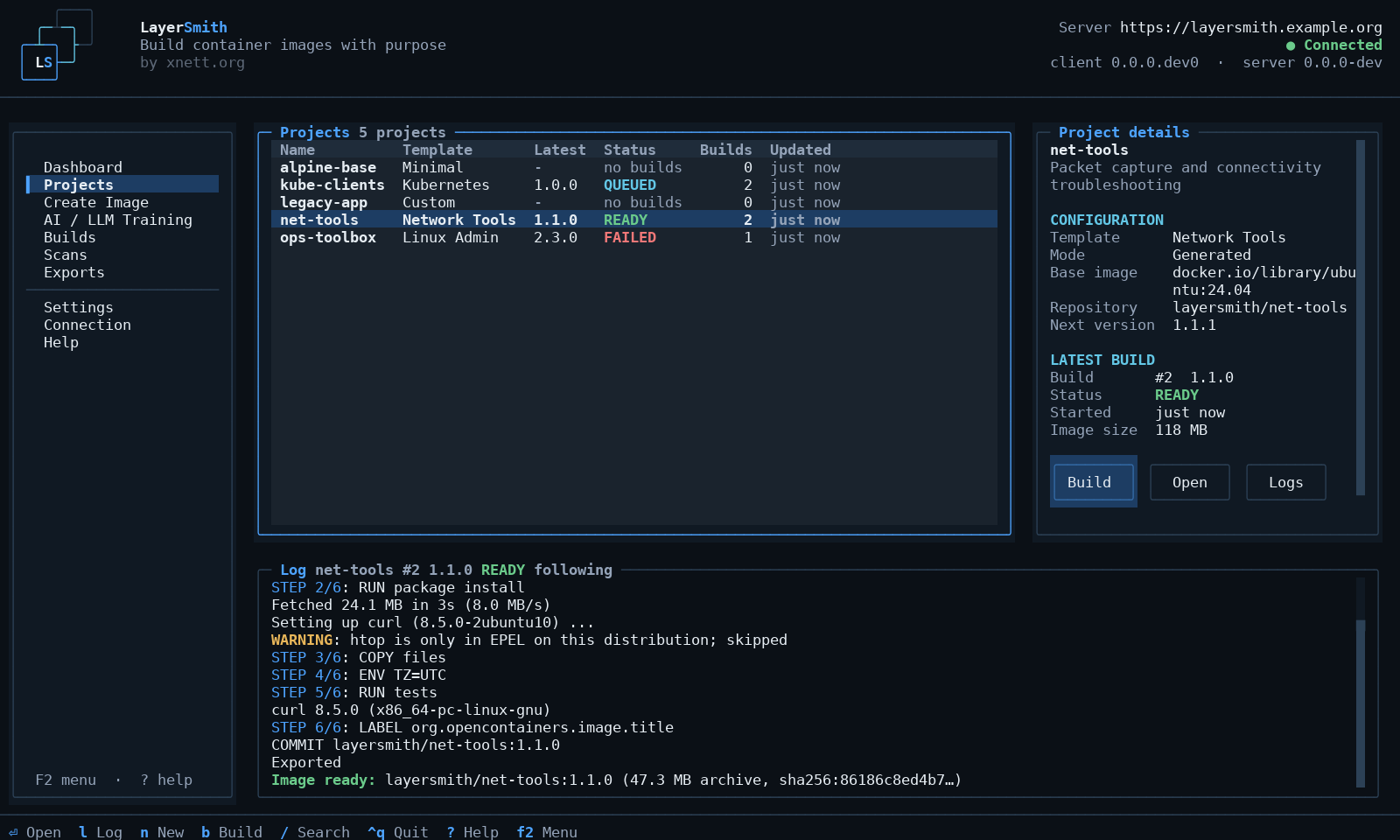
New
layersmith, a terminal client for a LayerSmith server. A separate, pure-Python package (Python 3.9+) that runs on any machine that can reach the server over HTTP(S). It needs no container runtime, no LayerSmith server installation, no access to the container host and no docker exec.
- Interactive interface - run
layersmithfor a keyboard-driven TUI: dashboard, projects with the selected project's details and the live log of its latest build, the image and LLM training wizards, builds, scans, exports, settings and a connection page with a read-onlydoctor. It works at 80x24, needs no special font, and every status is a word as well as a colour (NO_COLORis honoured). - Command line for scripts - the web UI's functions as commands (
projects,build,builds,export,bundle,scan,scans,training,settings, ...), with--json, JSON Lines for followed jobs, documented exit codes, no prompts without a terminal and--yesfor destructive actions. - Remote by design - local files are uploaded through the API; downloads stream to the client machine and are checked against the SHA256 the server recorded before they get their name. Builds keep running when the client quits or the SSH session drops;
layersmith builds wait <id>re-attaches. A change whose answer was lost is never repeated automatically. - Network - TLS is always verified (an internal CA is supported with
ca_cert), redirects and HTML login pages are errors rather than answers, and HTTP Basic or client certificates work for an authenticating proxy in front of LayerSmith. LayerSmith itself still has no logins, by design.
Install from the files attached to this release - the wheel, or the offline archive with every dependency for Python 3.9-3.13:
curl -LO https://github.com/r0lfi/layersmith/releases/download/v0.4.0/layersmith-client-0.4.0-offline.tar.gz
tar -xzf layersmith-client-0.4.0-offline.tar.gz && cd layersmith-client-0.4.0-offline
sha256sum -c SHA256SUMS
pipx install --pip-args="--no-index --find-links=$PWD/wheelhouse" layersmith-client
layersmith config set server https://layersmith.example.org
layersmith doctor
The client is not on PyPI. Guide: docs/client.md; what it covers of the web UI: docs/client-features.md.
API additions
All additive; existing clients are unaffected.
GET /api/builds/{id}/log?offset=N(or?tail=N) returns a slice of a build log by byte offset, so a client can resume without fetching the whole log again./api/healthlistsapi_features./api/settingsreports the upload, file-count and build-contextlimitsthe server enforces.
The client also works against a 0.3.x server; it then follows logs through the part of the log the server returns with a build, and layersmith doctor says so.
Verified for this release
- The client test suite (CLI, the TUI headless, and the CLI against the real API with a fake build runtime) on Python 3.9, 3.12 and 3.13 in CI; the backend suite and frontend build as before.
- The offline archive installed with networking disabled on Python 3.9 to 3.13 (venv) and with pipx.
- End to end from a separate client container with no server code, data or runtime socket, against a server doing real Podman builds: configure, create a project with an uploaded file, build from the CLI, follow it in the TUI, quit mid-build, re-attach by id, download the archive and air-gap bundle, checksums matching.
Not verified: the TUI in specific terminal emulators beyond headless rendering, a real scanner from the client (findings filters and SBOM download), recording a GPU report, and macOS.
Upgrading
No database change.
docker compose pull && docker compose up -dFull changelog: v0.3.1...v0.4.0