Releases: r4nd3l/agent-session-manager
v0.10.0

Full Changelog: v0.9.0...v0.10.0
v0.9.0
Full Changelog: v0.8.0...v0.9.0
v0.8.0
Full Changelog: v0.7.0...v0.8.0
v0.7.0 — Insight, export & PyPI

Insight, export, and packaging — since v0.6.0.
📖 Docs: https://r4nd3l.github.io/claude-session-manager/
What's new
- Waiting badge — sessions where Claude's last message was a question (with no reply after it) show an amber ? in the sidebar, so you can spot what needs you.
- Export as Markdown — right-click a session → Export as Markdown… to save the full transcript (metadata + You/Claude turns, tool calls noted).
- Now on PyPI — install with pipx (PyGObject comes from the system):
pipx install --system-site-packages claude-session-manager-gtk
- The app ID moved to
io.github.r4nd3l.ClaudeSessionManager(Flathub-ready).
Install
Debian/Ubuntu:
sudo apt install ./claude-session-manager_0.7.0_all.debOr from source — see the docs.
Unofficial community tool; not affiliated with Anthropic. Claude Code's own data is never modified.
v0.6.0 — Navigation & config
Navigation and configuration, since v0.5.0.
📖 Docs: https://r4nd3l.github.io/claude-session-manager/
What's new
- Quick switcher (
Ctrl+Shift+K) — a type-ahead dialog to jump to any session by name, project, preview, or ID. - New Session remembers your folder — the button starts a session in the last-used directory; its dropdown picks a different one.
- Resizable sidebar — drag the divider; the width is remembered across launches.
- Drag to reorder tabs.
- MCP servers browser (menu → MCP servers) — a read-only view of every MCP server configured in
~/.claude.json, global and per-project.
Install
Debian/Ubuntu:
sudo apt install ./claude-session-manager_0.6.0_all.debOr from source — see the docs.
Unofficial community tool; not affiliated with Anthropic. Claude Code's own data is never modified.
v0.5.0 — Session insight
Insight into your sessions, since v0.4.0.
📖 Docs: https://r4nd3l.github.io/claude-session-manager/
What's new
- Transcript peek — the session details dialog now shows a Recent activity section with the last ~12 user/assistant messages, so you can identify a session without resuming it.
- Idle notifications — when a background tab produces output and then goes quiet, you get a desktop notification ("Claude finished responding"); click it to jump to that tab. Toggle in Preferences.
- MCP insight — details now list the MCP servers available to the session's project and which MCP servers it actually used (parsed from the transcript). Strictly read-only.
- Documentation site — a full guide is now online at the link above.
Install
Debian/Ubuntu:
sudo apt install ./claude-session-manager_0.5.0_all.debOr from source — see the docs.
Unofficial community tool; not affiliated with Anthropic. Claude Code's own data is never modified.
v0.4.0 — Tab usability
Tab usability improvements since v0.3.0.
What's new
- Tab emoji — right-click a tab → Set emoji… to prefix its title (e.g.
🚀 my-session). Tab-only, persisted per session, independent of renaming, and cleared by saving an empty value. The dialog has a built-in emoji picker. - Shift+Enter inserts a newline in Claude's prompt (sends Meta+Enter), instead of submitting.
- Clearer active tab — the selected tab now stands out with a brand-colored tint, an accent underline, and a bold label; inactive tabs are dimmed.
- Close-all-tabs button — appears next to the new-tab button when more than one tab is open, with a custom close icon that mirrors the new-tab button.
Install
Debian/Ubuntu:
sudo apt install ./claude-session-manager_0.4.0_all.debOr from source — see the README.
Unofficial community tool; not affiliated with Anthropic. Claude Code's own data is never modified.
v0.3.0 — Search & graceful close
Search, graceful close, and sidebar polish since v0.2.0.
What's new
- In-terminal search — a find bar (
Ctrl+Shift+G) over each tab's scrollback, with next/previous and wrap-around. - Graceful close — closing a tab now asks Claude to exit cleanly (
/exit) in the background and closes once the shell returns, instead of terminating the process. A timeout force-closes as a fallback. - Copy session ID — straight from the tab right-click menu (Rename… / Copy session ID / Close).
- Collapsed by default — project groups and Favorites start folded for a tidy overview; manual expand/collapse choices survive live refreshes.
- Card-style rows — session rows are styled as subtle rounded cards.
Install
Debian/Ubuntu:
sudo apt install ./claude-session-manager_0.3.0_all.debOr from source — see the README.
Unofficial community tool; not affiliated with Anthropic. Claude Code's own data is never modified.
v0.2.0 — Tabs & workflow
Tab and workflow improvements since v0.1.0.
What's new
- Renameable tabs — right-click a tab → Rename… Renaming a session's tab updates its name everywhere; fork/new tabs get a local title.
- Per-tab status dots — each open tab carries the same colored dot as the sidebar (green = open, blue = output arrived while unfocused).
- Toggleable sidebar — header button or
F9to hide/show the sidebar and give the terminals the full width. - Close confirmation — closing a tab while a command is still running (e.g. claude mid-task) now asks first, instead of silently terminating it.
- Status footer — session, project, transcript-size, and open-tab counts at the bottom of the sidebar.
- .deb package — install on Debian/Ubuntu directly (attached below).
Install
Debian/Ubuntu:
sudo apt install ./claude-session-manager_0.2.0_all.debOr from source — see the README for distro packages.
Unofficial community tool; not affiliated with Anthropic. Claude Code's own data is never modified.
v0.1.0 — Initial release
Native GTK4/libadwaita desktop app to manage and resume Claude Code sessions.
Unofficial community tool. Not affiliated with or endorsed by Anthropic.
Highlights
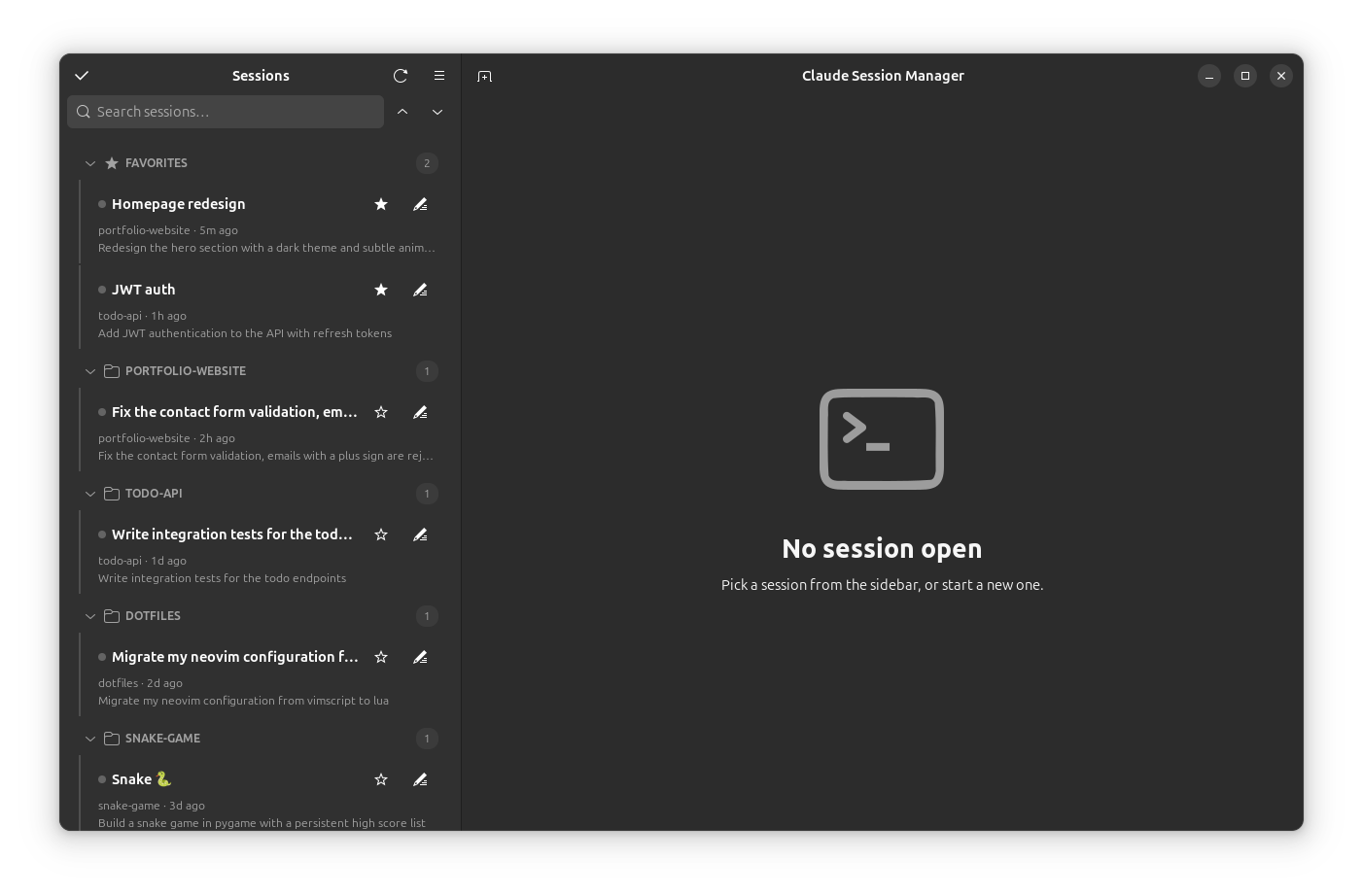
- Sidebar of all your sessions — grouped by project (collapsible), with a pinned Favorites section, custom names, search, and live updates as sessions are created or written to
- Tabbed embedded terminals — click a session to resume it (
claude --resume) in its original project directory, inside your own shell - Attention indicators — see when a background session produces output, in the tab and the sidebar
- Session details — message counts, models, token usage parsed from the transcript
- Bulk selection — open, star, hide, or trash many sessions at once
- Open in Ghostty — resume a session in an external Ghostty window
- Preferences (font, scrollback, color scheme), keyboard shortcuts, desktop launcher + icon
Install
See the README for distro packages, then:
git clone https://github.com/r4nd3l/claude-session-manager.git
cd claude-session-manager
./data/install.sh   # desktop launcher + icon
python3 -m claude_session_manager
Claude Code's own data is never modified — all app state lives in ~/.config/claude-session-manager/.