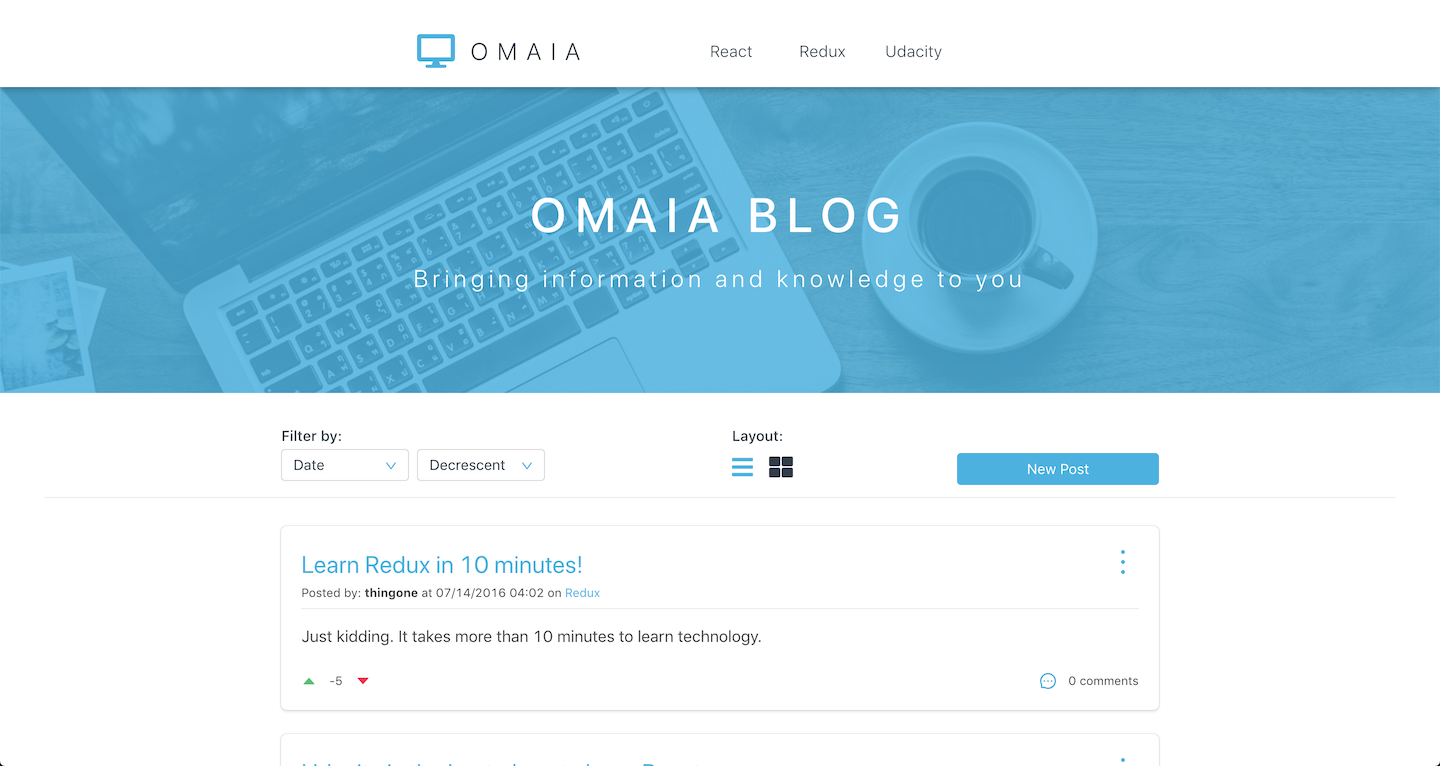
Project Readable (OMAIA Blog) is the second project from the Udacity's React Developer Nanodegree program. We build a web application for content and comments. The app will allow users to post content in pre-defined categories, comment on their own posts and those of other users, and vote on posts and comments. Users can edit and delete posts and comments. The project emphasizes the learn of REDUX to manage the application state.
To clone and run this application, you'll need Git and Node.js (which comes with npm) installed on your computer. After have them installed, from your terminal run:
# Clone this repository
$ git clone https://github.com/rafaelmaiach/reactnd-readable.git

# Go into the repository and install the application dependencies
$ cd reactnd-readable
$ npm install

# Go to api-server folder and install api-server dependencies
$ cd api-server
$ npm installYou can run the project in both environments: development and production. It needs a Be sure to have the dependencies installed before. Check the terminal to see the URL the project was initialized.
In this mode, hot loader is configured to be triggered on files changes. Also, it will use concurrently package to start the api-server and the application.
# Go to project root
# Run npm script for development mode
npm startIn this mode, the files are uglyfied, minified and compressed with gzip by Webpack and the server serves the GZIP files to reduce the project size for client.
# Go to project root
# Run npm script to build the project and generate bundle files
npm run build

# You may need to open two terminal tabs to run this
# On one terminal, run npm script for start the api-server
npm run api-server

# One the other, run npm script for start the production mode
npm run prod-startThis page is the root page. At this page the user can see all the posts created or filter them by a category using the options on the page header. Below the blog image, the user have a toolbar which let them sort the posts by type and order, change the posts layout and create a new post.
At the main page, a list of posts is shown on cards and each of them has some information and features. As informations each post have:
- Title: clicking on it the user is redirected to the post details page;
- Subtitle: shows author, created date, edited date (if it was editted) and category, and clicking on the category, the main page will be filtered by that category;
- Description: it has a limit of 25 words to be shown and to see the full description needs to go to post details page;
- Vote system;
- Comments count;
- Options menu: the user can edit the post, share the post link on Facebook, Twitter or copy the link to clipboard and delete the post.
At the details page the user will see the same post card with the same features and informations from main page but with full description being shown. Also, at this page the user can comment to the post and reply to the comments.
As the project has a lot of potencial to grow in features, I decided to add some new features beyond the default features that are wanted by the project specification.
- Reply system: The user can reply to comments on the details page. This system was very challenging to me and I'm so proud to have a working version of it.
- Improved sort: At the project specification it says to be able to sort posts by date or votes count, but I decided to increase the options and added Title, Author and Comments count together with sort order (crescent or decrescent);
- Layout change: As the project can include many posts, the user can be able to see more posts at the sametime changing the layout from the normal (list view) by box layout, where the posts have their size decreased and are put side-by-side;
- Edited post message: The posts will show the editted flag (with date and time) on its subtitle when they are editted;
- Share post: The user can share the post on Facebook, Twitter or copy the link to clipboard using the Share item from the post options menu;
- Ant Design - A set of React Components.
- Bulma - CSS Framework based on Flexbox.
- Eslint AirBnb - The Airbnb JavaScript lint rules to follow their style guide
- Express-static-gzip - Provides a small layer on top of serve-static, which allows to serve pre-gzipped files.
- Moment - Parse, validate, manipulate, and display dates in javascript.
- Pug - A high-performance template engine
- React Fontawesome - A wrapper for font-awesome icons on React.
- Redux - Predictable state container for JavaScript apps.
- Redux Thunk - Thunk middleware for Redux.
- Reselect - Selector library for Redux.
- Sort-by - A utility to create comparator functions for the native
Array.sort() - Webpack 4 - A bundler for javascript and friends. Packs many modules into a few bundled assets.
You can check the other dependencies on package.json file.
I'm always learning new things and I'm opened to feedbacks or just meet new people. I'll be glad to talk to you about JavaScript, React, Web Development, Harry Potter or anything you want to. Find me on: