Repository navigation
Releases: raspy-corroded3/borderlands2-native-hdr
Release list
bl2hdr v1.0.1-beta.1

bl2hdr 1.0.1-beta.1
HDR settings in the game's own menu, a separate cutscene brightness, and a clean exit instead of a frozen
game after a graphics-driver crash.
New
-
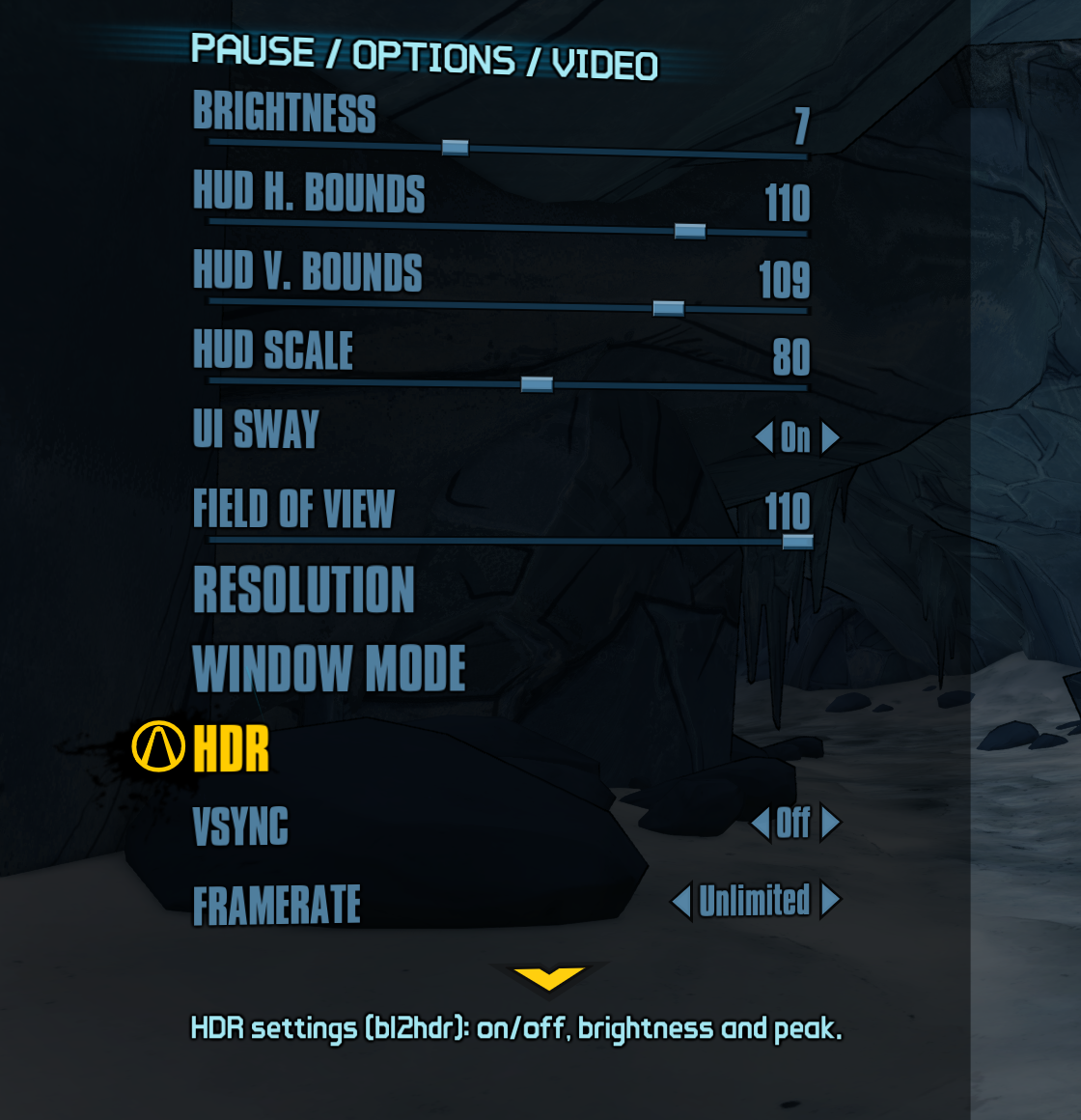
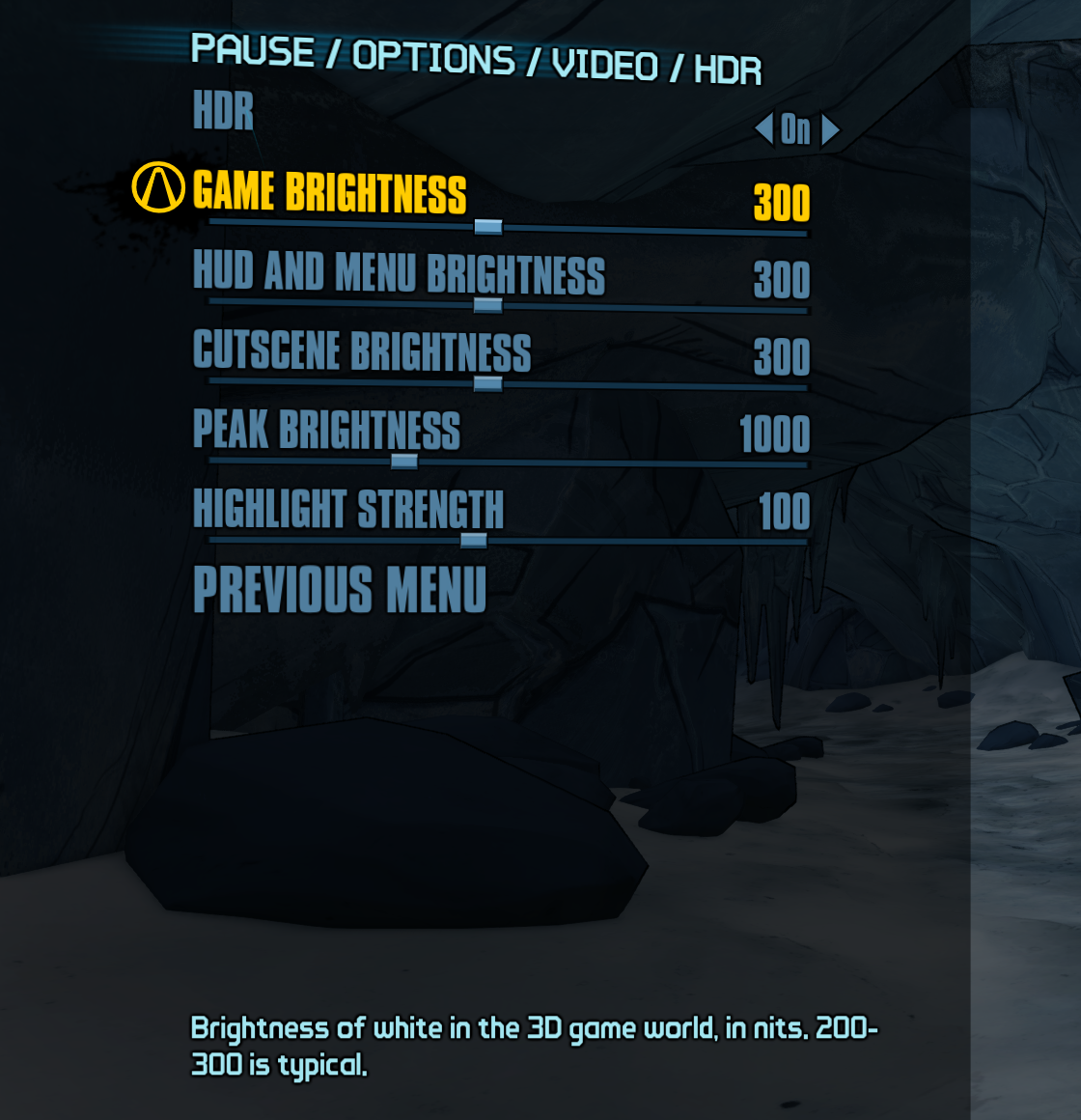
HDR settings page: Options > Video > HDR (the row below Window Mode). It has:
- HDR Off / On
- Game brightness, HUD and menu brightness, Cutscene brightness (80–500 nits)
- Peak brightness (400–2000 nits)
- Highlight strength (0–200 %)
Changes apply immediately and are saved to
bl2hdr.ini. Works with keyboard, controller and mouse. -
Cutscene brightness, new setting
[hdr] VideoWhiteNits. It defaults to the HUD brightness, so
nothing changes until you set it. -
Graphics driver crash (TDR): 9on12 cannot recover a lost GPU device, and the game used to freeze.
bl2hdr now shows a message and closes the game. New setting[d3d9] OnDeviceRemoved:message
(default),exit(close without a message) orcontinue(old behaviour).
Screenshots
| Options → Video: the HDR row, below Window Mode | The HDR settings page |
|---|---|
 |
 |
Fixes
- Some cutscenes were brighter than in the original game (e.g. the character trailers). The game's
video shader doesn't clamp its colours. The original 8-bit output did that by itself, bl2hdr's 16-bit
output didn't. Cutscenes now look like the original, at your cutscene brightness. - Frame captures (a developer feature) failed after some resolution changes.
Checked, no change needed
- Cel-shading outlines: unaffected by HDR.
- ECHO log videos (the hologram): look exactly like the original.
Upgrading
Replace d3d9.dll. Your bl2hdr.ini keeps working: the new keys use their defaults when missing. The
HDR settings page writes the brightness values into it for you. To see all options with comments, compare
with the new bl2hdr.ini.
Known issue: "ran out of video memory" after long sessions
Unchanged from 1.0.0-beta.2. BL2 is a 32-bit game, and 9on12 uses about 300 MiB more of its 4 GiB
address space than plain D3D9. If the game stops with this message, set PoolSize=256 under
[TextureStreaming] in Documents\My Games\Borderlands 2\WillowGame\Config\WillowEngine.ini.
Testing
Tested on Windows 11 with an NVIDIA RTX 3070 Ti: automated in-game runs (cutscenes and ECHO logs played
and compared with the original output, simulated GPU device removal, menu navigation, resolution
changes), no errors, frame rate unchanged. The menu was also checked by hand with mouse and controller.
Not yet tested on AMD/Intel GPUs or laptops with two GPUs. Reports are very welcome.
Full changes: v1.0.0-beta.2...v1.0.1-beta.1
Built by GitHub Actions from tag v1.0.1-beta.1 (commit c420695).
Install: copy d3d9.dll and bl2hdr.ini into Borderlands 2\Binaries\Win32. See README.md.
Verify: gh attestation verify d3d9.dll --repo raspy-corroded3/borderlands2-native-hdr and SHA256SUMS.txt.
VirusTotal
| File | Detections | Report |
|---|---|---|
d3d9.dll |
2 / 71 engines | live report |
bl2hdr-v1.0.1-beta.1.zip |
0 / 67 engines | live report |
Scanned automatically by the virustotal workflow on 2026-10-07. Detections can change over time: the live reports show the current result.
Flagged by:
d3d9.dll- Cynet: Malicious (score: 100)d3d9.dll- APEX: Malicious
bl2hdr is a proxy DLL that hooks game functions, which some heuristic engines flag. The DLL is built by GitHub Actions from this repository with a verifiable build attestation (see above).
bl2hdr v1.0.0-beta.2
bl2hdr 1.0.0-beta.2
A robustness release. The HDR picture itself is unchanged. This version fixes the problems found in a
full code review of 1.0.0-beta.1 (four passes: crashes and security, logic and races, performance,
polish; plus MSVC /analyze, clang-tidy and flawfinder).
Fixes
- No more permanent black screen after alt-tab, minimize or a resolution change. Before, any failure
in bl2hdr's output turned it off for the rest of the session, and under 9on12 the game's own fallback
never reaches the screen. Output now recovers by itself. Failures retry with a growing delay, and a
device reset retries at once. - GPU crash / driver reset (TDR) handled. Before, a lost GPU device caused a 2-second stall every
frame. Now it is detected and logged once with the reason, and bl2hdr's output stops cleanly.
Known limit: 9on12 cannot recover a lost D3D12 device, so after a driver reset the game itself still
has to be restarted. - Laptops with two GPUs now use the dedicated one. 9on12 used to pick the system's default adapter,
which is often the integrated GPU. A new setting,[d3d9] Gpu, chooses it:high-performance
(default),minimum-powerorsystem(the old behaviour). - Shader identity fix. A rare case where another shader could receive bl2hdr's HDR parameters (after
the game freed and reused a shader's memory) can no longer happen. - Safer game hooks. bl2hdr now hooks the game's script engine only when every byte pattern matches
exactly as often as in the verified game build. On an unknown build it turns its hooks off instead of
guessing. The HDR row in Options > Video no longer disappears for the whole session if the game's
menu functions were not loaded yet: lookups are retried. - Memory-safety hardening. Allocation and memory-protection results are checked. Every read or write
of game function parameters is bounds-checked against the game's own metadata. - Thread-safety fix in the internal hook lookup: the cached vtable and function are now always read
as one pair. - Bad pixels: negative or NaN colour values from the game are clamped to black instead of reaching
the display.
Diagnostics
- With
[debug] StatsIntervalSecset, the log now shows the process's free address space, its
largest free block, private memory, video memory against its budget, and what the used address space
holds (DLL images, mapped files, private memory).
Known issue: "ran out of video memory" after long sessions
BL2 is a 32-bit game, and 9on12 uses about 300 MiB more of its 4 GiB address space than plain D3D9. If
the game stops with this message, lower the texture pool in
Documents\My Games\Borderlands 2\WillowGame\Config\WillowEngine.ini: under [TextureStreaming],
set PoolSize=256. Details are in the README.
Upgrading
Replace d3d9.dll. Your bl2hdr.ini keeps working, because the new Gpu key defaults to
high-performance when it is missing. To set it explicitly, copy the Gpu= lines from the new
bl2hdr.ini.
Testing
Tested on Windows 11 with an NVIDIA RTX 3070 Ti (single GPU): automated in-game runs with no errors,
frame rate the same as 1.0.0-beta.1, and forced output failures and a simulated device removal to test
recovery. Not yet tested on a laptop with two GPUs or on AMD/Intel GPUs. Reports are very welcome.
Full changes: v1.0.0-beta.1...v1.0.0-beta.2
Built by GitHub Actions from tag v1.0.0-beta.2 (commit 493907f).
Install: copy d3d9.dll and bl2hdr.ini into Borderlands 2\Binaries\Win32. See README.md.
Verify: gh attestation verify d3d9.dll --repo raspy-corroded3/borderlands2-native-hdr and SHA256SUMS.txt.
bl2hdr v1.0.0-beta.1
Built by GitHub Actions from tag v1.0.0-beta.1 (commit 611c3ac).
Install: copy d3d9.dll and bl2hdr.ini into Borderlands 2\Binaries\Win32. See README.md.
Verify: gh attestation verify d3d9.dll --repo raspy-corroded3/borderlands2-native-hdr and SHA256SUMS.txt.