Repository navigation
Releases: rbartoli/obsidian-tela-theme
Releases · rbartoli/obsidian-tela-theme
Release list
1.2.1

A fix for links in notices, the small dark pop-ups at the top right:
- Links in notices read in light mode. Notices are dark in both modes, and in light mode a link in one, such as a plugin's "Roll back", was too dark to read (2.3:1). It now takes a lighter shade of your accent, 5.6:1.
The contrast audit gains a scene for notices and still finds 0 problems, now across 420 screens.
Every change, and what was checked: CHANGELOG
1.2.0
Two options, both off by default, in Style Settings:
- Dim images in dark mode. Images in notes show at 70% and come to full brightness under the pointer. Phones and tablets have no pointer, so there they stay dimmed. Light mode, print, and images opened on their own are unchanged.
- Tinted italics. Italics take bold's colour, a hint of the accent, so they stand out from body text while scrolling. Italics inside a link keep the link colour.
The contrast audit still finds 0 problems across 414 screens.
Every change, and what was checked: CHANGELOG
1.1.1
Fixes only.
- Headings after a folded section keep their space. Folding a section also hid the blank line before the next heading, so it sat right under the fold. It now gets the space an open section leaves, in live preview and reading view.
- Bold and italics in a heading keep the heading's colour. A bold word in a blue heading no longer reads as a smaller, different heading.
- Light settings cards on phones and tablets. In light mode the cards that group settings rows had vanished into the page; they're white now.
- macOS inputs keep Tela's 6px corners, where Obsidian rounded them to 8px.
- No
:has()selectors, which Obsidian's theme review warns can slow the app. Two small visible changes come with it: rows picked for a batch action get a thin accent ring, and quote bars in live preview have square ends.
The contrast audit still finds 0 problems across 378 screens.
Every change, and what was checked: CHANGELOG
1.1.0
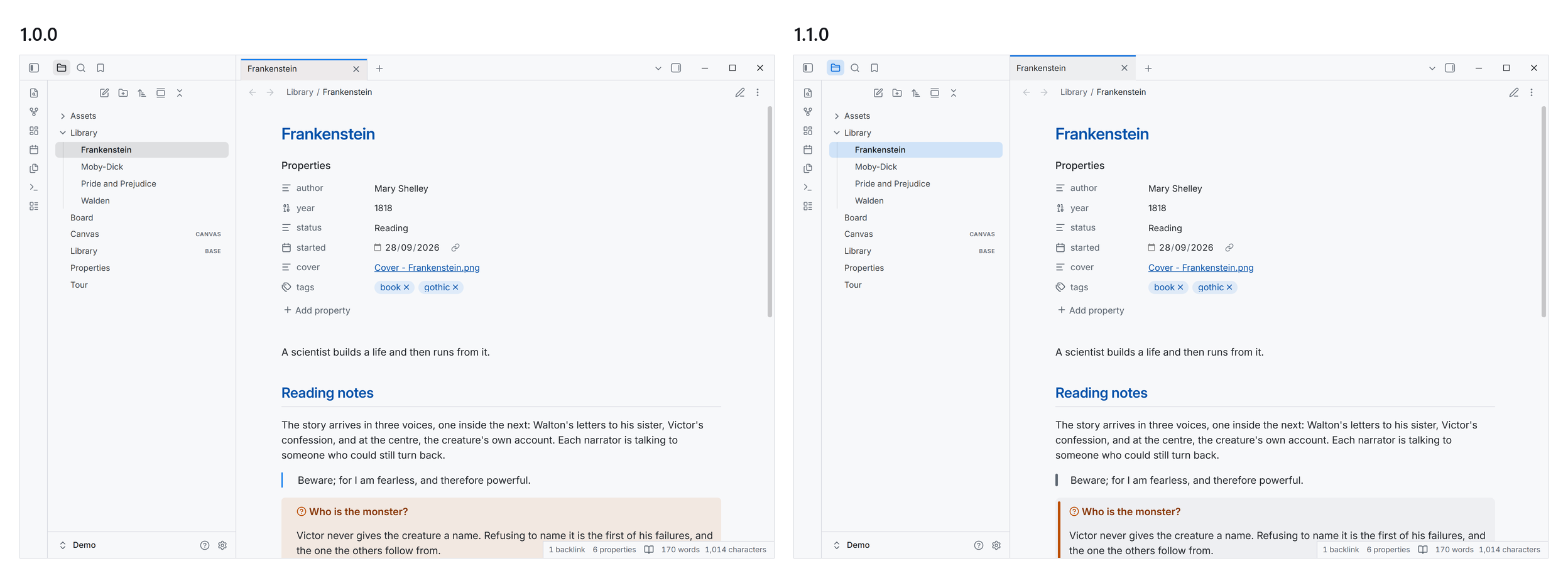
- The accent marks where you are. The open note, the open settings page and the active sidebar view sit on a blue wash, as in the Tela app. Hover stays grey, so the row under your pointer never looks selected. Menus and the command palette highlight in blue too.
- Callouts and quotes get a bar. Callouts are a quiet card with a rounded bar in their colour, instead of a tinted box. Quotes get the same bar in grey. Code inside a callout keeps its box.
- Tabs meet the edges. Document tabs sit flush with the tab bar, the active tab's blue line reaches the top, and with the sidebar collapsed the first tab lines up with the note.
- Fixes: on Android, the calendar icon no longer covers the date in date fields. In light mode, accent buttons and the file-type badges on multi-selected rows now pass AA contrast.
The contrast audit still finds 0 problems, now across 378 screens.
Every change, and what was checked: CHANGELOG
1.0.0
What's Changed
New Contributors
Full Changelog: https://github.com/rbartoli/obsidian-tela-theme/commits/1.0.0
Contributors

rbartoli