Describe the bug
When I try to start to react dev server locally with yarn start command it stucks on "starting the development server..." message. Sometimes it continues for hours without results error or success.
The project's react-script version was 4.0.0, updated it to 5.0.0, also removed node_modules, yarn.lock, and clear cache but none of them worked.
I faced the same thing many times but sometimes later or days it worked but I do not know how.
Did you try recovering your dependencies?
Yes I did
yarn -- version 1.22.19
Which terms did you search for in User Guide?
npm start
Environment
current version of create-react-app: 5.0.1
running from /Users/zuratsintsadze/.npm/_npx/10788/lib/node_modules/create-react-app
System:
OS: macOS 13.0.1
CPU: (10) x64 Apple M1 Max
Binaries:
Node: 14.20.0 - ~/.nvm/versions/node/v14.20.0/bin/node
Yarn: 1.22.19 - ~/.nvm/versions/node/v14.20.0/bin/yarn
npm: 6.14.17 - ~/.nvm/versions/node/v14.20.0/bin/npm
Browsers:
Chrome: 108.0.5359.94
Edge: Not Found
Firefox: 104.0.1
Safari: 16.1
npmPackages:
react: ^16.13.1 => 16.14.0
react-dom: ^16.13.1 => 16.14.0
react-scripts: 5.0.0 => 5.0.0 (4.0.3)
npmGlobalPackages:
create-react-app: Not Found
Steps to reproduce
The reason causing it is graphql queries.ts and mutations.ts files. Each file's line size is about 30000. When I copy new queries or(and) mutation from back-end happens what is described above.
Actual behavior
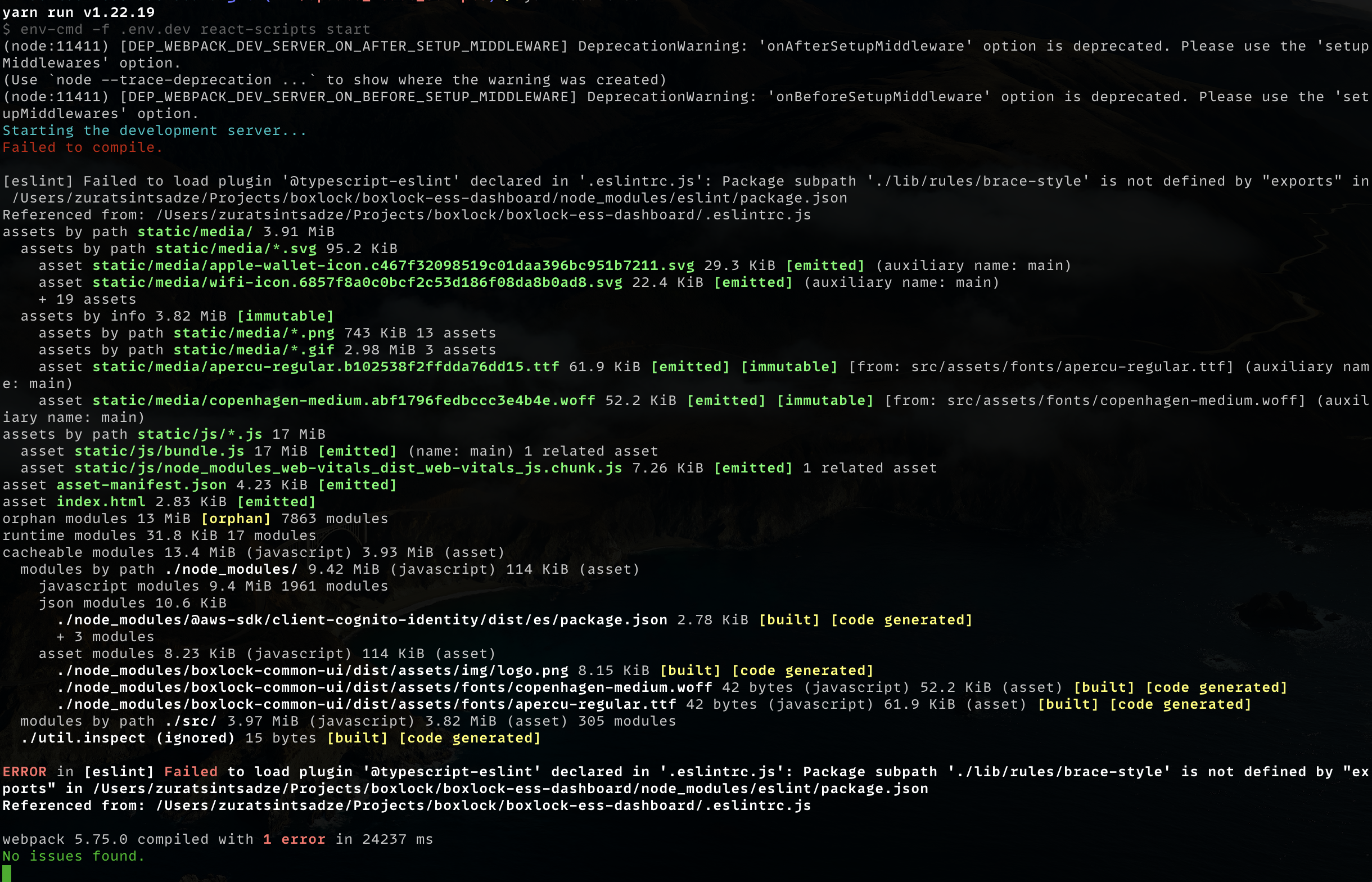
There is one strange behavior. When I removed eslint from devDependecies project finished building with eslint error.
Then I close the error window and the site is testable, but every compilation shows the same error
Reproducible demo
I can not add a project for sensitive code info

Describe the bug
When I try to start to react dev server locally with yarn start command it stucks on "starting the development server..." message. Sometimes it continues for hours without results error or success.
The project's react-script version was 4.0.0, updated it to 5.0.0, also removed node_modules, yarn.lock, and clear cache but none of them worked.
I faced the same thing many times but sometimes later or days it worked but I do not know how.
Did you try recovering your dependencies?
Yes I did
yarn -- version 1.22.19
Which terms did you search for in User Guide?
npm start
Environment
current version of create-react-app: 5.0.1
running from /Users/zuratsintsadze/.npm/_npx/10788/lib/node_modules/create-react-app
System:
OS: macOS 13.0.1
CPU: (10) x64 Apple M1 Max
Binaries:
Node: 14.20.0 - ~/.nvm/versions/node/v14.20.0/bin/node
Yarn: 1.22.19 - ~/.nvm/versions/node/v14.20.0/bin/yarn
npm: 6.14.17 - ~/.nvm/versions/node/v14.20.0/bin/npm
Browsers:
Chrome: 108.0.5359.94
Edge: Not Found
Firefox: 104.0.1
Safari: 16.1
npmPackages:
react: ^16.13.1 => 16.14.0
react-dom: ^16.13.1 => 16.14.0
react-scripts: 5.0.0 => 5.0.0 (4.0.3)
npmGlobalPackages:
create-react-app: Not Found
Steps to reproduce
The reason causing it is graphql queries.ts and mutations.ts files. Each file's line size is about 30000. When I copy new queries or(and) mutation from back-end happens what is described above.
Actual behavior
There is one strange behavior. When I removed
eslintfrom devDependecies project finished building witheslinterror.Then I close the error window and the site is testable, but every compilation shows the same error
Reproducible demo
I can not add a project for sensitive code info