Conversation


This also fixes two bugs:

1. the background for selected cells/colums now matches the
   actual column
2. the remaining space was off by one, when the table has no
   border

|
Thanks. I understand the request. It's similar to what is already available with the I'd rather keep this in line with similar features in Give me some time and I'll figure out a solution to this. |

Understandable, I too wanted to keep the API similar to existing functionality, but I also wanted it to be simple and unintrusive. I'm open for suggestions though, and willing to reimplement this with another API.
Yeah, my suggested upgrade would be backward-compatible. The API of this PR is func (t *Table) SetExpandable(int) *Tableand the upgrade would be func (t *Table) SetExpandable(...int) *TableIn both cases, the consumers would call table := tview.NewTable().SetExpandable(1)to mark the column with index 1 to be expandable. The "upgrade" would then also allow the consumer to mark multiple columns expandable: table := tview.NewTable().SetExpandable(1, 4)I haven't come around implementing this yet, because the calculations for the remaining space are a bit fiddly, and easily introduce off-by-one errors, resulting in tables a character too wide or to narrow... I'm also not sure how to handle cases where the remaining horizontal space is, say 3 characters, but you have more than 3 columns marked as expandable. The naïve solution might be to distribute an extra space to the first three columns—but that might not produce the visually most pleasing result. Imagine the first columns to be sparsely populated, i.e. they already have a "natural" spacing, while the other more densely populated columns would benefit more from extra whitespace...
Hm. I don't know if expandability is a concern of a single Let me rephrase my goal: I need a way to tell the func (t *Table) SetFullWidth(enabled bool, columnWeights ...int) *Tablewhere t.SetFullWidth(true, 1, 1, 100, 1, 1) // col 3 is at most 100 times as wide as cols 1,2,4,5
Sure, no problem :-) |
|
The idea of putting it in Other values in Also, if I only want to expand column |
|
Ah, I see, thanks for the explanation. Let me try to implement this. |
|
Actually, I was planning on implementing this myself anyway. Will probably have it ready for you by Monday.
…Sent from my iPhone
|

|
Please have a look at the referenced commit. This should be in line with what you requested. I actually also tried implementing a "contraction" value which shrinks columns if the table is larger than the available width. But then I realized this is in conflict with the table's behaviour of moving columns off-screen and letting you navigate to them. So there was no easy solution to that. I guess using |
|
At a first glance, this looks good, thank you very much. I'll try this out later when I'm back home. |

|
Works like a charm :-)
|
2 participants


I've added a bit of code to mark a column as "expandable", i.e. to use the remaining horizontal space, effectively making any table a full-width table.
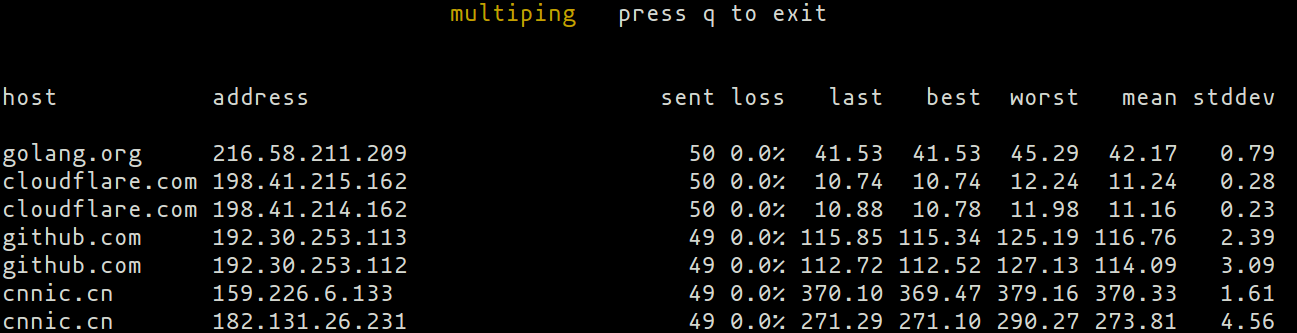
My use case is
multiping, which should align the statistic column on the right, and the host information on the left (kind of likemtr)For now, only one column can be made "expandable", but the API could later be upgraded to
func (t *Table) SetExpandable(columns ...int) *Tableto allow sharing the remaining space between multiple columns.