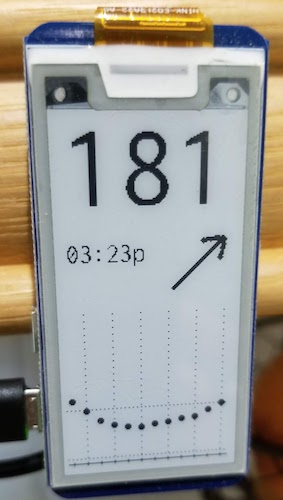
Display your CGM (Continuous Glucose Monitor) data on an e-Paper display anywhere in your home or office.
- Nightscout Integration: Read glucose data from your Nightscout instance
- Dexcom Support: Connect to Dexcom Share accounts
- Beautiful Display: Shows glucose level, trend arrow, time of last reading, and optional graph
- Web Configuration: Easy-to-use web interface for setup and settings
- Low Power: Optimized for Raspberry Pi Zero W
- Automatic Startup: Configured to run at boot via systemd
- Real-time Updates: Checks for new glucose readings every 5 minutes
- Raspberry Pi Zero W with soldered headers (or Pi Zero 2 W)
- Waveshare 2.13" e-Paper Display (V2 or V3)
- 4GB+ microSD card
- 5V power supply
This version has been updated for Raspbian Bookworm with:
- ✅ Modern systemd service management (replaces init.d)
- ✅ Python virtual environment support
- ✅ Updated dependencies for Python 3.8+
- ✅ Improved GPIO permission handling
- ✅ Enhanced logging with journalctl
- ✅ Network health monitoring
cd ~
git clone https://github.com/robertrub/SugarPiDisplay.git
cd SugarPiDisplaychmod +x install.sh
./install.shAfter installation:
exit  # Log out to apply permissions
# Log back in
sudo systemctl start sugarpidisplay.service
# Access http://<your-pi-ip>:8080 to configure- Installation Guide - Detailed setup instructions
- Hardware Setup - Physical assembly guide
- Software Setup - Software configuration
Access the web interface at http://<your-pi-ip>:8080
Configure:
- Data source (Nightscout or Dexcom)
- API credentials
- Display settings (orientation, units, time format)
Configuration is saved to ~/.sugarpidisplay/config.json
# Start service
sudo systemctl start sugarpidisplay.service

# Check status
sudo systemctl status sugarpidisplay.service

# View logs
sudo journalctl -u sugarpidisplay.service -f

# Stop service
sudo systemctl stop sugarpidisplay.service

# Disable autostart
sudo systemctl disable sugarpidisplay.serviceCheck the Installation Guide troubleshooting section for common issues.
This code is licensed under the MIT License. See the LICENSE file for details.
Original project by Bryan Bassett
Maintained and updated for modern Raspbian versions.
- Check logs:
sudo journalctl -u sugarpidisplay.service -f - Review config:
cat ~/.sugarpidisplay/config.json - GitHub Issues: Report a problem