Steven L. Topper, Elliot Topper, and Robert Q. Topper
Albert Nerken School of Engineering
The Cooper Union
for the Advancement of Science and Art
New York, NY 10003
http://engfac.cooper.edu/topper
TransRot (which stands for translation-rotation) is used to carry out simulated annealing geometry optimizations of atomic and molecular clusters using rigid body Monte Carlo methods. It is written in Java and has been tested under Windows (10 and 11), Linux (Ubuntu), and MacOS (El Catalina, Monterey, Ventur, Sequoia). Under the MacOS, multiple instances run in parallel on multiple cores with high efficiency, which allows multiple parameter sets to be explored simultaneously. Our goal is to produce software that is numerically efficient, machine portable, and simple to set up and use. We hope this proves to be a useful software tool for computational chemists and physicists.
Although TransRot is a standalone tool run from the command line, it also works as a backend for Visual TransRot (VTR). One of us (ET) designed VTR so as to make production work on a personal workstation simple and easy to manage. Like TransRot, VTR is programmed in Java and will run on all major operating systems. Please note that earlier TransRot versions are not compatible with VTR. Please visit the Visual TransRot project at https://github.com/xaridar/VisualTransRot.
The code uses a combination of two specific methods designed to overcome quasi-ergodicity and asymptotic quench rate problems that are not available in other publicly available codes. The first method is designed to overcome the problem that a simple linear or exponential cooling scheme may quench into a local minimum and never find its way out to locate the global minimum. TransRot uses a multilinear “sawtooth” temperature adjustment schedule in the simulated annealing process which takes the system through a series of slow cooling and instantaneous heating cycles, decreasing the uppermost temperature used at the start of each new cooling cycle.(1) This process enhances the probability of finding the global minimum and, with appropriate annealing parameters, can also be used to explore higher-energy structures as well. The second method unique to TransRot is the probabilistic use of magnified translational and rotational stepsizes, a process we have called “magwalking.”(2-4) These magnifications prevent molecules from becoming locked into locally minimum-energy orientations prematurely as the system is cooled, giving it the opportunity to overcome local energy barriers as needful.
TransRot assumes that all molecules are internally rigid throughout the simulation, i.e., each attempted Monte Carlo move is either a translation of the molecule’s center of mass or a rigid-body rotation of the molecule about a randomly chosen space-fixed axis with its origin at the center of mass. Individual atoms or atomic ions can also be simulated using TransRot, using only translational move attempts.
Defining a “particle” to be either an atom or a molecule, all particles interact with one another according to an effective pair potential. The geometry of each particle as well as the parameters of the pairwise interaction potential must be chosen by the user, and are supplied within an input file, with the format described below (see "How to Add New Molecules to the Database").
In the current version, TransRot does not itself fully optimize the set of final structures predicted at the end of the annealing schedule. It is intended that the user pass the final structures predicted by TransRot to other programs (including Psi4, Orca, Q-Chem, Spartan and Gaussian) for full geometry optimization using quantum mechanics methods. We anticipate adding full geometry optimization of the final structures in a future version.
For information on the allowed usage and distribution of TransRot and its derivative works, please read the section titled Licensing Information, which can be found at the bottom of this document.
TransRot requires an installed Java Development Kit (JDK) of version 1.8.271 or newer. The most up-to-date JDK can be found at https://www.oracle.com/java/technologies/downloads.
The latest release of TransRot can be found at https://github.com/steventopper/Transrot/releases/latest. Under “Assets”, click to download “transrot_[version number].zip” and unzip the folder, which should contain four files: “Transrot.jar”, “README.md”, “dbase.txt”, and “config.txt”.
When updating from a previous version of TransRot, you can either follow the instructions above to create a new version directory or download the standalone “Transrot.jar” file also found under “Assets” and drag it into your TransRot directory. If the input format of either “config.txt” or “dbase.txt” are changed during an update, one or both of these files will be found under “Assets” and need to be replaced as well.
For the purpose of our discussion below, we define a “particle” as being either an atom or a molecule that is intended to be used within the simulation. TransRot comes with a sample database file that contains entries for the three particles listed below:
- NH4+
- Cl-
- H2O (using TIP3P)
The cluster to be studied can consist of any desired number of any of the particles defined within the database, as specified in the config file (see below). Other atoms or molecules can be added to the database as needed, see "How to Add New Molecules to the Database".
A sample config file is also included in the TransRot directory, which can be used for a low-accuracy test run of the program’s systems. The config file contains run instructions for an 8-particle cluster with four NH4+ molecules and four Cl- atoms, cooled gradually from 10,000K to 0K. To run this test system, use your computer’s command line to navigate to the TransRot directory and run the command
java -jar Transrot.jar
to begin the simulation.
If desired, for more advanced users, more modular execution can be acheived using Command-Line Parameters.
After the test simulation completes four teeth and exits, there will be a new folder inside the TransRot directory named with the date and time the simulation was started. This folder includes several output files:
- config.txt: a copy of the main directory’s config.txt file and a record of the parameters used in the simulation.
- log.txt: a record of all lines of output from the program, excluding certain error messages.
- elapsed_time.log: a file containing the number of nanoseconds elapsed during the simulation.
- OutputX.xyz: a file recording molecule positions in a format (XYZ) that can be read by other molecular modeling programs (i.e. Avogadro, Spartan). Contains the state of the system after sawtooth number X; Output0.xyz contains the starting state of the system before any annealing takes place. These structures are the code’s predictions of minimum energy structures.
- OutputX_Y_Movie.xyz: an animation file designed to be read by other molecular modeling programs (i.e. Avogadro’s Animation extension). Contains n states of the system between sawtooths number X and Y, where n is the number of points per tooth given in config.txt.
- Min_Energy_Structure_X.xyz: a copy of the output file containing the lowest energy structure, as indicated by X. For example, Min_Energy_Structure_3.xyz would be a copy of Output3.xyz. Only generated when two or more teeth are simulated.
- interaction_params.txt: a record of all parameters used internally by the program to determine pairwise interactions, including units, Kappa value, atomic charges, and calculated pair potentials.
If no additional arguments are passed to TransRot during its execution, it will look for files named config.txt and dbase.txt (and possibly Input.xyz), which are required to be in thesame directory as TransRot.
If this default behavior is not desire, command-line parameters allow you to place input files anywhere on your machine and specify where they are when executing TransRot.
The defined command-line parameters can be specified when executing TransRot by using the form:
java -jar Transrot.jar [parameter identifier] [filepath]
Multiple parameters can be specified by chaining together such syntax:
java -jar Transrot.jar [identifier 1] [filepath 1] [identifier 2] [filepath 2]
Any input files specified in this way will be used instead of their default locations.
The possible command-line parameters are as follows:
- -c / --config: The filepath following this identifier will be used in the place of
config.txt. - -d / --dbase: The filepath following this identifier will be used in the place of
dbase.txt. - -i / --input: The filepath following this identifier will be used in the place of
Input.xyz. This option can only be included when 'Use Input.xyz' is true. - -p / --params: The filepath following this identifier will be used in the place of
interaction_params.txt. This option can only be included when 'Choose All Interaction Parameters' is true. - -o / --output: The path following this identifier should be the location of a directory. The output of the current run of TransRot will be generated in a subfolder of the folder specified here. Defaults to
.(same directory as Transrot.jar) - -s / --set-seed: This argument expects a long (integer) value, which is used to seed the parent Mersenne Twister (random number generator) instance. Using
--set-seedallows for reproducible TransRot simulations.
All run parameters are set in the specified configuration file, or config.txt.
-
Max Temperature (K): Starting temperature of the annealing process, from which the cluster will be cooled down to 0K in the first cooling cycle.
-
Moves per Point: Number of attempted translations or rotations per temperature segment.
-
Points per Tooth: Number of temperature segments within the first tooth. For example, if Points per Tooth is set to 4, the cluster will do [Moves per Point] translations or rotations at the maximum temperature, then the temperature will be reduced by 1/4 of the maximum temperature; this will repeat until the temperature is 0K at the end of the tooth.
-
Points Added per Tooth: Each tooth beyond the first will have this many temperature segments added to the number used in the preceding tooth. If set to 0, every tooth will have the same number of temperature segments as was used within the first tooth.
-
Number of Teeth: Number of sawtooths, or the number of times the cluster will be reheated to some fraction of the initial maximum temperature.
-
Temperature Decrease per Tooth: After each sawtooth, the temperature is set to the previous maximum temperature multiplied by this factor (must be less than 1).
-
Max Translation Distance (Angstroms): Maximum distance that a particle can be translated in one move.
-
Magwalk Translation Multiplication Factor: If magwalking occurs, Max Translation Distance will be multiplied by this factor each time a magnified translation is attempted.
-
Magwalk Translation Probability: Probability that magwalking will occur for each translation operation.
-
Max Rotation (Radians): Maximum rotation of a particle for an ordinary single rotational move, ½ of this value in either the positive or negative direction.
-
Magwalk Rotation Probability: Probability that magwalking will occur for each attempted rotational move, setting Max Rotation to 2π for that operation.
-
Length of Cubic Space: Size of the original cube inside of which particles will be randomly placed to obtain the initial cluster structure. During annealing, particles will be confined to a box with side lengths of 1.5x this value.
-
Max Failures During Propagation: While randomly placing particles inside the initial space, if a particle cannot be placed within the space within this number of attempts, the side length of the cubic space will be increased by 10% and the process will repeat until all particles are placed.
-
Use Input.xyz (true/false): Disables generation of a random cluster, instead using Input.xyz as the starting cluster. Input.xyz uses the standard .xyz file format, with the comment line denotating the order and number of particles in order, as read from top to bottom, separated by '|'. If desired, a particle can be marked as "frozen" (i.e. will not move or rotate during annealing) by following the count for that particle with the letter F.
Example: For an Input.xyz file containing 3 ammonium ions, followed by 4 chloride ions, followed by 1 "frozen" ammonium ion, the comment line would be:
3 NH4+ | 4 Cl- | 1F NH4+Important: While this option is enabled, Length of Cubic Space will not automatically increase and must be manually set to a proper value.
-
Choose All Interaction Parameters (true/false): Overrides automatic calculation of pairwise interaction parameters between atoms in a simulation. By default, A, B, C, and D for interactions between any two unlike atoms are calculated using averages; more specifically, B is calculated using a linear average while A, C, and D use a geometric average. The interaction parameters file uses a custom file format, specified in its own section.
-
0K Finale (true/false): Enables the final tooth to repeat itself at a static temperature of 0K. The output file for this tooth replaces the output file for the final tooth, and its movie file will be appended to the final output movie file.
-
Static Temperature (true/false): This option is designed to help with determining other values such as Max Translation Distance. When enabled, Number of Teeth and Points per Tooth will be considered as set to 1. During this tooth, the temperature will remain at the starting temperature.
-
Write Energies When Static Temperature (true/false): When Static Temperature is enabled, enabling this option saves the energy of the system to energies.txt after each attempted move. Enabling this option may cause TransRot to run significantly slower.
-
Write Configurational Heat Capacities (true/false): Enabling this option adds a file to the output, 'configurational_heat_capacities.txt'. For each distinct temperature, the file will contain a line with the temperature, the average energy at that temperature, and the configurational heat capacity (C) at that temperature, with C = (< V2 > - < V >2) / (kBT2).
-
Number of Equilibration Configurations: When Static Temperature and Write Configurational Heat Capacities are both enabled, the first N energies will not be considered in the configurational heat capacity, where N is the value set for Number of Equilibration Configurations.
-
Write Acceptance Ratios (true/false): This option is designed to help with determining other values such as Max Translation Distance. When enabled, the ratio of accepted moves for each temperature point will be written to "acceptance_ratios.txt", along with the corresponding temperature in degrees Kelvin.
The particles to be used in the simulation are set at the bottom of the configuration file. Each line includes the molecular formula of a particle followed by the number of that particle to be included, separated by two or more spaces. The default config.txt contains setup for an ammonium chloride cluster with 4 ammonium ions and 4 chloride ions, as follows:
NH4+ 4
Cl- 4
If 'Choose All Interaction Parameters' is enabled in the config file, TransRot expects input of a properly-formatted interaction parameter file. This can be done using either the --params command-line argument or by having a file named interaction_params.txt in the directory using TransRot.
If this option is selected, parameters for all interactions between unlike atoms (including all interactions involving massless interaction points) must be explicitly defined. This can be achieved with the combination of two standard line formats in the input file:
- Alias Lines - On any lines of the interaction parameter file (likely the beginning of the file such as in the example, but neither position nor order matters), the user must define aliases for every atom in all particles defined in the database file.
An alias line for a particle, defined by the identifier of the particle followed by a
=, must define identifiers for each atom and massless interaction point defined in the particle, being sure to maintain the order of definition. All atoms which should be treated the same in terms of interactions due to their similar nature in a structure should use the same identifier; otherwise, each atom should receive a unique identifier.- For example, in a system that defines NH4+ and Cl-, the following format may be used for Alias Lines.
NH4+ = N1, H1, H1, H1, H1
Cl- = Cl1
- The standard identifiers used by TransRot in its output are an atom's atomic symbol followed by an identifying number; however, any identifier is accepted as long as it contains only alphanumeric characters,
-, and_.
- Parameter Lines - Every other line in an interaction parameter file (excluding blank lines) should be in the Parameter Line format. Every combination of two different identifiers, as defined in Alias Lines, should be defined exactly once with a Parameter Line. Interactions between atoms with the same identifier use to standard average calculations for their parameters if these differ.
- Each Parameter Line shoulddisplay both identifiers in either order, separated by a
-. After this, A, B, C, and D should be defined as floating-points numbers at least 2 spaces apart from each other. - For example, in a system that defines NH4+ and Cl-, the following format may be used for Parameter Lines.
N1-H1          0.0                0.0                0.0                0.0
N1-Cl1         0.0                0.0                3099.144775        6911464.963
H1-Cl1         0.0                0.0                0.0                0.0
- Each Parameter Line shoulddisplay both identifiers in either order, separated by a
A full example of interaction_params.txt file can be found here.
In order to add new particles to the database, you must specify the Cartesian coordinates of all atoms within the particle as well as the pairwise interaction parameters for that particle. The origin for these coordinates should be at or near either the geometric center or the center of mass of the particle. Programs such as Spartan, Avogadro, or GaussView can be used for this purpose to build the initial structure, tweak its internal angles as desired, and export the result to a Cartesian file format such as XYZ.
You will also need to make a rough estimate of the radius of the particle (this is used for the initial random placement of particles to start the simulation).
Finally, the pairwise interaction parameters are defined for interactions between identical atoms of identical particle types. TransRot uses combination rules to obtain interaction parameters between non-identical atoms of non-identical particles, as explained below.
The pairwise interaction potential assumed by TransRot uses the formula

The double sums above are meant to imply that all of the interactions are summed up between the atoms (i and j) associated with the various particles within any given system. The base units employed for these parameters are (kcal/mole, Angstroms, atomic charge units). In the database, the user specifies the parameters (Aii,Bii,Cii,Dii,Qi,Massi) for each atom, with the following units:
| Parameter | Database Unit |
|---|---|
| Aii | kcal/mol |
| Bii | Angstroms-1 |
| Cij | kcal / (Angstroms6)(mole) |
| Dij | kcal / (Angstroms12)(mole) |
| Qi | atomic units of charge (here the charge of the electron = 1 exactly) |
| Massi | amu (the mass of carbon12 is 12.000 amu) |
Interactions between unlike atoms (i,j) on different particles are obtained within the code using arithmetic averages for the B parameters:

Geometric averages are used for the (A,C,D) parameters, as in
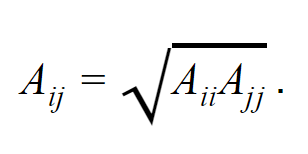
When adding entries for a particle to the dbase, all numbers or symbols on the same row must be separated by at least 2 spaces. Also, take care not to introduce any spaces after the end of each line of text. The format for appending a particle is shown below:
Number of Atoms In Particle
Molecular Formula Molecular Radius (for random placement purposes only)
Atomic Symbol     x      y      z      A      B      C      D      Q      mass
Atomic Symbol     x      y      z      A      B      C      D      Q      mass
...
Continued for each atom in the particle
For comparison, the parameters provided in the sample dbase file are appropriate for simulations of H2O clusters using the TIP3P interaction potential due to Jorgensen et al. (1) and are at the present time documented correctly on Wikipedia (2). In our testing, TransRot was used to successfully find the global minimum-energy structures of TIP3P and TIP4P water clusters (H2O)n with (n=2-8). (3)
- Jorgensen WL, Chandrasekhar J, Madura JD, Impey RW, Klein ML (1983). "Comparison of simple potential functions for simulating liquid water". Journal of Chemical Physics. 79 (2): 926–935.
- Wikipedia contributors, "Water model," Wikipedia, The Free Encyclopedia (https://en.wikipedia.org/wiki/Water_model) (accessed September 7, 2021).
- Wales DJ, Hodges MP (1998). “Global minima of water clusters (H2O)n, n le 21, described by an empirical potential”. Chemical Physics Letters 286: 65-72.
Massless interaction points can be defined in the database by including an asterisk (*) anywhere in the atomic symbol.
Massless interaction points do not contribute towards the center of mass of the particle and will not be written into output files or output movie files.
A particle cannot be made entirely out of massless interaction points; it must contain at least one atom.
These points are treated by the code as "massless atoms." Therefore, the total number of atoms used to define the particle in the dbase file must include the number of massless interaction points. For example, TIP4P water has three physical atoms and one massless interaction point, so the number "4"(=3+1) must appear at the top of the dbase entry.
TransRot is by default licensed under All Rights Reserved. However, we allow usage of, as well as the creation of derivative works of, TransRot under the following terms (hereforth referred to as the "TransRot License"):
-
Derivative works of this program for the purpose of improving upon, adding, or changing features are allowed.
-
Derivative works of this program cannot be commercially distributed.
-
All derivative works of this program must also be licensed under the TransRot License.
-
Usage of this program for general use is allowed; however, both this program and the following paper must be cited in any use:
R.Q. Topper, S.L. Topper. S. Lee, TransRot: A portable software package for simulated annealing Monte Carlo geometry optimization of atomic and molecular clusters, in ACS Symposium Series Vol. 1428, C.A. Parish and T.A. Hopkins, Eds., American Chemical Society, Chapter 2, pp. 19-38 (2022). https://pubs.acs.org/doi/abs/10.1021/bk-2022-1428.ch002
-
The following papers may optionally be cited as applicable:
- F.M. Torres, E. Agichtein, L. Grinberg, G. Yu, R.Q. Topper, A note on the application of the “Boltzmann simplex”-simulated annealing algorithm to global optimizations of argon and water clusters, Journal of Molecular Structure (THEOCHEM) 419, 85 (1997). DOI: https://doi.org/S0166-1280(97)00195-4
- R.Q. Topper, D.L. Freeman, D. Bergin, K. LaMarche, Computational techniques and strategies for Monte Carlo thermodynamic calculations with applications to nanoclusters, in Reviews in Computational Chemistry, Vol. 19, Ch.1, pp. 1-41, K.B. Lipkowitz, R. Larter and T.R. Cundari, Eds., Wiley-VCH/John Wiley and Sons, New York (2003). ISBN 0-471-23585-7.
- R.Q. Topper, W. V. Feldmann, I. Markus, D. Bergin, P.R. Sweeney, Simulated annealing and density functional theory calculations of structural and energetic properties of the ammonium chloride clusters (NH4Cl)n, (NH4+)(NH4Cl)n and (Cl–)(NH4Cl)n, n = 1–13, Journal of Physical Chemistry A, 115 (38), pp. 10423-10432 (2011). https://pubs.acs.org/doi/full/10.1021/jp2069732
- J.J. Biswakarma, V. Ciocoi, R.Q. Topper, Energetics, thermodynamics, and hydrogen bond diversity in ammonium halide clusters, 120(40), pp. 7924-7934 (2016). https://pubs.acs.org/doi/full/10.1021/acs.jpca.6b06788 Reference (i) was the first use of a sawtooth simulated annealing scheme; (ii) describes the use of magwalking; (iii) and (iv) demonstrated the use of this combination of methods.
To report a bug or issue, or to submit a feature request, please create a new issue in the "Issues" tab found at https://github.com/steventopper/TransRot/issues; alternatively, click here to create a new issue from a template.
For more information regarding TransRot, optimization videos, and examples, visit the Wiki for this project. You may also visit the project page at Cooper Union. The Visual TransRot project may be found at https://github.com/xaridar/VisualTransRot.