Arduino Power Consumption Investigation
This document describes how to put an Arduino into sleep mode, thus reducing the power consumption of the device, and detail several mechanisms for waking the Arduino.
There are four mechanisms for waking the Arduino from sleep :
- via an external interrupt. The device will wake up only when an external interrupt occurs.
- via the UART (USB serial interface). The device will remain asleep until data is received over the serial interface.
- via an internal timer. The device will periodically be woken up from sleep via Timer1, carry out an action and go back to sleep.
- via the watchdog timer. The device will periodically wake up from sleep via the Watchdog timer, carry out an action and go back to sleep. Note using the Watchdog for this provides the longest sleep time and lowest power consumption.
The ATmega168 micro-controller in our Arduino supports several modes of sleep:
SLEEP_MODE_IDLE - the least power savings
SLEEP_MODE_ADC
SLEEP_MODE_PWR_SAVE
SLEEP_MODE_STANDBY
SLEEP_MODE_PWR_DOWN - the most power savings
The more power saving the sleep mode provides, the less functionality is active. E.g. in Power-Down sleep mode, only the external interrupt and watch dog timer (WDT) are active, in Idle sleep mode the UART, timers, ADC, etc are all active, just the CPU and Flash clocks are disabled.
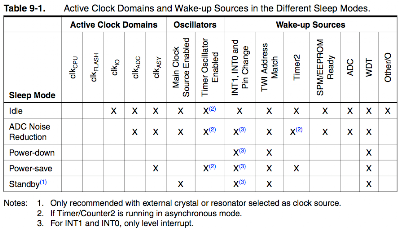
When the micro-controller is entered into sleep mode by your code, the execution of code will pause at that point. In order to resume execution of your code, the micro-controller must then be woken from sleep mode by one of it's internal hardware modules, e.g. timer expiring, external interrupt, WDT, etc.
There are several Arduino library functions used to control sleep mode. They are:
- set_sleep_mode(mode) - Configures the Atmega168 for the specified sleep mode (see above for supported sleep modes);
- sleep_enable() - Enables the sleep mode to be entered;
- sleep_mode() - Enters the sleep mode. Before this is called, the appropriate mechanism for waking the microcontroller must have been set up;
- sleep_disable() - Disables the sleep mode;
The following is the basic code needed to put the Arduino into a sleep mode:
void enterSleep(void)
{
set_sleep_mode(A_SLEEP_MODE);
sleep_enable();
sleep_mode();
/** The program will continue from here. **/
/* First thing to do is disable sleep. */
sleep_disable();
}
Note that once the mechanism to wake the device from sleep mode has occurred, execution of code will continue, starting at the next code statement after the sleep_mode() function call.
So,we need to go into a little detail on the micro controller's internal timers. The Atmega168 in the Arduino Diecimila has three internal timers:
Timer/Counter 0 - 8 bit (Max timer duration: 16.4ms)
Timer/Counter 1 - 16 bit (Max timer duration: 4.1s)
Timer/Counter 2 - 8 Bit (Max timer duration: 16.4ms)
Whether the timer is 8 bit or 16 bit defines how much the timer can count up to: an 8 bit timer counting to 256 and 16 bit to 65536. What drives the counter to count can be configured to be either the internal 16Mhz clock or an external clock source on T1 pin. We will be using the internal timer in this tutorial. Once a timer's counter has reached its maximum value and increments once more, it will overflow and the counter will reset to zero. This overflow event can be configured to trigger an overflow interrupt, which we will use to wake the Arduino from sleep mode. Note you can also modify the value within a timer's counter from your code to tune the overflow period.
