Releases: russmckendrick/terminal-svg
Release list
v0.4.0 — Animated demos go light and dark

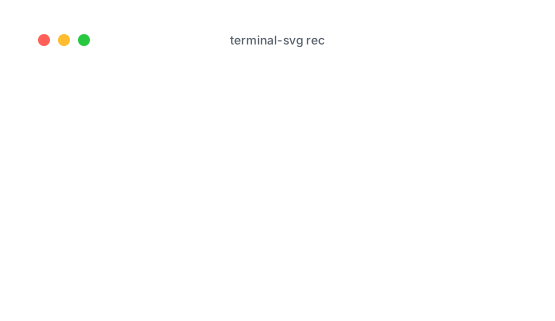
The dual-theme trick from v0.3.0 — one SVG carrying a light and a dark palette, switched by the viewer's prefers-color-scheme — now works for animated recordings too. One set of frames serves both palettes, so the dual file below costs 22 bytes more than its single-theme twin. If you're reading this in GitHub's dark mode it's already dark; flip your theme and it follows.
Highlights
- Animated dual-theme —
--theme-light github-light --theme-dark github-darknow works for.castinputs andrecsessions, not just stills. Frames are rendered once with palette classes and the colours live in a CSS block per theme, so a dual animation is ~100% the size of a single-theme one instead of double. - asciicast v3 — recordings from asciinema 3.0 load directly (v2 keeps working). v3 files embed the recording terminal's colours, so
-t autorenders a session with the palette of the terminal it was recorded in. - Trim the replay —
--from 12 --to 31animates just a slice of a recording. The first frame opens on the screen as of--from, so the lead-in is skipped, not fast-forwarded. - Cursor styles and reduced motion —
--cursor <block|bar|underline|none>picks the cursor shape, and every animated SVG now respectsprefers-reduced-motionby showing the final frame as a still poster. - Completions, man page, config file —
terminal-svg --completions zsh(and bash/fish/elvish/powershell), a generated man page, and personal defaults in~/.config/terminal-svg/config.toml— flags always beat the config, and typo'd keys fail loudly instead of silently doing nothing. - A
--helpworth reading — flags are grouped into the same sections as the docs (Output & themes, Window, Layout & fonts, Capture, Animation) with human value names and a set of examples at the bottom.
Existing invocations all keep working. Rendered output is unchanged apart from animated SVGs gaining the reduced-motion CSS block.
Install
brew install russmckendrick/tap/terminal-svg # or: brew upgrade terminal-svgOr grab a binary below (macOS arm64/amd64, Linux arm64/amd64, Windows amd64 — each with a SHA-256 checksum). rec is macOS/Linux only for now; rendering .cast files works everywhere.
Quick start
# an animated README demo that follows the viewer's light/dark mode
terminal-svg demo.cast --theme-light github-light --theme-dark github-dark

# render an asciinema 3 recording with its own terminal's colours
terminal-svg session.cast -t auto

# animate just the good bit
terminal-svg demo.cast --from 12 --to 31 -o highlight.svg
Docs: README · CLI reference · theme format · how it works
Bundled JetBrainsMono Nerd Font faces are under the SIL OFL; the code is MIT.
Full Changelog: v0.3.0...v0.4.0
v0.3.0 — Windows and Ubuntu get windows
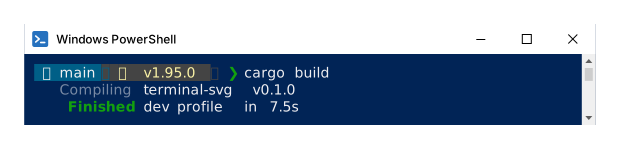
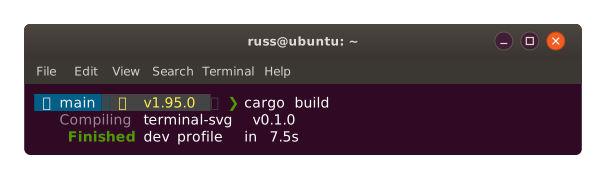
terminal-svg screenshots no longer have to pretend they were taken on a Mac. A new --chrome flag dresses the window as a classic Windows PowerShell console or an Ubuntu GNOME Terminal, each with a matching built-in theme — and the macOS chrome was retuned to real-window proportions while we were at it. Both images below are terminal-svg's own output.
Highlights
--chrome <macos|windows|ubuntu|none>— Windows renders the classic conhost console (white title bar, window icon, square corners, scrollbar gutter); Ubuntu renders GNOME Terminal's Ambiance look (dark header, orange close button, menu bar). Pair them with the two new built-in themes —powershell(conhost navy + the Campbell palette) andubuntu(aubergine + Tango) — bringing the built-ins to nine.- A more honest macOS window — 32 px title bar, true 12 px traffic lights, a fixed 12 px title in the system sans. Chrome is now fixed-size like a real window and no longer scales with
--font-size. - Light and dark in one file —
--theme-light github-light --theme-dark github-darkemits a single static SVG carrying both palettes, switched by the viewer'sprefers-color-scheme. One<img>tag, correct in both GitHub modes. - Titles sort themselves out — with no
--title, the window title falls back to the recording's own title, then the last OSC 0/2 report from your shell — shown Ghostty-style as📁 ~/Code/blog— then the command string.--title-emojiswaps or drops the emoji. - Freeze-frames and transparency —
--at <seconds>renders the screen at any point in a recording;--no-backgrounddrops the window body, chrome, and shadow for a transparent floating-text embed. - Themes can restyle the chrome — optional
[chrome]keys (bar_bg,bar_fg,button_fg,button_bg) recolour the new title bars straight from your theme TOML.
There's also a new home: terminal-svg.dev — a showcase site with a gallery of every theme rendered in its native chrome, built from the repo and deployed on every release.
Existing invocations all keep working; the macOS chrome retune does change rendered output — deliberately, it has real proportions now.
Install
brew install russmckendrick/tap/terminal-svgOr grab a binary below (macOS arm64/amd64, Linux arm64/amd64, Windows amd64 — each with a SHA-256 checksum). rec is macOS/Linux only for now; rendering .cast files works everywhere.
Quick start
terminal-svg --chrome windows -t powershell -- pwsh -c 'Get-ChildItem'
terminal-svg --chrome ubuntu -t ubuntu -- lsd -la
terminal-svg demo.cast --static --theme-light github-light --theme-dark github-dark
Docs: README · theme format · how it works
Bundled JetBrainsMono Nerd Font faces are under the SIL OFL; the code is MIT.
Full Changelog: v0.2.0...v0.3.0
v0.2.0 — record it, replay it, embed it
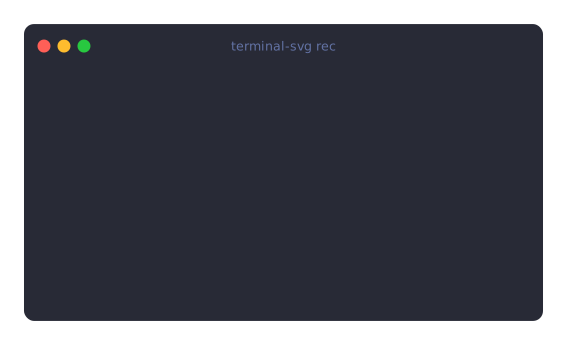
terminal-svg can now record. Run terminal-svg rec, do your thing, exit the shell — and out comes an animated SVG replaying the whole session: GIF-quality demos at a fraction of the size, with real selectable text, that play anywhere an <img> tag does. GitHub READMEs included, no JavaScript. The image below is one — 42 KB, font embedded.
Highlights
terminal-svg rec— records a live interactive session (your$SHELL, orrec -- <command>) on a real PTY at your current terminal size, keystrokes forwarded, window resizes captured. Exit the session and the animated SVG is rendered on the spot.- asciicast v2 in and out — every recording is saved as a standard asciicast next to the SVG (
asciinema play demo.castjust works), and any.castfile renders directly: re-theme or re-time a take without re-recording, or render recordings you already made with asciinema (terminal-svg session.cast -t github-dark). - Replays that stay small — output bursts coalesce to ≤30 fps, pauses are capped at 2 s (
--idle-time-limit), identical frames are dropped, and repeated rows are shared across frames via<defs>/<use>. A 120-line scrolling build log lands around 130 KB — font included. - Plays everywhere — frames are toggled by plain CSS keyframes with
step-endtiming inside the SVG itself: crisp discrete frames, no cross-fading, no scripts, loops forever with a hold on the last frame.--speedto taste,--no-loopto play once and freeze,--staticfor just the final screen. - The details still matter — a soft block cursor tracks the session, carriage-return progress bars and spinners replay exactly as they ran, mid-session window resizes grow the canvas, and per-frame font subsetting covers every glyph the whole recording touches.
Everything from 0.1.0 is untouched: the static screenshot CLI is byte-for-byte compatible, golden-tested to prove it.
Install
brew install russmckendrick/tap/terminal-svgOr grab a binary below (macOS arm64/amd64, Linux arm64/amd64, Windows amd64 — each with a SHA-256 checksum). rec is macOS/Linux only for now; rendering .cast files works everywhere.
Quick start
terminal-svg rec -o demo.svg        # exit the shell to finish
terminal-svg demo.cast --speed 2 -t nord -o demo-nord.svg
Docs: README · theme format · how it works
Bundled JetBrainsMono Nerd Font faces are under the SIL OFL; the code is MIT.
Full Changelog: v0.1.0...v0.2.0
v0.1.0 — pixel-perfect terminal screenshots

The first release of terminal-svg — a single self-contained binary that turns terminal output into pixel-perfect SVG screenshots, complete with macOS-style window chrome. The image above is its own output.
Highlights
- Three capture modes — run a command in a real PTY (
terminal-svg -- lsd -la), pipe ANSI through stdin, or render a captured dump file. - Real terminal emulation — output goes through a proper VT state machine (asciinema's avt), so carriage-return progress bars,
ESC[Kclears, and cursor-repaint spinners resolve to exactly the final screen — no regex-stripped artefacts. - Embedded font subsetting — only the glyphs you actually used are embedded as WOFF2 (typically a few KB), so the SVG renders identically everywhere: GitHub READMEs, blogs, machines with no fonts installed. Nerd Font powerline segments, box drawing, and wide CJK all align on the grid; emoji render through the viewer's native colour font.
- Full ANSI fidelity — truecolor, 256-colour, the classic 16, bold/dim/italic/underline/strikethrough/inverse.
- 7 built-in themes —
dracula(default),catppuccin-mocha,nord,tokyo-night,github-dark,github-light,solarized-dark— plus custom themes from a small TOML file.
Install
brew install russmckendrick/tap/terminal-svgOr grab a binary below (macOS arm64/amd64, Linux arm64/amd64, Windows amd64 — each with a SHA-256 checksum).
Quick start
terminal-svg --title "the proof" -o shot.svg -- cargo testDocs: README · theme format · how it works
Bundled JetBrainsMono Nerd Font faces are under the SIL OFL; the code is MIT.
Full Changelog: https://github.com/russmckendrick/terminal-svg/commits/v0.1.0
Full Changelog: https://github.com/russmckendrick/terminal-svg/commits/v0.1.0