v0.3.0 — Windows and Ubuntu get windows

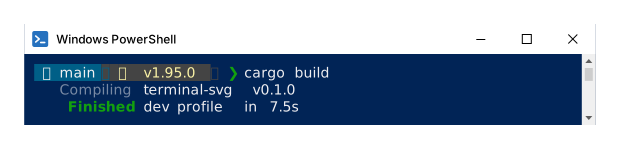
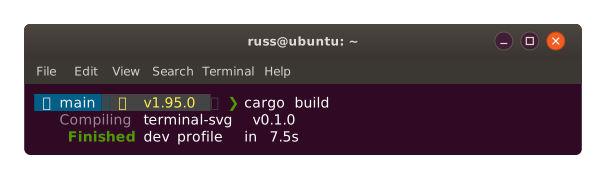
terminal-svg screenshots no longer have to pretend they were taken on a Mac. A new --chrome flag dresses the window as a classic Windows PowerShell console or an Ubuntu GNOME Terminal, each with a matching built-in theme — and the macOS chrome was retuned to real-window proportions while we were at it. Both images below are terminal-svg's own output.
Highlights
--chrome <macos|windows|ubuntu|none>— Windows renders the classic conhost console (white title bar, window icon, square corners, scrollbar gutter); Ubuntu renders GNOME Terminal's Ambiance look (dark header, orange close button, menu bar). Pair them with the two new built-in themes —powershell(conhost navy + the Campbell palette) andubuntu(aubergine + Tango) — bringing the built-ins to nine.- A more honest macOS window — 32 px title bar, true 12 px traffic lights, a fixed 12 px title in the system sans. Chrome is now fixed-size like a real window and no longer scales with
--font-size. - Light and dark in one file —
--theme-light github-light --theme-dark github-darkemits a single static SVG carrying both palettes, switched by the viewer'sprefers-color-scheme. One<img>tag, correct in both GitHub modes. - Titles sort themselves out — with no
--title, the window title falls back to the recording's own title, then the last OSC 0/2 report from your shell — shown Ghostty-style as📁 ~/Code/blog— then the command string.--title-emojiswaps or drops the emoji. - Freeze-frames and transparency —
--at <seconds>renders the screen at any point in a recording;--no-backgrounddrops the window body, chrome, and shadow for a transparent floating-text embed. - Themes can restyle the chrome — optional
[chrome]keys (bar_bg,bar_fg,button_fg,button_bg) recolour the new title bars straight from your theme TOML.
There's also a new home: terminal-svg.dev — a showcase site with a gallery of every theme rendered in its native chrome, built from the repo and deployed on every release.
Existing invocations all keep working; the macOS chrome retune does change rendered output — deliberately, it has real proportions now.
Install
brew install russmckendrick/tap/terminal-svgOr grab a binary below (macOS arm64/amd64, Linux arm64/amd64, Windows amd64 — each with a SHA-256 checksum). rec is macOS/Linux only for now; rendering .cast files works everywhere.
Quick start
terminal-svg --chrome windows -t powershell -- pwsh -c 'Get-ChildItem'
terminal-svg --chrome ubuntu -t ubuntu -- lsd -la
terminal-svg demo.cast --static --theme-light github-light --theme-dark github-dark
Docs: README · theme format · how it works
Bundled JetBrainsMono Nerd Font faces are under the SIL OFL; the code is MIT.
Full Changelog: v0.2.0...v0.3.0