Repository navigation
Releases: s1zzle5486/VitaDay
Release list
VitaDay 0.10.34 — fixes and faster startup

A small maintenance update for homebrew-enabled PS Vita.
Changes
- Applied community corrections to the Simplified Chinese interface and holiday translations.
- Added handling for the system quit request, cancellation of active network requests, and orderly release of the music worker, audio port and system services when closing the app.
- Reduced startup work: load the selected language first, defer built-in photo thumbnails until Appearance is opened, and prepare fonts and circle masks when needed.
- Added startup and shutdown diagnostics in
ux0:data/VitaDay/startup-status.txtandshutdown-status.txt.
Thanks to Whale-Circus for the Simplified Chinese corrections and the report about other apps failing to launch after exiting VitaDay.
Install
Install VitaDay-0.10.34.vpk with VitaShell over your existing installation. Settings, events, cached data and playlists stay in ux0:data/VitaDay/; title ID remains VDAY00001.
Validation
Native VitaSDK build, ELF relocation checks, LiveArea checks, VPK integrity and the complete offline ASan/UBSan test suite passed. On a physical Vita, application entry to first frame improved from 8.48 to 3.22 seconds; the owner measured approximately 5 seconds from tapping Start. System loading before application entry is outside the logged interval.
The system-wide app-launch issue after closing VitaDay still needs confirmation from affected hardware; the shutdown changes address that report, but this release does not claim that the original scenario has been verified as resolved.
SHA-256: 3e5c122b059b8163fcc92abbb95b63f51174db205295b98626d52560ed9e7217.
VitaDay 0.10.31 — MP3 playlists & weather colors
Local MP3 music and richer weather for homebrew-enabled PS Vita.
Install VitaDay-0.10.31.vpk with VitaShell over your previous installation. Settings, personal dates and playlists stay in ux0:data/VitaDay/; title ID: VDAY00001.
Changes since 0.10.20
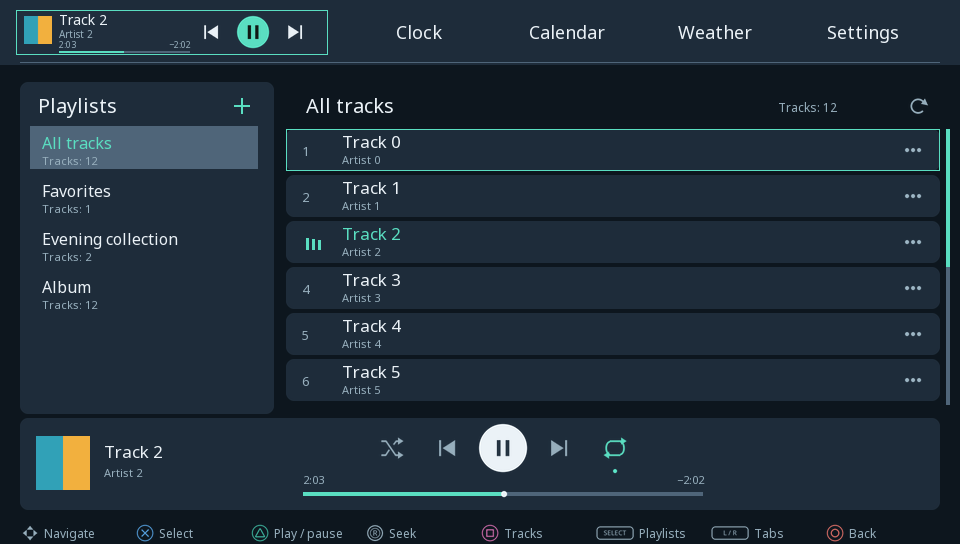
- Local MP3 player with playlists on the left, tracks on the right and playback controls below, using your appearance colors. L/R includes Music in the main tab cycle.
- Favorites and user playlists: create, rename, delete, add/remove tracks and reorder. SELECT manages playlists; Square or three dots opens track actions. Deleting an MP3 from the card requires confirmation; removing it from a playlist keeps the file.
- ID3 title/artist tags and embedded PNG/JPEG album artwork, with a fallback for missing or unsupported images. Covers load in a separate thread.
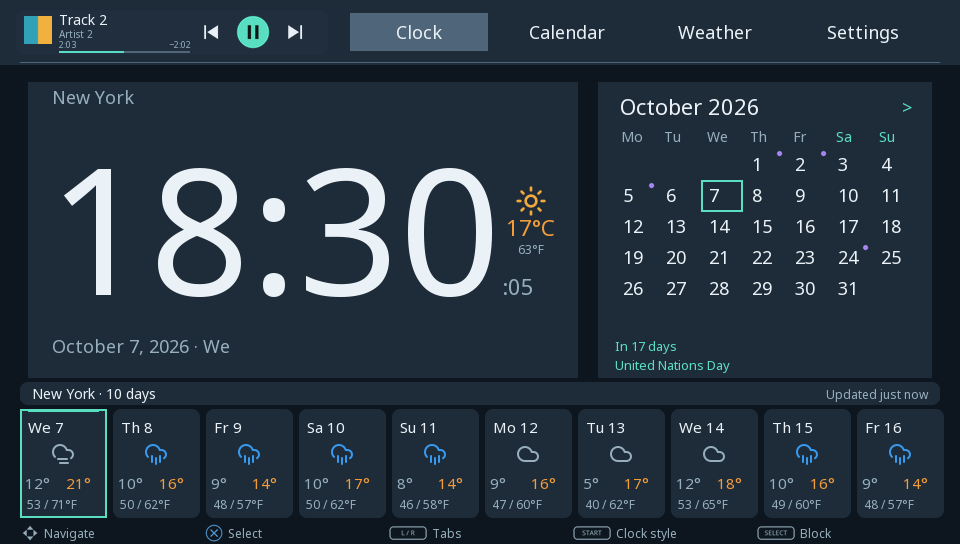
- Home mini-player with artist, cover, playback controls and seeking. Elapsed time is on the left, remaining time on the right; the full player progress bar is centered. Playlist repeat is enabled by default, with shuffle and repeat-one/off options.
- More logical navigation between playlists, tracks and transport controls; animated playback indication; filtering of macOS
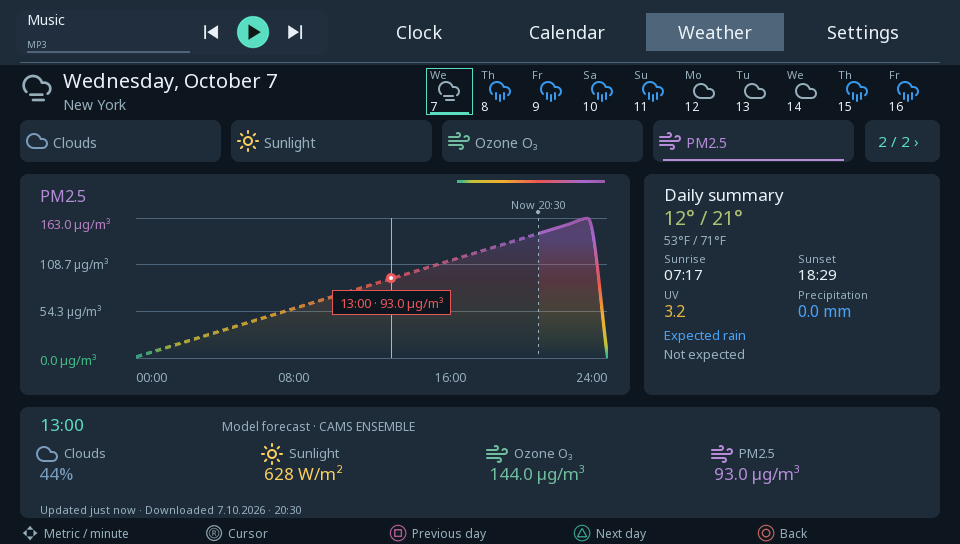
._files and invalid MP3s. Volume uses the Vita physical buttons. - Sunlight, ozone and PM2.5 forecasts. Sunlight shows the instantaneous forecast with the preceding-hour average alongside it. Improved weather text spacing, chart labels and daily summaries; corrected Simplified Chinese precipitation/pressure translations.
- Value-based colors for weather numbers, plus updated wind, humidity, ozone and PM2.5 chart palettes. Both unit systems share the same physical scale. Text colors adapt to light/dark panels. Pollutant colors use EEA hourly concentration boundaries, not a combined AQI.
- Personal dates use holiday-style calendar markers in their selected color.
Add your music
Copy your own MP3s into ux0:data/VitaDay/music/ or ux0:music/ using VitaShell, then open Music and choose SELECT → Refresh. Up to 256 tracks, four nested folder levels and 64 playlists including Favorites. Music is local only: no account, API key or online service. Closing the app or fully powering off stops playback; Power/display-blank playback still needs checking on physical hardware.
Custom backgrounds
Copy PNG/JPG/JPEG files into ux0:data/VitaDay/backgrounds/, then select a thumbnail in Settings → Appearance → Background. Recommended: 960 × 544, maximum: 2048 × 2048. Square rescans the gallery; automatic theme mode offers separate day/night backgrounds. Full instructions.
English previews
Desktop renders with sample data, not console captures:
Validation
Native VitaSDK build, ELF relocation checks, LiveArea checks and VPK integrity passed. Complete offline desktop tests passed with ASan/UBSan, including color boundaries and contrast. Weather layout was checked in all 20 languages. Native player/artwork/queue checks passed in earlier Vita3K player builds; the full app has an existing emulator networking crash. This exact release has not been tested on physical Vita hardware.
VPK SHA-256: 7c98ab783bcb0809d6a4d054ba39411ce323df5cee4aea57d441cbce231c4d58.
VitaDay 0.10.20
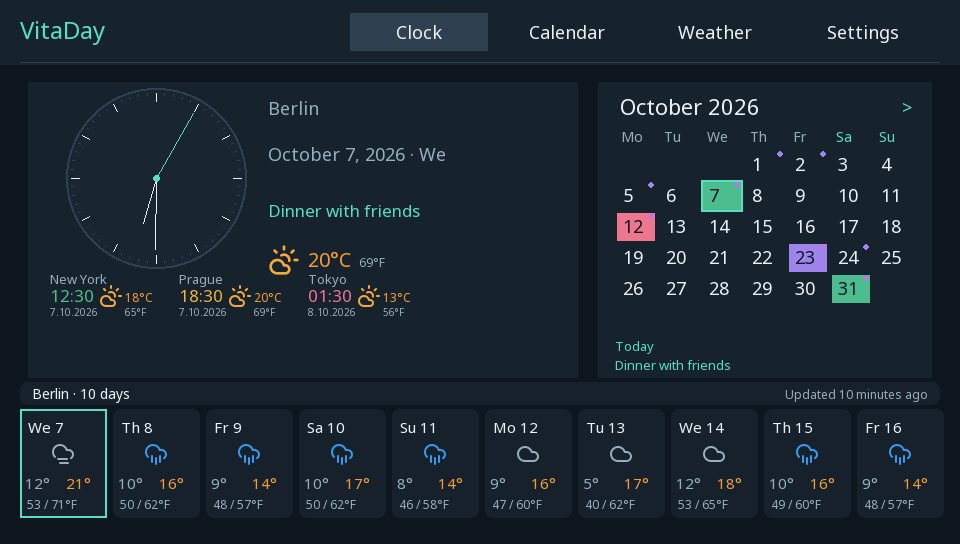
Clock, weather and calendar dashboard for homebrew-enabled PS Vita.
Install VitaDay-0.10.20.vpk with VitaShell over your existing installation. Settings and personal dates are preserved in ux0:data/VitaDay/ (title ID: VDAY00001).
Changes since 0.9.6
- All 20 Vita interface languages, automatic system-language selection, a full language picker, and a custom bitmap renderer for Japanese, Chinese and Korean characters.
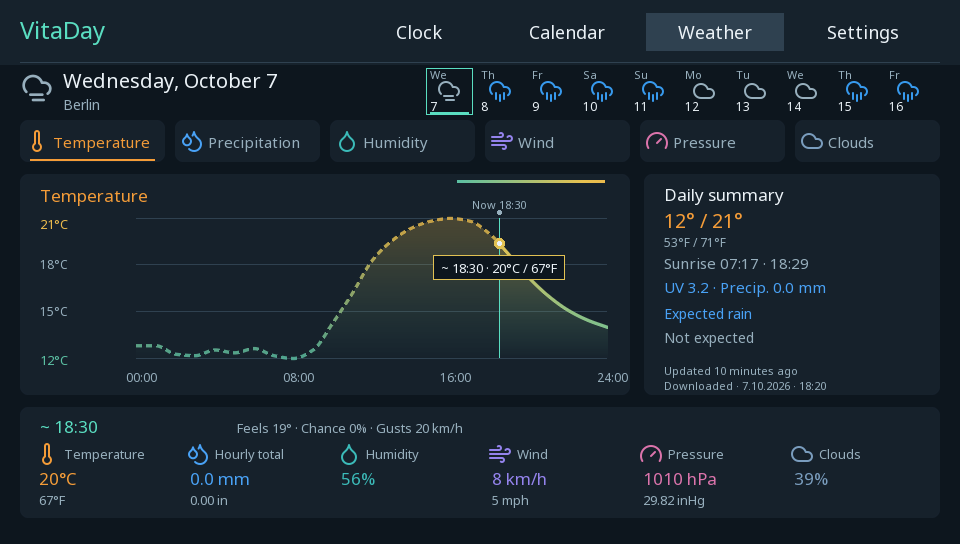
- Weather charts with gradient fills and dashed past segments, continuous minute-position browsing, smooth stick acceleration, and fixes for gaps and dotted descending curves. Minute values interpolate hourly forecasts.
- Offline warnings and cached weather fallback for additional cities, relative update times, and the initial chart cursor at the selected city's current time.
- Localized control diagrams at native screen resolution, clearer rounded panels, smoother background browsing, and scrollbars for lists.
- Expanded international observances and grouped matching multi-country holidays. International entries use the INT badge; source countries are available in the details.
- Persistent holiday caching across countries, years and regions. Matching cached holiday lists are reused without a daily redownload.
- Improved calendar spacing, long-title handling, scrolling and the full-day reader. The Home banner shows the next event and a count of additional entries; selecting it opens that date in the calendar.
- Simplified Locations settings and moved personal date colors next to holiday options.
- Selecting an additional city on Home opens its weather. The Remove city action and its explanation share a standard two-line card.
- Version label on the LiveArea launch card and custom-background instructions.
Custom backgrounds
Copy PNG/JPG/JPEG files to ux0:data/VitaDay/backgrounds/ using VitaShell, then select a thumbnail under Settings → Appearance → Background. Recommended size: 960 × 544; maximum: 2048 × 2048. Press Square in the gallery to rescan newly copied files. Automatic theme mode provides separate Day background and Night background selections. Full instructions.
Preview
English desktop renders of the application with sample data:
Validation
Native VitaSDK build, executable relocation checks, VPK integrity and LiveArea checks passed. Offline desktop tests and UI previews passed. This exact build has not yet been tested on a physical Vita.
VPK SHA-256: c27e8e8213a0283479508351484339b0dd14d8d359f8e7090b1a540b52ae8e34
VPK size: 35,295,303 bytes.
VitaDay 0.9.6
VitaDay 0.9.6 for PS Vita (title ID: VDAY00001).
Install the VPK with VitaShell over the previous version. Saved calendars and settings are preserved.
- Manage and remove additional cities directly from the Weather list: three-dot menu or d-pad/left stick Right.
- Returning to Appearance, General or Locations opens the section's first screen and resets scroll/navigation state.
- Prevent duplicate city additions across localized names and timezone aliases; keep genuinely different places with the same name separate.
- Keep country holidays and personal events when deleting a city; remove its extra clock and prevent in-flight refreshes from recreating it.
Built with VitaSDK; package integrity, ELF relocations, LiveArea assets and desktop tests pass. This build has been tested on a physical Vita.
VPK SHA256: 5430c71cfe2a707a7310874bdbcf766de8925489872f6d8a4901fbe346de89b2