Repository navigation
Releases: saawant12/orbit-store-ps5
Release list
Orbit Store 0.8.0 (Beta)

A big update: TorBox downloads and 10 interface languages come to Orbit Store.
- Debrid support: starting with TorBox. Connect your account and use TorBox for supported downloads in the native app and browser.
- Orbit in your language. Ten interface languages across both apps, following your device’s language automatically. Browser users can also choose their preferred language in Settings. Supported languages: English, German, Spanish, French, Italian, Dutch, Polish, Brazilian Portuguese, Russian and Turkish.
- A fuller Discover. Discover opens first again, with Latest releases and a paged All games grid.
- Refined controls. Improved dropdowns, pairing screens and form controls across both apps.
- Rest-mode recovery. Orbit reconnects after the PS5 wakes, without needing to reload the payload.
Install the native TV app
Download PPSA99177.ffpkg and its .sha256 file, verify the checksum, then copy the FFPKG to /data/homebrew/ on your PS5. Let ShadowMountPlus register it and open Orbit Store from the Games row. Discover opens first. Choose your sources in the native app's setup screen or App settings → Download sources.
If an older Orbit service is already running, stop it deliberately before opening the app so its new bundled service can start. The app preserves a newer saved service. The native app version is 1.2.0, bundled with Orbit service 0.8.0.
Use or update the browser version
Download orbit_store.elf and its checksum, then run it through your payload manager or ELF loader. Open the Orbit shortcut in the Media tab, or pair a phone at http://<ps5-ip>:34177/ on the same network.
Existing users can update the service through App settings → Update / reinstall, choose Stop Orbit to restart, then run the saved /data/orbit-store/orbit_store.elf or a synced manager copy. Loading a replacement while Orbit is running saves it for the next start. Pairing, source choices and the queue remain saved.
In the browser, App settings → TV app installs the native app from the official feed. The native app has separate TV app and download service controls under App settings → Updates. Installation and service restart require your choice. After updating the TV app, close and reopen it. If ShadowMountPlus still opens an older app, restart the console when convenient and run your jailbreak again.
Downloads and source
orbit_store.elfandorbit_store.elf.sha256: download service and browser interface.PPSA99177.ffpkgandPPSA99177.ffpkg.sha256: native TV app, including the same ELF.orbit-store-0.8.0-source-bundle.zip: complete application source, corresponding dependency sources, licence notices and rebuild instructions for both programs.
Run shasum -a 256 -c <filename>.sha256 beside each binary to verify it. Source-bundle contents have their own SOURCE-SHA256SUMS.
Orbit Store is in beta. The game catalogue continues to offer single-file FFPFSC and exFAT options. The TV app FFPKG is Orbit itself; game package installation has not been added. Keep the PS5 awake during downloads. Library actions require a compatible ShadowMount v1 local API. See the guides for setup and troubleshooting.
Orbit Store is free software under GPL-3.0-or-later. The application source is built from commit dac9d71934396668146fb5981e659a3de5cb47ac; component sources and licences are listed in THIRD-PARTY-NOTICES.md and SOURCES.json.
Orbit Store 0.7.0 (Beta)
Orbit Store 0.7.0 (Beta)
A big update: massively improved download speeds in Orbit Store.
- Faster downloads. A reworked download engine makes better use of your connection and storage.
- Browser performance improvements.
- Reliable pause and resume. Keep your progress when pausing or restarting Orbit. Existing compatible partial downloads remain resumable.
- Native app improvements. Manage sources, default storage, pairing and catalogue refresh from App settings. Check and update the app and download service separately, with notifications when updates are available.
After upgrading, keep using Orbit 0.7.0 or later. Older releases cannot read the updated download queue.
Install the native TV app
Download PPSA99177.ffpkg and its .sha256 file, verify the checksum, then copy the FFPKG to /data/homebrew/ on your PS5. Let ShadowMountPlus register it and open Orbit Store from the Games row. Browse opens first. Choose your sources in the native app's setup screen or App settings → Download sources.
If an older Orbit service is already running, stop it deliberately before opening the app so its new bundled service can start. The app preserves a newer saved service. The native app version is 1.1.0, bundled with Orbit service 0.7.0.
Use or update the browser version
Download orbit_store.elf and its checksum, then run it through your payload manager or ELF loader. Open the Orbit shortcut in the Media tab, or pair a phone at http://<ps5-ip>:34177/ on the same network.
Existing users can update the service through App settings → Update / reinstall, choose Stop Orbit to restart, then run the saved /data/orbit-store/orbit_store.elf or a synced manager copy. Loading a replacement while Orbit is running saves it for the next start. Pairing, source choices and the queue remain saved.
In the browser, App settings → TV app installs the native app from the official feed. The native app has separate TV app and download service controls under App settings → Updates. Installation and service restart require your choice. After updating the TV app, close and reopen it. If ShadowMountPlus still opens an older app, restart the console when convenient and run your jailbreak again.
Downloads and source
orbit_store.elfandorbit_store.elf.sha256: download service and browser interface.PPSA99177.ffpkgandPPSA99177.ffpkg.sha256: native TV app, including the same ELF.orbit-store-0.7.0-source-bundle.zip: complete application source, corresponding dependency sources, licence notices and rebuild instructions for both programs.
Run shasum -a 256 -c <filename>.sha256 beside each binary to verify it. Source-bundle contents have their own SOURCE-SHA256SUMS.
Orbit Store is in beta. The game catalogue continues to offer single-file FFPFSC and exFAT options. The TV app FFPKG is Orbit itself; game package installation has not been added. Keep the PS5 awake during downloads. Library actions require a compatible ShadowMount v1 local API. See the guides for setup and troubleshooting.
Orbit Store is free software under GPL-3.0-or-later. The application source is built from commit 2a0d4a9f4af278ee52f9bcd55c77d7059f2bba04; component sources and licences are listed in THIRD-PARTY-NOTICES.md and SOURCES.json.
Orbit Store 0.6.1 (Beta)
Orbit Store 0.6.1 (Beta)
UI Revamp
A refreshed experience across the native PS5 app and browser.
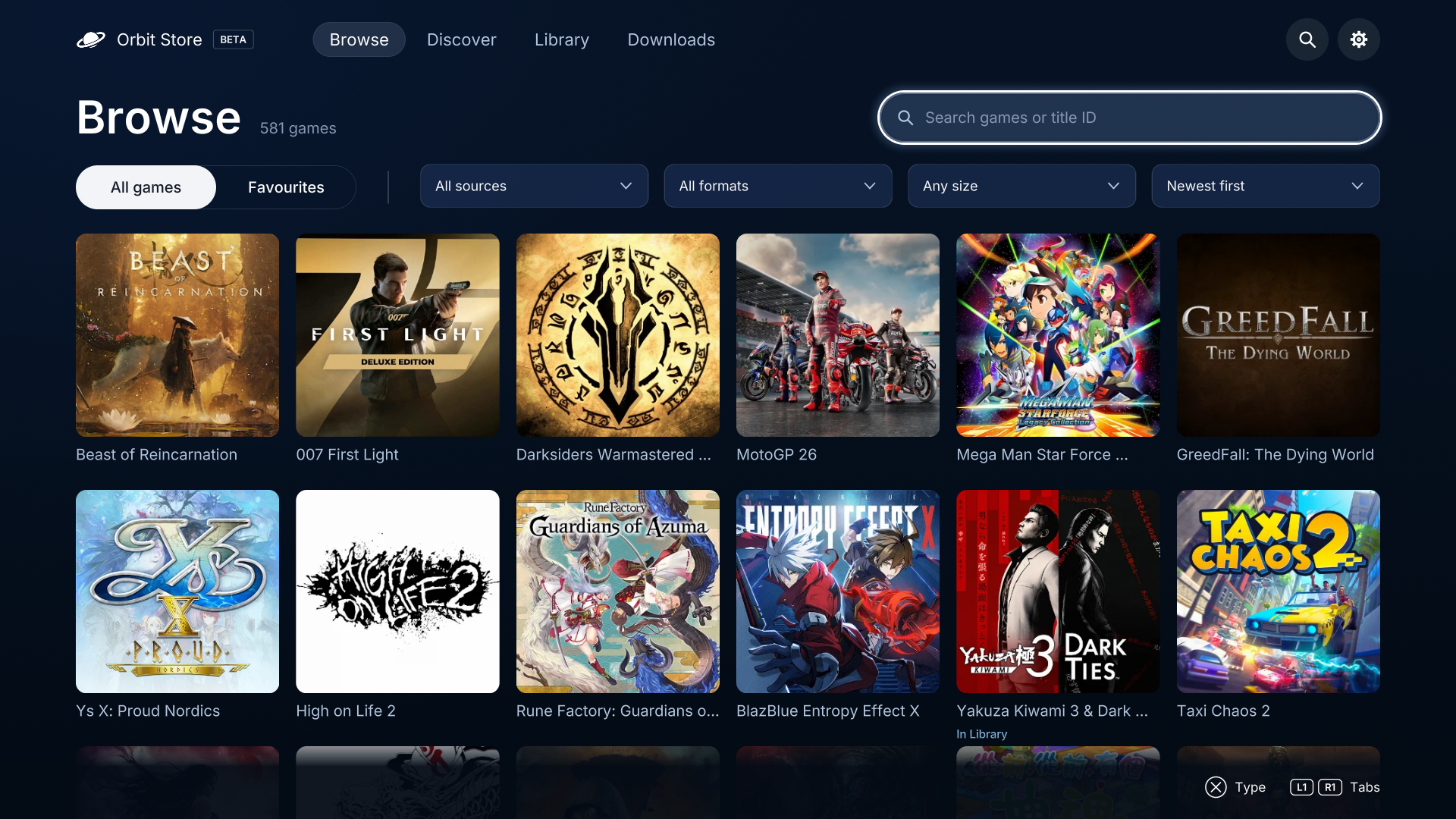
- Browse: a refined game grid with clearer search and filters.
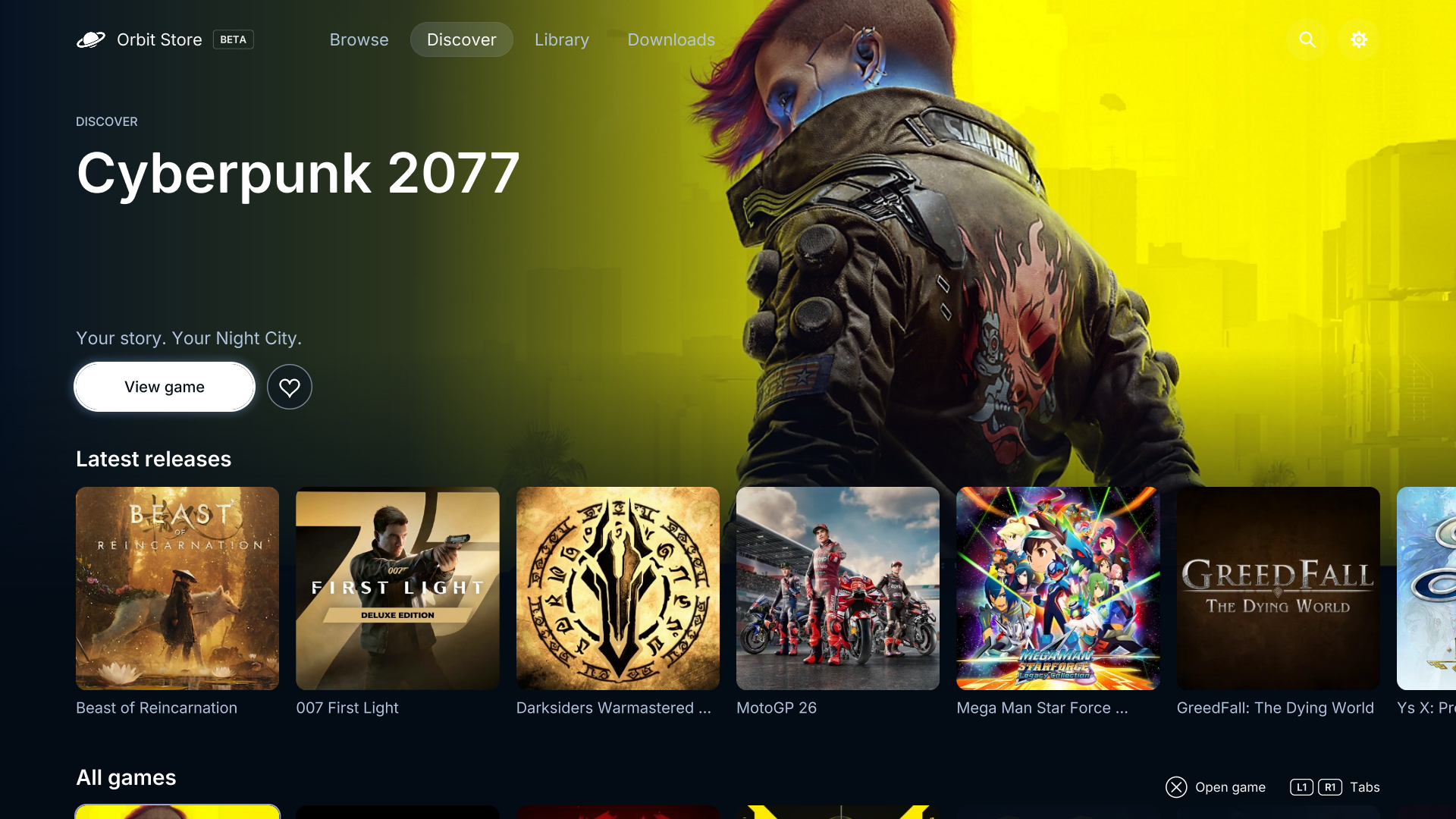
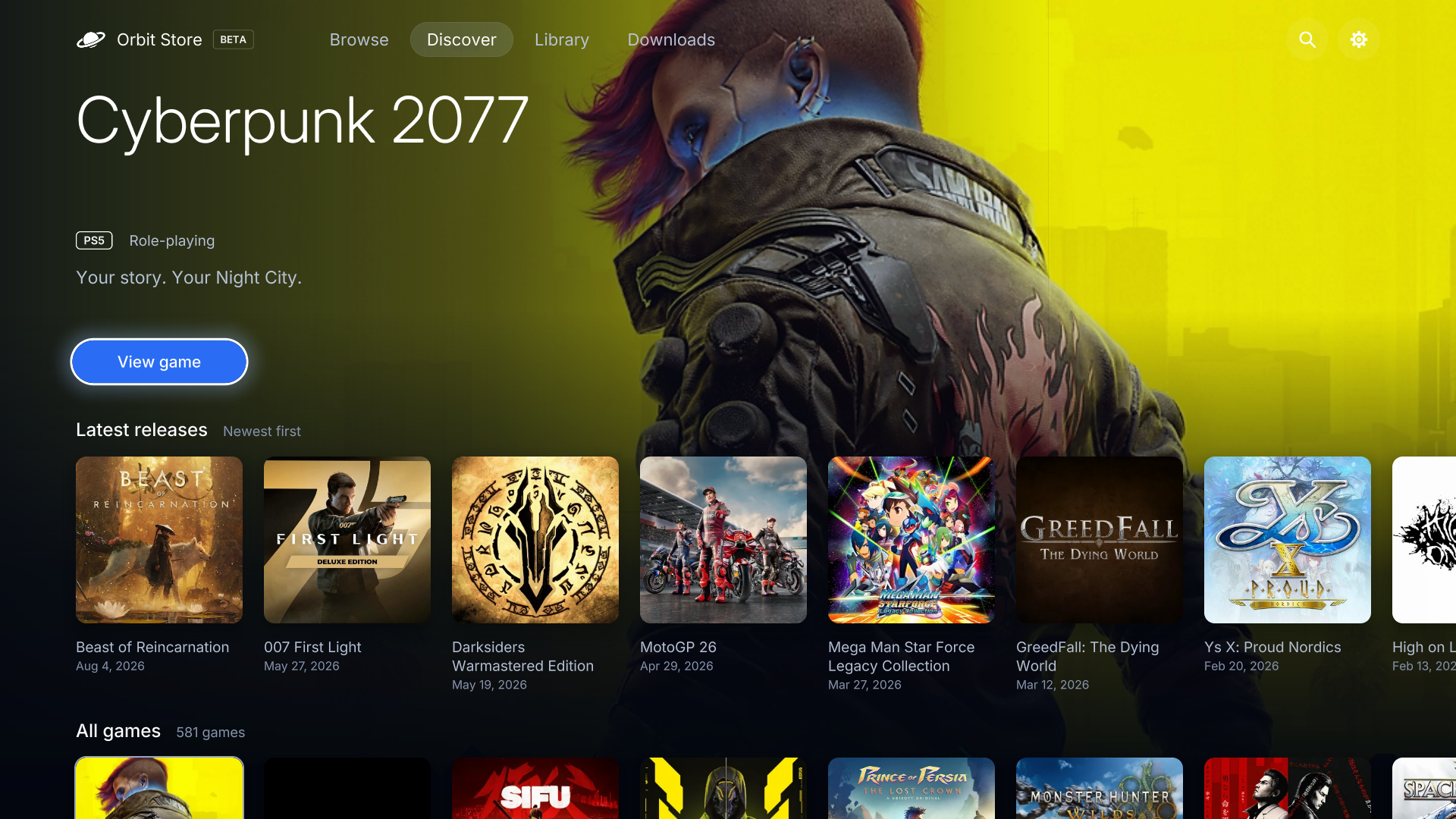
- Discover: an artwork-led layout that puts featured games first.
- Library: a cleaner view of your collection, storage and game status.
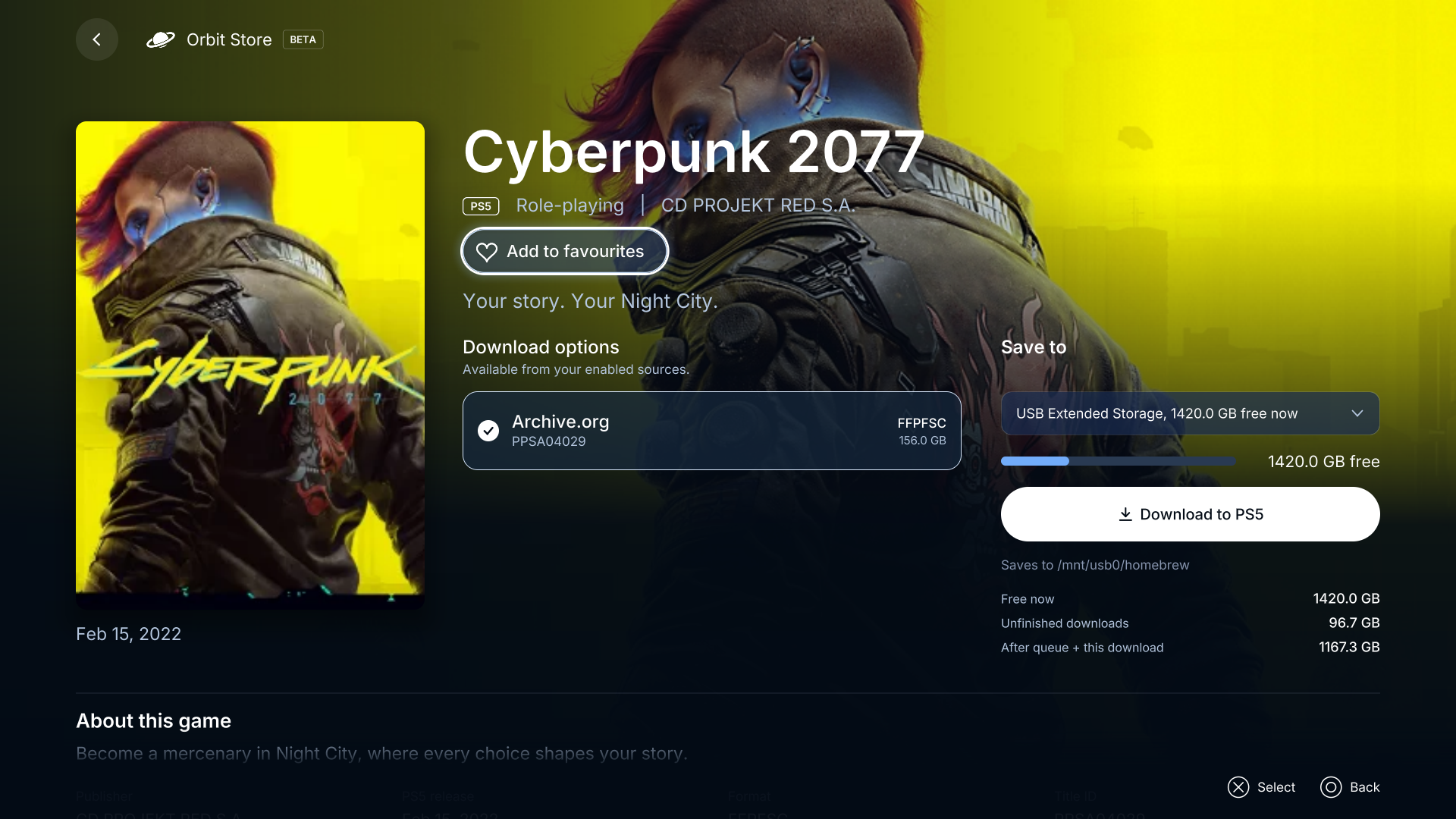
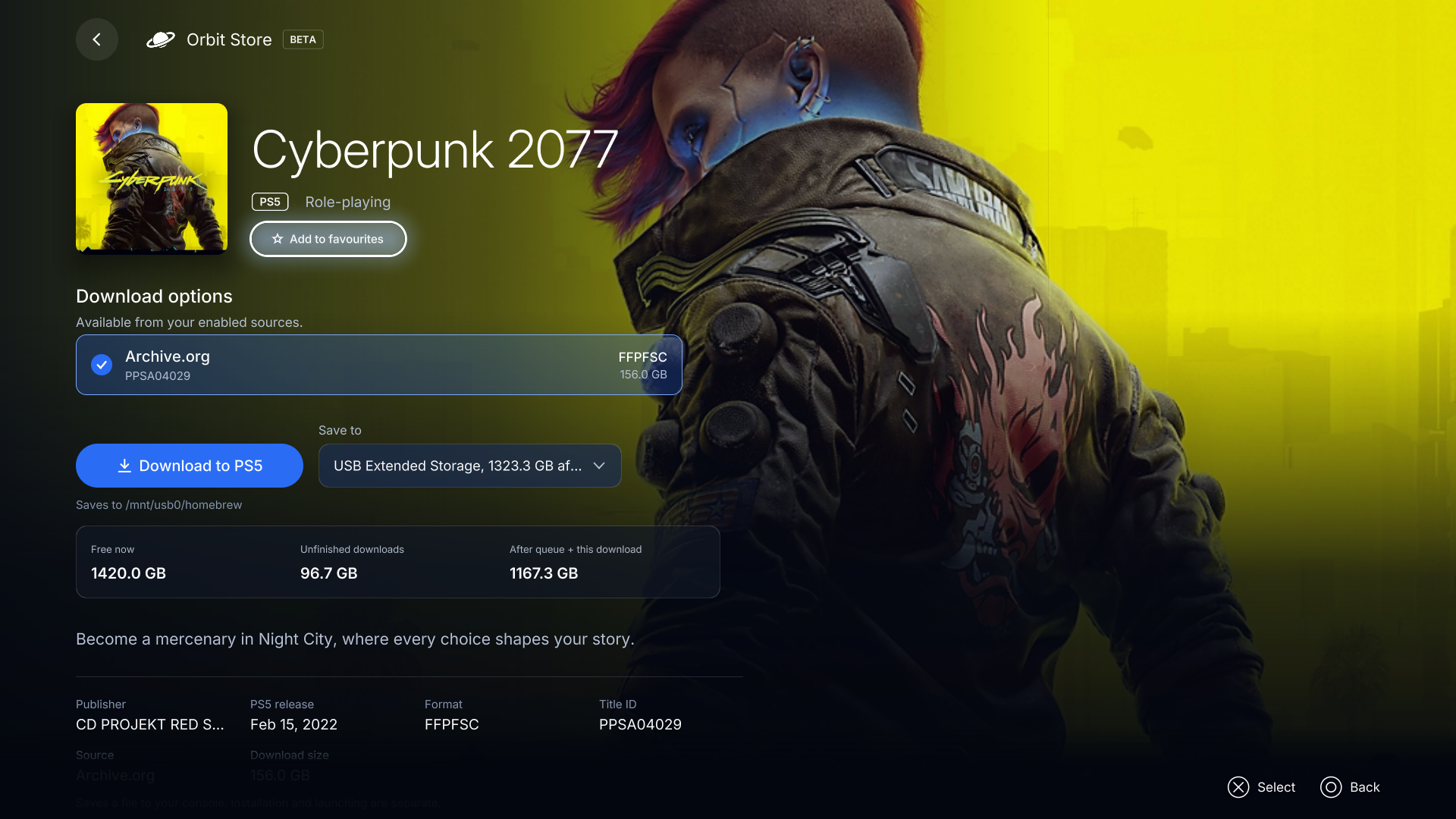
- Game details: a new cover-led layout with source options, storage selection and download controls together.
- Clearer guidance: Vikingfile instructions are visible before pairing in the browser, with improved pairing-button placement.
All existing information and actions remain available.
Preview
Browse, Discover and game details in the native app. Previews are rendered locally from the release code with the current catalogue and sample storage.
Browse
Discover
Game details
Install the native TV app
Download PPSA99177.ffpkg and its .sha256 file, verify the checksum, then copy the FFPKG to /data/homebrew/ on your PS5. Let ShadowMountPlus register it and open Orbit Store from the Games row. Browse opens first. Source selection is in the browser version; the app's setup screen opens it for you.
If an older Orbit service is already running, stop it deliberately before opening the app so its new bundled service can start. The app preserves a newer saved service. The native app version is 1.0.1, bundled with Orbit service 0.6.1.
Use or update the browser version
Download orbit_store.elf and its checksum, then run it through your payload manager or ELF loader. Open the Orbit shortcut in the Media tab, or pair a phone at http://<ps5-ip>:34177/ on the same network.
Existing users can update the service through App settings → Update / reinstall, choose Stop Orbit to restart, then run the saved /data/orbit-store/orbit_store.elf or a synced manager copy. Loading a replacement while Orbit is running saves it for the next start. Pairing, source choices and the queue remain saved.
In Orbit 0.6.1, App settings → TV app installs the native app from the official feed. Close the TV app before replacing it. If ShadowMountPlus still opens an older app after replacement, restart the console when convenient and run your jailbreak again.
Downloads and source
orbit_store.elfandorbit_store.elf.sha256: download service and browser interface.PPSA99177.ffpkgandPPSA99177.ffpkg.sha256: native TV app, including the same ELF.orbit-store-0.6.1-source-bundle.zip: complete application source, corresponding dependency sources, licence notices and rebuild instructions for both programs.
Run shasum -a 256 -c <filename>.sha256 beside each binary to verify it. Source-bundle contents have their own SOURCE-SHA256SUMS.
Orbit Store is in beta. The game catalogue continues to offer single-file FFPFSC and exFAT options. The TV app FFPKG is Orbit itself; game package installation has not been added. Keep the PS5 awake during downloads. Library actions require a compatible ShadowMount v1 local API. See the guides for setup and troubleshooting.
Orbit Store is free software under GPL-3.0-or-later. The application source is built from commit 8b4d55fd96c85dc359204a14338e8eec99736552; component sources and licences are listed in THIRD-PARTY-NOTICES.md and SOURCES.json.
Orbit Store 0.6.0 (Beta)
Orbit Store 0.6.0 (Beta)
A big update: Orbit Store now has a native PS5 app.
- Orbit on your Games row. Browse 581 games, explore Discover, manage downloads and view your Library in the new TV app.
- Open Orbit and get started. The TV app includes Orbit's download service and can start it when a compatible ELF loader is running.
- One queue across your screens. Use the native app on your TV or the browser version on a paired phone or computer. Downloads keep running when you close the TV app.
- Install the TV app from Orbit. Open App settings → TV app in the browser version, or download
PPSA99177.ffpkgfrom this release.
The TV app requires kstuff and ShadowMountPlus. Starting its bundled service requires an ELF loader on port 9021; you can also start orbit_store.elf yourself. Vikingfile browser downloads and App settings open the browser version. The existing Media-tab browser shortcut remains available.
A look at the native app
Previews rendered locally from the 0.6.0 app code with the current catalogue and sample drive data.
Browse. Find a game with search, filters and release-date sorting.
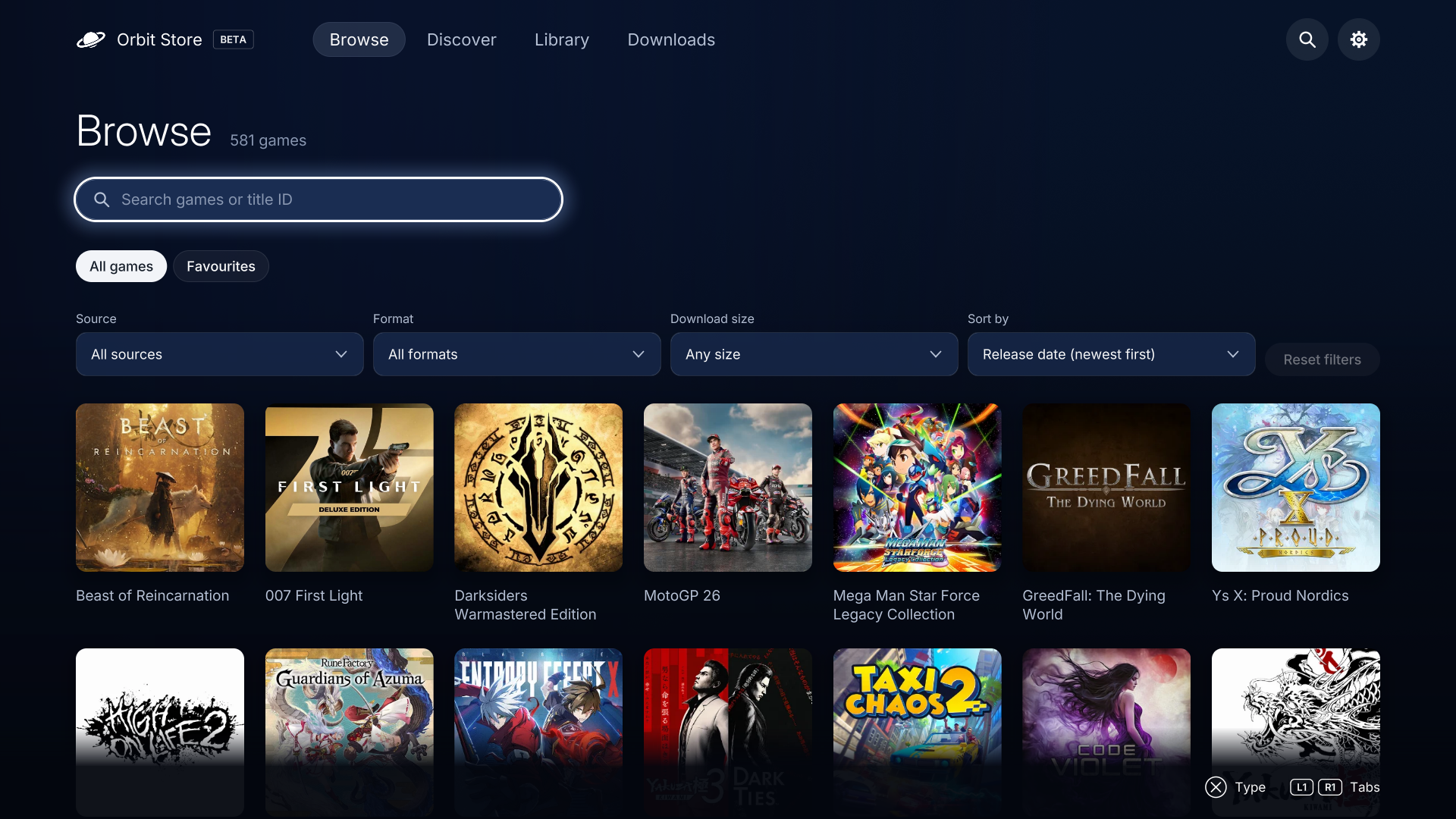
Discover. Explore featured artwork and game collections with your controller.
Game details. Read about a game, save a favourite and view its download options.
Install the native TV app
Download PPSA99177.ffpkg and its .sha256 file, verify the checksum, then copy the FFPKG to /data/homebrew/ on your PS5. Let ShadowMountPlus register it and open Orbit Store from the Games row. Browse opens first. Source selection is in the browser version; the app's setup screen opens it for you.
If an older Orbit service is already running, stop it deliberately before opening the app so its new bundled service can start. The app preserves a newer saved service. Its first native app version is 1.0.0, bundled with Orbit service 0.6.0.
Use or update the browser version
Download orbit_store.elf and its checksum, then run it through your payload manager or ELF loader. Open the Orbit shortcut in the Media tab, or pair a phone at http://<ps5-ip>:34177/ on the same network.
Existing users can update the service through App settings → Update / reinstall, choose Stop Orbit to restart, then run the saved /data/orbit-store/orbit_store.elf or a synced manager copy. Loading a replacement while Orbit is running saves it for the next start. Pairing, source choices and the queue remain saved.
In Orbit 0.6.0, App settings → TV app installs the native app from the official feed. Close the TV app before replacing it. If ShadowMountPlus still opens an older app after replacement, restart the console when convenient and run your jailbreak again.
Downloads and source
orbit_store.elfandorbit_store.elf.sha256: download service and browser interface.PPSA99177.ffpkgandPPSA99177.ffpkg.sha256: native TV app, including the same ELF.orbit-store-0.6.0-source-bundle.zip: complete application source, corresponding dependency sources, licence notices and rebuild instructions for both programs.
Run shasum -a 256 -c <filename>.sha256 beside each binary to verify it. Source-bundle contents have their own SOURCE-SHA256SUMS.
Orbit Store is in beta. The game catalogue continues to offer single-file FFPFSC and exFAT options. The TV app FFPKG is Orbit itself; game package installation has not been added. Keep the PS5 awake during downloads. Library actions require a compatible ShadowMount v1 local API. See the guides for setup and troubleshooting.
Orbit Store is free software under GPL-3.0-or-later. The application source is built from commit 7169a98901f93a3cd1afe6f40cdb493f9e724f08; component sources and licences are listed in THIRD-PARTY-NOTICES.md and SOURCES.json.
Orbit Store 0.5.1 (Beta)
UI fixes on Browse and Discover.
Orbit Store 0.5.0 (Beta)
Orbit Store 0.5.0
Browse on your PS5, download straight to your chosen storage, and manage your queue from the TV or your phone. Orbit Store is currently in beta.
What's new
- Vikingfile downloads on PS5. Choose “Open download page on PS5,” complete any verification, press Download on Vikingfile, then return to Orbit. Orbit checks the file and adds it to your queue.
- 581 games to browse. Single-file downloads across Archive.org and Vikingfile, including exFAT and FFPFSC.
- Browse opens first. Jump straight into the catalogue, sorted by release date with newest releases first. Games without a recorded date appear afterward.
- Diagnostics in App settings. View Orbit’s status and copy a report when you need help. Nothing is sent automatically.
Upgrade: Install 0.5.0 to access the new Vikingfile options. Future game additions and metadata corrections arrive through catalogue updates without reinstalling.
Download your way
- One file per game. Start with 581 games to browse, each available as a single download. No archive parts to collect.
- Find your next download. Explore recent releases or search for a title, then check its size, version and available download options before you choose.
- Stay in control. Download to your PS5's internal storage or an attached drive. Pause, resume or retry from the same queue, even after restarting Orbit.
- Use the screen that suits you. Browse with your controller, or pair your phone or computer to manage downloads on the same network. Missed the pairing code? Select Show code on PS5 to see it again.
- Update from the app. Check for Orbit updates in App settings → Update / reinstall. Orbit tells you when a restart is needed and keeps your settings and queue saved.
Install
Download orbit_store.elf, verify its SHA-256 below, then run it once through your payload manager or ELF loader. Open Orbit Store from the PS5 Media tab. On another device, visit http://<ps5-ip>:34177/ and select Pair devices.
Updating an existing installation
For beta.2 or earlier, replace the existing ELF in Payload Manager, pause downloads and stop only the identifiable Orbit process in Active Processes, then run the new ELF. If you cannot identify the process confidently, restart the console when convenient and launch the new ELF after the jailbreak. Keep the Orbit icon and saved data. Loading another ELF while Orbit is active saves it for the next start; it does not replace the running session.
From beta.3, use App settings → Update / reinstall, then Stop Orbit to restart and launch /data/orbit-store/orbit_store.elf or a synced manager copy. If you keep a manually imported copy outside opt-in sync, replace it yourself. Pairing, source choices and the download queue remain saved.
SHA-256: 4bfdcc14884905db494d816939e7cc7bf6d40ba4977de4a651a83c5f4895ca90
Before you download
This beta offers single-file FFPFSC and exFAT options across Archive.org and Vikingfile. Vikingfile browser options require you to open the download page on PS5, complete any provider verification and select Download, then return to Orbit. The browser session runs on the console, including when started from a paired phone. Orbit saves files and manages supported Library sources through ShadowMount. It does not extract archives, directly install packages, launch games, or download in rest mode. A confirmed ShadowMount scan may register or mount discovered games. Keep your PS5 awake while downloading.
Local tests cover transfer ranges and recovery, provider redirect and file validation, browser-session cancellation, catalogue compatibility, Browse controls, diagnostics, updates and Library operations against disposable fixtures. Library requires ShadowMount with the compatible v1 local API; supported actions depend on its capabilities. Hardware acceptance for Library and storage actions, full console downloads, online catalogue refresh, reboot/auto-start and other firmware versions remains pending. The reported etaHEN toggle interaction remains under investigation; this release does not claim to fix it. Catalogue options carry recorded file-listing or download-range evidence, depending on the source; browser-only entries are checked again during the user-initiated download flow. These records do not establish completion or integrity of full game downloads. Third-party URLs can change or disappear. Only download material you are entitled to obtain and use.
Source and licences
Orbit Store is free software under the GNU GPL, version 3 or later. orbit-store-0.5.0-source.tar.gz is the complete source of this payload, built from commit dd572ef22d9652cc8278883668a7f2397e54fceb. Third-party components and their sources are listed in THIRD-PARTY-NOTICES.md.
Orbit Store 0.4.2 (Beta)
Orbit Store 0.4.2
Browse on your PS5, download straight to your chosen storage, and manage your queue from the TV or your phone. Orbit Store is currently in beta.
What's new
- Two connections, one download. Supported hosts can now download a file over two connections. Orbit keeps a single queue entry, with pause, resume and cancel controlling the whole download. Other hosts continue using one connection. Speed depends on your provider, network and drive.
- Know when an update is available. Orbit checks when you open the app and shows a dismissible notice for a newer version. Open the update panel when you are ready; installation and restart remain your choice.
- Smoother Browse navigation. Browse starts on its first game. Move down from Search to explore your results, or up to the page tabs, with a keyboard or controller.
Upgrade note: this version updates the saved queue format. Use 0.4.2 or later after upgrading; older versions cannot read the new queue state.
Download your way
- One file per game. Start with 147 games to browse, each available as a single download. No archive parts to collect.
- Find your next download. Explore recent releases or search for a title, then check its size, version and available download options before you choose.
- Stay in control. Download to your PS5's internal storage or an attached drive. Pause, resume or retry from the same queue, even after restarting Orbit.
- Use the screen that suits you. Browse with your controller, or pair your phone or computer to manage downloads on the same network. Missed the pairing code? Select Show code on PS5 to see it again.
- Update from the app. Check for Orbit updates in App settings → Update / reinstall. Orbit tells you when a restart is needed and keeps your settings and queue saved.
Install
Download orbit_store.elf, verify its SHA-256 below, then run it once through your payload manager or ELF loader. Open Orbit Store from the PS5 Media tab. On another device, visit http://<ps5-ip>:34177/ and select Pair devices.
Updating an existing installation
For beta.2 or earlier, replace the existing ELF in Payload Manager, pause downloads and stop only the identifiable Orbit process in Active Processes, then run the new ELF. If you cannot identify the process confidently, restart the console when convenient and launch the new ELF after the jailbreak. Keep the Orbit icon and saved data. Loading another ELF while Orbit is active saves it for the next start; it does not replace the running session.
From beta.3, use App settings → Update / reinstall, then Stop Orbit to restart and launch /data/orbit-store/orbit_store.elf or a synced manager copy. If you keep a manually imported copy outside opt-in sync, replace it yourself. Pairing, source choices and the download queue remain saved.
SHA-256: 0b31068fec0319cf79cf7caf16f547d2a9f7daa9b6fb15cdfd53f14ea0756760
Before you download
This beta offers single-file FFPFSC downloads from Archive.org. Vikingfile is selectable but has no compatible download options yet. Orbit saves files and manages supported Library sources through ShadowMount. It does not extract archives, directly install packages, launch games, or download in rest mode. A confirmed ShadowMount scan may register or mount discovered games. Keep your PS5 awake while downloading.
Local tests cover transfer ranges and recovery, update notices, Browse controls, opt-in persistence, updates and Library operations against disposable fixtures. Library requires ShadowMount with the compatible v1 local API; supported actions depend on its capabilities. Hardware acceptance for Library and storage actions, full console downloads, online catalogue refresh, reboot/auto-start and other firmware versions remains pending. The reported etaHEN toggle interaction remains under investigation; this release does not claim to fix it. Links were checked for availability; their contents have not been fully downloaded and tested on console. Third-party URLs can change or disappear. Only download material you are entitled to obtain and use.
Source and licences
Orbit Store is free software under the GNU GPL, version 3 or later. orbit-store-0.4.2-source.tar.gz is the complete source of this payload, built from commit 23a4753ccc4a9c6a89f3cc8a8bab6371ff716f91. Third-party components and their sources are listed in THIRD-PARTY-NOTICES.md.
Orbit Store 0.4.1 (Beta)
Orbit Store 0.4.1
Browse on your PS5, download straight to your chosen storage, and manage your queue from the TV or your phone. Orbit Store is currently in beta.
What's new
- Your choice of payload manager. Orbit adds or updates copies in Payload Manager and Homebrew Launcher only after you opt in from App settings. Existing copies are preserved, and your choices are remembered. Auto-start is separate; Orbit leaves the manager's global Autoload switch unchanged.
- Your games, together in Library. See installed games and sources on your drives, with clear availability and mount status. Catalogue pages show what you already have, and completed downloads can be opened in Library.
- Manage games across drives. With a compatible ShadowMount API, scan for games, mount or unmount supported sources, and copy or move games between drives. Review the destination and confirm before moving; follow progress from Library.
- Understand your storage. View drive capacity and measure game sizes when needed, with unfinished downloads accounted for before starting a copy or move.
Download your way
- One file per game. Start with 147 games to browse, each available as a single download. No archive parts to collect.
- Find your next download. Explore recent releases or search for a title, then check its size, version and available download options before you choose.
- Stay in control. Download to your PS5's internal storage or an attached drive. Pause, resume or retry from the same queue, even after restarting Orbit.
- Use the screen that suits you. Browse with your controller, or pair your phone or computer to manage downloads on the same network. Missed the pairing code? Select Show code on PS5 to see it again.
- Update from the app. Check for Orbit updates in App settings → Update / reinstall. Orbit tells you when a restart is needed and keeps your settings and queue saved.
Install
Download orbit_store.elf, verify its SHA-256 below, then run it once through your payload manager or ELF loader. Open Orbit Store from the PS5 Media tab. On another device, visit http://<ps5-ip>:34177/ and select Pair devices.
Updating an existing installation
For beta.2 or earlier, replace the existing ELF in Payload Manager, pause downloads and stop only the identifiable Orbit process in Active Processes, then run the new ELF. If you cannot identify the process confidently, restart the console when convenient and launch the new ELF after the jailbreak. Keep the Orbit icon and saved data. Loading another ELF while Orbit is active saves it for the next start; it does not replace the running session.
From beta.3, use App settings → Update / reinstall, then Stop Orbit to restart and launch /data/orbit-store/orbit_store.elf or a synced manager copy. If you keep a manually imported copy outside opt-in sync, replace it yourself. Pairing, source choices and the download queue remain saved.
SHA-256: a5c8963eda8e799530e51431ba483b7a243096c1a58f61f0fd78f844cd3a4925
Before you download
This beta offers single-file FFPFSC downloads from Archive.org. Vikingfile is selectable but has no compatible download options yet. Orbit saves files and manages supported Library sources through ShadowMount. It does not extract archives, directly install packages, launch games, or download in rest mode. A confirmed ShadowMount scan may register or mount discovered games. Keep your PS5 awake while downloading.
Local tests cover opt-in persistence, untouched global manager settings, updates, transfers and Library operations against disposable fixtures. Library requires ShadowMount with the compatible v1 local API; supported actions depend on its capabilities. Hardware acceptance for Library and storage actions, full console downloads, online catalogue refresh, reboot/auto-start and other firmware versions remains pending. The reported etaHEN toggle interaction remains under investigation; this release does not claim to fix it. Links were checked for availability; their contents have not been fully downloaded and tested on console. Third-party URLs can change or disappear. Only download material you are entitled to obtain and use.
Source and licences
Orbit Store is free software under the GNU GPL, version 3 or later. orbit-store-0.4.1-source.tar.gz is the complete source of this payload, built from commit 5663440a57df4563db83f9538ebdc5d9d3ce2871. Third-party components and their sources are listed in THIRD-PARTY-NOTICES.md.
Orbit Store 0.3.0 (Beta)
Orbit Store 0.3.0
Browse on your PS5, download straight to your chosen storage, and manage your queue from the TV or your phone. Orbit Store is currently in beta.
What's new
- Archive.org downloads work through redirects. Fixed the false “Provider returned a page instead of a downloadable file” error when a file host redirects to its download server. Actual error pages and invalid file responses are still rejected.
- Retry your failed download. After updating and restarting Orbit, open Downloads → Failed → Retry download. Existing partial files are preserved and checked before resuming.
- Cancelled downloads have their own view. Finished contains successfully completed downloads only. Clear finished and cancelled history separately while keeping downloaded files and recoverable partials.
Download your way
- One file per game. Start with 147 games to browse, each available as a single download. No archive parts to collect.
- Find your next download. Explore recent releases or search for a title, then check its size, version and available download options before you choose.
- Stay in control. Download to your PS5's internal storage or an attached drive. Pause, resume or retry from the same queue, even after restarting Orbit.
- Use the screen that suits you. Browse with your controller, or pair your phone or computer to manage downloads on the same network. Missed the pairing code? Select Show code on PS5 to see it again.
- Update from the app. Check for Orbit updates in App settings → Update / reinstall. Orbit tells you when a restart is needed and keeps your settings and queue saved.
Install
Download orbit_store.elf, verify its SHA-256 below, then run it once through your payload manager or ELF loader. Open Orbit Store from the PS5 Media tab. On another device, visit http://<ps5-ip>:34177/ and select Pair devices.
Updating an existing installation
For beta.2 or earlier, replace the existing ELF in Payload Manager, pause downloads and stop only the identifiable Orbit process in Active Processes, then run the new ELF. If you cannot identify the process confidently, restart the console when convenient and launch the new ELF after the jailbreak. Keep the Orbit icon and saved data. Loading another ELF while Orbit is active saves it for the next start; it does not replace the running session.
From beta.3, use App settings → Update / reinstall, then Stop Orbit to restart and launch the saved ELF. Pairing, source choices and the download queue remain saved.
SHA-256: d3a1e2a8dd0043808b706c7c3355032cb55b566e60a2c22c320092f4272ba7b5
Before you download
This beta offers single-file FFPFSC downloads from Archive.org. Vikingfile is selectable but has no compatible download options yet. Orbit saves files; it does not extract archives, install or launch games, or download in rest mode. Keep your PS5 awake while downloading.
Startup and a live game-transfer retry passed on PS5 for this version. Local tests cover redirects, resume, file validation and separate history cleanup. Full console downloads, online catalogue refresh, reboot/auto-start and other firmware versions still need testing. Links were checked for availability; their contents have not been fully downloaded and tested on console. Third-party URLs can change or disappear. Only download material you are entitled to obtain and use.
Source and licences
Orbit Store is free software under the GNU GPL, version 3 or later. orbit-store-0.3.0-source.tar.gz is the complete source of this payload, built from commit b1d93ba7862f124eef2a1c852f8f7bc3fc0f369c. Third-party components and their sources are listed in THIRD-PARTY-NOTICES.md.
Orbit Store 0.2.0-beta.5
Orbit Store 0.2.0-beta.5
Browse on your PS5, download straight to your chosen storage, and manage your queue from the TV or your phone. Orbit Store is currently in beta.
What's new
- A clearer download queue. Switch between Active, Finished and Failed, move waiting downloads up or down, and see when an automatic retry is due.
- Clear history, keep your files. Remove finished entries without deleting downloaded files. Kept partials stay listed so you can resume or remove them deliberately.
- See what fits before you start. Storage estimates include the remaining bytes of unfinished downloads, including paused and failed jobs. Orbit checks the whole queue before adding or resuming a download.
- Find games your way. Filter by source, format and download size; sort by title, release date, addition date or size. Recently added shows titles added to Orbit in the last 30 days.
- Keep favourites across devices. Save a game from its details page and find it from Favourites on the console or any paired device.
Download your way
- One file per game. Start with 147 games to browse, each available as a single download. No archive parts to collect.
- Find your next download. Explore recent releases or search for a title, then check its size, version and available download options before you choose.
- Stay in control. Download to your PS5's internal storage or an attached drive. Pause, resume or retry from the same queue, even after restarting Orbit.
- Use the screen that suits you. Browse with your controller, or pair your phone or computer to manage downloads on the same network. Missed the pairing code? Select Show code on PS5 to see it again.
- Update from the app. Check for Orbit updates in App settings → Update / reinstall. Orbit tells you when a restart is needed and keeps your settings and queue saved.
Install
Download orbit_store.elf, verify its SHA-256 below, then run it once through your payload manager or ELF loader. Open Orbit Store from the PS5 Media tab. On another device, visit http://<ps5-ip>:34177/ and select Pair devices.
Updating an existing installation
For beta.2 or earlier, replace the existing ELF in Payload Manager, pause downloads and stop only the identifiable Orbit process in Active Processes, then run the new ELF. If you cannot identify the process confidently, restart the console when convenient and launch the new ELF after the jailbreak. Keep the Orbit icon and saved data. Loading another ELF while Orbit is active saves it for the next start; it does not replace the running session.
From beta.3, use App settings → Update / reinstall, then Stop Orbit to restart and launch the saved ELF. Pairing, source choices and the download queue remain saved.
SHA-256: c3868358eb18c2403311ac7cd23602cbe0ada69519733169d6a18ffd37483c5b
Before you download
This beta offers single-file FFPFSC downloads from Archive.org. Vikingfile is selectable but has no compatible download options yet. Orbit saves files; it does not extract archives, install or launch games, or download in rest mode. Keep your PS5 awake while downloading.
Previous-beta startup, icon recovery and offline browsing have been checked on PS5. Automated and desktop/phone checks cover these queue, storage and discovery changes, but online catalogue refresh on PS5, full console downloads, reboot/auto-start and other firmware versions still need testing. Links were checked for availability; their contents have not been fully downloaded and tested on console. Third-party URLs can change or disappear. Only download material you are entitled to obtain and use.
Source and licences
Orbit Store is free software under the GNU GPL, version 3 or later. orbit-store-0.2.0-beta.5-source.tar.gz is the complete source of this payload, built from commit 4d2ac3676da40acfd0edd9e494baeed1d084f608. Third-party components and their sources are listed in THIRD-PARTY-NOTICES.md.