Releases: saeidrahmanbd/BDIX-IPTV
Release list
Playlist Studio v2.8.2 — Playback Stability & Recovery

📺 Playlist Studio v2.8.2
Playback Stability & Recovery
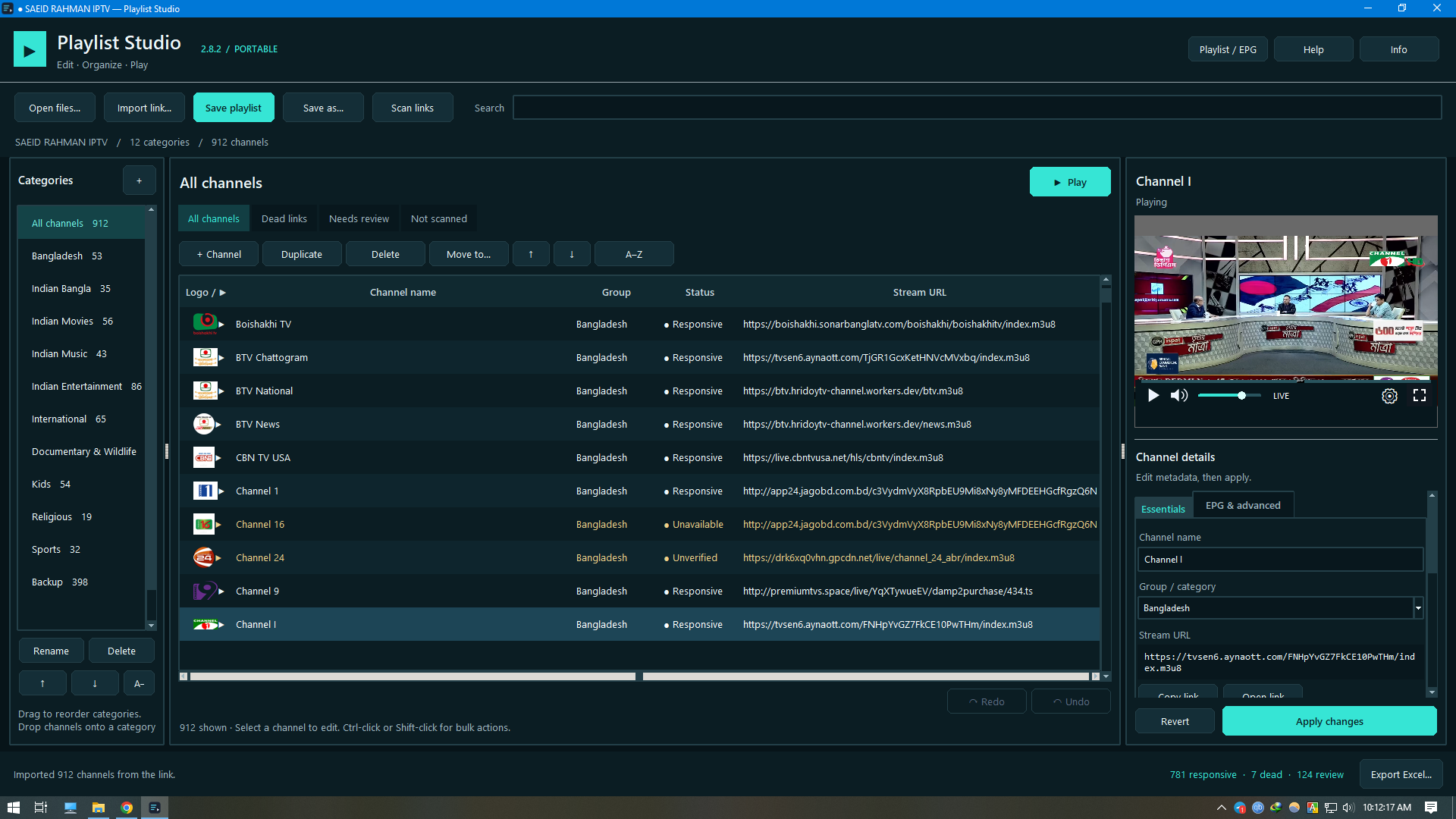
A more resilient playback architecture for Playlist Studio.
v2.8.2 keeps the playlist editor isolated from native VLC playback failures, so a problematic stream is less likely to take down the main application.
Windows · Portable · No installation required
✨ What changed
| Improvement | What it does | |
|---|---|---|
| Isolated Playback | Runs VLC playback separately from the main playlist editor. | |
| 🔄 | Fresh Channel Sessions | Starts a clean playback process when switching channels. |
| ⚡ | Smarter Switching | Consolidates rapid channel requests so the latest request is processed. |
| 🛡️ | Bounded Recovery | Terminates stalled playback processes after a controlled timeout. |
| 🔧 | Playback Recovery | Provides Retry or channel-selection options when playback stops or becomes unresponsive. |
| 🔊 | Settings Preserved | Keeps volume, mute and view settings across channel changes. |
🎯 The problem this release addresses
During testing, Windows crash reports identified access violations involving VLC 3.0.23's HTTPS plugin, libgnutls_plugin.dll.
In Playlist Studio v2.8.1, a native playback failure could close the entire playlist editor.
v2.8.2 changes the architecture
Before — v2.8.1

Playlist Studio
      │
      └── VLC Playback
             │
             └── Native failure
                    ↓
              Editor can close


Now — v2.8.2

Playlist Studio
      │
      └── Playback Process
             │
             └── Native failure
                    ↓
              Playback is isolated
                    │
                    └── Editor remains available
The goal is failure isolation, not modification of VLC itself.
🛡️ Playback protection
Main editor
Playlist editing · Channel management · Playlist import · UI state
⬇️ isolated from
Playback process
VLC · HTTPS/TLS · Decoder · Stream connection
If playback becomes unstable, Playlist Studio can recover or replace the playback process without requiring the main editor to restart.
Important: The bundled VLC version is unchanged. v2.8.2 does not claim to repair VLC or the underlying native library.
⚡ Switching behavior
Rapid channel changes are handled more deliberately:
Channel A → Channel B → Channel C
Instead of allowing every request to create competing playback work, the application consolidates rapid requests and processes the latest channel.
A new playback process also prevents the previous channel's TLS/decoder state from being unnecessarily reused.
🔧 When playback fails
A failed stream can still be a failed stream.
If the source itself is unavailable, Playlist Studio may require:
- Retry
- selecting another stream URL
- switching to another channel
Because each channel switch starts a new player process, a brief startup delay may occur.
🧪 Validation
The v2.8.2 build was tested for:
- Native playback
- 15 queued channel switches
- Deliberate playback-process termination with editor survival
- Playback recovery
- Stop
- Pause / resume
- Asynchronous playlist drops
- Repeated fullscreen resizing with volume controls
- Packaged portable EXE startup
- Playlist import
- HTTP test-stream playback
Fullscreen geometry, restoration behavior and control visibility were also verified separately.
One desktop-wide fullscreen hit-testing test was partially obscured by the Windows Date and Time panel.
🚀 Run Playlist Studio
1. Download
Open the Assets section below and download:
Playlist.Studio.Portable.v2.8.2.exe
2. Run
Launch the EXE directly.
3. That's it
No installation is required.
No separate VLC folder or VLC download is required.
📦 Release at a glance
| Detail | Value |
|---|---|
| Version | 2.8.2 |
| Release date | September 13, 2026 |
| Platform | Windows |
| Package | Single-file portable EXE |
| Playback architecture | Separate playback process |
| VLC version | Unchanged from previous release |
| Release type | Playback stability & recovery |
📥 Download
Recommended: Download the portable EXE from the Assets section below.
⬇️ Download Playlist Studio v2.8.2
Playlist Studio v2.8.2
Playback failures should stay with playback — not with your playlist editor.
IPTV Player and Editor v2.8.1
Released: September 10, 2026
Platform: Windows 64-bit
Playlist Studio 2.8.1 combines the improvements introduced in versions 2.7 and 2.8 with the 2.8.1 drag-and-drop crash fix and a new single-file portable build.
✨ Highlights
- Single-file portable executable
- No installation required
- No separate VLC download required
- New Midnight Teal interface
- Improved drag-and-drop playlist importing
- Automatic playback after playlist drop
- Excel export for link-scan results
- Filter playlist by dead links
- Updated playback controls and playlist indicators
📦 Single-file portable app
Playlist Studio is now distributed as a single executable:
Playlist Studio Portable.exe
No installation, manual ZIP extraction, or separate VLC download is required. The playback engine and required components are bundled with the application.
You can keep the executable:
- In any folder on your PC
- On an external drive
- On a USB flash drive
Just double-click the EXE to launch the application.
Note: Playlist Studio extracts its bundled components to a temporary folder when it starts. Because of this, startup may take a few moments.
🎨 Interface improvements
- Introduced the new Midnight Teal interface
- Improved separation between the playlist, video player, and channel-details areas
- Updated playback controls
- Updated volume controls
- Added channel logos directly to the playlist
- Added link-status indicators to playlist entries
- Removed the unused New button
📂 Import & playback improvements
Fixed
- Fixed a crash when dragging M3U or M3U8 playlist files into the application
Improved
Dragged playlist files now:
- Load automatically
- Start playing the first channel automatically
- Work when dropped on the main window
- Work when dropped on the video area
- Work during fullscreen playback
If a playlist is dropped while a dialog window is open, Playlist Studio waits until the dialog is closed before processing the dropped file.
A right-click editing menu has also been added to the Import Link field, allowing playlist URLs to be pasted more easily.
🔍 Link scanning & reports
The Scan Links feature now includes:
- Excel workbook export (
.xlsx) - A playlist filter for showing only channels marked as dead
This makes it easier to review problematic streams and maintain large IPTV playlists.
📄 Licenses & source
Information about bundled third-party components, licenses, and included source-code notices is available inside the application:
About → Licenses & source
✅ Verification
The portable build was tested from a folder containing only the EXE file.
The following were successfully verified:
- Application startup
- Playlist file import
- Automatic playback
- Local HTTP test-stream playback
- Drag-and-drop on the main window
- Drag-and-drop on the video area
- Drag-and-drop during fullscreen playback
- Drag-and-drop while a dialog is open
Regression tests were also performed specifically for the drag-and-drop crash fix.
🚀 Getting started
- Download
Playlist Studio Portable.exefrom the Assets section below. - Place the executable wherever you want to keep it.
- Double-click it to start Playlist Studio.
- Import an M3U/M3U8 playlist file or playlist URL.
- You can also drag an M3U/M3U8 file directly into the application.
📝 Version summary
2.8.1
- Fixed drag-and-drop crash
- Introduced single-file portable packaging
2.8
- Interface improvements
- Playback and playlist enhancements
- Link scanning and Excel export improvements
2.7
- Earlier playlist, interface, and usability improvements
Recommended update: Version 2.8.1 is recommended for all Playlist Studio users.
IPTV Player and Editor v.2.6
📺 IPTV Organizer
A standalone portable Windows application for playing, browsing, and organizing IPTV playlists in a simple and convenient interface.
Developed by SAEID RAHMAN.
✨ Overview
IPTV Organizer is designed for users who regularly work with IPTV playlists and want an easier way to browse, organize, and manage their channels.
The application is distributed as a portable Windows executable, so no installation is required. Simply download the program and run it.
🚀 Features
- 📺 IPTV playlist playback
- 📂 Load and manage M3U / M3U8 playlists
- 🔎 Browse channels conveniently
- 🗂️ Organized channel and category management
- 🖼️ Channel logo support
- 📋 Easy playlist handling
- ⚡ Portable — no installation required
- 💻 Designed for Windows
- 🎯 Simple and user-friendly interface
📥 Download
The latest portable version is available from the GitHub Releases section.
➜ Download Latest Release
Download:
Playlist Studio Portable.exe
Then simply run the executable.
No installation is required.
🖥️ How to Use
- Download the latest release.
- Run Playlist Studio Portable.exe.
- Open or load your IPTV playlist.
- Browse the available channel categories.
- Select a channel to play it.
- Use the organizational features to manage your playlist.
📁 Supported Playlist Formats
The application is intended to work with common IPTV playlist formats, including:
.m3u.m3u8
A typical playlist entry looks like:
#EXTM3U
#EXTINF:-1 tvg-name="Example Channel" group-title="Entertainment",Example Channel
https://example.com/stream.m3u8

**Full Changelog**: https://github.com/saeidsujon-rahman/BDIX-IPTV-Saeid-Rahman-/commits/IPTV