tmux-sessionizer, for herdr. One keybind opens an fzf picker over your open workspaces and your zoxide directories; selecting an open workspace focuses it, selecting a directory creates a workspace there with your template tabs already running (default: a single plain shell tab).
Open workspaces are ordered by how recently you switched to them, with the
current workspace last — so prefix+f, enter toggles between your two most
recent workspaces, like tmux's switch-client -l.
Press tab inside the picker to flip to the agent view: one row per pane
with a detected agent, most urgent first, for jumping straight to whichever
agent needs you.
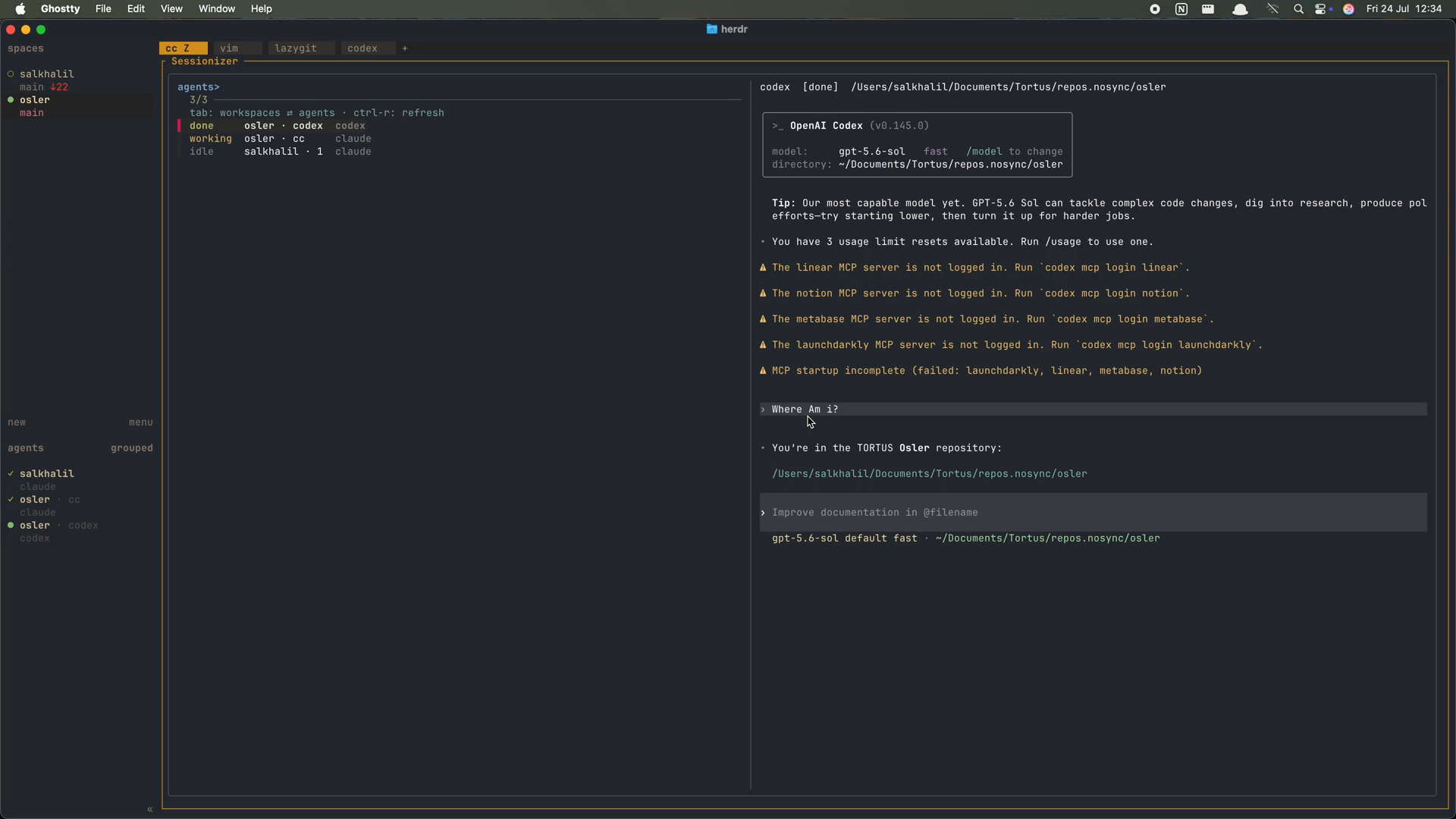
Click to play (1 min). The video lives on the assets branch, so plugin installs never download it.
herdr ≥ 0.7, fzf ≥ 0.45, jq, bash ≥ 4. zoxide is recommended but
optional — without it the picker only offers open workspaces and extra_dirs.
herdr plugin install salkhalil/herdr-sessionizer   # from GitHub
# or, from a local checkout:
herdr plugin link /path/to/herdr-sessionizer
Then bind keys in ~/.config/herdr/config.toml:
[[keys.command]]
key = "prefix+f"
type = "plugin_action"
command = "sessionizer.pick"
description = "fuzzy-switch workspace"

[[keys.command]]
key = "prefix+a"
type = "plugin_action"
command = "sessionizer.agents"
description = "jump to an agent"
and herdr server reload-config.
tab flips the picker between the workspace view and the agent view (and
back); sessionizer.agents opens directly in it. Rows are ordered
blocked > done > working > idle, then by workspace/tab number, with the
agent you're currently in last — so enter jumps to the most urgent agent
elsewhere. Non-agent tabs (vim, lazygit, plain shells) never appear; reach
those through the workspace view.
The preview shows the agent's live screen — e.g. the exact permission prompt
a blocked agent is stuck on — so you can decide before jumping. ctrl-r
refreshes statuses in either view.
Jumping to an agent records the target workspace in switch history, so the
workspace view's recency order (and the enter toggle) stays truthful.
bin/sessionizer also works standalone from any shell (symlink it onto your
PATH): run it bare for the picker, sessionizer --agents for the agent view,
or sessionizer <dir> to switch/create directly — handy for scripting.
First run writes config.json to the plugin config dir
(herdr plugin config-dir sessionizer):
{
  "template": [
    { "tab": "main" }
  ],
  "git_roots_only": true,
  "extra_dirs": ["~/Documents/some-project"],
  "overrides": [
    {
      "match": "*/work/*",
      "template": [
        { "tab": "cc", "command": "claude" },
        { "tab": "dev", "command": "pnpm dev" },
        { "tab": "scratch" }
      ]
    }
  ]
}template— tabs for new workspaces. The first entry replaces the initial tab and gets focus;commandis typed into the tab's shell (arguments work), and omitting it leaves a plain shell.git_roots_only— setfalseto offer every zoxide directory, not just git roots.extra_dirs— directories to always offer regardless of zoxide/git (leading~is expanded).overrides— per-project templates: the first entry whose globmatches the new workspace's directory replacestemplate. Overrides live in your config, never in the target repo, so cloned code can't inject commands into fresh shells.
Switch history (for recency ordering) lives in the plugin state dir.