Repository navigation
Releases: samuelkcc/script-bridge
Release list
Script Bridge 1.1.0 — PDF amendments, Gemma and script colours

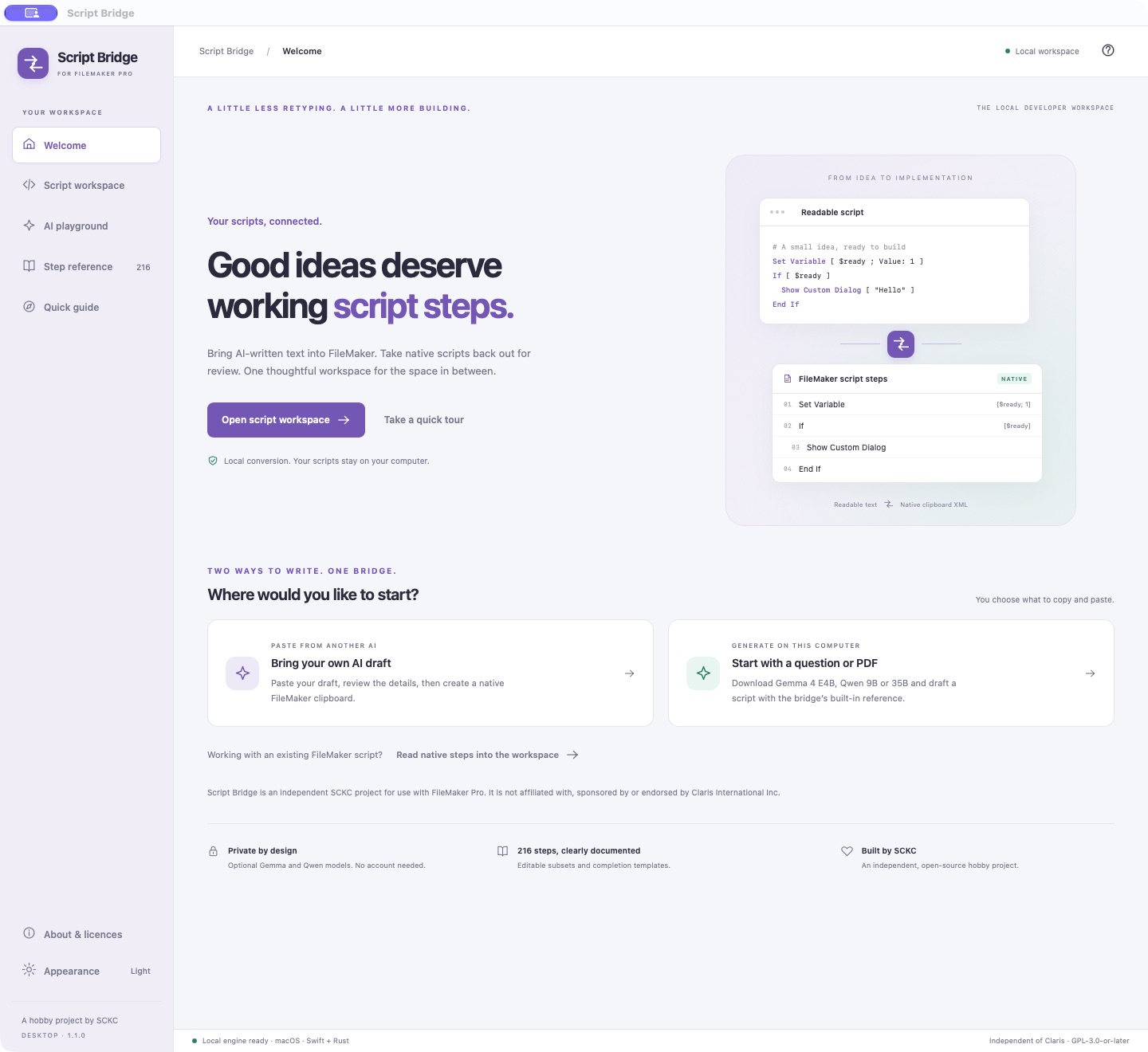
Script Bridge 1.1.0 adds a complete-script PDF amendment workflow, readable syntax colours and Google Gemma 4 E4B alongside Qwen. The project now uses the independent name Script Bridge, with for use with FileMaker Pro as compatibility text.
What changed
- Attach a selectable-text script PDF in AI playground, preview the extracted text, describe an amendment and request a full replacement draft. Replace or remove the attachment while idle.
- Review generated drafts in Script workspace, with syntax colours in both appearances, validation, Smart Fix and the prominent Copy to FileMaker action.
- Choose Google Gemma 4 E4B, Qwen3.5 9B or Qwen3.5 35B-A3B. Selecting a missing model starts its download; installed and partial downloads can be removed. Weights are optional and stay outside the app.
- Gemma 4 E4B uses a pinned 4.59 GB Q4_0 download. Suggested memory is 12 GB; Qwen 9B and 35B recommend 16 GB and 48 GB respectively. This is Gemma, not the cloud Gemini service.
- Updated About, offline component notices, non-affiliation wording, original app icons and full-app screenshots. The sidebar compatibility line stays on one line.
- Mac and Windows share the interface. The playground makes better use of wide windows; the workspace keeps its clipboard actions visible.
Downloads
- Script-Bridge-macOS.zip — Apple Silicon, macOS 13.3 or later. Extract Script Bridge.app. Ad-hoc signed; not Apple-notarized.
- Script-Bridge-Windows-x64.exe — per-user Windows 10/11 x64 installer. Includes the conversion worker and DLLs; Swift is not required. Missing WebView2 is obtained from Microsoft during setup. This unsigned cross-built package is available for native Windows testing.
FileMaker Pro 26 needs a separate valid licence and a Claris-supported operating system. Existing app-data identifiers are retained for downloaded models and settings. Close the previous app before opening the update.
Validation and limits
The JavaScript suite passes 9 tests and the Rust suite passes 12 tests. The unchanged conversion engine retains its 107-test Swift coverage. Real Gemma and Qwen short-script generation was checked through the Swift validator. Gemma also completed a private seven-page PDF replacement with the requested branch conditions and zero syntax errors; Qwen 9B exposed omitted requirements and blocked syntax errors on the long fixture.
AI output remains a draft. Compare the full replacement with the original and test its logic in a copy of your solution. Native copying requires validation, but validation cannot establish business correctness. The 35B model has not been inference-tested. Windows installation, FileMaker clipboard handling and AI inference still need native Windows acceptance testing.
PDF extraction is local and text-only: up to 15 MB, 40 pages and 120,000 characters, subject to the model context budget. Scanned PDFs need OCR first. Printed scripts cannot preserve hidden native step options. No private test PDF or generated business script is included in the release.
Sources and licences
Matching project source, original Rust component sources, llama.cpp sources and PDF reader sources accompany the binaries. SHA256SUMS.txt, release-manifest.json and windows-build-receipt.json record package checksums and platform status. Script Bridge is GPL-3.0-or-later; models and bundled dependencies retain their own licences. Full notices are available offline in About.
Script Bridge is independently developed by SCKC. It is not made by, authorized, sponsored, endorsed by, supported by or affiliated with Claris International Inc. FileMaker and FileMaker Pro are trademarks of Claris International Inc. The promotion and licensing review records remaining clipboard-interoperability legal questions; it is not legal clearance.
Support the project
An independent hobby project by SCKC. Buy Samuel a coffee if it saves you time.
FileMaker Script Bridge 1.0.0 — A new workspace for your scripts
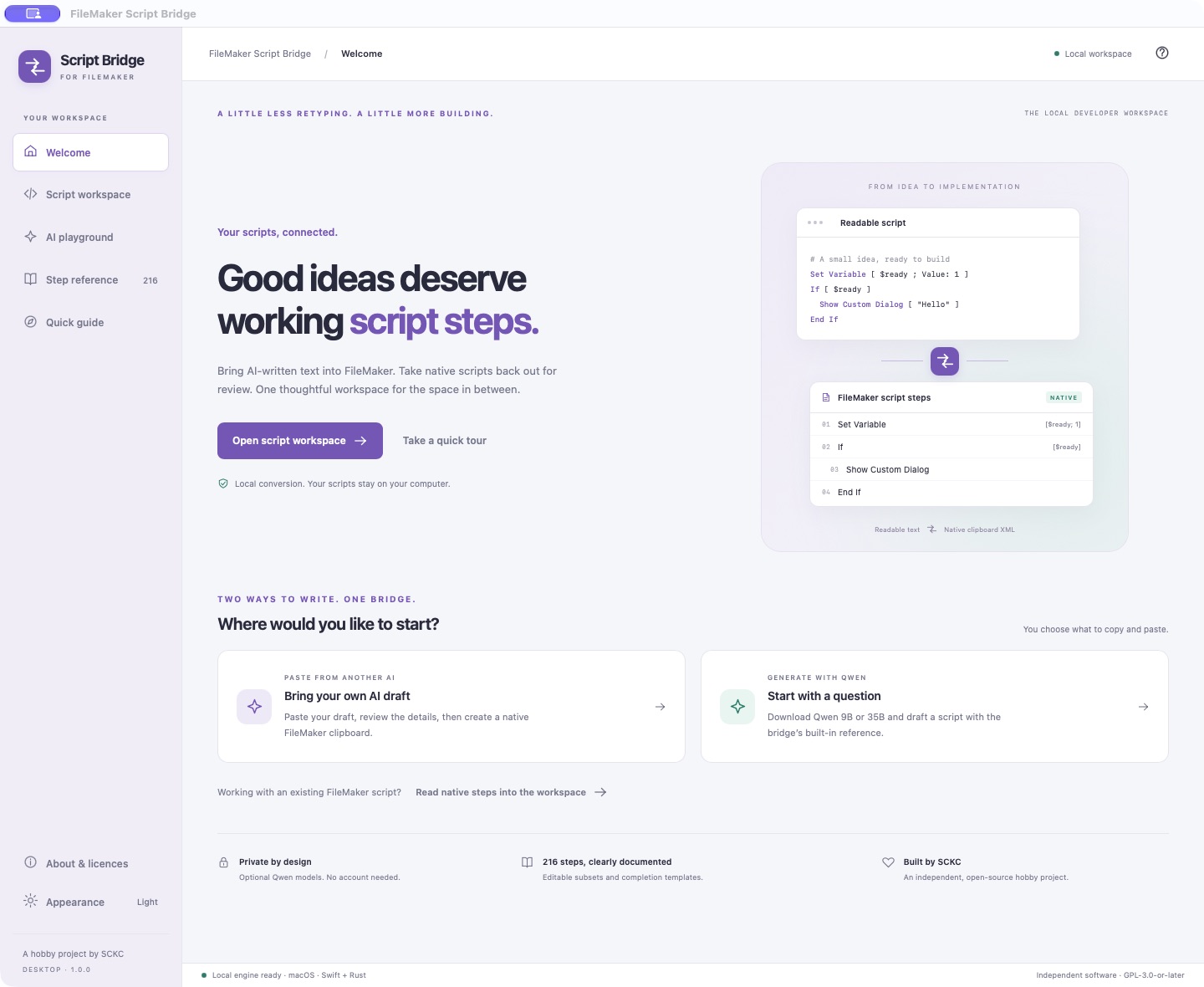
FileMaker Script Bridge 1.0.0 is a major desktop update: a redesigned workspace for macOS and Windows, two ways to create a script, and optional on-device Qwen generation.
Download
| Package | Requirements | Status |
|---|---|---|
| FileMaker-Script-Bridge-macOS.zip | Apple Silicon · macOS 13+ | Mac app, version 1.0.0, build 2026102004 |
| FileMaker-Script-Bridge-Windows-x64.exe | Windows 10/11 x64 | Installer available for native Windows testing |
Mac: extract the ZIP and move the app to Applications. This package is ad-hoc signed and is not Apple-notarized; your macOS settings may require an additional first-open confirmation.
Windows: run the installer and launch from Start. The conversion worker and required DLLs are included; a Swift installation is not required. Setup obtains Microsoft WebView2 from Microsoft if it is missing, which needs an internet connection. The installer is unsigned. Native Windows installation, display, FileMaker clipboard acceptance and inference remain unverified; please use the Windows acceptance guide when testing.
The new Mac package targets Apple Silicon. Intel Mac users can continue using the previous universal SwiftUI release. It has the older interface and no Qwen playground. FileMaker Pro 26 is the documented clipboard target.
What's new
- A shared desktop design. An AniCanto-inspired Tauri/Rust interface for Mac and Windows, with Welcome, Script workspace, AI playground, Step reference and Quick guide.
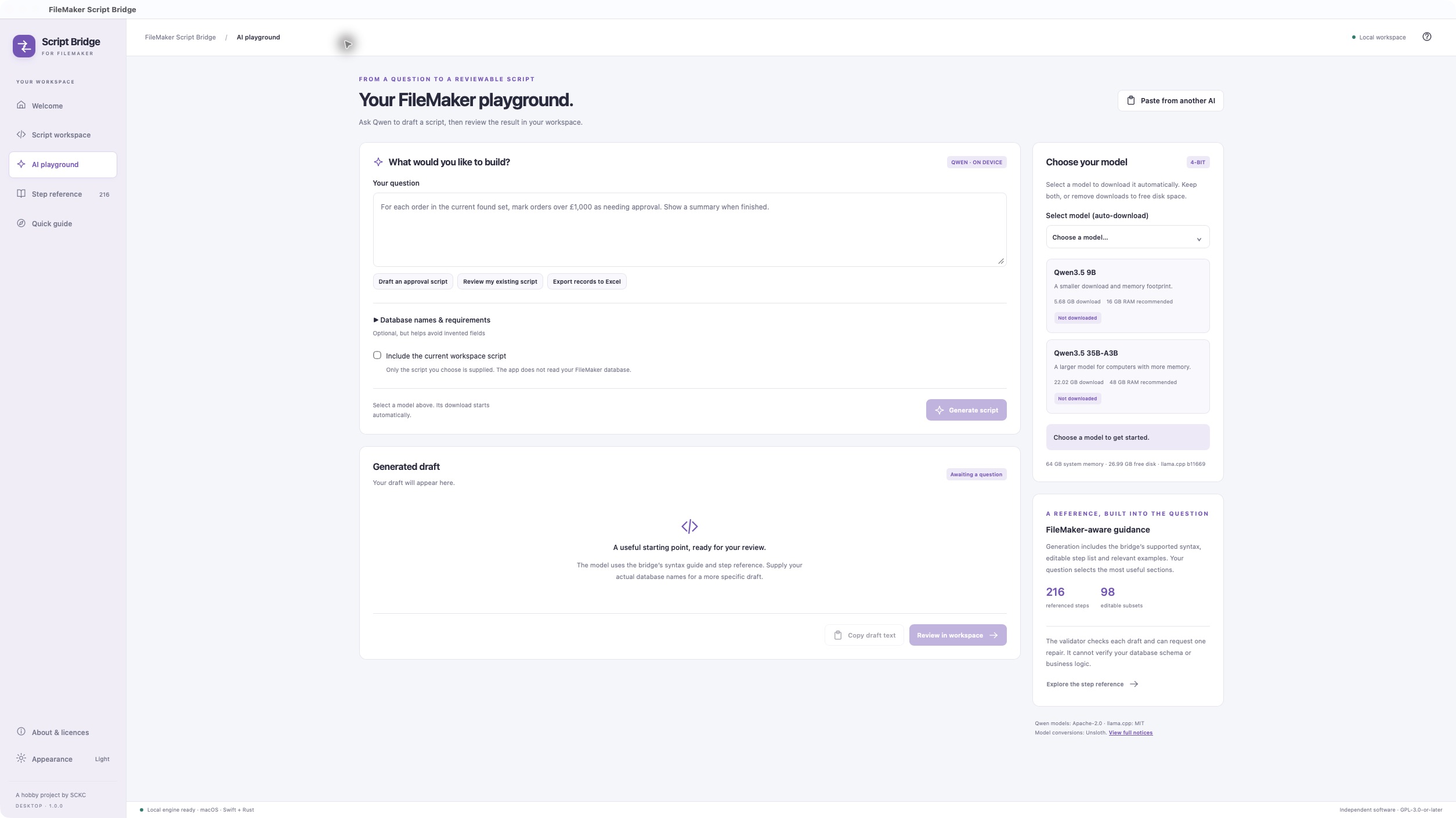
- A clearer review workflow. Live validation, Smart Fix, native XML inspection and a prominent Copy to FileMaker button with a new clipboard/arrow icon. The tested Swift conversion engine remains behind the new interface.
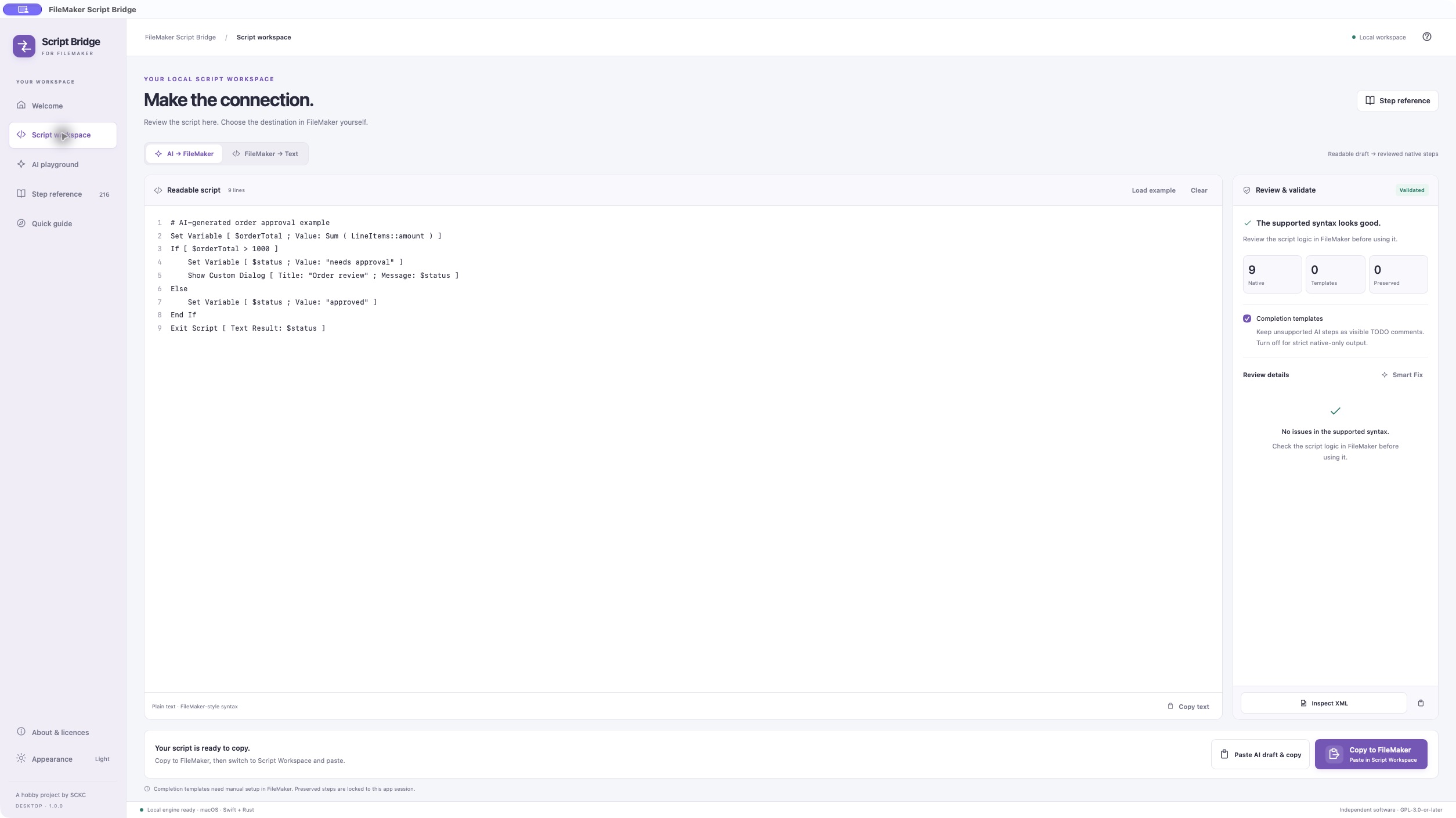
- Two draft paths. Paste text from another AI tool or ask the built-in Qwen playground to generate a draft.
- Optional model downloads. Select Qwen3.5 9B or 35B-A3B to download automatically. Downloads are size/SHA-256 verified and resumable. Remove model unloads and deletes installed weights; Remove download clears partial files.
- FileMaker-aware guidance. Generation includes the bridge's syntax reference, editable-step list and relevant examples, plus optional database context supplied by you. Drafts are validated and can receive one repair attempt before you choose Review in workspace.
- Updated appearance and identity. Light, dark and system themes; the purple bridge icon; proper version 1.0.0; and an outer app shell that does not introduce an unnecessary scrollbar.
- About and licences. Revised project information and searchable offline application, dependency, inference-engine and model notices.
Optional Qwen models
| Model | Q4_K_M download | Suggested memory |
|---|---|---|
| Qwen3.5 9B | 5.68 GB | 16 GB or more |
| Qwen3.5 35B-A3B | 22.02 GB | 48 GB or more |
Weights are separate optional downloads, stored outside the app. Memory figures are estimates. macOS uses the bundled Metal inference runtime; the Windows package currently uses the portable CPU runtime. Model files are pinned Unsloth conversions of the original Qwen models.
Support and verification
- The reference covers 216 official script steps: 98 editable subsets and 118 completion templates. Editable subsets can have option-specific limits.
- 107 Swift tests, 5 JavaScript/worker tests and 10 Rust host/knowledge/codec tests pass locally. Separate integration checks exercise verified/resumable downloads and real Qwen 9B generation through the Swift validator.
- The Windows host and Swift worker were cross-compiled on macOS. The installer was extracted, all 73 payload files were checked against their hashes, and regular/delayed DLL imports were audited across 54 native x64 app/runtime PE files.
- The Mac bundle signature and icon were checked, including the corrected Finder icon in build 2026102004.
- The 35B model has not been inference-tested. Native Windows acceptance is pending. This release does not claim a new native FileMaker acceptance run on either platform.
Review script logic, actual database names and generated calculations before running scripts. Completion templates remain visible TODO comments requiring manual setup. Preservation markers depend on the original XML held in the same app session; copy the native steps again after restarting the app.
Source, checksums and licences
The assets include matching project-source.tar.gz, component-sources.tar.gz, inference-runtime-source.tar.gz, release-manifest.json, windows-build-receipt.json and SHA256SUMS.txt. Keep the corresponding source archives with the binaries when redistributing them.
Conversion and optional generation run on this computer; the app does not upload scripts or prompts. Optional model downloads and external links require network access.
Created by SCKC as an independent hobby project. Application: GPL-3.0-or-later, without warranty. Qwen: Apache-2.0. llama.cpp: MIT. Other components retain their original terms and notices. Not affiliated with or endorsed by Claris International Inc.
Support the project
If FileMaker Script Bridge saves you time, you can help support Samuel’s hobby projects.

FileMaker Script Bridge 2026.09.29
Adds XLSX export options, whole-file data reads, and guided Smart Fix questions for incomplete AI-generated steps.
Changes
- Export Records now supports worksheet-name calculations and common AI option labels. Smart Fix repairs unambiguous multiline field lists while preserving field order.
- Read from Data File supports whole-file reads as Bytes, UTF-8, or UTF-16, with variable or field targets. Binary reads retain XLSX attachment data.
- Smart Fix asks for missing paths, field order, column-heading choices, file IDs, targets, and encodings instead of guessing. Safe defaults and inferred settings are shown for review.
- Existing TODO comments can be recovered through the same review workflow.
- Numbered custom-dialog buttons are accepted without inserting an extra OK button.
- Duplicate and unknown export options are rejected rather than silently ignored; unrecognized native XML remains preserved.
- Coverage increases to 98 editable subsets across 216 official script steps.
Validation
- All 96 automated tests passed.
- Export and read steps passed native FileMaker paste/copy round-trip checks, including worksheet names, headings, binary reads, UTF-8, and a UTF-16 field target.
- Universal Apple Silicon and Intel app; bundle signature verified.
- Runtime export, read, and email execution was not tested as part of clipboard verification.
Known limitation
Non-empty Read from Data File amounts require manual setup in FileMaker. The observed native clipboard omitted that parameter, so the bridge blocks these drafts rather than silently converting them to whole-file reads. Blank or omitted Amount reads the whole file, subject to FileMaker's 64 MB per-read limit.
Download and requirements
Download FileMaker Script Bridge.app.zip, extract it, and move the app to Applications.
- macOS 13 or later; Apple Silicon and Intel.
- FileMaker Pro 26 for the documented native clipboard compatibility.
- Fully local operation; no accounts, analytics, or network requests.
- Ad-hoc signed, not Apple-notarized. macOS may require Control-clicking the app and choosing Open on first launch.
- Preservation markers retain their original XML only during the same app session.
Released under GPL-3.0-or-later. This independent project is not affiliated with or endorsed by Claris International Inc.
FileMaker Script Bridge 2026.09.23
FileMaker Script Bridge 2026.09.23
Highlights
- Adds local Smart Fix review for flagged script lines and missing dialog defaults. Review suggested repairs, edit replacements, keep unresolved items, or explicitly omit a step with a comment preserving the original text.
- Validates replacements as native steps before applying them and requires a separate Update FileMaker Clipboard action after review.
- Recovers the bridge’s exported two-comment TODO drafts for review and repair.
- Improves Show Custom Dialog parsing and validation, including positional title/message forms, ordered button definitions, and rejection of unsupported or duplicate options. Missing default-button suggestions use
Default Button: "OK", Commit: Noand require review. - Expands coverage since the first release from 92 to 97 editable subsets across the 216-step reference. Adds native data-file operations and Insert from URL, improves wrapped record/find options, and fixes Go to Record exit-option XML.
- Provides completion-template comments for the remaining 119 official steps, with optional strict native-only export.
- Improves universal app packaging with optional SDK and build-system overrides.
Validation
The universal release build completed for Apple Silicon and Intel, and its ad-hoc signature and bundle version were verified. Automated tests could not run on the release machine: Command Line Tools lacks XCTest, and the installed Xcode requires license acceptance.
Download and requirements
Download FileMaker Script Bridge.app.zip, extract it, and move the app to Applications.
- macOS 13 or later; universal Apple Silicon and Intel build.
- FileMaker Pro 26 for the documented script-step catalogue.
- Fully local operation; no accounts, analytics, or network requests.
- Ad-hoc signed and not Apple-notarized. macOS may require Control-clicking the app and choosing Open on first launch.
- Preservation markers retain their original XML only during the same app session. Complete unresolved TODO steps in FileMaker before using the script.
Released under GPL-3.0-or-later. This independent project is not affiliated with or endorsed by Claris International Inc.
FileMaker Script Bridge 2026.08.11
FileMaker Script Bridge 2026.08.11
This is the first public release of FileMaker Script Bridge, a native offline macOS clipboard bridge for FileMaker Pro Script Workspace and readable script text.
Highlights
- Converts selected FileMaker steps (
XMSS) and complete scripts (XMSC) into readable text. - Validates readable text and creates native FileMaker clipboard data for paste-back.
- Covers all 216 official FileMaker Pro 26 steps in the in-app reference.
- Provides 92 tested editable subsets and lossless same-session preservation for other imported steps.
- Includes syntax colouring, issue navigation, review/XML views, and strict blocking of lossy AI-authored exports.
- Ships as a universal macOS application for Apple Silicon and Intel.
- Runs fully offline with no accounts, analytics, or network requests.
Requirements
- macOS 13 or later
- FileMaker Pro 26 for the documented and tested script-step catalogue
Installation note
The downloadable build is ad-hoc signed and is not Apple-notarized. macOS may require Control-clicking the app and choosing Open on first launch.
Licence and independence
Released under GPL-3.0-or-later. This independent community project is not affiliated with or endorsed by Claris International Inc.