Additional Features
Some additional features have been introduced to the ProGRESS tool. These features are currently available only for command line simulations in example_simulation.py and example_simulation_multi_proc.py.
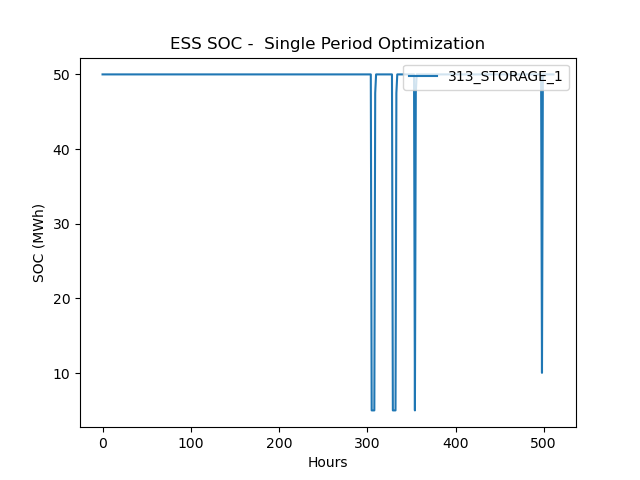
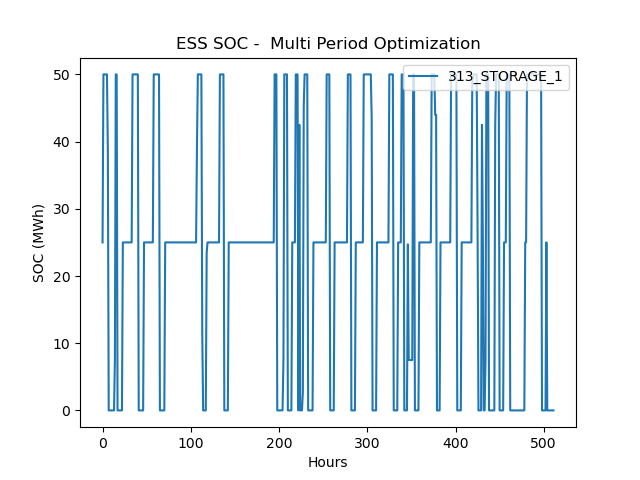
ProGRESS now supports both single-period and multi-period optimization models within the Monte Carlo framework. Single-period optimization is designed to run the energy storage systems in reliability support mode, i.e. they only discharge to reduce load curtailments and maintain full state-of-charge otherwise. In the multi-period optimization, storage serves two purposes: operate to reduce the system operation fuel costs and support the grid during load curtailment events. Users can select the optimization mode using the optimization_period parameter in the input.yaml file. We recommend running multi-period option with 24 hour periods for a high computational performance.
 |
| 
ProGRESS now supports cathode-chemistry specific battery degradation models for energy storage systems. Users can now specify the cell cathode chemistry in the storage.csv file. Currently, there are four battery chemistry choices: LMO (derived from Xu et. al.) and LFP, NMC, NCA (derived from Preger et. al.). Details on the stress-factor-based degradation models using in this tool can be found in this paper. For degradation analysis, in the input.yaml file, following parameters need to be provided:
| Parameter | Comments |
|---|---|
evaluate_degradation |
Set to True to consider energy storage degradation in the simulation. |
degradation_interval |
Use this parameter (in hours) to configure how often degradation is evaluated and enforced. Recommended: 168 hours (1 week) or more. |
detailed_thermal_model |
Set to True to use detailed PyBaMM thermal model for degradation calculations. Enabling this option will increase computation time. If set to False, constant 25 C temperature is used. |
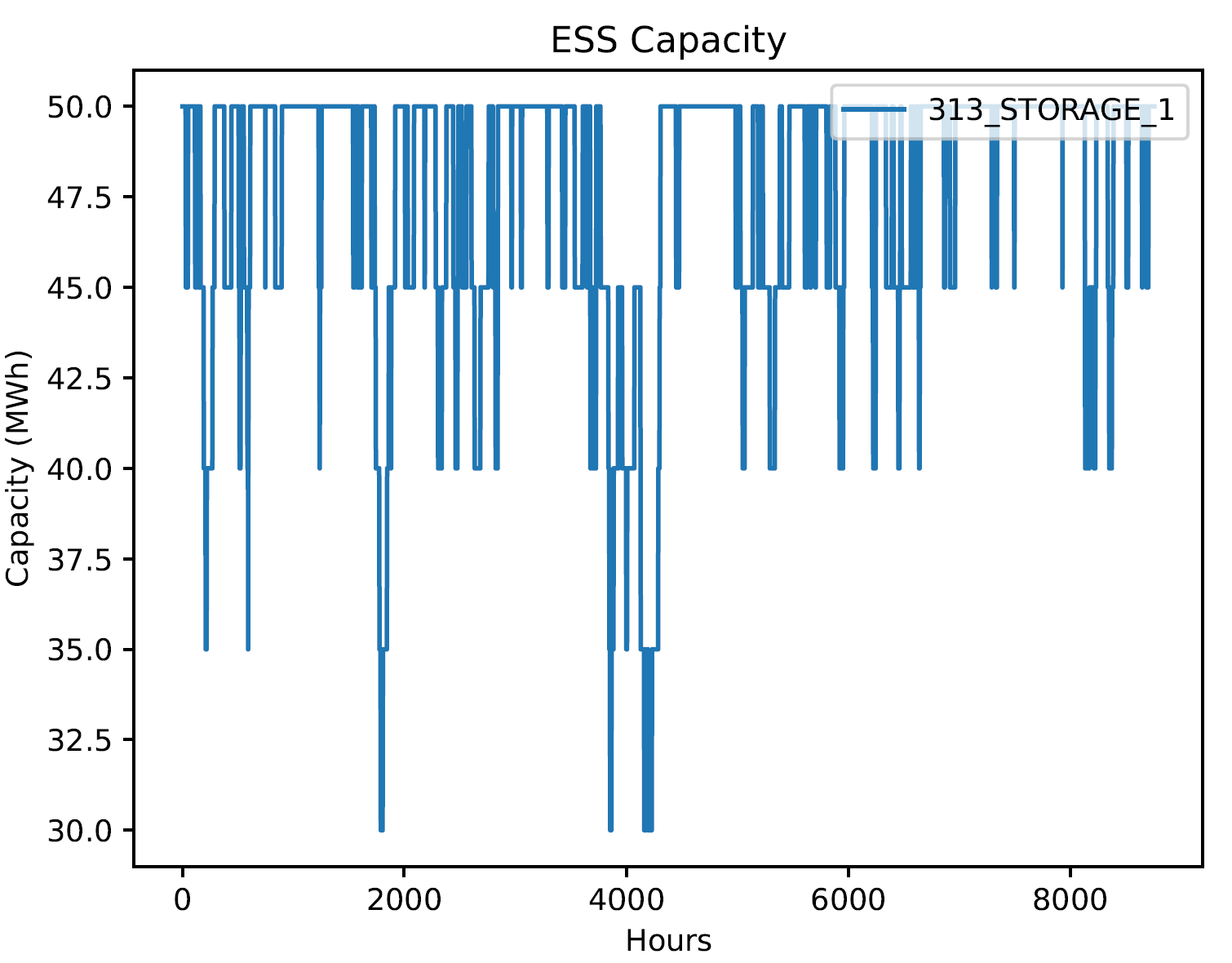
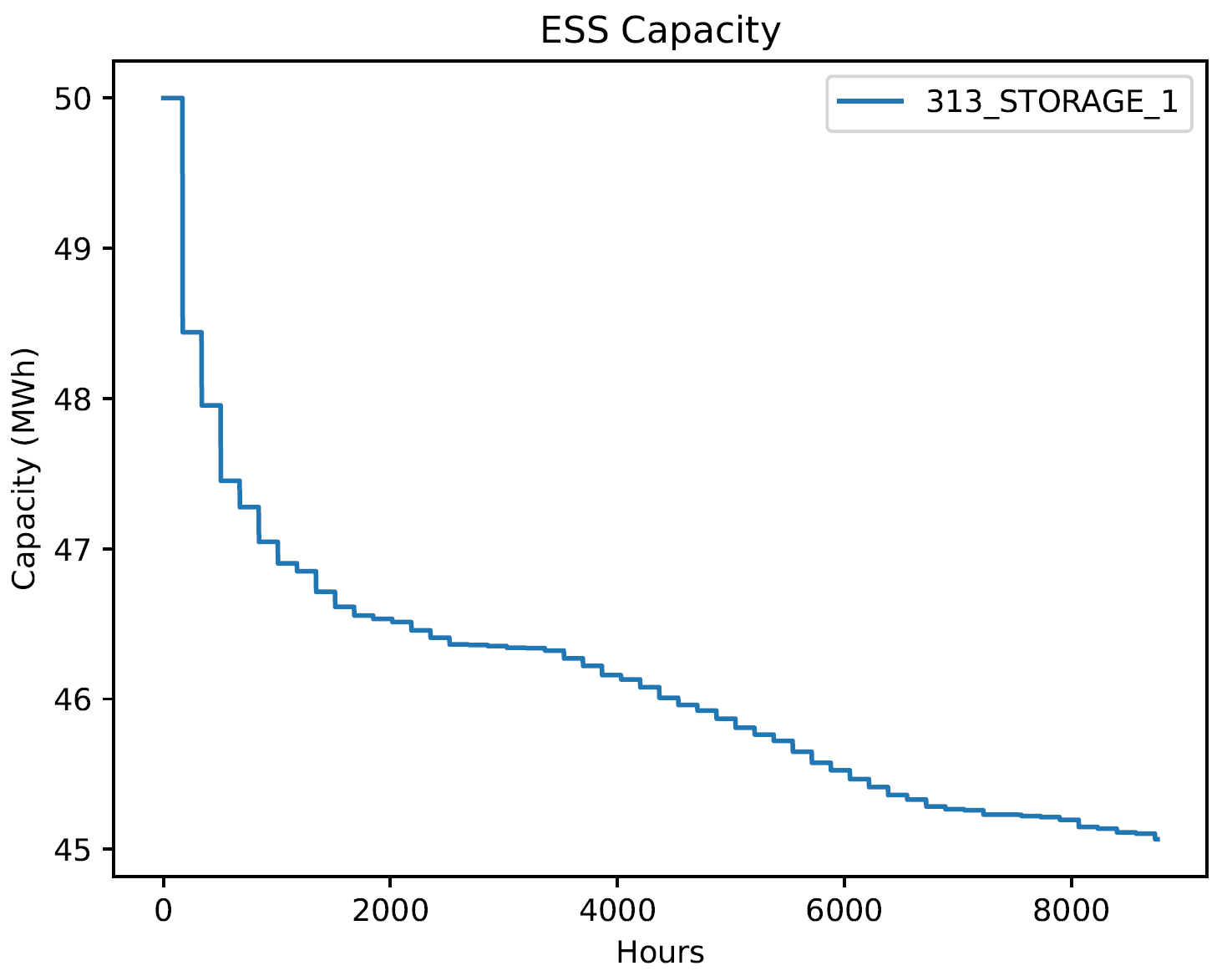
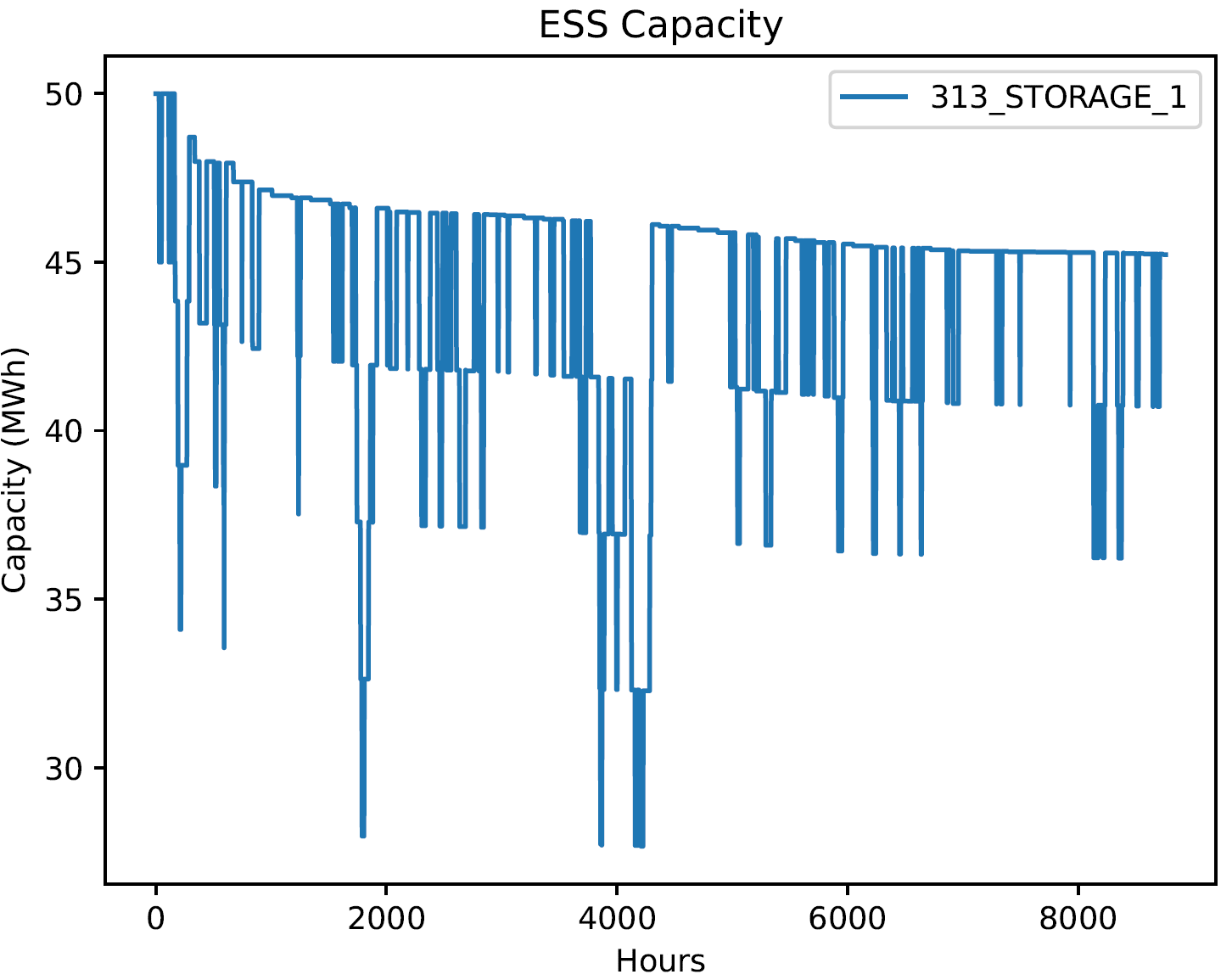
Users can view the impacts of cell degradation and failures in the ESS_cap.pdf file, which can be found in the Results folder.
 |
 |
 |
|---|---|---|
| (a) Capacity failure only | (b) Capacity degradation only | (c) Combined failure and degradation |
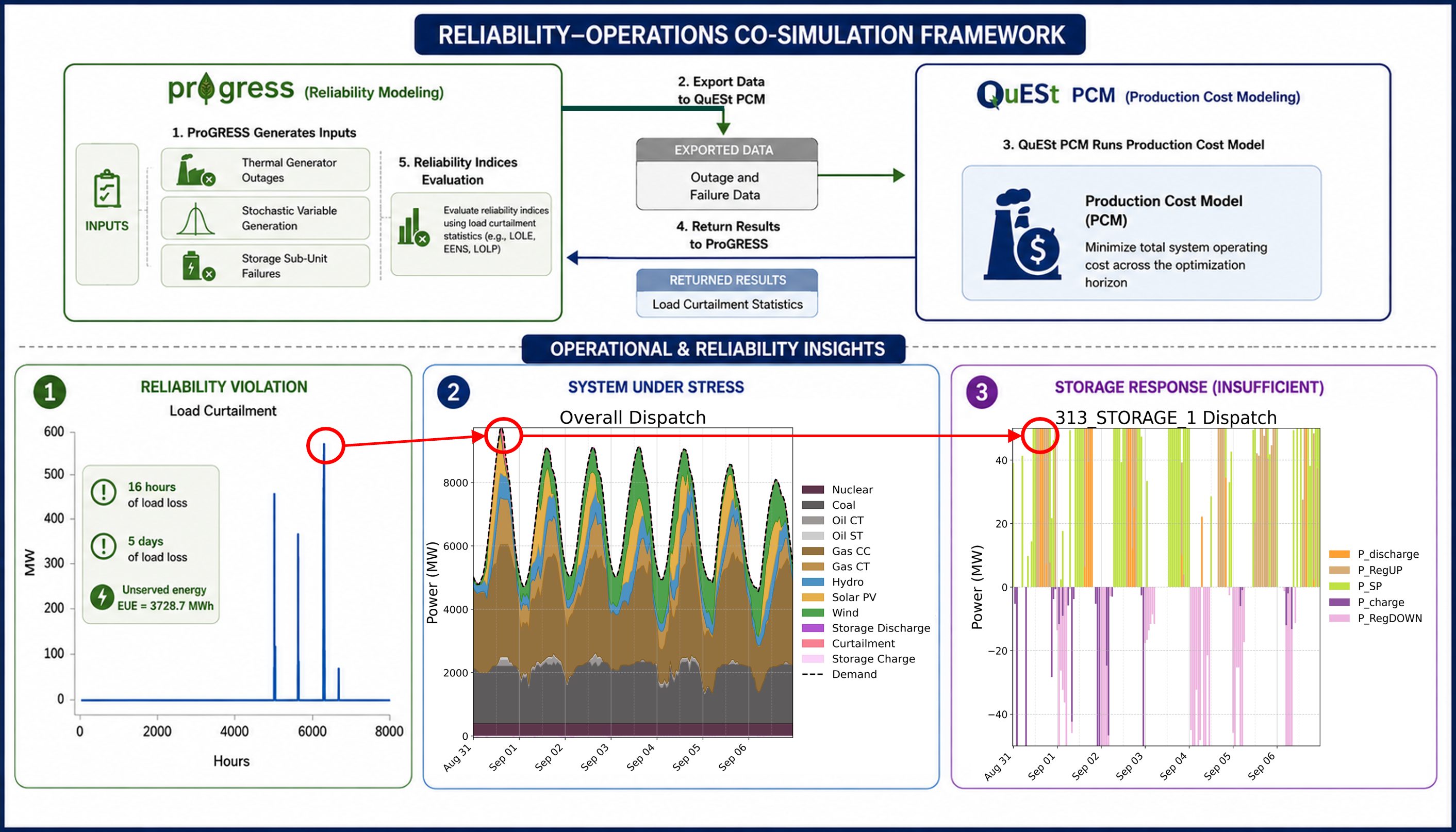
ProGRESS now supports Production Cost Modeling (PCM) simulations within its Monte Carlo reliability assessment framework. To use this capability, the QuESt PCM tool must be downloaded and installed. During a ProGRESS simulation, stochastic scenarios are generated and automatically exported to QuESt PCM, where they are used to perform detailed nodal production cost simulations. QuESt PCM executes a series of day-ahead unit commitment while modeling conventional generators, renewable resources, energy storage systems, transmission constraints, and ancillary service markets in detail. This integrated workflow enables users to assess the operational and economic impacts of stochastic reliability events using a high-fidelity production cost model. The following steps describe how to configure and run the integrated framework.
-
Clone the QuESt PCM tool into your machine: The
progress_integrationbranch of QuESt PCM needs to be used using the command below:
git clone -b progress_integration https://github.com/sandialabs/quest_PCM.git- Create a QuESt PCM virtual environment: Using python 3.12, create the virtual environment as follows:
# On Windows:
py -3.12 -m venv pcm_venv
# On macOS/Linux:
python3.12 -m venv pcm_venv
Note: On macOS,
python3.12is typically installed via Homebrew. If you don't have it, runbrew install python@3.12. The resulting venv's python executable will be at<path_to_quest_PCM>/pcm_venv/bin/python3.12.
- Install QuESt PCM: With the virtual environment activated, install QuESt PCM and it's dependencies as follows:
pip install -e .-
Populate required parameters in the config file: The config
input.yamlfile must contain the following parameters:
| Parameter | Comments |
|---|---|
pcm_venv_path |
Full path to the QuESt PCM virtual environment python executable. Example: "C:/John_Doe/snl-progress/progress_venv/Scripts/python.exe". |
solver |
Solver to be used for PCM optimization; Options are 'gurobi', 'cplex', 'cbc', etc. |
mipgap |
MIP gap for PCM optimization; lower values lead to more optimal solutions but increase computation time. |
pcm_output_frequency |
Frequency for generating PCM output plots. Options: 'daily', 'weekly', 'monthly', 'at_once'. More frequent output creates finer-grained plots but increases the number of output subfolders and postprocessing time. |
solve_pricing_problem |
True/False based on whether user wants to solve the pricing problem in PCM. Increases computation time but generates LMPs, revenues, etc. |
storage_AS_mode |
True/False based on whether user wants to include BESS participating in ancillary services. |