v1.0.1

THIS IS AN OLD VERSION
### GOOD NEWS!!! NEW VERSION AVAILABLE HERE
https://github.com/sderaps/DMM/releases/tag/v1.0.2
Installation Software Requirements
Phone (Android 11 or Higher required for Wear installer 2) or PC (Side load apk via ADB Commands from Computer to Wear OS Watch)
Watch Software Requirements
Wear Os 3 or Later
ABOUT
Oversized Diabetic Watch Face designed specifically for Dexcom G7 with Xdrip+ and Glucodatahandler Customizations. You can also use these Faces with Libre 3 using Juggluco with (xdrip+ (Data Source) as Libre(Patched App) )
Specific GlucodataHandler Customizations are as Follows

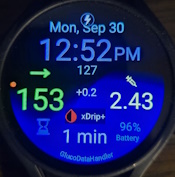
DMM1
- Delta big,
- Glucose and Trend (big and colored),
- Glucose time stamp
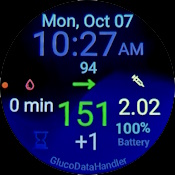
DMM2
- Glucose and Trend (big and colored),
- Delta big,
- IOB
- Samsung or Google Timer
- Glucose time stamp
- Watch Battery Level.
DMM4
- Glucose time stamp
- Glucose and Trend (big and colored),
- IOB
- Samsung or Google Timer
- Delta big
- Watch Battery Level
DMM_KIDS
- Delta big
- Glucose and Trend (big and colored),
- Glucose time stamp


Other Customizations might not appear on the watch face correctly being either too large or Tiny.
HOW TO INSTALL -- Sorry it's not exactly EASY for Beginners
WE DO HAVE INSTALLATION PROBLEMS FOR SOME USERS BUT THERE IS A WORKAROUND:
Preferred Method is Sideloading via Wear Installer 2 BUT Some users are Reporting
Wear Installer 2 app crashes while selecting the apk to install. If you have this problem
you will have to install the apk via ADB on a PC with a wifi connection to the watch.
Both instruction methods are described below
https://github.com/pachi81/GlucoDataHandler/blob/master/INSTALLATION.md
Once these watch faces are what people want, we will try to upload the Faces for FREE to the Google Play Store
for ease of Installation.