Repository navigation
FreeRam V2.5

Version 2.5 - STABLE RELEASE
FreeRam is going to have a huge overhaul in the next few months, with a lot of new features for windows optimization and maintainance.
Instructions for installation:
- After V2.5 the app will automatically update, however users can manually update as well.
- If you are using a older version of FreeRam
- 2.0 and above:
- Delete
C:\FreeRam
- Delete
- 1.0 and above (Till April 15 2022)
- Delete
C:\Program Files (x86)\FreeRam - Delete freeram.exe from
shell:startup[press Win+R and type]
- Delete
- Do the above steps before installing the newer version [These steps will be automated in future release]
- 2.0 and above:
- If you are using FreeRam for the first-time or a new PC
- Download JDK if you don't have it yet
- Download FreeRam.zip
- Extract to
C:\FreeRam - Run
freeram.exe
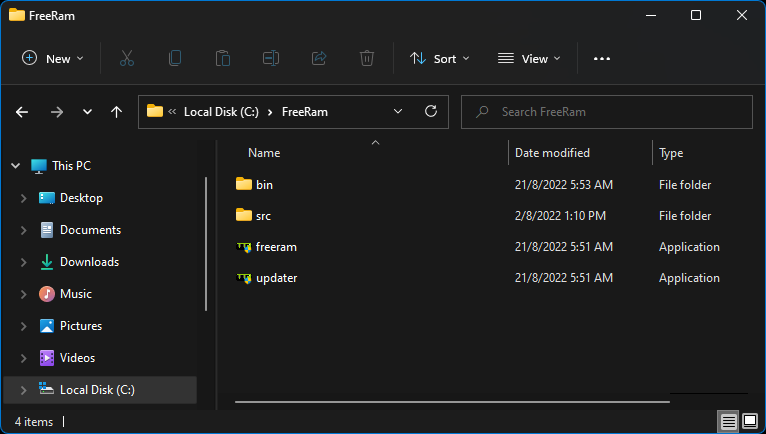
- Folder structure after extraction:
- Make sure the following image matches your structure after extracting
Changelog from V2.4 - V2.5:
QOL changes:
Previous changes (V2.2 - V2.4)
- https://github.com/shanuflash/freeram/releases/tag/2.2
- https://github.com/shanuflash/freeram/releases/tag/2.3
- https://github.com/shanuflash/freeram/releases/tag/2.4
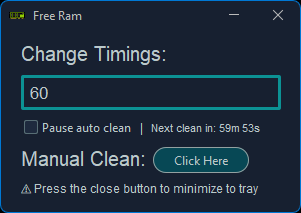
Screenshots

Track further improvements at #7
FreeRam is an opensource project, you are free to modify and use the source code for your personal works
If you want to help FreeRam improve please leave a pull request with your changes, if you're not a tech person and still want to help the project, go ahead and leave a bug report/improvements in the ISSUES section.