


Project Iris is a fully accessible, eye-tracking Augmentative and Alternative Communication (AAC) platform built for patients with severe neurodegenerative diseases such as ALS, locked-in syndrome, and late-stage Parkinson's. It operates with near-zero latency by running its entire AI inference stack client-side — in the browser — using WebGPU and WebAssembly. It connects to a doctor in real time via a LiveKit-powered WebRTC telemedicine layer, and physically controls the patient's environment (fan, lights) through an MQTT-connected IoT device.
Iris features a strict Neobrutalist UI engineered around Fitts's Law — enormous interactive targets separated by calculated dead-zones — to guarantee that gaze jitter never causes a misclick.
| Requirement | Version | Notes |
|---|---|---|
| Node.js | v18.0.0+ | |
| Python | v3.10+ | For LiveKit STT Agent |
| Browser | Chrome / Edge | WebGPU required for local LLM |
| LiveKit Account | Any tier | livekit.io |
| Deepgram Account | Any tier | deepgram.com |
| Mosquitto | 2.x | Local MQTT broker |
| Seeed Wio Terminal | — | Optional, for IoT control |
Important
Live Preview (Frontend-Only): A partial, frontend-only exhibition demo is hosted here for preview purposes:
🔗 https://iris-mu-livid.vercel.app/
Note: For full functionality (Doctor STT backend, LiveKit telemedicine, and MQTT Hardware integration), you must download the repository and run it locally.
1. Clone and install dependencies
git clone https://github.com/shawnsony07/iris.git
cd iris
npm install
cd worker
python -m venv venv
venv\Scripts\activate       # Windows
pip install -r requirements.txt
cd ..
2. Environment variables
Create .env.local in the project root:
NEXT_PUBLIC_LIVEKIT_URL=wss://your-project.livekit.cloud
LIVEKIT_API_KEY=your_api_key
LIVEKIT_API_SECRET=your_api_secret
TWILIO_ACCOUNT_SID=your_sid          # Optional: emergency alerts
TWILIO_AUTH_TOKEN=your_token         # Optional
TWILIO_PHONE_NUMBER=+1...            # Optional
EMERGENCY_CONTACT_NUMBER=+1...       # Optional
Create worker/.env:
LIVEKIT_URL=wss://your-project.livekit.cloud
LIVEKIT_API_KEY=your_api_key
LIVEKIT_API_SECRET=your_api_secret
DEEPGRAM_API_KEY=your_deepgram_key
3. Mosquitto MQTT Broker (for IoT control)
- Windows: Download the installer from mosquitto.org/download or run
winget install eclipse.mosquitto - macOS:
brew install mosquitto - Linux:
sudo apt-install mosquitto
Once installed, start the local broker with:
mosquitto -v -c mosquitto.conf4. Flash the Wio Terminal (optional)
Open hardware/iris-hardware-mqtt/iris-hardware-mqtt.ino in Arduino IDE, set your Wi-Fi credentials and broker IP, and flash to the Wio Terminal.
Start everything:
./start.batThis frees port 3000, starts the Next.js frontend, boots the Python STT agent, and opens both portals in the browser.
Stop everything:
./end.bat
Note on "Fetching param cache": Do not be alarmed if the UI shows "Fetching param cache..." the very first time you run the app. Because Project Iris runs its predictive AI (Llama 3.2 1B) entirely locally inside your browser via WebGPU, the browser must download the model parameters into its cache. This download is roughly 1.5GB and may take a few minutes initially. Subsequent loads will be instantaneous as the model is cached directly on your device.
Iris is a distributed system composed of five independent layers that communicate through well-defined interfaces:
┌─────────────────────────────────────────────────────────────────┐
│                        PATIENT BROWSER                          │
│                                                                 │
│  ┌──────────────┐  ┌──────────────┐  ┌──────────────────────┐   │
│  │  MediaPipe   │  │  WebLLM      │  │  ONNX TTS Worker     │   │
│  │  Gaze Engine │  │  Llama 3.2   │  │  (Kokoro / tinytts)  │   │
│  │  (WASM/CPU)  │  │  1B (WebGPU) │  │  (Web Worker)        │   │
│  └──────┬───────┘  └──────┬───────┘  └──────────┬───────────┘   │
│         │                 │                     │               │
│  ┌──────▼─────────────────▼─────────────────────▼───────────┐   │
│  │              Next.js App Router (React 19)               │   │
│  │ Zustand Store │ GazeButton │ GridUI │ LiveKitWrapper     │   │
│  └──────────────────────────┬───────────────────────────────┘   │
└─────────────────────────────┼───────────────────────────────────┘
                              │ WebRTC DataChannel + Audio
              ┌───────────────┼────────────────┐
              │               │                │
   ┌──────────▼──────┐  ┌─────▼──────┐  ┌─────▼──────────────┐
   │  DOCTOR BROWSER │  │ LiveKit    │  │  Python STT Agent  │
   │  (Next.js)      │  │ Cloud      │  │  (Deepgram + VAD)  │
   │  Doctor Portal  │◄─┤ WebRTC     ├──►  worker/agent.py   │
   └─────────────────┘  │ Room       │  └────────────────────┘
                        └─────┬──────┘
                              │ MQTT (local broker)
                    ┌─────────▼──────────┐
                    │  Mosquitto Broker  │
                    │  localhost:1883    │
                    └─────────┬──────────┘
                              │
                    ┌─────────▼──────────┐
                    │  Seeed Wio Terminal│
                    │  (Arduino/C++)     │
                    │  Fan + Light ctrl  │
                    └────────────────────┘
Engine: MediaPipe FaceLandmarker v0.10 (WebAssembly)
Processing Model: CPU-bound, deliberate isolation from GPU
The gaze engine processes a live webcam stream through MediaPipe's FaceLandmarker task, which computes a full 478-point 3D facial mesh on every frame. From this mesh, Iris extracts the precise iris landmark coordinates for both eyes and projects them onto screen space using viewport-relative scaling.
The raw gaze coordinates are intentionally processed on the CPU rather than GPU. This design decision explicitly reserves all available VRAM for the local LLM (Llama 3.2 1B), which requires ~700MB of GPU memory for inference. Running two heavy GPU workloads simultaneously would cause frame drops on integrated graphics hardware (the typical deployment environment for bedside devices).
Relative Iris Math (Decoupling Head Movement):
To prevent the cursor from moving when the patient moves their head, the gaze engine calculates the iris position relative to the physical eye socket rather than its absolute position in the camera frame.
The left and right eye ratios are then averaged and inverted (to compensate for camera mirroring) to produce a stable 0.0 to 1.0 gaze coordinate.
Calibration (Least-Squares Affine Transform):
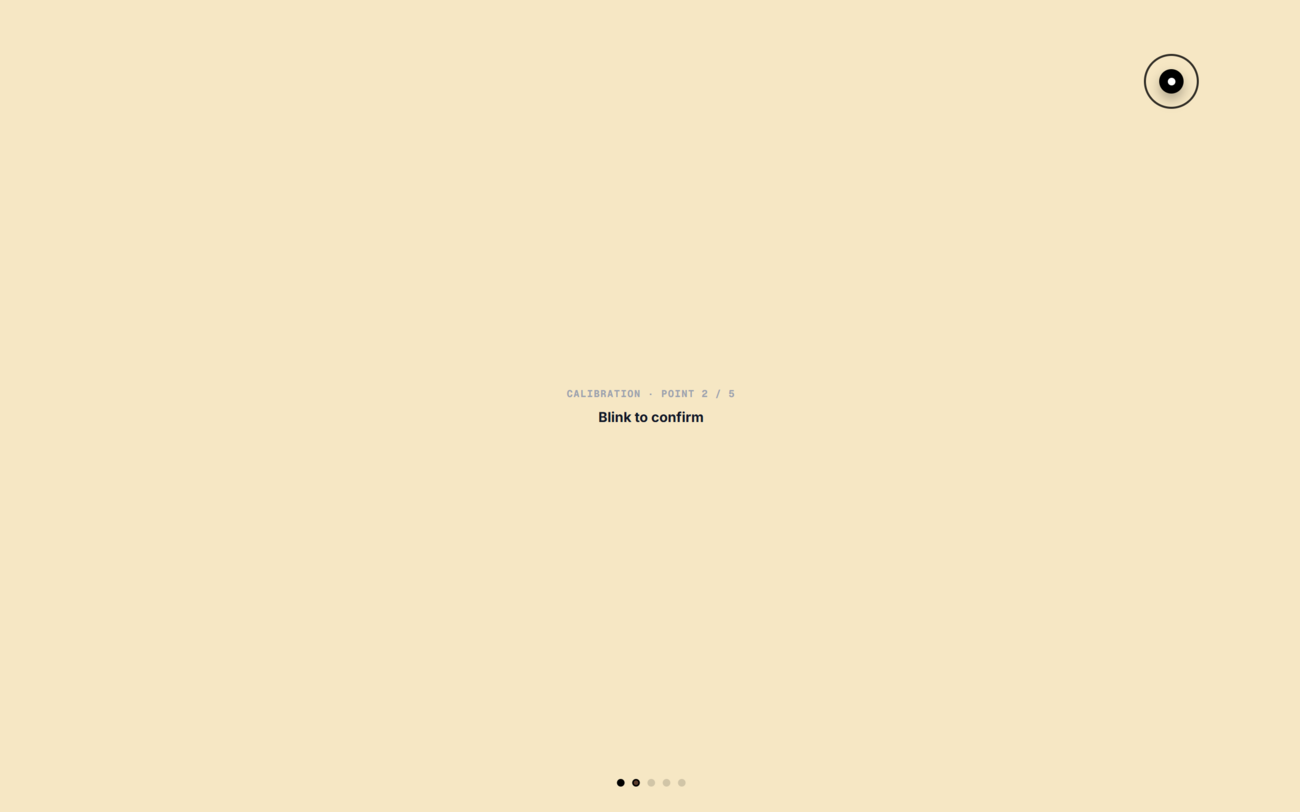
To map the normalized 0.0-1.0 gaze ratios to the physical screen pixels, Iris uses a 5-point calibration system. This calculates an optimal
EMA Smoothing (Jitter Elimination):
Raw pupil coordinates exhibit micro-saccades — rapid involuntary eye movements that cause significant cursor jitter on screen. Rather than a computationally expensive Kalman filter, Iris applies a highly efficient Exponential Moving Average (EMA) filter to the X/Y coordinates.
With
Cursor Snapping & Dwell Ring Feedback:
When the user's gaze enters a button's bounding box, the cursor intelligently snaps to the center of the target. As the patient continues to hold their gaze on the button, a visual dwell ring progressively fills around the crosshair. This provides immediate, clear visual feedback that the target is locked and ready for selection.
Blink-to-Select (Exclusive Selection Mode):
To eliminate accidental selections (the "Midas Touch" problem), actions are triggered exclusively by deliberate blinking, not by dwell time. The system calculates the Eye Aspect Ratio (EAR) using 6 facial landmarks surrounding the eyelid:
When
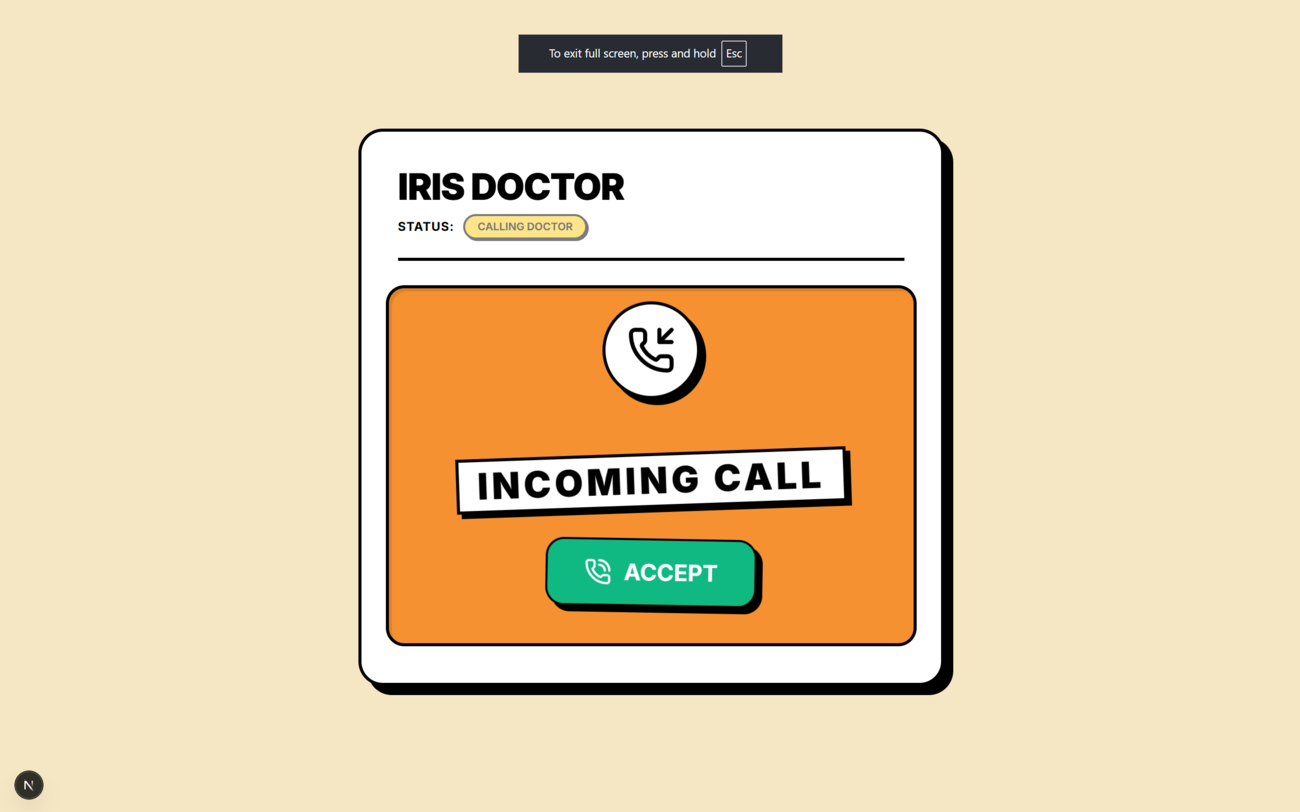
Engine: LiveKit SDK v2 (livekit-client, @livekit/components-react)
Server: LiveKit Cloud (hosted, global edge nodes)
Token Authority: Next.js serverless route (/api/livekit/token)
When a call is initiated, the Next.js server generates a short-lived JWT (JSON Web Token) signed with the LiveKit API secret. This token encodes the participant's identity ("Doctor" or "Patient"), the room name, and permission flags (canPublish, canSubscribe, canPublishData). The token is never stored and expires after a single session.
Both browser clients connect to LiveKit Cloud using the signed token. LiveKit establishes a WebRTC peer-to-peer connection through its TURN/STUN infrastructure, with ICE candidate negotiation handled transparently.
Audio Publishing:
- The Doctor's browser captures the microphone and publishes it as a LiveKit audio track (
audio={true}inLiveKitWrapper). - The Patient's browser does not publish the microphone. Instead, TTS audio is routed through an
AudioContext.createMediaStreamDestination()node and published as a synthetic audio track (patient_tts), so the doctor hears the patient's synthesized voice over the WebRTC connection.
Data Channels:
LiveKit's reliable data channel (WebRTC DataChannel with TCP-style reliability) carries two message topics:
| Topic | Publisher | Subscriber | Content |
|---|---|---|---|
doctor_transcript |
Python STT Agent | Patient Browser, Doctor Browser | Final Deepgram transcript of doctor's speech |
patient_text |
Patient Browser | Doctor Browser | Exact text of the patient's selected AAC phrase |
Both the patient and doctor browser instances run a DataChannelManager component that subscribes to these topics using the useDataChannel(topic, callback) hook from @livekit/components-react. Topic-specific subscriptions are used (not the generic no-topic form) to ensure proper message routing in LiveKit React SDK v2.x.
Session State Machine:
A lightweight polling mechanism (/api/session-status) maintains a shared state machine across the two browser windows:
idle → calling_patient → [patient accepts] → connected → idle
idle → calling_doctor  → [doctor accepts]  → connected → idle
The state is stored in Next.js server memory (globalThis.irisSession) and polled every 1.5 seconds by both portals. The LiveKit JWT token endpoint refuses to issue tokens unless the session state is "connected", preventing unauthorized room access.
Engine: MLC AI WebLLM (@mlc-ai/web-llm)
Model: Llama-3.2-1B-Instruct-q4f16_1-MLC
Runtime: WebGPU (Chrome / Edge, hardware acceleration required)
The local LLM runs entirely inside the patient's browser tab. No prompt data, no conversation text, and no patient information ever leaves the device for LLM inference. The model is downloaded once and cached by the browser's Cache API (IndexedDB-backed), loading from disk on subsequent sessions.
Model Specifications:
- Parameters: 1.24 billion
- Quantization: Q4F16 (4-bit weights, float16 activations)
- VRAM footprint: ~700MB
- Inference speed: ~15–40 tokens/second on a mid-range GPU
- Context window: 128K tokens
The Prediction Engine — predictFromAmbientContext:
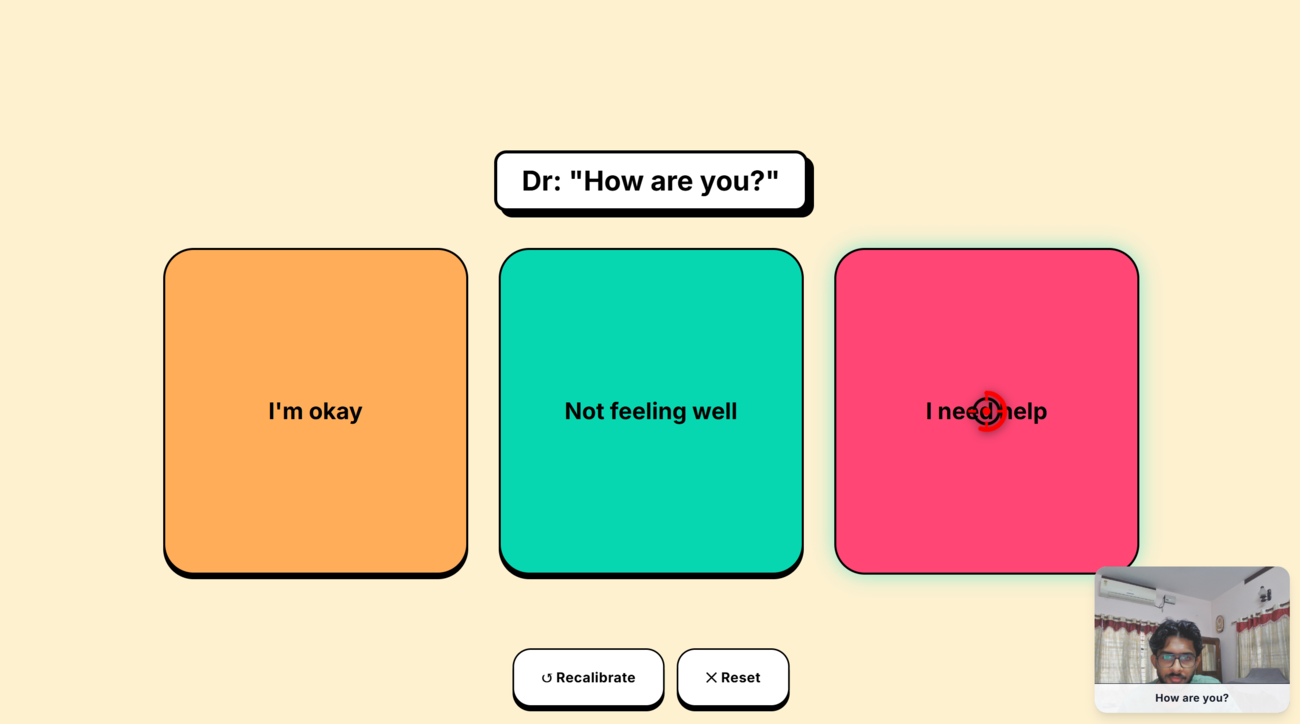
When the Python STT agent delivers the doctor's transcript to the patient browser, Iris waits 1.5 seconds (debounce, to allow for sentence completion) and then generates three response options for the patient to select.
This is a two-stage process designed around the real capabilities of a 1B model:
Stage 1 — Intelligent Intent Routing & Context Analysis:
Before delegating creative language generation to the LLM, the system performs an ultra-fast deterministic analysis of the incoming speech context:
- Linguistic Classification: The system parses the sentence structure to understand the grammatical expectation (e.g., distinguishing closed Yes/No queries from open-ended conversational prompts).
- Environmental Intent Recognition: The context engine scans for actionable environmental vocabulary (temperature, lighting). If the patient's context matches an actionable state (e.g., the doctor asking about room temperature), the system seamlessly constructs a highly specific, actionable response option tailored exactly to the hardware context.
This stage serves as an intelligent semantic router—rather than hard-coding answers, it guarantees that the physical environment responds instantly when the semantic context requires it, while preserving the LLM's full capacity for creative communication.
Stage 2 — Contextual Language Generation (LLM):
Once the intent is routed, the LLM is given a highly focused generative task:
- Closed-Ended Scenarios: If the conversation requires a definitive affirmation/negation, the LLM dynamically generates a nuanced third alternative that fits the conversational context.
- Open-Ended Scenarios: If the doctor asks an exploratory question ("How are you feeling today?"), the LLM generates a complete array of three distinct, natural, first-person replies the patient can choose from.
By separating intent routing from semantic creativity, the system plays to each component's strengths. The LLM acts purely as a linguistic engine, which allows a highly efficient 1B model to produce stunningly accurate conversational options without being overwhelmed by structural rule-following.
LLM Request Queuing:
A requestLock promise chain (enqueue() method) serialises all LLM calls. Because the WebGPU inference engine cannot handle concurrent requests, any new prediction or evaluation waits for the previous one to complete before starting. An 8-second timeout wraps each call so a stuck request never blocks the queue indefinitely.
AAC Phrase Generation — generate:
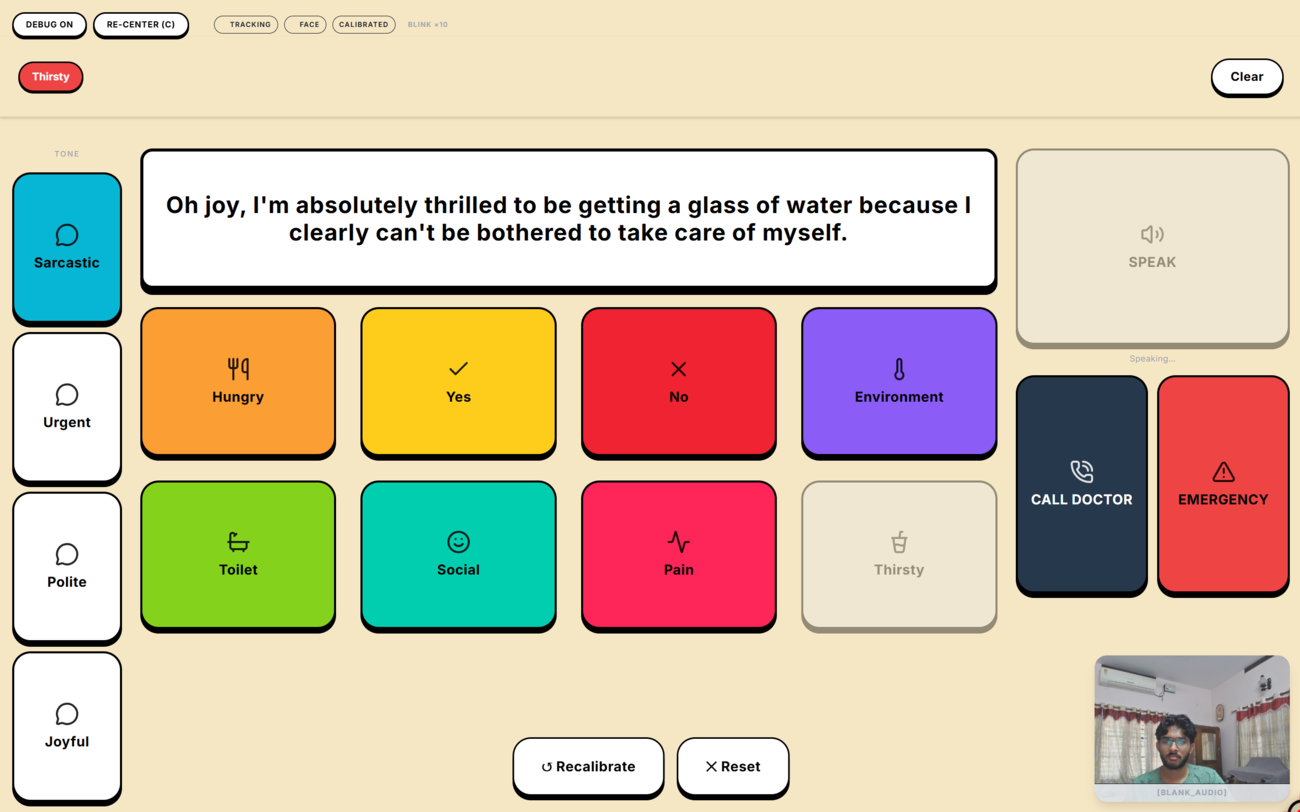
For standard grid-based communication (patient selects word nodes and presses SPEAK), the LLM takes the selected keyword array and generates a single fluent first-person spoken sentence. For example: ["Thirsty"] → "I need some water please." or ["Physical", "Adjust"] → "Please adjust my position." Single-word affirmations (Yes, No) bypass the LLM entirely and are returned immediately.
Iris maintains two independent STT pipelines for two distinct use cases.
Engine: Transformers.js (@xenova/transformers), Whisper Tiny English
Processing: Web Worker + WebAssembly
Activation: Only when sessionState === "idle" (no active call)
During idle use (between calls), the patient's ambient environment is monitored passively. The useWhisperMic hook captures microphone audio via an AudioContext, processes it in chunks through a dedicated Web Worker, and sends float32 PCM frames to the Whisper Tiny model. Whisper runs via ONNX through Transformers.js — fully local, fully offline.
When a final transcript is produced, it is fed into predictFromAmbientContext exactly as if a doctor had spoken it — giving the patient contextual response buttons from their own environment even without a call active.
This pipeline is automatically suspended when a telemedicine session becomes active to avoid audio routing conflicts.
Engine: LiveKit Agents Python SDK + Deepgram Nova-2
VAD: Silero VAD
Process: worker/agent.py (Python background process)
The Python agent (agent.py dev) registers with LiveKit Cloud as a worker process. When a room is created and a participant named "Doctor" joins, the agent is assigned to that room and begins monitoring the Doctor's audio track.
Audio Pipeline:
- The agent subscribes to the Doctor's published audio track via
AutoSubscribe.AUDIO_ONLY. - Each audio frame is pushed into a Deepgram STT stream (real-time streaming transcription).
- Deepgram performs server-side VAD, noise filtering, and produces
FINAL_TRANSCRIPTevents when a speech segment ends. - The final transcript is published to the LiveKit room's data channel on topic
"doctor_transcript"viactx.room.local_participant.publish_data().
Late-Join Resilience:
The track_subscribed event only fires for tracks published after the agent joins. To handle the race condition where the Doctor is already in the room when the agent connects, the agent iterates ctx.room.remote_participants after connecting and starts the audio pipeline for any Doctor tracks already present.
Transcript Filtering (Browser-Side):
Even with Deepgram's high accuracy, background noise can occasionally produce classification labels like [BLANK_AUDIO] or [typing]. LiveKitWrapper.tsx discards any incoming transcript that contains bracket characters ([, ], (, )) before it reaches the LLM or the UI.
Engine: ONNX Runtime Web (onnxruntime-web)
Model: Kokoro / tinytts (.onnx)
Processing: Dedicated Web Worker (tts.worker.ts)
Audio Routing: Web Audio API → MediaStream → LiveKit
The TTS system deliberately avoids window.speechSynthesis, which is cloud-dependent on many platforms and produces robotic, inconsistent voices. Instead, a dedicated Web Worker loads a small ONNX neural TTS model and synthesises speech as float32 PCM audio data.
Audio Pipeline:
- The main thread sends a text string to the TTS Web Worker via
postMessage. - The worker runs the ONNX model and posts back a
Float32Arrayof audio samples. - The main thread decodes this into an
AudioBuffer, plays it through anAudioContext, and simultaneously routes it through aMediaStreamDestinationNode. - The resulting
MediaStreamis the track published to LiveKit as the patient's voice — so the doctor hears the synthesised speech over the WebRTC call.
Promise Queue:
speak() returns a Promise that resolves when the audio finishes playing (source.onended). Consecutive calls queue correctly, ensuring phrases never overlap.
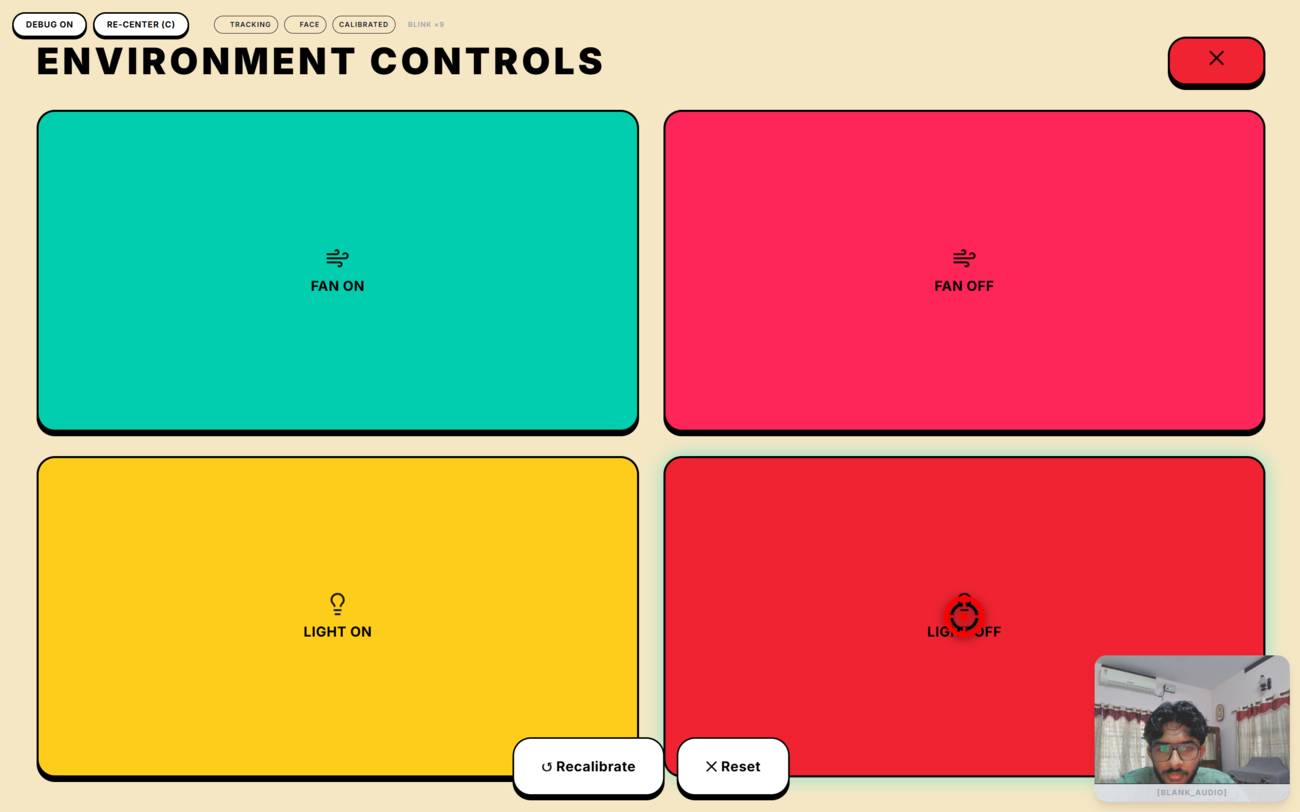
Broker: Eclipse Mosquitto (local, localhost:1883)
Hardware Client: Seeed Wio Terminal (ARM Cortex-M4, Arduino/C++)
Server Interface: Next.js API Route (/api/room-action)
Protocol: MQTT v3.1.1
This is the first layer in Iris that crosses the boundary from software to the physical world. The patient's room devices (fan and ceiling light) are controlled by a Seeed Wio Terminal running custom Arduino firmware that subscribes to MQTT topics.
MQTT Topic Schema:
| Topic | Payload | Effect |
|---|---|---|
iris/fan |
ON |
Activates the fan relay |
iris/fan |
OFF |
Deactivates the fan relay |
iris/light |
ON |
Activates the light relay |
iris/light |
OFF |
Deactivates the light relay |
Server Route (/api/room-action):
A Next.js API route accepts POST requests with { device: "fan"|"light", state: "ON"|"OFF" } and publishes the corresponding MQTT message to the local Mosquitto broker using the mqtt npm package. The doctor's Environment panel and the conversational trigger both call this endpoint.
Conversational Hardware Trigger:
When the patient selects a response button during an active call, useIrisStore.executeAction runs a two-step evaluation:
- Environmental keyword scan: The doctor's last utterance (stored in
ambientContext) is checked for temperature and light vocabulary (hot,warm,cold,dark,bright, etc.). This is a direct string search — fast, deterministic, and impossible to misclassify. - Button text evaluation: The selected button text is checked for explicit action phrases ("Please turn on the fan", "Please turn on the light").
If either check produces a match, fetch("/api/room-action") is called immediately with the resolved device and state. The context is captured before the store clears it, so the evaluation always reads the correct doctor utterance regardless of React's state batching.
This architecture means the patient can control their environment simply by answering the doctor's questions naturally — clicking "Yes" to "Are you feeling hot?" turns on the fan without any additional interaction.
Wio Terminal Firmware (iris-hardware-mqtt.ino):
The Wio Terminal connects to the local Wi-Fi network and the Mosquitto broker on boot. It subscribes to iris/fan and iris/light topics and drives GPIO pins connected to the relay module on receipt of ON/OFF payloads. The device display shows the current state of each device and connection status.
Library: Zustand (zustand)
Store: useIrisStore.ts
Iris relies on Zustand as the central nervous system connecting all its asynchronous, highly independent layers. With WebRTC data channels, local WebGPU LLM inference, Web Worker TTS, and MediaPipe all firing events asynchronously, traditional React context would trigger catastrophic re-renders.
Zustand provides a lightweight store that allows components to subscribe only to the specific slices of state they need (e.g., isPredicting, ambientContext, callState). Critically, Zustand allows state to be read and mutated outside of the React render cycle, which is essential for LiveKitWrapper and the conversational hardware trigger (executeAction) to handle events instantly without waiting for React batch updates.
Framework: Next.js 16 App Router, React 19
Styling: Tailwind CSS v4
Animation: Framer Motion
Design Language: Neobrutalism
Fitts's Law Compliance:
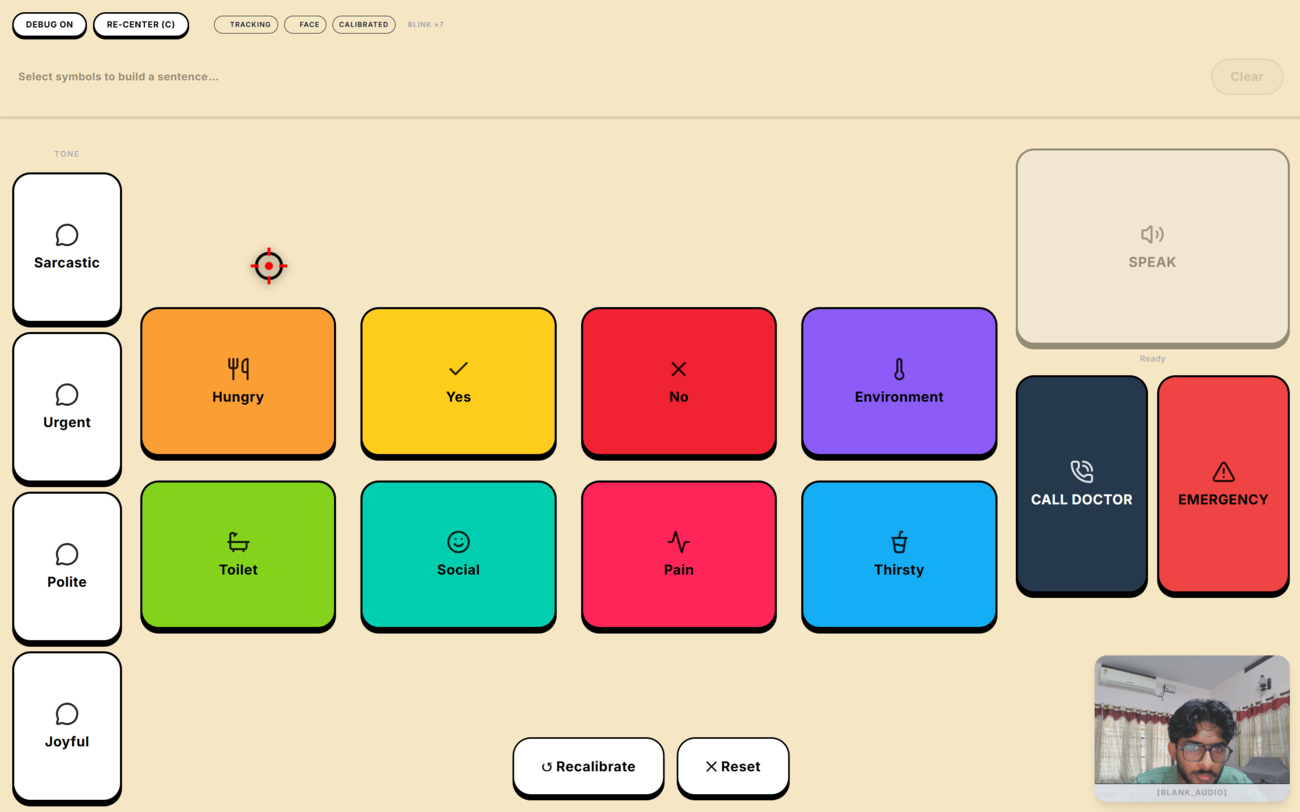
Every interactive element is sized to a minimum of 100×100px with 80px separation between adjacent targets. This makes even coarse gaze pointing reliable enough to select the correct target, accommodating patients with significant motor and gaze tremor.
Neobrutalist Design Rationale:
High-contrast black borders on a warm #FDF1D0 background maximise legibility for patients experiencing vision changes. The stark graphic style also aids cognitive clarity for patients with early-stage neurological decline — there is no visual ambiguity about what is a button and what is not.
Gaze Button Component (GazeButton.tsx):
Every interactive element in the patient interface is a GazeButton. It subscribes to the shared gaze coordinate stream via a React context, runs its own hit-testing logic, renders a dwell-progress arc animation, and dispatches dwell-click when the dwell threshold is reached. Standard mouse/touch clicks also trigger the action for development and caregiver use.
AAC Grid Layout:
The communication grid uses a frequency-reranking system. Every time a patient selects a word, its usage frequency is incremented in Zustand state (persisted to localStorage). The "Re-Optimize Layout" action re-sorts the grid by frequency and places the most-used words in the Fitts's Law optimal positions (centre, corners), progressively personalising the layout to each patient's vocabulary.
Predictive Overlay:
When the doctor speaks and the LLM generates response options, the standard AAC grid is replaced by three large prediction buttons. Each button is colour-coded (orange, teal, pink) and labelled with the LLM-generated phrase. Selecting one speaks the phrase via TTS, sends it to the doctor over the data channel, and immediately returns the grid to normal. If a hardware action was inferred, it fires simultaneously.
| Category | Technology | Version |
|---|---|---|
| Frontend Framework | Next.js (App Router) | 16.2.6 |
| UI Library | React | 19.2.4 |
| Language | TypeScript | 5.x |
| State Management | Zustand | 5.x |
| Styling | Tailwind CSS | 4.x |
| Animation | Framer Motion | 12.x |
| WebRTC | LiveKit Client SDK | 2.19.x |
| WebRTC Components | @livekit/components-react | 2.9.x |
| WebRTC Token Auth | livekit-server-sdk | 2.15.x |
| Local LLM | @mlc-ai/web-llm (WebGPU) | 0.2.84 |
| Local TTS | onnxruntime-web (WASM) | 1.26.x |
| Local STT | @xenova/transformers (WASM) | 2.17.x |
| Gaze Tracking | @mediapipe/tasks-vision | 0.10.x |
| Cloud STT | Deepgram Nova-2 (Python) | via livekit-agents |
| VAD | Silero VAD (Python) | via livekit-agents |
| STT Agent Runtime | LiveKit Agents Python SDK | latest |
| MQTT Broker | Eclipse Mosquitto | 2.x |
| MQTT Client (JS) | mqtt (npm) | 5.x |
| Hardware | Seeed Wio Terminal | Arduino/C++ |
| Emergency Alerts | Twilio SMS API | 6.x |
iris/
├── src/
│   ├── app/
│   │   ├── page.tsx              # Patient portal
│   │   ├── doctor/page.tsx       # Doctor portal
│   │   └── api/
│   │       ├── livekit/token/    # JWT token generation
│   │       ├── session-status/   # Call state machine
│   │       └── room-action/      # MQTT hardware control
│   ├── components/
│   │   ├── GazeButton.tsx        # Core gaze-input button
│   │   ├── GridUI.tsx            # AAC communication grid
│   │   ├── LiveKitWrapper.tsx    # WebRTC + data channel mgmt
│   │   └── SpeakHandler.tsx      # LLM generation + TTS trigger
│   ├── hooks/
│   │   └── useWhisperMic.ts      # Local ambient STT hook
│   ├── store/
│   │   └── useIrisStore.ts       # Global Zustand state
│   ├── utils/
│   │   ├── webLlmService.ts      # LLM inference service
│   │   └── ttsService.ts         # TTS synthesis service
│   └── workers/
│       ├── stt.worker.ts         # Whisper WASM Web Worker
│       └── tts.worker.ts         # ONNX TTS Web Worker
├── worker/
│   ├── agent.py                  # LiveKit + Deepgram STT agent
│   └── requirements.txt
├── hardware/
│   └── iris-hardware-mqtt/
│       └── iris-hardware-mqtt.ino   # Wio Terminal firmware
├── start.bat                     # One-click start
└── end.bat                       # One-click stop