Accéder à Internet avec la carte C64Net WiFi
- Commodore 64
- Carte C64Net WiFi
- Accès Wifi
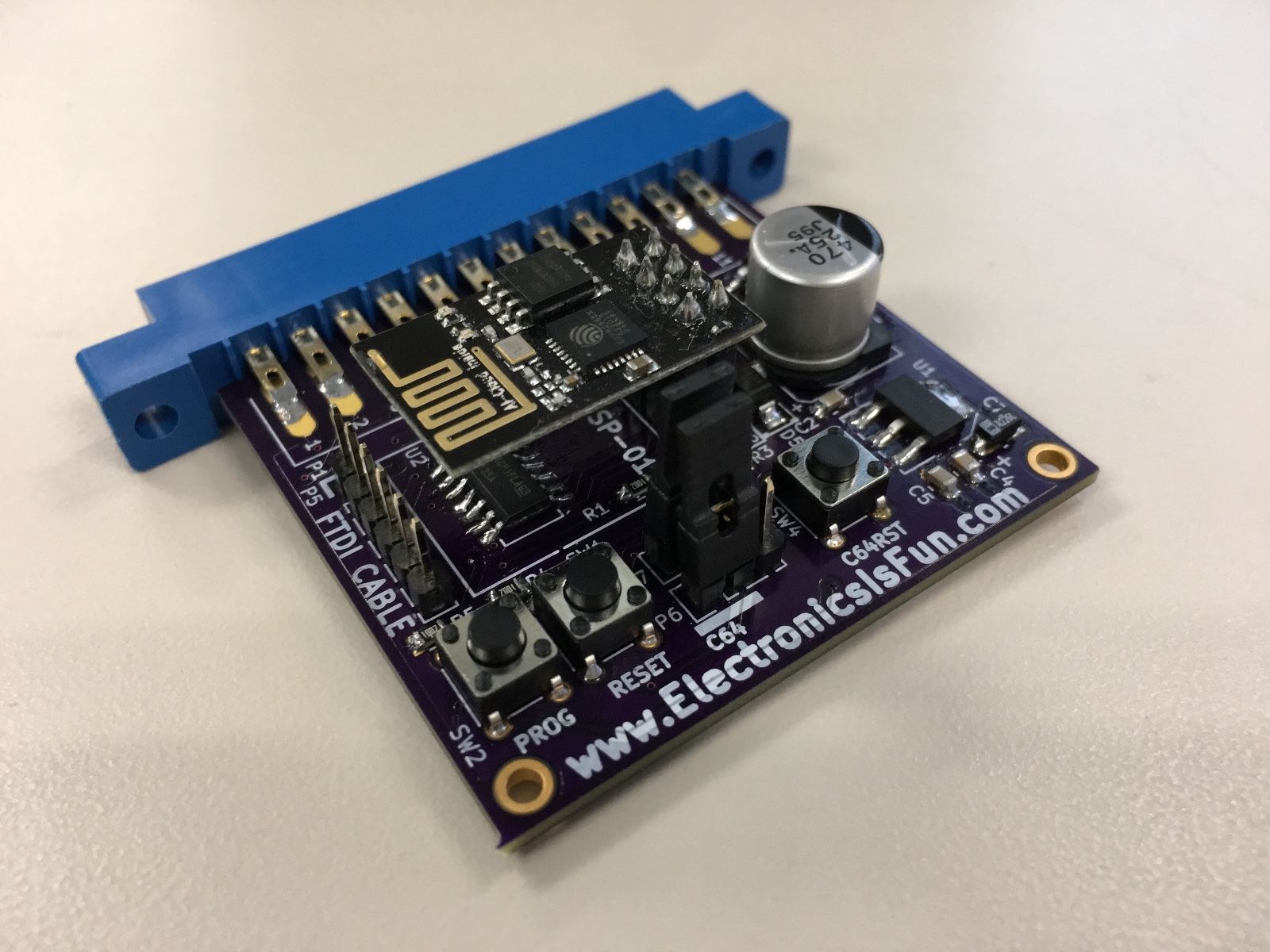
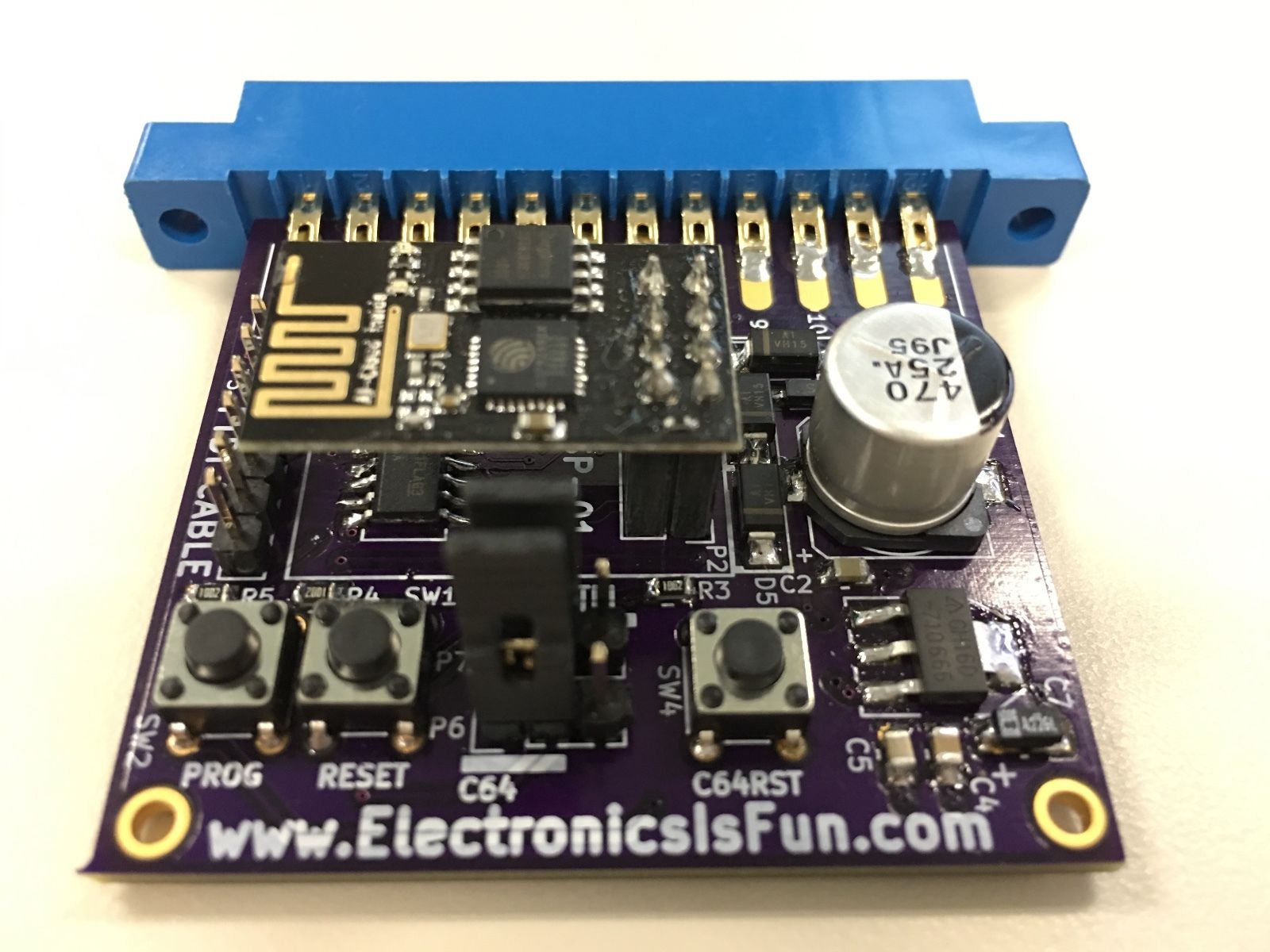
- Connecter la carte C64Net Wifi au port
USER - Allumer le C64
- Charger la disquette c64net_apps
- Lancer le programme
CONFIGURE - Sélectionner le réseau Wifi et entrer le nom d'utilisateur/mot de passe
La carte C64Net Wifi émule les commandes AT des modems analogiques. Pour cela, plusieurs interfaces:
- via le
BASICet ce terminal minimal:
10 open5,2,0,chr$(8):poke665,73-(peek(678)*30)
15 print#5,"at&p1e1":print#5,"at&p1e1":printchr$(14);
20 get#5,a$:ifa$<>""thenprinta$;
30 geta$:ifa$<>""thenprint#5,a$;
40 goto20

save"DUMBTERM.BAS"
Note: La commande AT&P1E1 met le terminal en mode PETSCII et active l'écho local.
-
via le terminal fourni sur la disquette:
CBMTERM- Charger la disquette c64net_apps
- Lancer le programme
CBMTERM - Passer en mode terminal
(4) - Initialiser la communication, taper en aveugle
at&p1e1 - Taper une commande AT ou
at&hpour avoir de l'aide
-
via le terminal
CCGS 2017 v6(téléchargement)- Charger le programme avec `LOAD"CCGS 2017 v6.PRG",8' puis 'RUN'
- Enter dans les paramètres avec '(F7)'
- Sélectionner le baudrate
2400 - taper
RETURNpour enter en mode terminal - Initialiser la communication, taper en aveugle
at&p1e1 - Taper une commande AT ou
at&hpour avoir de l'aide
-
at&h: afficher toutes les commandes (très long!) -
at&p1e1: activer le mode PETSCII et écho local -
atb9600: passer immédiatement le baudrate à 9600bps (ensuite il faut modifier les settings pour passer rester compatible) -
ati4: afficher la version du firmware -
ati2: afficher l'adresse IP -
ati6: afficher l'adresse MAC -
atd"ip:port": lancer une session de streaming, genre avec un BBS -
at&s"40=[HOSTNAME]": Change le hostname du modem -
atw: liste les hotspots Wifi
A TESTER
- avec un programmeur type
ESP01 Programmer Adapter UART GPIO0 ESP-01 Adaptateur ESP8266 USB
- (Wiki officiel)[http://coffeemud.net:8080/ctcug/index.php/C64Net_Wireless_Internet_(WiFi)_Modem]
De: (ZiModem)[https://github.com/bozimmerman/Zimodem]
The command set is as follows (not case sensitive):

ATZ : closes all open socket connections (preserving the Access Point connection), stops all listeners, and resets the
state of the Command processor to the saved configuration, preserving the current baud rate and wifi connection.

A/ : Repeats the previous command

ATI : re-shows the startup message, including wifi connection information.
ATI0 : same as ATI
ATI1 : Shows the current common variable settings, common 'S' registers.
ATI2 : Shows the modem's current IP address
ATI3 : Shows the modem's current Wireless Router connection
ATI4 : Shows only the firmware current version
ATI5 : Shows all the current variable settings, all 'S' registers.
ATI6 : Shows the current mac address.
ATI7 : Shows the current formatted time (see AT&T).
ATI8 : Shows the firmware build date/time

ATA  : If a server listener has generated a RING, then ATA will switch the last rung connection to Stream mode (see ATD).

ATAn : Causes the modem to create a server listening on port n.  When a connection is received, the terminal will generate
1 or more RINGs according to the ATS0 register, followed by a normal CONNECT respose. At this point, all other commands
related to connections may be used normally, unless ATS41 is > 0, in which case incoming connections are automatically
sent to Stream mode as per ATD or ATA. Listeners are listed along with other connections using ATC0.
ATAPn : Adding a P modifier causes all incoming connection input to be translated to PETSCII
ATATn : Adding a T modifier causes connection streaming input to be translated per TELNET when the changed to Stream mode
ATAEn : Adding a E modifier causes connection terminal echo to be enabled when the changed to Stream mode
ATAXn : Adding a X modifier causes connection XON/XOFF flow control to be enabled  when the changed to Stream mode.

ATN0 : Shuts down all listeners, leaving client connections open
ATNn : if n > 0 then same as ATAn

ATE0 : Turns serial terminal echo off for command mode.
ATE1 : Turns serial terminal echo on for command mode.

ATV0 : Turns off verbose responses mode (Uses Terse Numeric response mode)
ATV1 : Turns on verbose responses mode (Uses Word response mode)

ATX0 : Turns off extended response codes (1/CONNECT instead of 5/CONNECT 2, etc..)
ATX1 : Turns on extended response codes (5/CONNECT 2 instead of 1/CONNECT, etc..)

ATF0 : Turns on rts/cts flow control.
ATF1 : Turns on xon/xoff flow control.
ATF2 : Turns on xon/xoff flow control, sets XON mode (if necessary), and, in command mode, will immediately go to XOFF
when a single connection packet is received. This is very useful when the client wants to ensure it only receives one
packet to process.  You can think of this as an alternative way to use xon/xoff by having XOFF automatic between packets.
ATF3 : Similar to ATF2 except that the default is XOFF, and, in command mode, a XON code from the user will immediately
trigger either an empty packet response [ 0 0 0 ], or a real packet if one is available.  After this, as in ATF2, XOFF is
automatically set.
ATF4 : Turns off flow control for command mode

ATQ0 : Turns off quiet mode (Sends response codes)
ATQ1 : Turns on quiet mode (Stops sending response codes)

ATR0 : Suppresses linefeed (\n $0a) in end of lines.  Will only send carriage return (\r $0d).
ATR1 : Sends \r\n ($0d0a) as end of line string.
ATR2 : Sends \n\r ($0a0d) as end of line string.
ATR3 : Suppresses carriage return (\r $0d) in end of lines.  Will only send linefeed (\n $0a).

ATBn : Sets a new serial Baud Rate. Takes effect immediately.
ATB"n,xYz" : Sets baud rate n, bits x, parity (E,O,M, or N) for Y, and stop bits z.

ATW : List all wireless network access points scanned within range.  The response for each entry is the SSID, following by
the RSSI, followed by an * character is the connection is encrypted.
ATWn : Where n > 0, this lists up to n wireless network access points scanned within range.  The response for each entry
is the SSID, following by the RSSI, followed by an * character is the connection is encrypted.
ATW"[SSI],[PASSWORD]" : Connects to the wireless access point with the given SSI, using the given password.
ATWP : Adding a P modifier is the same as all forms of ATW, with both arguments and results presented in PETSCII.

ATD : Start a streaming connection between the current opened connection.  Use "+++" to exit back to Command mode.
ATDn : Where n > 0, this will start a streaming connection between the previously opened connection with an id the same as
n.  Use "+++" to exit back to Command mode.
ATD"[HOSTNAME]:[PORT]" : This opens a streaming connection between the terminal and the given host/port. Use "+++" to
disconnect and exit back to command mode.
ATDP"[HOSTNAME]:[PORT]" : Adding a P modifier causes connection input to be translated to PETSCII during the streaming
session.
ATDT"[HOSTNAME]:[PORT]" : Adding a T modifier causes connection input to be translated per TELNET during the streaming session.
ATDE"[HOSTNAME]:[PORT]" : Adding a E modifier causes terminal echo to be enabled that streaming session.
ATDX"[HOSTNAME]:[PORT]" : Adding a X modifier causes XON/XOFF flow control to be enabled that streaming session.
ATDnnnnnnn : Where n=0-9, if the digits exist in the phonebook (see ATP), it will try connect to that host, with those
modifiers, from the phonebook.

ATC : Shows information about the current network connection in the following format "[CONNECTION STATE] [CONNECTION ID]
[CONNECTED TO HOST]:[CONNECTED TO PORT]"
ATC0 : Lists information about all of the network connections in the following format "[CONNECTION STATE] [CONNECTION ID]
[CONNECTED TO HOST]:[CONNECTED TO PORT]", including any Server (ATA) listeners.
ATCn : Where n > 0, this changes the Current connection to the one with the given ID.  If no connection exists with the
given id, ERROR is returned.
ATC"[HOSTNAME]:[PORT]" : Creates a new connection to the given host and port, assigning a new id if the connection is
successful, and making this connection the new Current connection.  The quotes and colon are required.
ATCP"[HOSTNAME]:[PORT]" : Adding a P modifier causes all connection input to be translated to PETSCII
ATCT"[HOSTNAME]:[PORT]" : Adding a T modifier causes streaming input to be translated per TELNET when the changed to
Stream mode
ATCE"[HOSTNAME]:[PORT]" : Adding a E modifier causes terminal echo to be enabled when the changed to Stream mode
ATCX"[HOSTNAME]:[PORT]" : Adding a X modifier causes XON/XOFF flow control to be enabled  when the changed to Stream mode

ATH  : Hangs up (disconnects and deletes) all open connections.  Does not close Server listeners.
ATH0 : Hangs up (disconnects and deletes) the current opened connection.
ATHn : Hangs up (disconnects and deletes) the open connection with the given id.  Closing a Server (ATA) listener does not close any connections received from that listener.

ATO : Re-enters a Streaming session (see ATD) under the previous settings, with the current (previous) connection.

ATP : Lists all existing phonebook entries, with the format phone number followed by ATD modifiers, followed by the host
and port
ATP"[NUMBER]=[HOSTNAME]:[PORT]" : Adds or Modifies an entry to the phonebook with the given 7 digit number, host, and
port. Use ATDnnnnn.. to connect.
ATPP"[NUMBER]=[HOSTNAME]:[PORT]" : Adding a P modifier causes connection input to be translated to PETSCII  when connected
to that entry.
ATPT"[NUMBER]=[HOSTNAME]:[PORT]" : Adding a T modifier causes connection input to be translated per TELNET  when connected to that entry.
ATPE"[NUMBER]=[HOSTNAME]:[PORT]" : Adding a E modifier causes terminal echo to be enabled when connected to that entry.
ATPX"[NUMBER]=[HOSTNAME]:[PORT]" : Adding a X modifier causes XON/XOFF flow control to be enabled when connected to that
entry.
ATP"[NUMBER]=DELETE" : Removes the phonebook entry with the given number.

ATS0=n : Changes the number of RING messages received before a CONNECT response is sent, on incoming Server listeners.
ATS1=n : Unimplemented, always returns OK
ATS2=n : Change the escape character (n = 0-255), Defaults to ASCII decimal 43 ("+")
ATS3=n : Change the Carriage Return Character	(n = 0-127), Defaults to ASCII decimal 13 (Carriage Return)
ATS4=n : Change the Line Feed Character	(0-127), Defaults ASCII decimal 10 (Line Feed)
ATS5=n : Change the Backspace Character	(0-32), ASCII decimal 8 (Backspace)
ATS6 ... 39=n : Unimplemented, always returns OK
ATS40=n : Change the size of the connection packets (n > 0), Defaults to 127 bytes
ATS41=n : When n > 0, all incoming Server listener connections are immediately sent to Stream mode.  If n=0, connections
remain in normal command mode (default).
ATS42=n : Set the CRC8 for an attached Transmit command.  e.g. ATS42=123T"[MESSAGE]" returns error unless 123 is CRC8 of
[MESSAGE]".
ATS43=n : Sets a standby baud rate n for the next incoming or outgoing connection only.  ATZ clears.
ATS44=n : Sets an automatic delay of n milliseconds after most bytes written to the Serial port.  This is for computers
that support a baud rate, but can't really keep up, and you don't want to use flow control.
ATS45=n : Changes how packet and at&g data is delivered.  0 is normal binary with normal headers, 1 is 78 char HEX digit
streams followed by EOLN with hex digit headers, 2 is decimal digits followed by EOLN, with decimal digit headers.
ATS46=n : Changes DCD status. n=0 is default DCD=HIGH=online. n=1 is DCD=LOW=online. n=2 always HIGH. n=3 always LOW.
ATS47=n : Changes DCD pin number, n=2 is default
ATS48=n : Changes CTS status. n=0 is default CTS=HIGH=active. n=1 is CTS=LOW=active. n=2 always HIGH. n=3 always LOW.
ATS49=n : Changes CTS pin number, n=0 is default on ESP01, and default is 5 otherwise
ATS50=n : Changes RTS status. n=0 is default RTS=HIGH=active. n=1 is RTS=LOW=active. n=2 always HIGH. n=3 always LOW. (N/A
on ESP01)
ATS51=n : Changes RTS pin number, n=4 is default (N/A on ESP01)
ATS52=n : Changes RI status. n=0 is default RI=HIGH=active. n=1 is RTS=LOW=active. n=2 always HIGH. n=3 always LOW. (N/A
on ESP01)
ATS53=n : Changes RI pin number, n=14 is default (N/A on ESP01)
ATS54=n : Changes DTR status. n=0 is default DTR=HIGH=active. n=1 is RTS=LOW=active. n=2 always HIGH. n=3 always LOW. (N/A
on ESP01)
ATS55=n : Changes DTR pin number, n=12 is default (N/A on ESP01)
ATS56=n : Changes DSR status. n=0 is default DSR=HIGH=active. n=1 is RTS=LOW=active. n=2 always HIGH. n=3 always LOW. (N/A
on ESP01)
ATS57=n : Changes DSR pin number, n=13 is default (N/A on ESP01)
ATS60=n : When n > 0, immediately saves existing listeners and automatically restores them later. n=0 to clear.

+++ : With a 1 second pause with no other characters afterwards, this will disconnect the current opened connection.

ATT"[MESSAGE]" : Transmit the given text string, with \r\n at the end, on the current connection.
ATTn : Where n > 0, this starts a transmit of exactly n bytes to the current connection.  The \n from entering this
command must be followed by the n bytes to transmit.
ATTP"[MESSAGE]" : Transmit the given text string, translating petscii to ascii, with \r\n at the end, on the current
connection.
ATTPn : Where n > 0, this starts a transmit of exactly n bytes to the current connection, translating petscii to ascii.
The \n from entering this command must be followed by the n bytes to transmit.
ATT+"[MESSAGE] : A + argument may be used to force the 'T' command to return the CRC8 of the message instead of OK, when
successful.

ATL0  : Re-sends the most recently sent data packet again
ATLn  : Re-sends the most recently sent data packet for connection id n.

AT&H  : Shows a help file from the web, or brief help otherwise.  Use &H6502 to reforce web download.
AT&L  : Reloads the saved configuration.
AT&W  : Saves the current configuration: WiFi settings(ATW), baud rate (ATB), end of line (ATR) settings, flow control
(ATF), echo mode (ATE), extended responses (ATX), verbose responses (ATV), quiet responses (ATQ), PETSCII mode (AT&P1),
pin statuses (ATS46 - S58), Rings (ATS0), Listener Stream-mode (ATS41), and Listener restore (ATS60)
AT&F  : Restores the modem to factory default settings.  Use &F86 to reformat the SPIFFS.
AT&On : n is 1 to turn on internal serial-reception log, n is 0 to turn off or view a previously turned-on log.
AT&U  : Checks the firmware home page to see if a new version is available.
AT&U6502 : Will update the firmware from the home page on the web.
AT&U=x: Will update the firmware from the web to custom version x.
AT&Kn : Flow Control, similar to ATFn, n=0,1,2: disable, n=3,6: rts/cts, n=4,5: Xon/Xoff
AT&Pn : Where n > 0, all command mode input and output will be translated to/from PETSCII before internal processing.
This will not affect received packet data, or the stream mode.
AT&Nx : Shows the status of ESP module I/O pin x
AT&Mn : Adds the byte denoted by n to a list of mask-out bytes.  These are bytes that are not transmitted to the serial
port in command mode incoming packets.  If this command is followed by a C, N, or A command on the SAME LINE, then the
setting will apply ONLY to that connection or listener.
AT&M  : Resets the mask-out bytes list. No bytes will be masked-out. If this command is followed by a C, N, or A command
on the SAME LINE, then the setting will apply ONLY to that connection or listener.
AT&Dn : Adds the byte denoted by n to a list of delimiter bytes.  These are bytes that will compose the last byte in a
command-mode incoming packet that is still shorter than the limit set by ATS40. This is useful for CR-LF formatted data.
If this command is followed by a C, N, or A command on the SAME LINE, then the setting will apply ONLY to that connection
or listener.
AT&D  : Resets the delimiter bytes lis. No bytes will be delimited, and packets will contain as many bytes as are received
and allowed by ATS40.  If this command is followed by a C, N, or A command on the SAME LINE, then the setting will apply
ONLY to that connection or listener.

AT&S"40=[HOSTNAME]" : Change the modem hostname
AT&T"[TIMEZONE],[TIME FORMAT],[NTP URL]" : set up the NTP clock. DISABLE to disable. Format is like Java SimpleDateFormat,
but with % escapes. Each argument is optional.
AT&G"[HOSTNAME]:[PORT]/[FILENAME]" : Streams a file from an HTTP source on the internet.  The header contains channel 0,
file length, and an 8-bit sum of all the bytes in the forthcoming file, followed by the bytes of the file, all formatted
as a normal packet.  An ASCII 3 (CNTRL-C) received during the transfer will abort. The S44 register can be used to create
artificial delays in this output.  XON/XOFF Flow control also remains in effect with, on a byte-by-byte basis for the auto
and manual flow control systems.
AT&Y  : Resets the state machine string. No state machine will be executed.
AT&Yn : Change the current state (for command mode AND current connection) to state n, where n is a decimal number.
AT&Y"[CODED STATE MACHINE]" : Adds the coded format string to a state machine.  If this command is followed by a C, N, or
A command on the SAME LINE, then the setting will apply ONLY to that connection or listener.   State Machine Format: MMcCCNN ...  States are numbered by their order in the list starting with 00.  Non-matches automatically go to the next
state until a match is made.   'MM' is hex byte to match (or 00 to match all).  'c' is one of these commands :e=eat byte,
p=push byte to que, d=send byte, q=send all queued, x=flush queue, r=replace with byte represented by hex CC.  'C' is
either '-', one of the command letters above, or a hex byte value if the first command was 'r'.  'NN' is the next state to
go to, with 00 being the first state.