Repository navigation
我的博客图床新方案 R2-Explorer #177
shenweiyan
announced in
2.2-好玩

Replies: 0 comments
Sign up for free
to join this conversation on GitHub.
Already have an account?
Sign in to comment

Uh oh!
There was an error while loading. Please reload this page.
Uh oh!
There was an error while loading. Please reload this page.
博客站点 图床的问题,纠结了很久,也一度以为很难会找到一个自己满意的 Pages 工具。但幸运的是,2025 年 12 月时候看到了 R2-Explorer 这个基于 Worker 的 Cloudflare R2 存储管理工具,部署完成后一番体验下来,发现这就是我一直要找的图床。
在线访问
首先,它是基于 GitHub Actions 部署到 Cloudflare 的 Workers 边缘计算平台上,通过绑定域名提供基于网页的在线访问。
身份验证
其次,它提供了基本的身份验证支持,可以通过配置 GitHub Secrets and variables 实现用户名、密码登录。
R2EXPLORER_CONFIG => { readonly: false, basicAuth: { username: 'shenwy', password: '123456' }, }文件管理
支持的文件管理包括:
复制图片的直接链接 的功能现在也已经支持,如果你在这个功能的配置中遇到了问题,可以参考这里。
文件处理
支持 PDF 文档、图片、文本文件、Markdown、CSV 等,浏览器内文件预览。
部署与构建
虽然 官方文档 有很详细的部署和配置说明,但有一些细节并未给出。
Cloudflare API Token
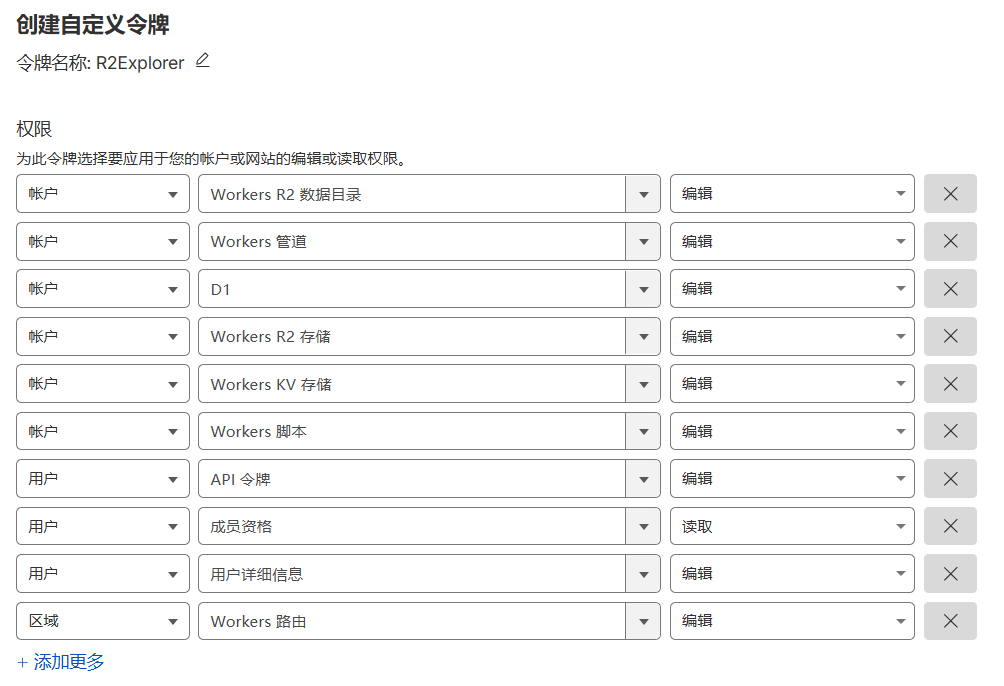
进入 https://dash.cloudflare.com/profile/api-tokens 申请 Cloudflare API Token,对应权限如下:
GitHub Secrets and variables
配置 GitHub Secrets
CF_API_TOKEN => Cloudflare API Token配置 GitHub Variables
R2EXPLORER_WORKER_NAME => gitimg-r2-explorerR2EXPLORER_CONFIG => { readonly: false, basicAuth: { username: 'steven', password: '123456' }, buckets: { 'gitimg-r2-explorer': { publicUrl: "https://gi.weiyan.tech" } }, }R2EXPLORER_BUCKETS => gitimg-r2-explorer:gitimgR2EXPLORER_DOMAIN => gg.weiyan.tech最后
最后总得写点什么,搜索枯肠墨枯笔涩,只能说好好码字,努力生活!
All reactions