Pomi turns a rooted Rabbit R1 into a small, persistent voice-agent appliance. It provides a custom touch and wake-word interface and runs the Hermes gateway directly on the R1. The device uses Wi-Fi or cellular data to reach a remote LLM. Tailscale provides optional private dashboard access and remote maintenance, so a Mac is not part of the normal request path.
Early release: Installation modifies the Android system partition and can make the device unbootable. Read the recovery section and make a verified backup before installation.
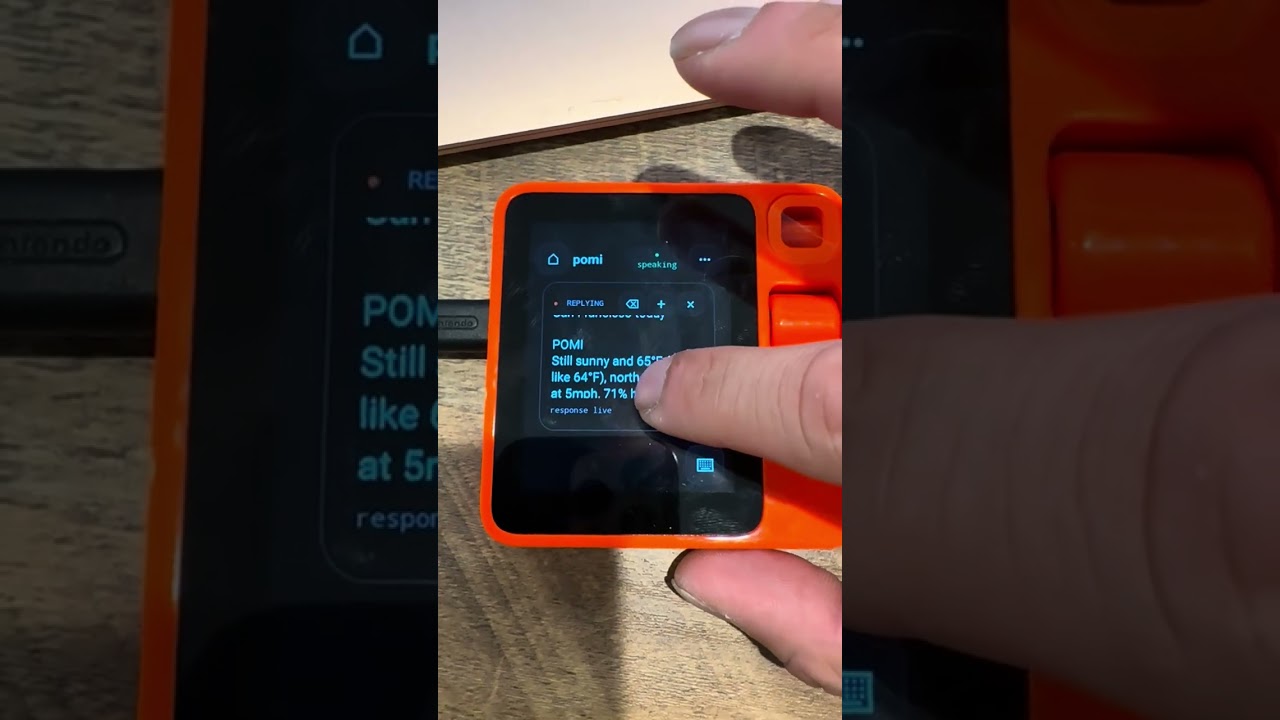
Watch the 30-second demonstration on YouTube.
Pomi is an independent software experiment inspired by the R1's distinctive hardware and agent-oriented form factor. It was not created out of frustration with Rabbit's software. The project explores a different question: how much of a custom, persistent voice-agent experience can run directly on the device?
- Tap the tomato to begin speaking.
- See live transcription in a foreground conversation overlay.
- Send automatically after a short pause.
- Read and hear the agent's response in the same overlay.
- Start a new conversation or clear the current one.
- Use an ambient lock display when the device is idle.
- Enable local “Hey Pomi” wake-word detection.
When you speak, the Pomi Android app captures and transcribes the request. It
sends the text to the Hermes gateway running on the same R1 at
127.0.0.1:8642. Hermes contacts the configured remote LLM over the device's
ordinary internet connection and returns the response to the interface.
Tailscale is not in the conversation path. It provides private access to the dashboard, diagnostics, and over-the-air application updates while the R1 is online.
| Component | Location | Purpose |
|---|---|---|
| Pomi Home APK | Android | Home, lock/ambient display, voice capture, chat |
| Hermes gateway | Debian chroot on the R1 | Agent sessions and tools |
| Porcupine | Inside the APK | Local “Hey Pomi” detection |
| Tailscale | Debian chroot on the R1 | Optional private remote access |
| LLM | User-selected remote provider | Inference |
The APK talks to Hermes over http://127.0.0.1:8642. Credentials remain in
private files on the R1. They are not compiled into the APK.
The current release is deliberately narrow:
- Rabbit R1 (
arm64-v8a) - Android 13 / API 33
- fingerprint matching
rabbit/gsi_r1/r1:13/* - unlocked bootloader
- root ADB (
adb shell idreportsuid=0) - USB debugging enabled
- at least 2 GB free under
/data
Pomi does not include Rabbit firmware, boot images, unlock tools, or bypasses.
Start from a legally obtained Android 13 image for your own R1. The community
r1_escape project describes
the device-specific boot process. Its code and instructions are independent
from Pomi. Confirm that ./scripts/verify-device.sh passes before continuing.
- macOS or Linux
- Android platform/build tools (
adb,fastboot, andapksigner) - JDK 21
- Docker with ARM64 build support
- e2fsprogs (
debugfs,e2fsck, andresize2fs) curl,git,gzip,openssl,tar, andshasum- a private release keystore
- your own LLM API key
- your own Tailscale auth key
- a Picovoice AccessKey and Android
.ppnkeyword file
Pomi separates the public installation path into four auditable modules:
capture-system-image.shprivately captures the active, already-bootable compatible system partition;bootstrap-device.shverifies and backs up the device before it patches and flashes that user-owned image.build-runtime.shcreates the pinned ARM64 Hermes/Tailscale runtime and its checksum manifest.configure.shprompts without echoing secrets;provision-device.shinstalls the resulting private configuration under/data.build-release.shbuilds, verifies, and checksums an APK signed with the owner's private release key.
Clone the repository and build the pinned ARM64 runtime:
git clone https://github.com/sidmohan0/pomi.git
cd pomi
./scripts/build-runtime.sh
Runtime inputs are fixed in
device-runtime/versions.env. The build checks
the downloaded Tailscale archive and writes checksums for all runtime outputs.
Create a release keystore once and keep two secure backups:
./scripts/create-release-keystore.sh /private/path/pomi-release.jksExport the four signing values without storing them in this repository:
export POMI_RELEASE_STORE_FILE=/private/path/pomi-release.jks
export POMI_RELEASE_STORE_PASSWORD='...'
export POMI_RELEASE_KEY_ALIAS=pomi
export POMI_RELEASE_KEY_PASSWORD='...'
./scripts/build-release.sh
The signed APK and SHA256SUMS are written under release/.
Create a private configuration file. Secret prompts are not echoed, the
gateway key is generated locally, and the resulting file has mode 0600:
./scripts/configure.sh /private/path/pomi.envThe file is shell-readable so it can drive unattended recovery later. Keep it outside this checkout and never attach it to a bug report or release.
Connect one R1 over USB. Do not rely on wireless ADB for recovery.
adb devices -l
./scripts/verify-device.sh
./scripts/backup-device.sh
The backup is created as an ignored, permission-restricted
device-backup-TIMESTAMP/ directory. Copy it to separate storage. The script
captures Pomi/Hermes state, package inventory, the installed APK, and both-slot
boot, vbmeta, and dtbo partitions, then verifies every checksum.
This is not a complete userdata or proprietary firmware backup. Keep the private system capture and the original firmware/recovery package that you used to prepare the device.
Pomi does not publish firmware. Start the R1 on the supported rooted Android build and privately capture its active system partition:
./scripts/capture-system-image.sh /private/path/compatible-system.imgDo not use a generic GSI or an image from another R1. The captured image stays on your host and must not be committed or redistributed.
After exporting the four signing variables shown above, the one-command bootstrap verifies the device and source artifacts, creates and validates a backup, builds the runtime and signed APK, patches and checksums the image, flashes it, provisions private state, and runs the health check:
./scripts/bootstrap-device.sh \
  /private/path/to/compatible-system.img \
  /private/path/pomi.env
To run the same modules separately, patch and flash as follows:
./scripts/patch-system-image.sh \
  /private/path/to/compatible-system.img \
  dist/pomi-system.img
./scripts/flash-system-image.sh dist/pomi-system.img
The patch contains the signed APK, pinned runtime, Tailscale binaries, and init service. It contains no credentials. Flashing overwrites the system partition. Never use an image from a different device or Android build.
If you did not use configure.sh, copy the example outside the repository and
fill in your own values:
cp scripts/pomi.env.example /private/path/pomi.env
chmod 600 /private/path/pomi.env
./scripts/provision-device.sh /private/path/pomi.env
./scripts/health-check.sh
Provisioning:
- rejects unsupported, non-rooted, or unpatched devices;
- writes LLM and Tailscale credentials under
/datawith mode0600; - places the Picovoice key/model in private app storage;
- reboots once to start the runtime; and
- leaves credentials out of command output, Git, and the system image.
Expected final output:
PASS: runtime ready, gateway reachable, and Pomi APK installed.
Select Pomi as the Android Home app if Android prompts.
Maintainers can exercise a destructive clean-checkout reinstall on a backed-up test device:
./scripts/clean-install-test.sh \
  /private/path/pomi.env \
  dist/pomi-system.img
This test creates and verifies another backup before it removes Pomi state.
Use the same signing keystore for every APK update. Rebuild the pinned runtime
and rerun provisioning. The runtime is replaced atomically on the next boot;
Hermes state and the workspace remain under /data.
./scripts/build-runtime.sh
./scripts/build-release.sh
./scripts/patch-system-image.sh /private/path/to/compatible-system.img dist/pomi-system.img
./scripts/flash-system-image.sh dist/pomi-system.img
./scripts/provision-device.sh /private/path/pomi.env
./scripts/health-check.shadb shell getprop hermes.runtime.ready
adb shell tail -100 /data/hermes-runtime.log
adb shell tail -100 /data/hermes-gateway.log
adb shell tail -100 /data/tailscale.log
adb shell dumpsys package ai.hermes.rabbit | grep versionIf the gateway is healthy, this command exits with status zero:
adb shell 'chroot /data/hermes-rootfs curl -fsS http://127.0.0.1:8642/v1/models >/dev/null'If Android still boots with root ADB:
adb root
adb remount
adb shell stop hermes-device
adb shell stop tailscale-device
adb shell rm /system/etc/init/hermes-device.rc
adb shell rm -r /system/hermes
adb uninstall ai.hermes.rabbit
adb reboot
If Android does not boot, use the bootloader/recovery procedure for the Android
image you installed. Restore the matching backed-up boot, vbmeta, and
dtbo images only to the same device and slot layout. Those files do not
replace a complete firmware recovery package.
- Do not publish
pomi.env, a keystore, backups,.ppnfiles, or runtime state. - Use short-lived or reusable-limited Tailscale auth keys.
- Restrict LLM keys to the minimum required account/project.
- The gateway listens on loopback. Tailscale exposure is opt-in and private.
- Rotate a credential if it is ever committed or included in a release bundle.
hermes-shell/— Android Home applicationdevice-runtime/— pinned runtime recipe and Android init servicesscripts/— backup, build, provisioning, health, and release toolsui-lab/— browser-based visual prototypedocs/— architecture, compatibility, licensing, and maintenance notes
- Only the Android 13 R1 build above is currently tested.
- Voice transcription uses Android speech services and can depend on network and installed system components.
- Picovoice requires each user to accept its terms and provide their own key and model.
- There is no automatic firmware unlock or recovery flow.
- Runtime rebuilds require Docker and network access.
Original Pomi code is licensed under Apache-2.0. Third-party components keep
their own licenses and are listed in THIRD_PARTY_NOTICES.md.