Releases: siggifly/ipod-emulator
Release list
ipod-emulator v0.4.0

Four bugs reported by users, all reproduced, all ours — plus a setup screen somebody can actually use.
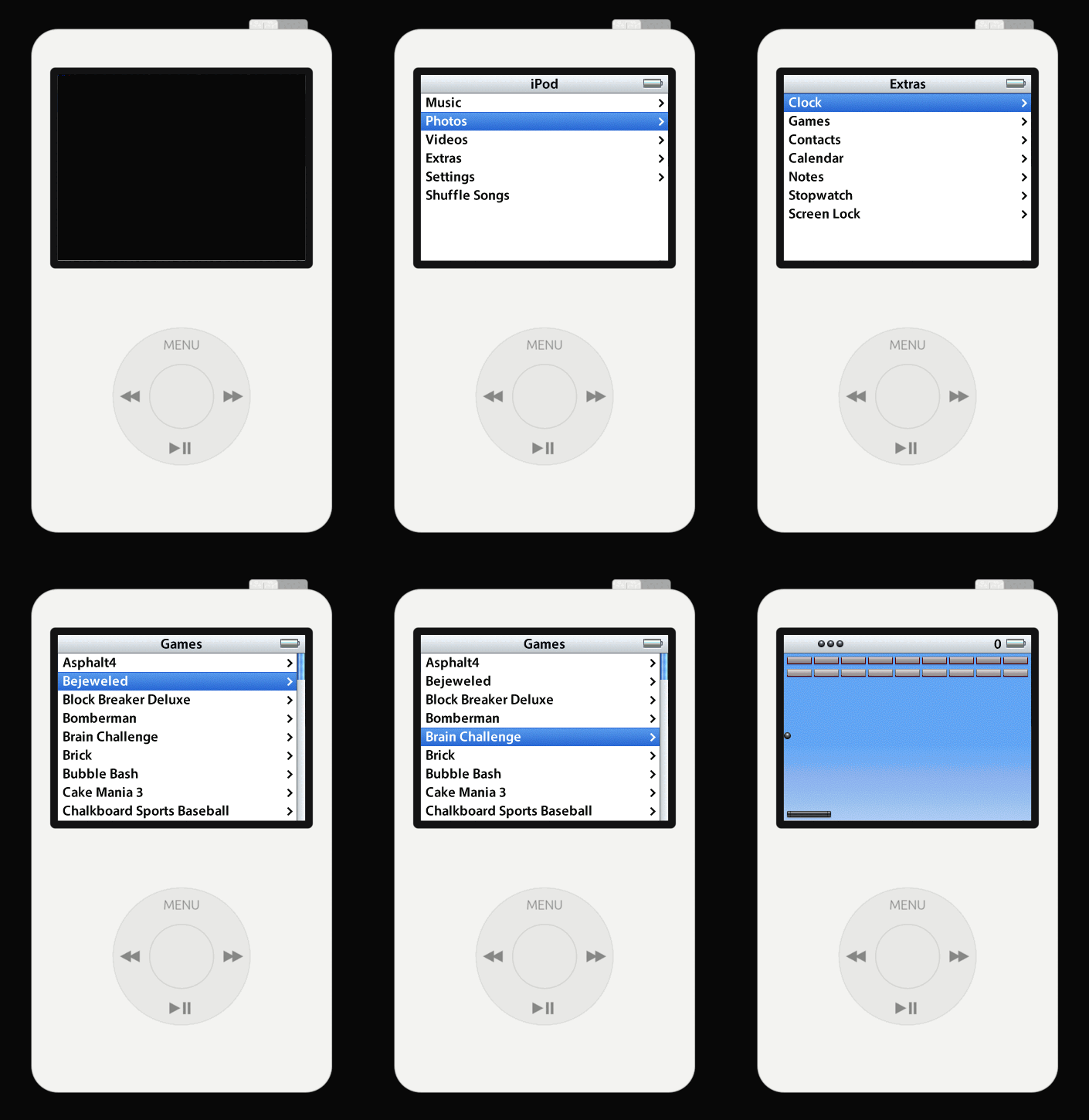
This is alpha. It boots, it draws, it plays Brick, and it is a few days old. Please open an issue — every report so far has found a real bug and every one is fixed here.
ipod5g-macos-arm64.tar.gz |
macOS, Apple Silicon |
ipod5g-macos-x86_64.tar.gz |
macOS, Intel |
ipod5g-linux-x86_64.tar.gz |
Linux, x86-64 |
ipod5g-windows-x86_64.zip |
Windows, x86-64 |
Unpack and run ipod-emulator, or double-click ipod-emulator.app on macOS. The six developer tools are in tools/ and are for taking firmware apart, not for playing anything.
It will not eat your disk any more
The cache was keyed on both image paths and nothing had ever deleted one. Every pair of files you tried left an 8 GB working disk and a ~1.6 GB snapshot behind, silently, in a folder the program never named. Somebody lost 50 GB trying four firmware versions.
One pair is kept now, the rest go on every start, the setup screen shows the total with a button to clear it, and it tells you what starting will cost before it costs it.
One folder, and it stays where you put it
Settings went to one directory and gigabytes to another — on Windows, AppData\Roaming and AppData\Local. There is one now, and for an archive you unpacked it is data/ beside the executable. Settings from the previous version are carried forward and the old folders are named in the UI so you can delete them.
Setup is a wizard, and it is readable
It was dark grey text on a black background. It survived because an author cannot reach that screen — run it from a source checkout and the paths resolve, so it boots straight past. Only somebody without the files ever sees it.
It now asks one question at a time, verified before the next, with back and forward, real margins, and the device drawn at the top. Getting the boot ROM off your own iPod with Rockbox is the first recommendation, with links — it is the route that involves nobody else's copy of anything.
The mouse wheel turns the wheel
Every mouse has one. One notch is one detent; a trackpad glides.
Also
- The prototype boot ROM and its recipe are gone. It boots a firmware partition the retail ROM correctly rejects, and shipping it sent a user hours down a path that cannot work.
- The app is
ipod-emulatoreverywhere. It answered to four names, and users' settings lived under one nothing else used. - The README says exactly which boot ROM and which
.ipswwere tested — and explains that the retail dump is archived under iPod Classic, in a folder namedA1238, which is why searching for "iPod Video" finds nothing. - New:
ROADMAP.md, which says what this becomes and in what order.
Nothing here is signed
Deliberately. macOS refuses the first launch of anything downloaded — on macOS 15 and later, open it, let it be blocked, then allow it once in System Settings → Privacy & Security. Windows SmartScreen shows More info → Run anyway. Anything you build yourself is not quarantined.
What does not work
No audio, no USB, and purchased titles do not launch. The cold boot takes far more simulated time than hardware does — that is the long white screen, it is a bug, and it is next. KNOWN-BUGS.md is the honest list.
iPod 5G emulator v0.3.0
Apple's retail iPod 5.5G firmware, booted from the reset vector on an emulator written from scratch.
ipod5g-macos-arm64.tar.gz |
macOS, Apple Silicon |
ipod5g-macos-x86_64.tar.gz |
macOS, Intel |
ipod5g-linux-x86_64.tar.gz |
Linux, x86-64 |
ipod5g-windows-x86_64.zip |
Windows, x86-64 |
On macOS, double-click iPod 5G.app. The command-line tools sit beside it.
What's new since 0.2.0
The app is called what it is. macOS shows the executable's name in the application switcher — not the crate's, and not CFBundleName — so Cmd-Tab said ipod-gui. The binary is ipod-emulator now, and the copy inside the bundle is named iPod 5G, which is what the bundle claimed all along while the switcher read the file instead.
A real icon — the drawn iPod with Brick on its screen, at 81 % of its canvas, which is what Apple's own icons measure rather than what looked right. Notes and Reminders both occupy 104×104 of a 128px icon; this one does too, to the pixel.
The cold boot is legible. The progress bar was a 6-point hairline with its label clipped inside — an indicator that reported nothing during the one minute anybody wants to be told something. The bar keeps its place, the text moved to the footer's left at a size you can read, and debug mode no longer draws a second bar for the same boot.
The keyboard list moved out of a tooltip and into the empty column beside the device. Nothing in this window covers anything now.
The black/white switch moved out of the debug panel — which of the two colours the 5G shipped in is a fact about your iPod, not an instrument — and it is remembered, which it was not.
Full list in CHANGELOG.md. How a release is cut, and the check that catches a stale version literal, is in RELEASING.md.
What you have to supply
Two files, from an iPod you own. Neither is distributed here and neither ever will be.
| What to look for | ||
|---|---|---|
| NOR flash dump | internal_rom_000000-0FFFFF.bin |
Exactly 1 048 576 bytes. The name is the convention, after the offset range it covers. Any name works — the size and the reset vector are what get checked |
| IPSW | *.ipsw — Apple's own bundle, about 14 MB |
The filename varies and does not tell you which iPod it is for |
The IPSW's updater family must match the iPod your NOR dump came from. The family is inside the bundle, not in its filename — the emulator reads it out of the manifest (Firmware-25.1.2 → family 25) and prints it, because a mismatch does not fail loudly: RetailOS boots, does not recognise the drive as its own, and asks to be restored from iTunes.
Open it and it asks for both, then says what each file you picked actually is — a 2 MiB dump when the 5G ROM is 1 MiB gets told so, rather than failing later. It remembers them, and the command-line tools use the same pair with no arguments. ipod-boot setup asks the same questions in a terminal, for a machine with no window.
Nothing here is signed with a certificate
Deliberately. Buying one to make a reverse-engineering tool look official is the wrong trade for this project, and the source is right there to build.
So the operating system refuses the first launch of anything you download. On macOS 15 and later the old right-click → Open shortcut no longer works: open it, let it be blocked, then go to System Settings → Privacy & Security, where a button offers to open it anyway. Once. xattr -dr com.apple.quarantine "iPod 5G.app" does the same from a terminal. On Windows, SmartScreen shows More info → Run anyway.
Anything you build yourself is not quarantined and none of this happens.
What does not work
No audio, no USB, and purchased titles do not launch — Apple's DRM refuses them, and this emulator neither ships nor depends on a decrypted copy of anything. The games that run are the ones built into RetailOS itself.
KNOWN-BUGS.md is what is wrong, kept apart from what is absent and what is deliberately faked. At the top of it: a cold boot takes far more simulated time than hardware does. That is the long white screen, and it is next.
iPod 5G emulator v0.2.0
Apple's retail iPod 5.5G firmware, booted from the reset vector on an emulator written from scratch.
ipod5g-macos-arm64.tar.gz |
macOS, Apple Silicon |
ipod5g-macos-x86_64.tar.gz |
macOS, Intel |
ipod5g-linux-x86_64.tar.gz |
Linux, x86-64 |
ipod5g-windows-x86_64.zip |
Windows, x86-64 |
On macOS, double-click iPod 5G.app. The command-line tools sit beside it.
What's new since 0.1.0
You can change the images without quitting. The setup screen used to be reachable only when no machine was running, and the first pair that worked was remembered — so the second launch went straight into the iPod and never showed that screen again. Whatever you picked on day one was what you had. images… in the footer goes back to it.
The cold boot says what it is doing, in both modes. A cold boot spends most of its time on a white screen, and a blank window that is busy looks exactly like one that has hung. The progress bar had been in the debug panel all along; it is in the footer now.
Booting no longer asks for a game. Every recipe demanded an eApp image and refused to run without one — even though a boot enters from the reset vector and never looks at it. Anyone with exactly the two files the README documents could not boot from the command line at all.
Setup carries over to the terminal. ipod-boot reads what the setup screen remembered, so once you have set up in the window the recipes need no arguments. --print says where each path came from. ipod-boot setup asks the same questions in a terminal for a machine with no window.
Binaries no longer name the machine that built them — 395 occurrences of a home directory in ipod-gui alone, now zero across all eight.
Full list in CHANGELOG.md.
What you have to supply
Two files, from an iPod you own. Neither is distributed here and neither ever will be.
| What to look for | ||
|---|---|---|
| NOR flash dump | internal_rom_000000-0FFFFF.bin |
Exactly 1 048 576 bytes. The name is the convention, after the offset range it covers. Any name works — the size and the reset vector are what get checked |
| IPSW | *.ipsw — Apple's own bundle, about 14 MB |
The filename varies and does not tell you which iPod it is for |
The IPSW's updater family must match the iPod your NOR dump came from. The family is inside the bundle, not in its filename — the emulator reads it out of the manifest (Firmware-25.1.2 → family 25) and prints it, because a mismatch does not fail loudly: RetailOS boots, does not recognise the drive as its own, and asks to be restored from iTunes.
Open it and it asks for both, then says what each file you picked actually is — a 2 MiB dump when the 5G ROM is 1 MiB gets told so, rather than failing later.
Nothing here is signed with a certificate
Deliberately. Buying one to make a reverse-engineering tool look official is the wrong trade for this project, and the source is right there to build.
So the operating system refuses the first launch of anything you download. On macOS 15 and later the old right-click → Open shortcut no longer works: open it, let it be blocked, then go to System Settings → Privacy & Security, where a button offers to open it anyway. Once. xattr -dr com.apple.quarantine "iPod 5G.app" does the same from a terminal. On Windows, SmartScreen shows More info → Run anyway.
Anything you build yourself is not quarantined and none of this happens.
Known bugs
New in this release: KNOWN-BUGS.md, which is what is wrong, kept apart from what is absent and what is deliberately faked. The one at the top is that a cold boot takes far more simulated time than hardware does — that is the long white screen, and it is next on the list.
No audio, no USB, and purchased titles do not launch — Apple's DRM refuses them, and this emulator neither ships nor depends on a decrypted copy of anything. The games that run are the ones built into RetailOS itself.
iPod 5G emulator v0.1.0
Apple's retail iPod 5.5G firmware, booted from the reset vector on an emulator written from scratch.
ipod5g-macos-arm64.tar.gz |
macOS, Apple Silicon |
ipod5g-macos-x86_64.tar.gz |
macOS, Intel |
ipod5g-linux-x86_64.tar.gz |
Linux, x86-64 |
ipod5g-windows-x86_64.zip |
Windows, x86-64 |
On macOS, double-click iPod 5G.app. The command-line tools sit beside it.
What you have to supply
Two files, from an iPod you own. Neither is distributed here and neither ever will be.
| What to look for | ||
|---|---|---|
| NOR flash dump | internal_rom_000000-0FFFFF.bin |
Exactly 1 048 576 bytes. The name is the convention, after the offset range it covers. Any name works — the size and the reset vector are what get checked |
| IPSW | *.ipsw — Apple's own bundle, about 14 MB |
The filename varies and does not tell you which iPod it is for |
The IPSW's updater family must match the iPod your NOR dump came from. The family is inside the bundle, not in its filename — make-disk reads it out of the manifest (Firmware-25.1.2 → family 25) and prints it, because a mismatch does not fail loudly: RetailOS boots, does not recognise the drive as its own, and asks to be restored from iTunes, after roughly 70 ATA commands instead of 600.
Running it
Open it and it asks. Double-click iPod 5G.app, or run ipod-gui. With nothing set up it opens on a setup screen: a picker for each of the two files, and under each a verdict saying what the file you chose actually is — a 2 MiB dump when the 5G ROM is 1 MiB gets told so, rather than failing later. Point the second slot at an .ipsw and it builds the drive for you.
It remembers both, so you do this once — and the command-line tools beside it use the same pair with no arguments:
./ipod-boot retail            # the recipe every number in research/ is measured on
./ipod-boot retail --print    # compose the argv, run nothing — and say where each path came from
ipod-boot setup asks the same two questions in a terminal, for a machine with no window. FLASH= and DISK= override either. ipod-gui --check-images --flash=… --disk=… checks a pair with no window at all.
Nothing here is signed with a certificate
Deliberately. Buying one to make a reverse-engineering tool look official is the wrong trade for this project, and the source is right there to build.
So the operating system refuses the first launch of anything you download. On macOS 15 and later the old right-click → Open shortcut no longer works: open it, let it be blocked, then go to System Settings → Privacy & Security, where a button offers to open it anyway. Once. xattr -dr com.apple.quarantine "iPod 5G.app" does the same from a terminal.
On Windows, SmartScreen shows More info → Run anyway.
Anything you build yourself is not quarantined and none of this happens.
What does not work
No audio. No USB. Purchased titles do not launch — Apple's DRM refuses them, and this emulator neither ships nor depends on a decrypted copy of anything. The games that do run are the ones built into RetailOS itself. Roughly 30 % of real time headless, 19 % with the window.
research/12-bypass-ledger.md lists everything that is faked, with a written condition for retiring each one.