Releases: skavan/harmonium
Release list
v0.87.0 — The Style release

Harmonium v0.87.0 — The Style release!
I'm biased, but I think the basic design language of Harmonium is pretty good. But the challenge with an "opinionated" platform is that it forces all our implementations to feel a bit samesy. The good news is, that they all look consistent. Bad news, is that they all look consistent. And on the subject of consistency, over the days and weeks, lots of high speed additions broke that consistency. A volume tile was one shape in one place and 10px taller in another. And slightly different than a brightness slider.
This release provides:
A standardized, documented, design language for every component, everywhere - but married to a level of configurability to let an opinionated design feel like your design; every device type now draws with the same control language; icon support finally covers everything installed in your Home Assistant. Around that core: proper controls for device types that never had them, a page that shows and manages your actual remotes, activities you can drive from outside of harmonium, and a long tail of fixes that came straight from daily use in a real house.
In pictures
Four short pictorials walk the new ground with screenshots: Control groups · Custom controllers · Entity support and variants · Styling tiles. The mental model behind controllers, casts and the preview is written up in How controllers work.
Design coherence
The theme of the release: one visual language, applied everywhere, that you can still make your own.
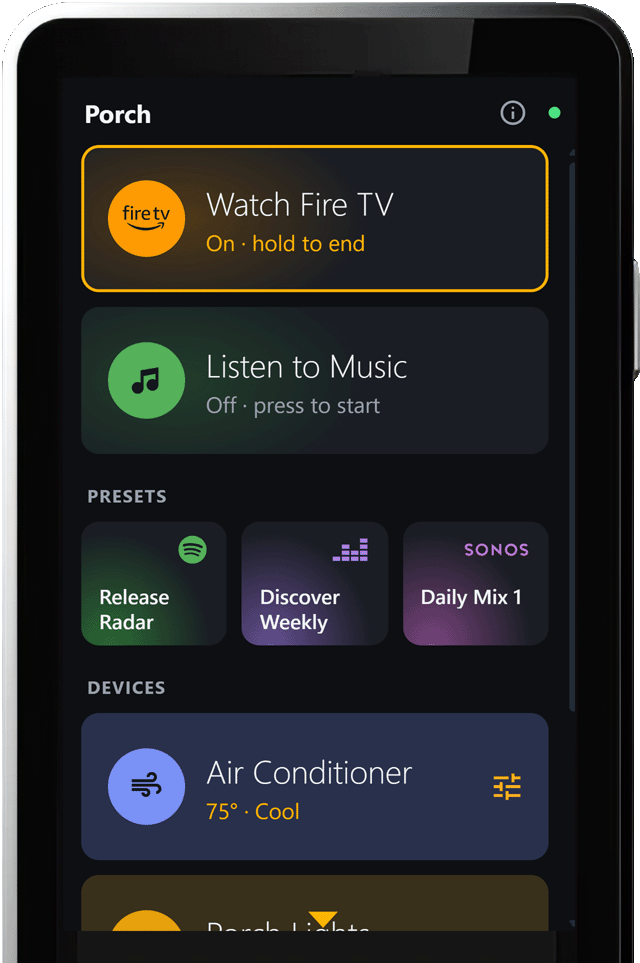
One page wearing the new palette: a running Fire TV activity in its brand orange, Spotify green and Deezer purple on title-led presets below, and a plain device tile carrying an accent (tint) of its own.
Configuration that makes an opinionated design feel bespoke
Activities, presets, apps and even plain device tiles can carry an accent — either one of nine tuned colors (coral, fern, jade, indigo, violet, orchid, rose, azure, slate) or a real brand color: Fire TV's orange, Netflix's red, Spotify's green, and twenty more, adjusted only as much as needed to stay visible on a dark tile. Text on top of any of them automatically picks black or white for readability, including on Apple TV's white and Sony's black.
How the color shows is a style choice per tile or per section: just the icon tinted, a subtle tint across the tile, a soft glow behind the icon, or title-led versions of the same. When an activity is running, its tile warms up a notch — the color is the identity, the brightness is the state.
Streaming App tiles in the drawer are either full color logo tiles (we provide 21 of them, and you can add your own — see TV app logos) or brand colored glyphs, out of the box; stock apps you haven't customized pick this up automatically. Your own hex colors still work exactly as before and are never deleted by trying a named color. And all of it is opt-in: nothing changes on your remotes until you pick an accent.
Every color in the palette is derived, not eyeballed — the same lightness and chroma math tunes all thirty-one, which is why they sit together so well. The full reasoning lives in the identity palette design notes.
A consistent display language across all tiles
Every control shape — sliders, steppers, chips, hold-to-confirm, the two-button pair — is drawn from one shared table that the Studio and the remote both read, so what you configure is what you get, at least thats the goal! The smaller rules got unified too:
- Two-line tiles (name plus status) align identically everywhere, at every size.
- Chevrons and gear icons mean one thing each now: a chevron takes you somewhere, a gear opens controls in place.
- Several tiles can be grouped into one card (a thermostat with its mode switch, say) — and the card now reads as one card: members drop their own backgrounds inside the group, while each keeps its own touch and d-pad behavior.
- Style options only do sensible things wherever they're offered. A title-led style on a tile that has no title band falls back to its plain version instead of half-applying.
- The right-hand icon marks on Title-style tiles sit flush and size together through one theme setting.
- On pages where the physical keys drive a device, the bottom Back/Home strip now names which device holds them, and the title bar washes in the running activity's accent — you always know whose remote you're holding, and whose activity you're inside.
- The focus ring can be turned off. A tester running Harmonium on an old iPhone asked for this: on a touch-only remote there is no d-pad, so the orange ring is just stuck on whatever you tapped last. Theme → Focus ring → Off paints it transparent everywhere (the cursor still exists underneath, so a d-pad remote sharing the config keeps working). A color works too, and a remote profile can carry the same setting — one phone with the ring off, the d-pad remotes with it on.
Why every control looks and behaves the way it does is written down in the control language design notes.
An icon library that spans your whole install
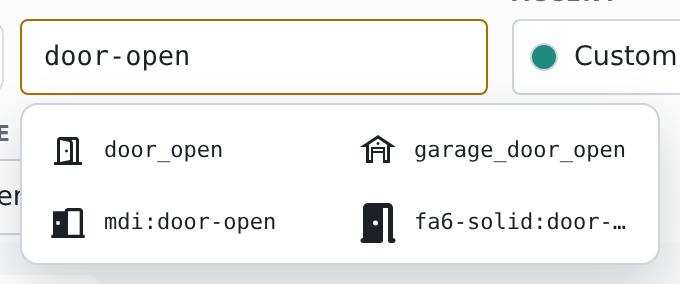
One query, every set: Material, Home Assistant's MDI, and a Font Awesome pack answering together, each glyph drawn live.
Type into any icon box and matches now come from everywhere at once: the built-in Material set, the brand icons pack, all of Home Assistant's own MDI icons, and — if you run the Custom Icons integration — every set you've activated there (Font Awesome, and friends). Type "door" and you get door glyphs from four sets, each drawn live, prefix matches first. Type "phu:" or "mdi:" to search one set only.
Two real bugs died here. MDI search used to be nearly useless because Harmonium was only reading a fraction of the icon list Home Assistant ships — it now reads all ~7,400. And searches no longer download whole icon packs into the Studio; they ask for just the matches, so the dropdown answers in a keystroke instead of hanging.
Icons still work the same way on the remote: everything a config references is baked into the deployed files at save time, so the remote never fetches a full icon pack. And if you use icon packs that only exist as dashboard resources, list their prefixes under Theme → Icons and the picker will ask those packs too. How the whole pipeline works — sources, banking, the browser bridge — is in the icon sets design notes.
Extended entity support
Until now, some device types got beautiful controls (media players, fans, covers) and the rest got a generic launcher. This release closes the gap:
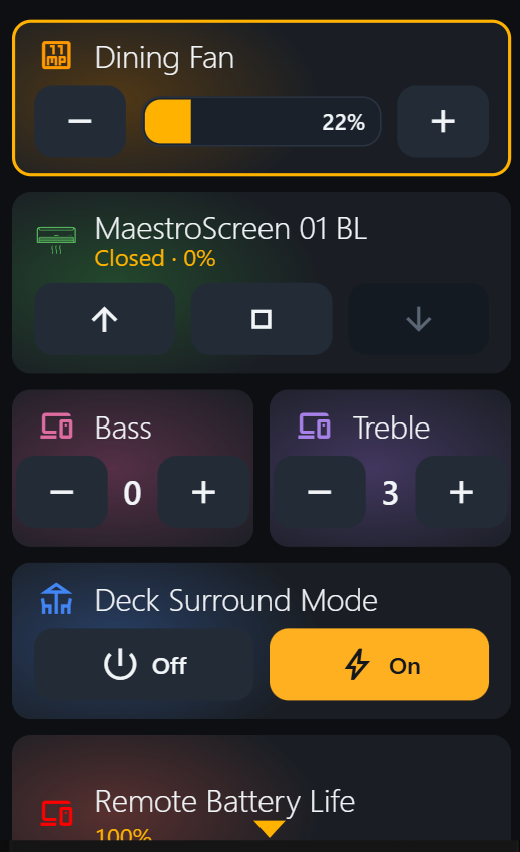
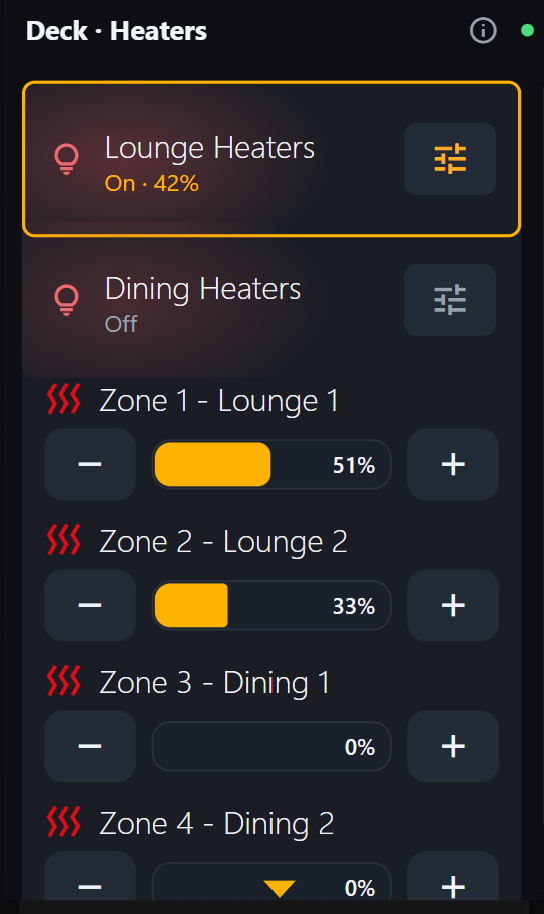
Left: the new controls — a switch pair, a lock with hold-to-unlock, a number slider reading its range from the device, dropdown chips, a scene button. Right: the new light dimmer, twice over, grouped into one card.
- All entities support rendering as (a) A Launcher Tile, (b) a Control Tile. When a Control Tile is selected, there is typically a large and compact variant.
- Switches show a two-button Off/On pair. The side that's currently active is lit; the other is raised and ready. No status line needed — the buttons are the status.
- Buttons, scenes and script triggers are now a single tile that IS the button. Tap it and it flashes "Sent" so you know the press landed.
- Locks get the careful treatment they deserve: locking is one tap, but unlocking takes a press-and-hold — half a second, with a fill that grows under your finger, and letting go early cancels. A jammed lock shows in red with a Retry. If your lock can also open a door (a latch), that hold applies there too. Need some field testing on this one - I only have a basic one.
- Numbers (a target temperature, a fan percentage) become sliders and steppers that read their range and step size from the device itself — a thermostat that moves in half degrees steps in half degrees.
- Dropdowns (input selects, source pickers) get a proper picker page, or inline chips if you prefer.
- Lights get a real dimmer. "Light control" draws a brightness track right in the tile — drag to dim, tap − / + to nudge, and sliding to zero honestly turns the light off. A compact form puts the value and − / + on the row instead. (Color and color temperature are on the list for a later release.)
- Thermostats and aircons get a temperature control. The sa...
v0.86.0-Beta
Harmonium v0.86.0
Coming from v0.85.7 — the last tagged release — this is a double jump: v0.85.8 was never published to HACS, so everything from it arrives here too (its section is below). Export your current workspace(s) for safety. Update in HACS, restart Home Assistant — the migration runs once, automatically — then open the Studio and Save & Deploy.
Breaking & behavior changes
- One-time config migration (layered catalogs). On the first restart, each workspace's catalogs are restructured (details in "The migration" below). It is automatic and backed up first —
config.<workspace>.prelayers.backup.jsonlands beside your deployed config, kept indefinitely — but it is a real format change: after it, your config stores only your own apps/edits/removals. - A custom image on a TV app now fills the whole tile as a channel card (from the unreleased 0.85.8). Concretely: if you had put your own artwork on, say, the Netflix app, it used to render as a small icon stamp — it now becomes the full logo card, matching the shipped logos. And nothing is hardcoded: adding art for an app we don't ship (Sky TV, say) is one file named after the app id, or one image path in the Studio (Platforms → Master list → open the app → the Icon field — a
/local/…path there becomes the card; a plain icon name is the no-logo fallback) — the two-minute recipe is in App logos. - The Apps section of the Studio is now called "Platforms" — same place in the left nav, better name for what it edits.
- "Save + Reload Astrion" is now "Save + Reload Remote" — and it works for any remote. First, what this even is: it's the item under the ⋯ menu at the Studio's top right that saves your config and then makes your hardware remote clear its browser cache and reload, so your change appears on the remote immediately (it presses two buttons that HA's Fully Kiosk integration provides for your remote). Until now it was hardwired to a device named
astrion1and silently did nothing for a remote named anything else. Now you can point it at your remote: in the Studio's map section, under Startup & Home, two new Remote reload pickers let you choose your Fully device's Clear browser cache and Load Start URL button entities. It reloads that one remote — with several remotes on a workspace, the others pick the change up on their next page load (or press their own Fully buttons in HA). If your device happens to be namedastrion1, there's nothing to do — the old defaults still apply. Either way, a missing button now fails loudly, naming exactly what to wire, instead of pretending it worked. - Browsers now get a Home button on room pages. The touch Home button used to hide on the boot view; it now walks parent → boot view → your overview page and hides only at the top. Hardware remotes are unchanged (clean bar).
- No engine/config schema changes beyond the above; the breaking hold-key changes some users asked about shipped back in v0.85.7.
The spread model
Until now, the built-in app list and platform dialects were copied into your config at first install and never touched again — which meant new built-in apps never reached existing installs. From this release the built-in catalogs live underneath your config, and what you see is your list spread over ours: everything you added, edited, or removed is yours forever; everything you never touched now follows the shipped catalog. When a Harmonium update adds an app to a platform (with its launch command and its logo), it simply appears on your Apps page.
What this means in practice:
- Built-in catalog updates reach every install. The four Fire TV apps added in 0.85.8 (Hulu, Fubo TV, ESPN, BritBox) arrive on your Fire TV apps page with this update — nothing to do.
- Your edits are permanent. An entry you changed is yours: updates never touch it. The Studio's Apps editor now shows this per entry — a
stockchip means the entry follows updates,editedmeans it's yours (with one-tap ↺ Reset to built-in if you want back on the update train). - Your deletions are permanent. Remove a built-in app and it stays removed across updates. The Apps editor shows removed built-ins in a "Hidden built-ins" row, each one restorable with a tap.
- Your config file shrinks. It now stores only your own apps, edits, and removals — not a copy of everything we ship. Hand-editing JSON? You lose nothing: the Studio's Code view and the deployed
www/harmonium/config.jsonboth show the complete merged result, every built-in entry included — the shrinkage is in what's stored, not in what you see or edit. Change an entry in the Code view and it's yours; leave one identical to stock and it simply lifts back out on save.
The migration
On the first restart after updating, each workspace's config is examined once. Every catalog entry that matches a shape Harmonium ever shipped is lifted out (the built-in layer supplies it from now on). Every entry you edited stays in your config as yours. A built-in entry missing from your config is treated as your deletion only if every version we ever shipped included it — an entry newer than your install simply starts appearing.
Before anything is touched, each workspace is backed up beside its deployed file as config.<workspace>.prelayers.backup.json in www/harmonium/. The migration log (Settings → System → Logs, filter "harmonium") lists exactly what was lifted, what stayed yours, and what was tombstoned.
Derived classes — clone a platform, keep it updating
Any built-in platform now has ⑂ Derive a class: it seeds a new class of your own from the built-in (say, firetv_custom → rename it FireTV-SE), and the built-in keeps flowing underneath — new stock apps still arrive in your derivative, your changes win forever, apps you remove stay removed. It is the spread model applied one level out: the config stores only your deltas plus a derived_from marker. The class card shows what it derives from, offers View parent / Reset to parent, and can adopt the parent's activities in one tap. One level deep — you derive from built-ins, not from derivatives.
Fast d-pad is first-class
A dialect's D-pad command may now be a full HA action instead of a name — the fast-dpad path (androidtv.adb_command → sendevent, single-digit-ms presses; see docs/design-fast-dpad.md). The Studio's D-pad fields now render an action as a ⚡ chip with a JSON editor (previously they showed [object Object] and a stray keystroke would destroy the action), and every string field has a ⚡ button that converts it to an action template. Combined with derived classes, the intended recipe is: derive your platform, ⚡ the arrow keys, adopt your activities.
The Platforms editor
The Apps section is now Platforms — that's what it edits. Built-in platforms and yours are visually separated, and per-entry provenance (stock / edited chips, hidden built-ins, resets) now works on derived classes too, computed against the parent.
The hardware remote story — reboot-proof keys, and the cord is cut
If you run an Astrion / HA100, the repo-side work in this release is as big as anything in the app:
- New-firmware units are fixed. On the newest Astrion firmware the well-known Expert-Mode Key Mapper setup dies at every reboot — its shell bridge cannot be recreated at boot, and volume/mute/back go dead until you plug USB back in. We root-caused it and rebuilt the whole button story on Key Mapper's IME path, which the system starts at boot like any keyboard. Keys survive reboot after reboot; the full investigation (and every dead end, so you don't have to walk them) is in
remotes/astrion/key-input-findings.md. It's an hour of work...but worth it to me. - Wireless ADB lives on the Blue key. If you update KeyMapper to the latest shipped key_mapper.zip, press Blue — wireless ADB turns on and the remote plays a confirmation chime; long-press Blue turns it off. Which means: do the setup once over USB, then screw the back cover on and never open it again. Push and pull key maps, manage every Fully setting, even mirror and control the remote from your PC with scrcpy — all over the air, with the remote sitting in its charging cradle.
- A complete, field-tested setup guide —
remotes/astrion/README.md— takes a unit from out-of-box to sealed case: Fully + Key Mapper (IME path), KISS as the Home app (so the remote actually sleeps and charges instead of holding a wake lock), the four colour keys (Red = Harmonium, Green = launcher, Blue = wireless ADB, Yellow = recovery), the tuned Fully settings applied in one import, and the reboot test you run before sealing the case. - A fleet toolkit under
remotes/: pull/push scripts for Key Mapper and Fully configs that work over USB or wireless, route by each remote's serial number (units.json— your LAN details never enter a repo), never overwrite a backup, and regenerate the key-map documentation straight from the device's actual config.
This part is repo-side — clone the repo or grab the few files the guide names from GitHub; it's independent of the HACS update.
Fixed — much of it straight off the beta thread's feedback list (post #23)
- Multi-room navigation opens the right room's controller. With two room pages sharing a controller (Deck and Porch both using the TV controller), tapping an activity on the second room could open the FIRST room's version — the deployed config never named each room's activity select, so the controller fell back to the global one. Every room page's minted select is now wired automatically at deploy (and served to the Studio p...
v0.85.7-Beta
Harmonium v0.85.7
The biggest release since the beta opened. Three themes: your config is now protected by a real ownership system (updates can never again strand you on old built-ins or overwrite your changes), the physical keys now do exactly what the routing doc says (several long-press bugs among them), and the Music Library got a full redesign. Around them: a new styling stack, deep links, a rebuilt ⓘ page, and a permanent fix for the "my remote is running an old version" class of bug.
⚠ Upgrading — four steps
-
Export your config first (Studio → Export) and keep the file. It's your safety net: Studio → Import puts everything back exactly as it was, and if you report a problem it's what lets us reproduce it (and if you need it, we can fix it for you).
-
Restart Home Assistant after the HACS update — the integration's Python changed (new service option, new API endpoint).
-
Open the Studio and press Save & Deploy. Updates to built-ins apply when you save.
-
One last cache clear, then it maintains itself. If the remote's ⓘ page shows an engine older than 0.85.7, on the Fully device page in HA press Clear browser cache, then Load Start URL (the two buttons). Then set Fully's Start URL from the Studio: open the page the remote should boot to (usually your home page) and click the second link under its Name — the one that ends
&device=<profile>— to copy the complete address:
That address re-checks the engine version on every boot, and from this release the engine also checks for a newer deployed version whenever it reconnects or wakes and reloads itself — so updates reach long-running kiosks on their own. If a remote ever seems stuck anyway, the failsafe is those same two Fully buttons: Clear browser cache, then Load Start URL. The remote's ⓘ page shows the address the device is currently using (the "This page" row) — compare it against the Studio's link to confirm the remote is pointed at the right place.


⚠ Breaking changes
Three things change real behavior. The first needs your hands on the remote; the other two arrive on their own.
1. The hold-gesture keys moved — hardware remotes need their Key Mapper rules updated (action required).
The engine's hold vocabulary is now: ] = hold-Back, = = hold-Home, F12 = hold-Power (All Off). The pre-0.85.7 profiles sent = for hold-Power — so on a remote still carrying the old rules, hold-Power goes Home instead of All Off, and hold-Home does nothing.
Fix it in the Key Mapper app on the remote. The output keys are identical on both remotes; the trigger keys are mirrored (Astrion: Home=F1, Power=F2 · RS90: Power=F1, Home=F2) — never copy one remote's rules to the other:
| Rule | Astrion trigger | RS90 trigger | Output key |
|---|---|---|---|
| Hold-Back | Back, long-press | Back, long-press | ] — KEYCODE_RIGHT_BRACKET (72) |
| Hold-Home | F1, long-press |
F2, long-press |
= — KEYCODE_EQUALS (70) |
| Hold-Power | F2, long-press |
F1, long-press |
F12 — KEYCODE_F12 (142) |
Or skip the hand-editing and restore our ready-made profile: copy remotes/keymapper/<remote>/key_mapper.zip to the remote (adb push, or download it in the remote's browser), then in Key Mapper: ⋮ menu → Restore and pick the file. It contains the complete mapping, these three rules included.
The full rule-by-rule maps: Astrion key map · RS90 key map · setup runbook: docs/cookbook/hardware-keys.md.
Check your work: turn on Key debug (Studio → your home page → Key debug switch), then hold Back, Home and Power on the remote — the debug card on the remote should print ], = and F12. Turn the switch off when done.
The Harmonium-side keymaps heal automatically (if you never edited them); the rules on the device itself are the one part no update can reach.
2. Tap vs hold flipped for Back/Home on TV pages. The doctrine is now: tap Back/Home drive the device (i.e. FireTV, AppleTV) on TV pages (and Harmonium everywhere else); hold Back/Home always drive Harmonium. The old policy sent the holds to the device. Heals automatically unless you edited the input policy — nothing to configure, but the reversal takes a day of getting used to.
3. The on-screen transport row is removed from remotes with real transport keys. The astrion2 and rs90 profiles declare physical_transport, so the stock music controller hides its transport bar there — not missing: the physical REW/Play-Pause/FWD buttons do that job, and the screen space goes to the Now Playing card and queue.
Your config is yours now
Every part of an install is now formally one of three things: ours (stock — updates refresh it), yours (your pages, activities, photos, remapped keys — no update may ever touch them), or started as ours but editable — and that last group is judged by content fingerprint against every shape we have ever shipped:
- A built-in you never touched silently heals to the newest version. New stock apps, fixed layouts, new capabilities, new key maps — they just arrive. Expect some visual updates from this: the stock TV page's Now Playing becomes the art hero, and the back/home strip and transport row now show or hide by remote profile.
- A built-in you edited becomes your copy, formally. The Studio shows "Your edited copy, preserved.", it unlocks for editing, and ↺ Reset to built-in returns current stock any time. Nothing you wrote is ever thrown away.
- Device dialects (Fire TV, Google TV, Samsung, Apple TV) work the same way: untouched dialects track ours wholesale (new apps arrive), edited ones are yours — with View stock in the Apps editor to copy across whatever you want.
- Remote keymaps and the input policy: un-remapped/unedited copies refresh (that's how this release's key fixes reach you automatically); change even one key and the whole unit is yours.
The keys, finally consistent (sort of)
- The navigation doctrine is enforced everywhere (
docs/HARMONIUM-INPUT-ROUTING.md): tap Back/Home go to the device on TV pages and to Harmonium everywhere else; long-press Back/Home always go to Harmonium. Installs still carrying the older policy (long-press went to the device) heal automatically — unless you edited it, in which case it's yours or manually reverted to stock. - Does this model feel right to you? We want opinions on the targeting approach — D-pad/Back/Home drive the on-screen remote everywhere except TV pages, where taps drive the television. Join the discussion: issue #5.
- Long-press Home was toggling the TV. The stock Astrion keymap had the long-press-Home key wired to hold-Power (end/restart the activity). Fixed across astrion, astrion2 and rs90:
=is long-press Home,]is long-press Back,F12is long-press Power (All Off) — chosen because no physical key emits F12 and it can't be typed into a text field. Update your device rules per the Breaking-changes section above. - Long-press Back reloaded the page on the Astrion. A long-press that slips past the shell's mapping arrives as native Android Back and the webview unloads. The engine now traps it — a stray native Back behaves as a normal Harmonium Back; the page never unloads.
- Ch▲/Ch▼ jump sections on every page that has them (walk tile-by-tile where there are none; still the panel walk on TV pages), with proper breathing room above the jumped-to section.
- Menu opens the focused tile's own page — a nav card's target, a device's detail page, an activity's controller; deliberately nothing otherwise. A menu binding still wins.
- The device-keys strip works from the D-pad. The info / menu / back / home row was touch-only; it now roves like the transport row — ◀▶ move the highlight, OK presses, ▲▼ move on. And ▲▼ never snag on corner ▶ badges anymore.
- Hold keys are bindable:
back_hold/home_holdaccept page or workspace bindings like every other key. - The vanishing power button: reopening a browser mid-activity showed the card lit but no End button. The engine now falls back to device truth when the routing select is stale — exactly one activity provably running → the button shows.
Start activities from outside Harmonium
Wall switches, dashboards and automations can now start an activity properly — the routing and the activity's Start action — with one service call (the item promised in the 0.85.6 notes):
service: harmonium.set_activity
data:
  activity: listen_to_music
  start: true
start: true runs the activity's Start action after flipping the routing select; leave it off and the call only flips routing (the old behavior, unchanged for existing callers). The owning room and workspace are found automatically. To end things: activity: "off" with start: true runs the running activity's Stop action first — add room: porch to end one room instead of the whole workspace.
The Music Library, redesigned
- Grid views are art-forward: the artwork is the tile — reserved at its full square size from the first paint (no more collapsed tiles while art loads), name under it (two lines when needed), a service-colored dot (Spotify green, Deezer purple).
- List view is a real list: compact rows (roughly seven per screen instead of four), square 48px art, bold title, a "Spotify · Playlist" line, a colored source bar, a › on rows that drill. The queue got the same compaction and the same square art.
- The D-pad reaches the top rows: ▲ from the first item climbs into the ca...
v.0.85.6-beta
Harmonium v0.85.6
A big one. Most of this release exists because two beta testers wrote
things down — thank you both.
(v0.85.5 supersedes two short-lived releases from the same day.
v0.85.3 was withdrawn: it could overwrite a user-made RS90 photo skin
during migration, and updated installs never received the RS90 remote
profile. v0.85.4 fixed both but still left updated installs with a
frozen TV controller. If you installed either, update normally.)
⚠ Upgrading from v0.84.1 — three steps
- Restart Home Assistant after the HACS update (the Python changed).
- Check the remote got the new engine. If it looks unchanged, press
Clear browser cache on the Fully device page and reload. The ⓘ page
should say 0.85.6. - Open the Studio and press Save & Deploy once. Updates to the
built-in pages are applied when you save — never behind your back.
Highlights
The buttons finally make sense. One written rule set now governs every
physical key (docs/HARMONIUM-INPUT-ROUTING.md). The arrows drive what
you're looking at — the TV on TV pages, the panel everywhere else. Ch±
borrows the arrows for the panel with a visible focus ring that hands them
back after five idle seconds. Volume, mute and transport never change
meaning. Hold Back or Home always reaches Harmonium. Press ⓘ on any page
to see the live key map. Remotes with real transport or Back/Home keys no
longer show the on-screen duplicates — and that now works on updated
installs too, not just fresh ones: the built-in TV controller used to be
frozen at install time; it now stays current like the other built-ins
(your customised copies are never touched).
Apple TV works now. The remote was sending Fire TV command names;
Apple TV only accepts its own (lowercase — and its "back" is literally
menu). Dialects can now declare their platform's command names under
D-pad commands, and a stock Apple TV dialect ships preconfigured with
sixteen launchable apps checked against a real device.
The RS90 arrives everywhere. The Haptique RS90 gets a remote profile
(38-key map), a photo skin with a transparent screen cutout, and — new in
this release — the profile reaches existing installs on their first
save, not just fresh ones. If you made your own RS90 photo skin, it is
explicitly protected: no earlier release ever shipped a file by that
name, so the updater refuses to claim yours — photo, key mapping and
screen cutout stay exactly as you made them.
Now Playing, rebuilt. Five styles per activity — Slim row, Basic, and
three sizes of artwork card up to the near-full-screen Art Hero Large.
Cards hold their size through play/pause/idle, pausing dims the artwork
instead of erasing it, and TVs headline the app you're in.
Your changes are yours — stock is locked. Built-in controllers, device
pages and skins are read-only in the Studio; press ⧉ Duplicate to edit
to customise. Updates keep the built-ins current and can never silently
wipe your work. This also fixes fresh installs missing several bands on
the stock Music controller.
Device photo skins for the Astrion v2 and Haptique RS90, with shipped
skins and your uploads now stored separately so updates never touch your
photos.
Smaller things: battery level on the ⓘ page, engine version shown on ⓘ,
per-tile height in the Styling tab, KeyMapper Expert Mode documented, and
the 2017-browser compatibility promise is now machine-checked for CSS too.
Known, and next
harmonium.set_activity switches what a room shows; it doesn't run the
Start sequence (use harmonium.run for that — a start: option is
planned). Apple TV owners: confirmation that the new dialect behaves would
be very welcome in the release thread.
Full notes: docs/releases/release-notes-v0.85.6.md
v0.84.1-Beta Release RC1
Hopefully our beta release!
Full Changelog: v0.83.10...v0.84.1
v0.83.10-Beta
Final release before code refactoring
v0.83.9-Beta
v0.83.8-Beta
Multiple updates to improve Music Controller and TV Controller and allow importing and exporting workspaces - and drag and drop images.
v0.83.7-Beta
Harmonium v0.83.7 — The Controller Release
The biggest release since the Studio itself: activities gained a
control panel of their own, speakers became a first-class building
block, Now Playing learned three shapes, and a stack of field bugs —
including dead volume keys on fresh installs — got fixed.
The Controller tab
Every activity now has a Controller tab — per-activity switches
over the shared control surface, no custom copy needed:
- Band switches — turn Now Playing, Transport, Modes, the Volume
band, Speakers, Cast-group cards, Source picker, Presets and the
Devices section on or off for this activity only. Absent = Auto =
the band's own rules; other activities on the same surface keep
their own answers. - Reorder the bands with ↑↓ — non-band tiles hold their slots.
- Label slots — rename any single-tile band on the remote (empty
= no label, ↺ restores); Presets and Devices rename their section
headings. Placeholders show what the band actually says today. - Volume style per activity (Compact / Slider / Stepper), and the
stepper is now its own shape: "Vol n%" on the title line with a
fat draggable track between − / +. - Presets folded in beneath — the activity's one-touch shortcuts,
now with a searchable service picker (media_player services first)
and cast-first entity targeting.
Speakers
- Speaker grouping card: join/unjoin players against the running
activity's stream (standardmedia_player.joincontract — Sonos,
Music Assistant), with a group volume that preserves relative
levels, and a per-player volume link toggle — an unlinked
player keeps playing in the group while the group slider leaves it
alone. - Speaker Groups: named, workspace-level sets of joinable players
("Outdoor Music Players") independent of any activity's cast —
edited under Model → Speaker Groups, selected per activity on the
Controller tab. Two card modes: a slim launcher ("5 available ·
2 linked" → the group's own page, with a volume row per player) or
the full card inline. - Every player row's volume is
[−] [track with the % inside] [+];
on the inline card, tap a player's name to reveal it. - Cast groups can hold loose entities now, and grouped entities leave
the Devices section for their group's page.
Now Playing, three ways
Pick per activity on the Controller tab: Standard card (state and
source on separate lines), Slim row (a one-liner with a live play
indicator and auto-scrolling title), or the Art hero — artwork
riding the right edge at full strength, fading toward the track text,
with the library jump as a full-height fade-in zone over the art. The
original full-bleed wash survives as Art wash.
Fixes that matter
- Volume keys work on fresh installs: unbound
vol_up/vol_down
now route to the running activity's wired volume at the engine
level (the starter config shipped without bindings — every new
install had dead volume keys). - Generated Stop is conditional: ending an activity clears the
room's routing only if that activity still owns it — a room can run
more than one. - Mute indicator on volume tiles (glyph + dimmed track), and the
volume % is said once, not twice. - Icon-font gate: no more ligature-text flash before Material Symbols
loads. - A malformed entity id can no longer silently kill a whole page's
live updates. harmonium.runexplains the draft/saved seam instead of erroring
cryptically.- Studio: the stretched-preview bug was pinned to the preview's
scale math and fixed; a ↻ button reloads the engine preview in one
tap. - Soundbar-style devices (volume-only claims) get their Inputs row.
Fresh-install polish
A virgin HACS install now seeds a starter config server-side (with
the bundled Astrion skin and working volume-key bindings) and the
Studio opens on it ready to Save & Deploy — no more red "no config
found".
For tinkerers
pull-keymapper.bat / push-keymapper.bat back up the remote's
KeyMapper wiring into the repo over USB and restore it onto a new
device — see docs/cookbook/hardware-keys.md.
Full detail: docs/PROJECT.md (the changelog) and
docs/cookbook/creating-an-activity.md §8 for the Controller tab.