Releases: skv89/Topaz-SLP-Launcher
Release list
Topaz SLP Tuning Launcher v1.0.3.4

Topaz SLP Tuning Launcher v1.0.3.4
Test your own setting combinations, run only the tests you choose, and get clearer help when AutoTune encounters a runtime problem.
Custom combinations and selected tests
- Add row or combination and Edit row or combination use familiar tuning controls. Start from current, saved or previously tested settings, and hover over a combination row for its full configuration.
- The arrow beside Start AutoTune offers Run selected tests. The required Topaz and upgraded-cuDNN baseline comparisons are included automatically. This works before your first full AutoTune run and preserves the other rows in your suite.
- Built-in adaptive plans select tests up front for your hardware and output resolution, without a preliminary calibration run or previous results. Saved custom suites retain your edits.
Earlier failure detection and better support ZIPs
- AutoTune automatically checks each selected cuDNN runtime before starting benchmark rows. No new button is needed, and simply opening the launcher has no additional runtime check.
- Startup checks record the runtime actually loaded and useful DLL/version information. Each runtime check has a 30-second deadline; it does not render a video or change installed DLLs.
- Support ZIPs include upgraded-cuDNN inventory metadata and consider every test row. Problem rows receive priority within the size limits, and the manifest identifies missing, truncated or omitted evidence.
- New runs retain compact memory, temperature, GPU clock and chunk-timing evidence using existing readings. Sensor polling intervals and memory safeguards are unchanged.
- Unsupported saved test rows cannot be restored or run. Use Create / refresh plan to build a supported plan; the original saved plan is retained.
This release improves diagnosis of cuDNN startup failures; it does not claim to resolve every Windows DLL-initialization failure. It contains no Fusion feature.
Update
Exit the launcher, back up the old EXE, and replace it with Topaz-SLP-Launcher.exe. Keep Topaz-SLP-Launcher-Data to preserve settings, presets, reports and cuDNN backups.
Requires Windows x64, NVIDIA CUDA hardware and a supported Topaz Video installation with SLP 2.6. No Python installation is needed. The portable app is unsigned.
Topaz SLP Tuning Launcher v1.0.3.3
Topaz SLP Tuning Launcher v1.0.3.3
AutoTune now recovers from more memory-limited tests, makes better use of earlier measurements, and gives clearer results when a run cannot finish.
- Continue after a recoverable memory limit: a test that reaches a memory safety limit can be stopped and skipped once its worker has closed and memory has recovered. A failed required upgraded baseline, persistent memory pressure or unavailable safety readings still stops the run and preserves completed results.
- More reliable GPU memory readings: improves Windows GPU counter handling, checks that required readings are ready before each test, and records clearer troubleshooting details if they remain unavailable.
- More realistic combination estimates: retains an allowance for Windows, Topaz and other applications after failed tests, and uses measured memory overruns to refine later choices. Each preset must still fit its own VRAM and system RAM buffers.
- Fewer repeated baseline tests: after some brief memory failures, AutoTune can reuse a recent, comparable upgraded baseline instead of running it again.
- Better chunk-test coverage: eligible high-resolution adaptive plans can include a 161-frame chunk test when the initial memory estimate would otherwise exclude every larger-chunk test.
- Clearer stopped-run reports: incomplete tests no longer display partial FPS as a completed result. Reports retain stop reasons and memory context even if the first baseline fails, and identify the actual recommended presets when available.
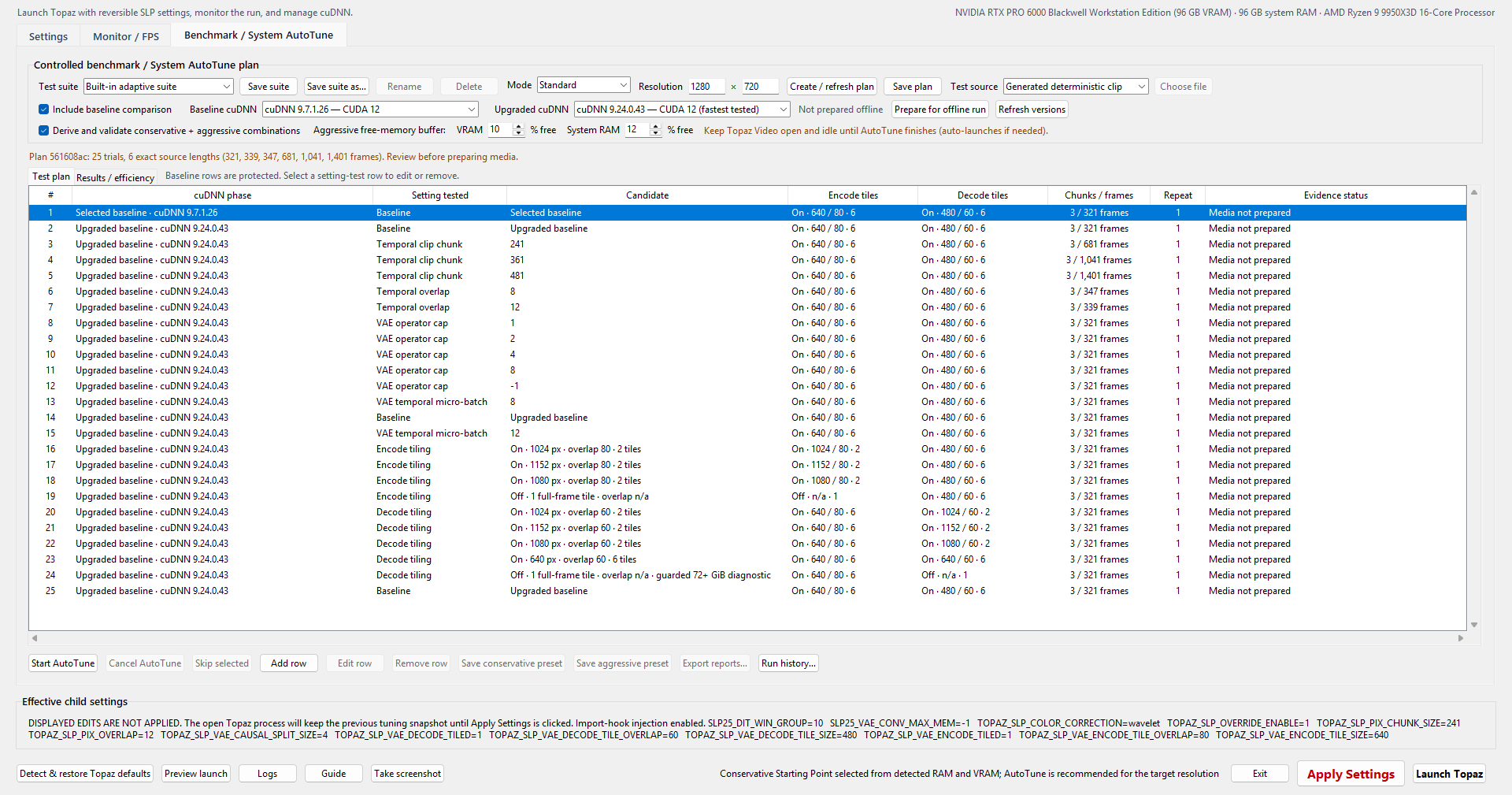
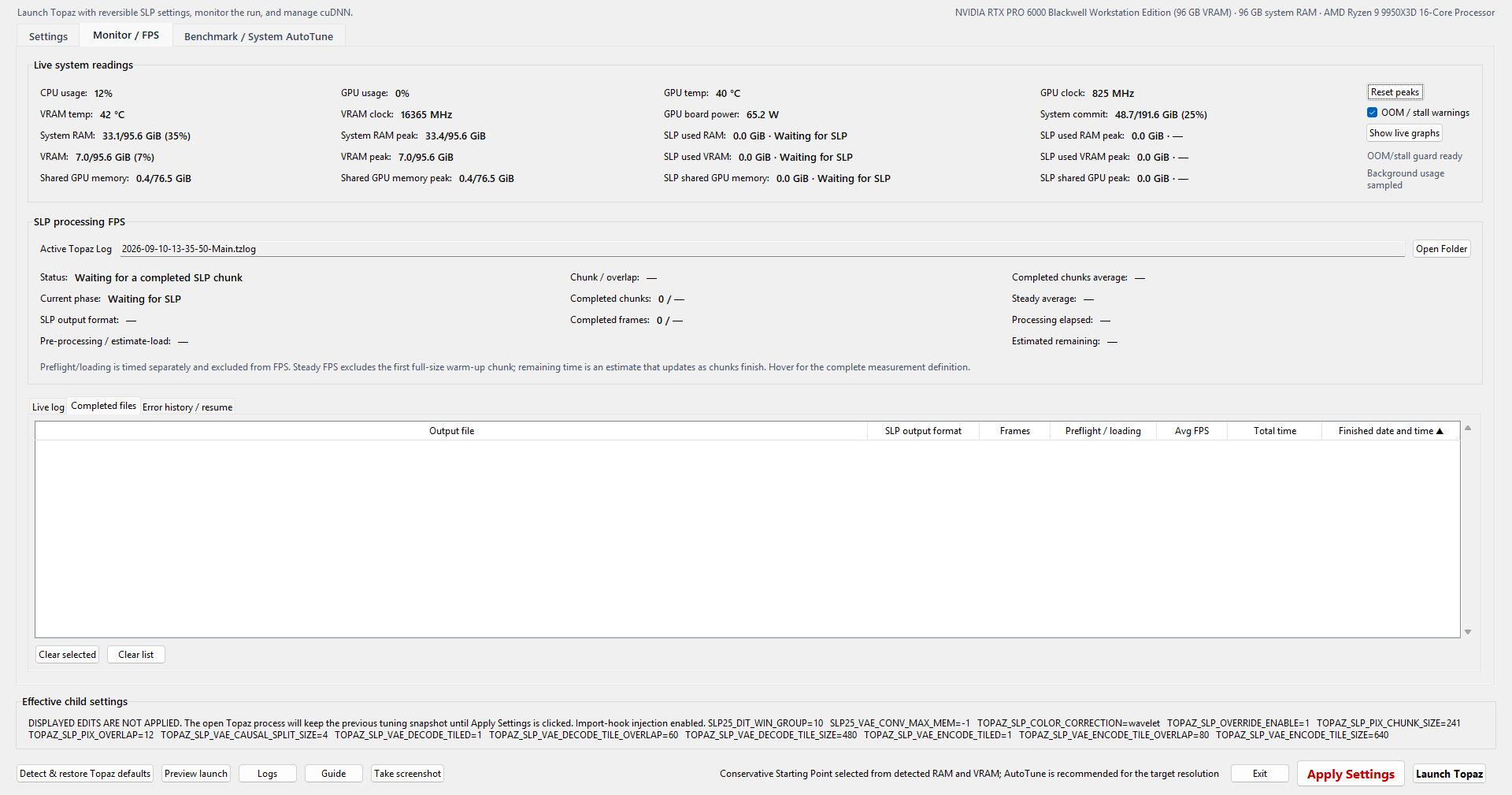
Screenshots show the existing interface from v1.0.3.2. Settings and memory needs vary by computer, video and resolution.
If AutoTune still stops: open Run history…, select the affected run and choose Export selected diagnostics…. Use App support ZIP… for a general launcher problem. Review the ZIP for private information before sharing it.
Updating: exit the launcher, back up the old EXE and replace it with Topaz-SLP-Launcher.exe. Keep Topaz-SLP-Launcher-Data to retain your settings, presets, reports and cuDNN backups. Windows x64, Topaz Video with SLP 2.6 and an NVIDIA CUDA GPU are required; no Python installation is needed. See the README for setup and memory-buffer guidance.
SHA-256 — Topaz-SLP-Launcher.exe:
686383a5ea99f9c7efdf08f2af7fc4f5be2e9a6e69dd73dba23ae301b8c3dd4d
Topaz SLP Tuning Launcher v1.0.3.2
Topaz SLP Tuning Launcher v1.0.3.2
AutoTune makes better use of completed setting tests, gives you control over aggressive memory buffers, and explains its recommendations.
- Better combination selection: ranks combinations by predicted speed under each preset's VRAM and system RAM limits. Validates up to three aggressive and three conservative choices, reuses eligible successes, and keeps a conservative fallback when needed. It does not repeat the isolated test suite.
- Adjustable aggressive buffers: hardware-specific recommendations but now allows user to set their own buffers.
- Clearer preset help: hover over either Save preset button for the selection method, tested recommendation and up to two calculated alternatives, with speed and memory comparisons. The help identifies recorded capacities and buffers, differences from the current setup, and the winner's measured memory peaks. F1 opens the help from the keyboard.
- Automatic stalled-test handling: candidate render phases that stop reporting progress can be stopped and skipped after a bounded wait. AutoTune verifies cleanup and memory stability before advancing, while preserving completed results.
- Ctrl+Z: undo tuning parameter changes and AutoTune row edits or deletions.
- Compact, lighter monitoring: automatic five-second readings including supported VRAM temperature, with controls beside the readings. Low-VRAM warning thresholds are reduced to 0.8 GiB remaining on 16-GB cards and 1 GiB on 24-GB cards based on user feedback.
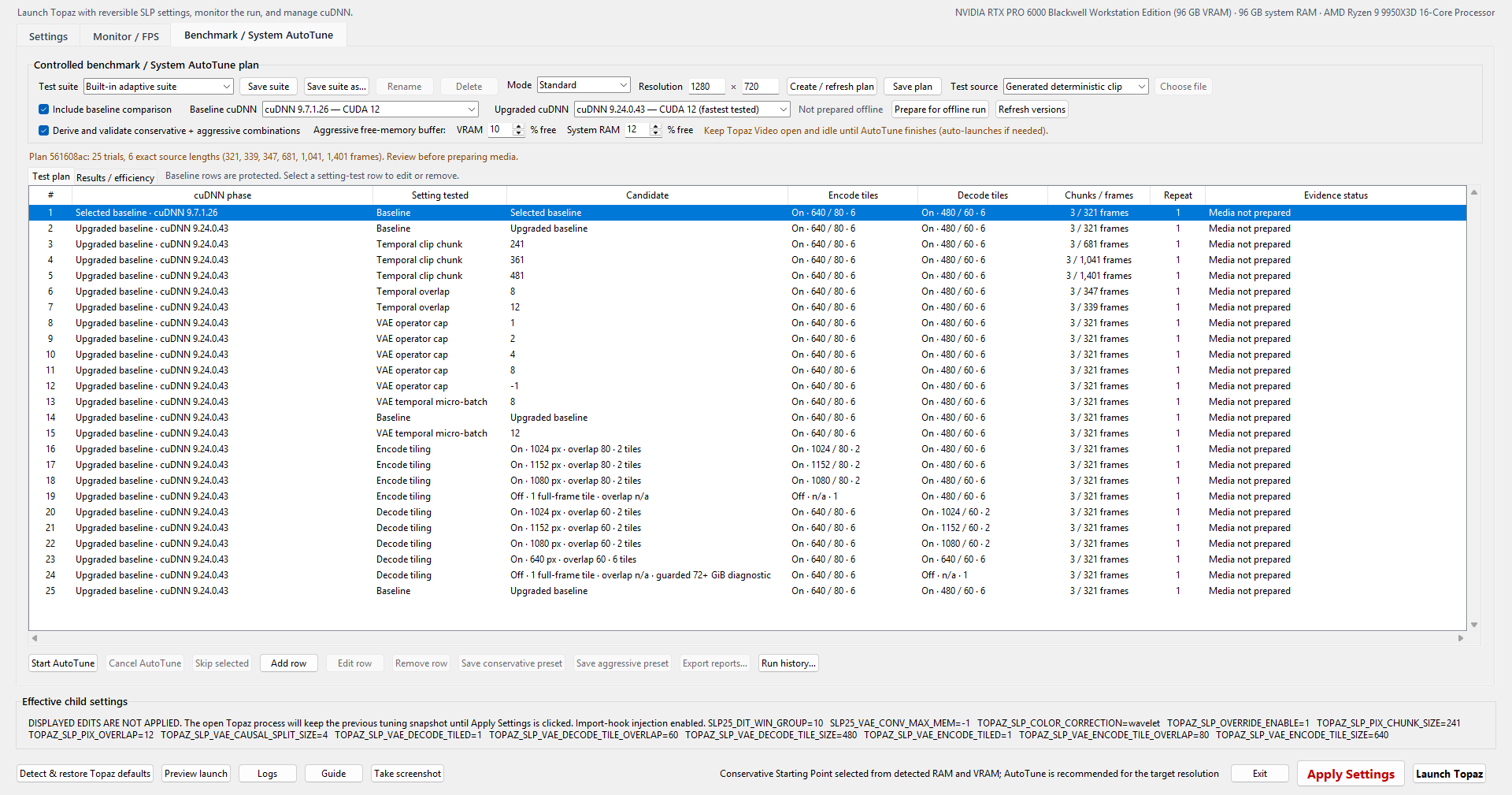
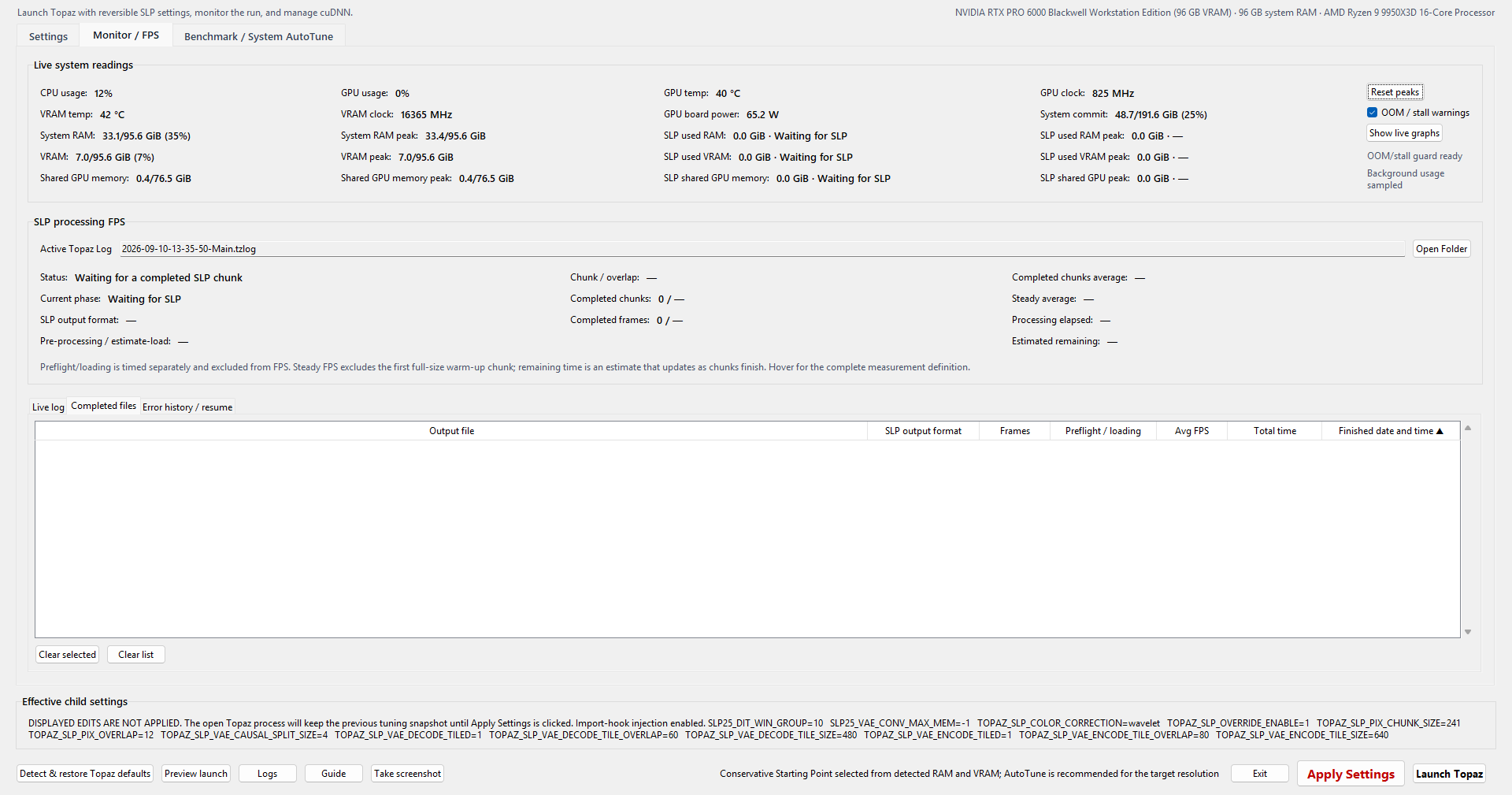
Memory percentages refer to total installed capacity. Real Topaz exports may need more memory than the idle interface used during AutoTune. Calculated alternatives are estimates; only eligible tested recommendations can be saved. See the README for the hardware buffer table and details.
Updating: exit the launcher, back up the old EXE and replace it with Topaz-SLP-Launcher.exe. Keep Topaz-SLP-Launcher-Data to retain your settings, presets, reports and cuDNN backups. Windows x64, Topaz Video with SLP 2.6 and an NVIDIA CUDA GPU are required; no Python installation is needed.
SHA-256 — Topaz-SLP-Launcher.exe:
1c065c9c383005e4a04e6b9d5be011b76f26b2a22732bbf7a27fa21e4ae651ac
Topaz SLP Tuning Launcher v1.0.3.1
Topaz SLP Tuning Launcher v1.0.3.1
Fixes FFmpeg/FFprobe detection errors that could stop AutoTune or faster preflight.
- Finds both tools beside the launcher EXE, even if you rename it.
- Fixes detection when the tools are on another drive.
- Gives clearer instructions when a tool is missing.
If needed, put ffmpeg.exe and ffprobe.exe in the same folder as Topaz-SLP-Launcher.exe, then try again. No system settings need to be changed. Recommend downloading the Gyan version full build from https://www.gyan.dev/ffmpeg/builds/
SHA-256 — Topaz-SLP-Launcher.exe:
e4e59b8bb13d8985cf698fd0080660468f10c43ea159bc304c1c516beaa3bf23
Topaz SLP Tuning Launcher v1.0.3
Topaz SLP Tuning Launcher v1.0.3
A simpler interface, live performance graphs and more dependable long sessions.
- Opens maximized with compact controls and clearer hover help.
- Sets up tuning compatibility automatically—no separate hook button.
- Broader compatibility for different Topaz Video releases including tested support for Topaz Video v1.7.1.2 BETA.
- Adds synchronized live graphs with memory peaks and processing phases.
- Starts AutoTune fresh each time, with editable test suites and improved results/report handling.
- Groups diagnostic export and disk cleanup in Run history.
- Fixes launcher memory growth, popup stability and media-tool discovery problems.
Update: choose Exit in the launcher or its tray menu, back up the old EXE if desired, then replace Topaz-SLP-Launcher.exe. Keep Topaz-SLP-Launcher-Data to preserve settings, presets, reports and cuDNN backups.
Requires Windows x64, a supported Topaz Video SLP 2.6 installation and an NVIDIA CUDA GPU. No Python installation is needed.
Tuning remains experimental. Start conservatively and test your own resolution; settings from a high-memory workstation may not fit smaller GPUs. This release does not claim to fix every reported OOM. The EXE is unsigned, so Windows may show an unknown-publisher warning.
SHA-256 — Topaz-SLP-Launcher.exe:
5e9feb61c6182197574e9ae5145f319f37043f262ce554f4f6132ed63f2daa7d
Topaz SLP Tuning Launcher v1.0.2.3
Topaz SLP Tuning Launcher v1.0.2.3
Full-Topaz memory and OOM regression
v1.0.2.3 fixes the full-Topaz launch regression that could make v1.0.2.2 consume far more dedicated VRAM than v1.0.0 with the same visible SLP settings, causing slowdowns, shared-memory spill, or out-of-memory failures on smaller GPUs as reported by various users.
The cause was not a different neuroserver.exe command line. Blank DiT block/MLP fields mean “keep Topaz's native profile values,” but app versions after v1.0.0 settings-file refresh removed the native 16384/16384 values and restored only fields the user had explicitly filled in. The worker therefore reached its DiT phase without those native settings even though the GUI still looked equivalent. Direct AutoTune rows did not use this affected full-Topaz refresh path, which is why they functioned normal while a regular Topaz Video through the tuner app did not.
The corrected hook now restores omitted DiT block/MLP values from the exact verified SLP module's captured native constants after import. Explicit user-entered values still override them, and direct AutoTune behavior is unchanged.
AutoTune prepared-source integrity
v1.0.2.3 fixes an AutoTune failure in which every test row could stop immediately with AutoTune source SHA-256 changed after media preparation.
The controller previously recorded the prepared clip's digest before the final geometry-probe boundary. If the file's bytes changed during that post-encode interval, every row inherited a stale digest and correctly refused to process the finalized file. The controller now verifies exact frame count, resolution, and square-pixel geometry first, then hashes the finalized clip only after its filesystem identity remains stable through a bounded settle check.
Packaging
The release artifact remains the single portable Topaz-SLP-Launcher.exe. It is not Authenticode-signed, so Windows SmartScreen may show an unknown-publisher warning.
- File size: 22,253,824 bytes
- SHA-256:
4498D11347CAFD1B5A6B610BCC086D88663FA1B1111A1647EB66A04303F01D28
Download it only from this repository and verify the published SHA-256 before running it.
Topaz SLP Tuning Launcher v1.0.2.2
Topaz SLP Tuning Launcher v1.0.2.2
v1.0.2.2 is a focused AutoTune compatibility hotfix for the portable Windows launcher.
AutoTune FFprobe compatibility
Some systems do not have a separate FFmpeg installation on the Windows PATH. On those machines, v1.0.2.1 could prepare benchmark media successfully but then start Topaz neuroserver.exe from its subdirectory without making the already-discovered FFprobe available to the SLP worker. Both the faster threaded probe and Topaz's native fallback could fail with FileNotFoundError: [WinError 2], producing neuroserver code 7 on every row before VAE encode. This was not an OOM failure.
The launcher now selects one complete FFmpeg/FFprobe pair and carries that exact selection into each affected child process. A complete independent/system pair remains preferred. If none exists, it uses the pair bundled beside the selected Topaz Video executable. The exact FFprobe path is given to the process-local hook, and the selected pair's directory is placed first only on the child PATH so Topaz's compiled native fallback can also resolve ffprobe. No Topaz files or global Windows environment variables are changed.
Launch and AutoTune evidence records the selected source and exact tool paths. Nonzero worker exits now surface a bounded relevant exception line when available instead of reporting only the exit code; explicit OOM/allocation messages retain their existing capacity classification.
Benchmark mode order
The Mode dropdown and its hover guidance now follow shortest-to-longest order: cuDNN only test, Quick, Standard, Thorough.
Download verification
- File:
Topaz-SLP-Launcher.exe - Size:
22,251,854 bytes - SHA-256:
5314F207724C42C49D467E4E7F8247BB67379FCCBBA9525761616BF81BCE32CF - File/Product version:
1.0.2.2 - Authenticode: not signed; Windows SmartScreen may show an unknown publisher
Scope
This hotfix addresses the missing-FFprobe launch failure. It does not claim to eliminate genuine allocation failures or the separately reported, locally unreproduced full-Topaz-launch memory behavior.
This public release is intentionally binary-only. GitHub's automatically generated tag archives contain the same minimal release-only tree and no application source, tests, build scripts, development workflows, or QA records.
Topaz SLP Tuning Launcher v1.0.2.1
Topaz SLP Tuning Launcher v1.0.2.1
v1.0.2.1 is a corrective reliability release for the portable Windows launcher.
AutoTune low-memory correction
Native and Upgraded baseline rows now observe RAM, Windows commit, dedicated VRAM, shared-GPU spill, and forward progress without enforcing launcher-added memory floors while the SLP worker continues to advance. This permits baseline behavior comparable to an ordinary Topaz run on a 12 or 16 GiB card instead of stopping merely because dedicated VRAM is nearly full. Real worker failures, cancellation, timeouts, Topaz lifecycle violations, and sustained spill accompanied by severe progress collapse still stop the row.
Experimental rows no longer reserve a fixed amount or percentage of dedicated VRAM, and every row receives Topaz's full nominal device-memory limit. The 0.3/0.5/1/4 GiB VRAM tier values now arm sustained process-attributed shared-memory spill detection near the local-memory limit; low free VRAM alone does not fail a row.
The previous 4 GiB physical-system-RAM buffer is reduced, not removed: candidate rows retain 1 GiB on systems through 24 GiB RAM and 2 GiB above 24 GiB. The separate Windows commit/pagefile reserve remains 8 GiB. Baseline rows remain observation-only while they continue making progress.
cuDNN-only comparison and plan editing
- Added cuDNN only test to the Mode dropdown. It runs exactly two Standard-length rows at Topaz-native SLP settings: the selected native/baseline cuDNN and the Upgraded baseline.
- Custom tuning rows are ignored in this mode and tuning recommendations are disabled.
- Renamed Test baseline to Upgraded baseline.
- The keyboard Delete key can remove the selected custom test-plan row, including the final row; an empty custom suite can therefore run the same narrow cuDNN comparison.
Custom Topaz model folders
Compatibility discovery now reads the selected Topaz product's configured Windows ModelDir before trying default ProgramData and installation-adjacent model locations. This restores launch and AutoTune support when SLP 2.6 assets are stored in another local folder or drive. Missing, inaccessible, malformed, duplicate, or stale configuration entries fall back safely, and a configured folder still must pass unambiguous SLP asset validation.
Validation
The final source passed 252 launcher tests, 22 injected-runtime-hook tests, and the source GUI self-test. The exact standalone executable passed the packaged GUI, helper, cleanup, embedded-notice, icon, private-path, source-test, and runtime-hook release gate.
Known limitation
A credible 24 GiB field report found substantially higher memory use when the same displayed settings were launched through v1.0.2 than through v1.0.0. Controlled same-settings tests on the development workstation did not reproduce that difference, so v1.0.2.1 does not claim that the full-Topaz-launch memory discrepancy is resolved. The AutoTune corrections prevent launcher-added reserve thresholds from causing false failures, but they cannot prevent a genuine Topaz, CUDA, driver, or Windows allocation failure. Keep a system-managed pagefile enabled and share launcher diagnostics plus the matching Topaz .tzlog if the issue occurs.
Compatibility and safety
- Independent community tooling for unsupported Topaz SLP internals; not affiliated with or endorsed by Topaz Labs or NVIDIA.
- One portable, unsigned Windows executable. No application source is distributed in the public release.
- Test representative output before unattended production use.
Download verification
- File:
Topaz-SLP-Launcher.exe - Size:
22,247,737 bytes - SHA-256:
EEA7008E63986F66375EDFE572A05A98F4F19045EB7546C38EF05546776B4333 - Authenticode: not signed; Windows SmartScreen may report an unknown publisher
Topaz SLP Tuning Launcher v1.0.2
Topaz SLP Tuning Launcher v1.0.2
v1.0.2 is a major reliability, safety, monitoring, and automatic-tuning release for the portable Windows launcher.
Why I made it
I have tried nearly every AI video enhancer I could find, from precision/traditional models such as Proteus, Iris, Rhea, UniFab, Aiarty, VikPea, and Nero to generative/diffusion restorers such as SEEDVR2, FlashVSR, SLM, SLP, and LTX-2.5 LoRA. For my material and standards, SLP is the undisputed king of quality—but it is slow. I built this launcher to make SLP faster, safer to tune, easier to understand, and much more enjoyable to use. SLP once ran slowly enough on my workstation that I sometimes used SEEDVR2 for less-important videos; with the gain I now get from this launcher, I personally no longer have a reason to do that. Your results will depend on your own hardware, source, driver, and output resolution.
Important RAM + VRAM correction
The v1.0.0 and v1.0.1 starting presets used installed VRAM but did not account for system RAM. v1.0.1 also made several preset recipes more aggressive than v1.0.0, which could leave VRAM-rich but RAM-constrained systems vulnerable to paging or OOM. A separate migration defect could silently refresh an older serialized built-in preset by name and substitute the newer, more memory-intensive recipe.
v1.0.2 replaces that approach with a conservative starting-point matrix selected from both physical RAM and VRAM. Systems with 16 GiB RAM or less have their own explicit fail-safe column and keep every exposed SLP value at the known native floor—121/21, cap 0.5, slice 4, and tiled 640/480 geometry—instead of being silently rounded up to the 24 GiB-RAM tier. This prevents added launcher tuning on a RAM-constrained host; it cannot guarantee that Windows, Topaz, source decoding, and native SLP will all fit in 16 GiB physical RAM. Keep a system-managed pagefile enabled and close unnecessary applications. The launcher also preserves the exact values of a differing older recipe as a custom or unsaved preset instead of silently replacing it. The matrix is only a rough 1080p starting point, not a guarantee. Run at least a Standard AutoTune at every output resolution you use: VAE encode/decode tiling and other settings can gain speed at one geometry but become neutral or slower at another.
Benchmark / System AutoTune
- Builds guarded Quick, Standard, or Thorough plans from a deterministic clip or your own source. Standard discards the first warm-up chunk and measures the next two; Thorough repeats that three-chunk measurement three times in randomized order with drift controls.
- Compares an explicitly verified baseline cuDNN runtime with the upgraded runtime without repeatedly modifying the installed Topaz DLLs. Prepare for offline run downloads, hashes, extracts, and freezes both child-local runtimes before the campaign.
- Runs bounded one-factor tests, then derives and separately validates conservative and aggressive combined presets. Successfully measured, warning-free custom-suite rows are included in that decision evidence.
- Tracks whole-system RAM, Windows commit, dedicated VRAM, workload deltas, warning evidence, exact settings revisions, output integrity, and matched repetition baselines.
- Exports a landscape PDF plus JSON, CSV, and Markdown evidence with speed, memory, efficiency, and frontier views.
- Adds compact, responsive Benchmark controls; explicit mode hover help; editable custom suites; resolution-aware temporal and tile candidates; and sortable live Results/efficiency tables.
For trustworthy results, close unnecessary applications and leave the machine idle. After offline preparation is complete, consider disconnecting from the internet to avoid background traffic or updates. Even light typing or web browsing can lower measured FPS. Keep the system thermally stable with adequate ventilation, an open window, or air conditioning as appropriate; a long campaign can otherwise drift as the CPU, GPU, or room heat-soaks.
Speed and quality
The launcher does not increase speed at the expense of output quality. It uses the same SLP model and exposes the same runner's scheduling, chunking, overlap, tiling, memory, cuDNN, and preflight behavior. My extensive SEEDVR2 testing found that pushing these controls can slightly improve quality while using more memory: larger or untiled spatial regions create fewer artificial tile boundaries, and lower overlap reduces the amount of independently processed imagery that must be blended. Larger temporal chunks can give the model longer continuous context and reduce chunk-boundary resets, potentially improving motion continuity and jitter.
Those are tradeoffs, not universal rules. Zero spatial or temporal overlap can expose seams; this project observed localized seams at zero overlap and therefore keeps guarded floors. Larger or untiled VAE geometry can consume far more RAM/VRAM and can even run slower at some resolutions. If you have substantial spare headroom—especially 48 GB VRAM or more—you may still test larger or untiled spatial regions for quality even when they are not the fastest setting. Topaz already starts at a relatively large chunk 121, so the visible improvement over stock SLP is likely smaller than the differences I saw in SEEDVR2.
Judge representative output yourself with SKV89 Video Compare. Static frames can reveal spatial boundary/blending differences, but they cannot demonstrate smoother motion or reduced jitter. Use modes 2, 3, or 4 to play the videos side by side.
Live monitoring, warnings, and history
- Adds process-attributed SLP used RAM, SLP used VRAM, and SLP shared GPU memory current/peak readings with the phase at which each peak occurred, alongside whole-system capacity and peak readings.
- Rising SLP dedicated VRAM near capacity together with sustained shared-GPU growth and rising RAM/commit is a useful visual signal of spill or thrashing. Shared GPU memory alone is not proof and never triggers an alert by itself.
- Adds sustained RAM, commit, VRAM, likely-spill, and no-progress warnings. A warning is not proof that Topaz has already OOMed. The launcher never terminates anything automatically; No is the safe default and continues while muting later warnings for that runner. Choosing Yes explicitly terminates only a verified
neuroserver.exeprocess tree and therefore makes the current export fail; Topaz Video itself is never killed. - Reconciles log state with the live process list so canceled or missing runners no longer leave a stale VAE-decode phase or warning behind.
- Makes long-chunk tracking resilient to repeated intermediate
RUNNINGrecords and long log gaps, so the active counter and FPS history do not reset without a genuine later runner start. - Labels the live all-completed-chunks measurement Completed-chunk average while processing and changes it to Completed-run average only after the export finishes.
- Adds persistent Completed files, including SLP output format, and separate Error history / resume evidence. Recovery is an honest frame-0 retry under captured settings; unsafe pixel-changing mid-file continuation is not exposed.
- Adds a redacted, rotating diagnostic Live log and bounded searchable/exportable on-screen history.
Settings and preflight
- Save to existing custom automatically selects the custom preset currently shown, while retaining a safe first-preset fallback when the current view is not a saved custom preset.
- Launch Topaz now checks for an existing Topaz/SLP process through Windows' native process snapshot instead of the external
tasklist.execommand, so a transienttaskliststall cannot abort an otherwise valid launch. - Adds Detect & restore Topaz defaults. Unknown native values are never guessed; a successful default restore disables faster threaded preflight.
- Makes Apply Settings visibly active for every pending launch change, including the threaded-preflight checkbox. Ordinary SLP values apply to later SLP runners in the existing launched Topaz session. Threaded preflight is chosen when Topaz starts, so apply it, fully close Topaz, and use Launch Topaz here.
- Keeps the opt-in threaded SLP 2.6 frame-count hook process-local and reversible. It adds decoder threading to the same exact
ffprobe -count_framesoperation, falls back to native behavior, and does not alter Topaz, FFmpeg, Windows, or source media. - Adds Take screenshot, which maximizes the launcher, waits for stable window geometry, then copies the complete launcher to the clipboard. Open the relevant tab and paste it into a support or results reply with Ctrl+V; without the settings/monitor/results evidence, a report cannot be meaningfully diagnosed and offers little help to the community.
cuDNN 9.24 and lower-memory NVIDIA cards
cuDNN 9.24.0.43 for CUDA 12 remains the fastest package tested by this project with Topaz's CUDA 12.8 runtime. NVIDIA cards with 12 GB or 16 GB should theoretically be able to benefit from that runtime even when SLP tuning values remain stock, because the cuDNN comparison does not require selecting larger chunks or tiles. This is not a promise for hardware I do not own. Please do not ask me whether your hardware configuration will benefit from this app or ask me to predict its exact gain. Run AutoTune at your desired SLP output resolution and share the complete results so others with the same hardware can learn from them.
Safety and scope
- Independent community tooling for unsupported Topaz SLP internals; not affiliated with or endorsed by Topaz Labs or NVIDIA.
- One portable, unsigned Windows executable. No application source is distributed in the public release.
- SLP tuning and threaded preflight are process-local; they affect only Topaz sessions launched through this launcher....
Topaz SLP Launcher v1.0.1
Portable Windows x64 launcher for reversible Topaz Video SLP 2.6 tuning, monitoring, repeatable benchmarking, and rollback-safe cuDNN management.
v1.0.1 highlights
- Adds compact CPU, system RAM, GPU, and VRAM identification.
- Adds Apply Settings for subsequent SLP files without changing a file already processing.
- Adds persistent completed-file history with output name, frames, preflight/loading time, average FPS, total time, finish time, sorting, playback, Explorer selection, and exact render-settings recall.
- Adds six selectable SLP color-correction modes.
- Makes SLP monitoring always active and automatically follows the newest Topaz log across repeated jobs.
- Adds clearer progress totals, separate preflight/loading time, processing elapsed time, and estimated remaining time.
- Adds cuDNN package selection, NVIDIA catalog refresh, and exact custom-install targeting based on the selected
Topaz Video.exe. - Refines presets, validation, hover guidance, compact layout, table sizing, shutdown cleanup, and DPI-sharp application identity.
cuDNN 9.24.0.43 for CUDA 12 remains the fastest tested package for Topaz's CUDA 12.8 runtime at release. The documented test measured approximately 32.8% higher throughput than Topaz v1.7.0's native runtime. CUDA 13 packages and other catalog entries were not benchmarked by this project and are not performance recommendations.
Download verification
- File:
Topaz-SLP-Launcher.exe - Size: 12,454,938 bytes
- SHA-256:
D691673BC19882B252FF872CC78DD45BAA555A6C25DD06BF8707360FC6E6F329 - File/Product version: 1.0.1
- Authenticode: not signed; Windows SmartScreen may show an unknown publisher
This public release is intentionally binary-only. GitHub's automatically generated tag archives contain the same minimal binary-only tree and no application source, build files, tests, or workflows.
Settings

Monitor / FPS
