Project Lupin is a Local, Multi-Modal Agent Workflow System in Unity powered by Microsoft Agent Framework and Ollama.
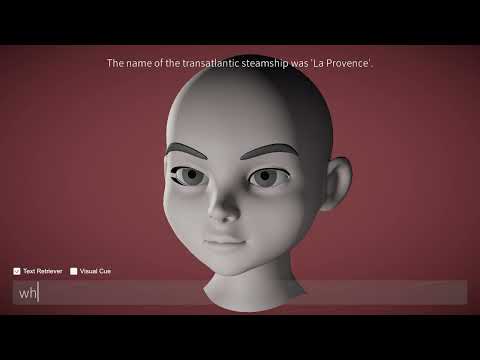
Project Lupin is an AI Avatar project that implements the Microsoft Agent Framework within Unity. It orchestrates a complex, multi-agent workflow entirely on the local device, ensuring privacy and zero-latency inference.
This project demonstrates a "Fan-Out/Fan-In" architecture where multiple specialized agents (Vision, RAG, Prompt Engineering) work in parallel to synthesize context-aware responses. The system creates an immersive conversational experience with the persona of Arsène Lupin, powered by local LLMs (Qwen), Vector Databases, and Neural Speech synthesis.
- Microsoft Agent Framework: Implements graph-based multi-agent workflows.
- Local LLM Inference: Fully offline capability using Ollama (LLM/VLM/Embedding).
- Multi-Modal Interaction:
- Vision: Webcam image based analysis.
- Audio: Speech-to-Text (Whisper) and Text-to-Speech (Kokoro) using Unity Sentis.
- RAG (Retrieval-Augmented Generation): Custom local VectorDB implementation for context retrieval.
- Modular Architecture: Decoupled executors for easy extension of agent capabilities.
- Unity:
6000.2.10f1 - Unity Sentis:
2.4.1 - Microsoft Agent Framework:
1.0.0-preview - Ollama:
qwen2.5:3b,qwen3-vl:2b,qwen3-embedding:4b - External Tools:
espeak-ng(for phoneme generation)
This project relies on specific local models managed via Ollama and Sentis.
| Role | Model Name | Description |
|---|---|---|
| LLM (Chat) | qwen2.5:3b |
Main conversational agents |
| VLM (Vision) | qwen3-vl:2b |
Visual context analysis |
| Embedding | qwen3-embedding:4b |
Text embedding for RAG |
| STT | Whisper (Small) |
Speech recognition |
| TTS | Kokoro 82M |
High-quality neural speech synthesis |
The core of this project is the AgentWorkflowManager, which constructs a directed graph for processing user inputs.
The system processes user input through the following stages:
- Prompt Rewriting Agent: Refines raw user input into clear, structured queries.
- Fan-Out Execution (Parallel):
- Vision Executor: Captures a snapshot from the webcam and analyzes it using the VLM.
- RAG Executor: Searches the local VectorDB for relevant context.
- Pass-Through: Retains the original query intent.
- Context Aggregator: Waits for all parallel tasks to complete and combines their outputs into a single prompt.
- Chat Generation Agent: Synthesizes the final response using the aggregated context under the persona of Arsène Lupin.

- Source: Arsène Lupin (Project Gutenberg Text) Link
- Vector Database: Custom local implementation (
ddd_db.bininStreamingAssets).- Generation: Accessible via
Tools > Generate VectorDBin the Unity Editor.
- Generation: Accessible via
- Chunking Strategy:
- Chunk Size: 500 characters
- Overlap: 100 characters
- Input: Whisper Small model handles voice command transcription.
- Output: Kokoro 82M (ONNX) combined with
espeak-nggenerates phonemes and audio for the agent's voice.
Ensure Ollama is installed and the required models are pulled:
ollama pull qwen2.5:3b
ollama pull qwen3-vl:2b
ollama pull qwen3-embedding:4b-
Clone or download this repository.
-
Download the required assets: Assets.zip
-
Unzip the
Assets.zipfile and place the contents into the following directories within your Unity project:/Assets/Models/Assets/StreamingAssets
(Ensure the folder structure matches exactly to avoid missing reference errors.)
- Open
/Assets/Scenes/LupinScene.unityin the Unity Editor. - Press Play.
- Toggle Text Retriever or Visual Cue checkboxes to dynamically enable or disable specific agents.
- Interact by typing directly into the input field, or hold the
](Right Bracket) key to issue commands via STT.
- Microsoft Agent Framework GitHub
- Ollama
- Unity Sentis
- eSpeak NG
- Text: Project Gutenberg - Arsène Lupin
This project is licensed under the MIT License - see the LICENSE file for details.
Usage of third-party dependencies is subject to their respective licensing terms.