Repository navigation
wip sandbox
Creates, inspects and runs commands in named sandboxes — long-lived containers declared in
wip.yml alongside your app's stack, each with its own image and its own storage.
wip sandbox create NAME
wip sandbox list
wip sandbox status NAME
wip sandbox exec NAME [--timeout SECONDS] [--interactive] -- COMMAND...
wip sandbox attach NAME
wip sandbox stop NAME
wip sandbox destroy NAME
A sandbox is not the primary container. wip up, wip down, wip exec and wip sync never
touch one, and wip sandbox stop never touches the stack — the two sets of commands work on
different resources and share only the wip.yml they are declared in. See
Sandboxes for the configuration this command reads.
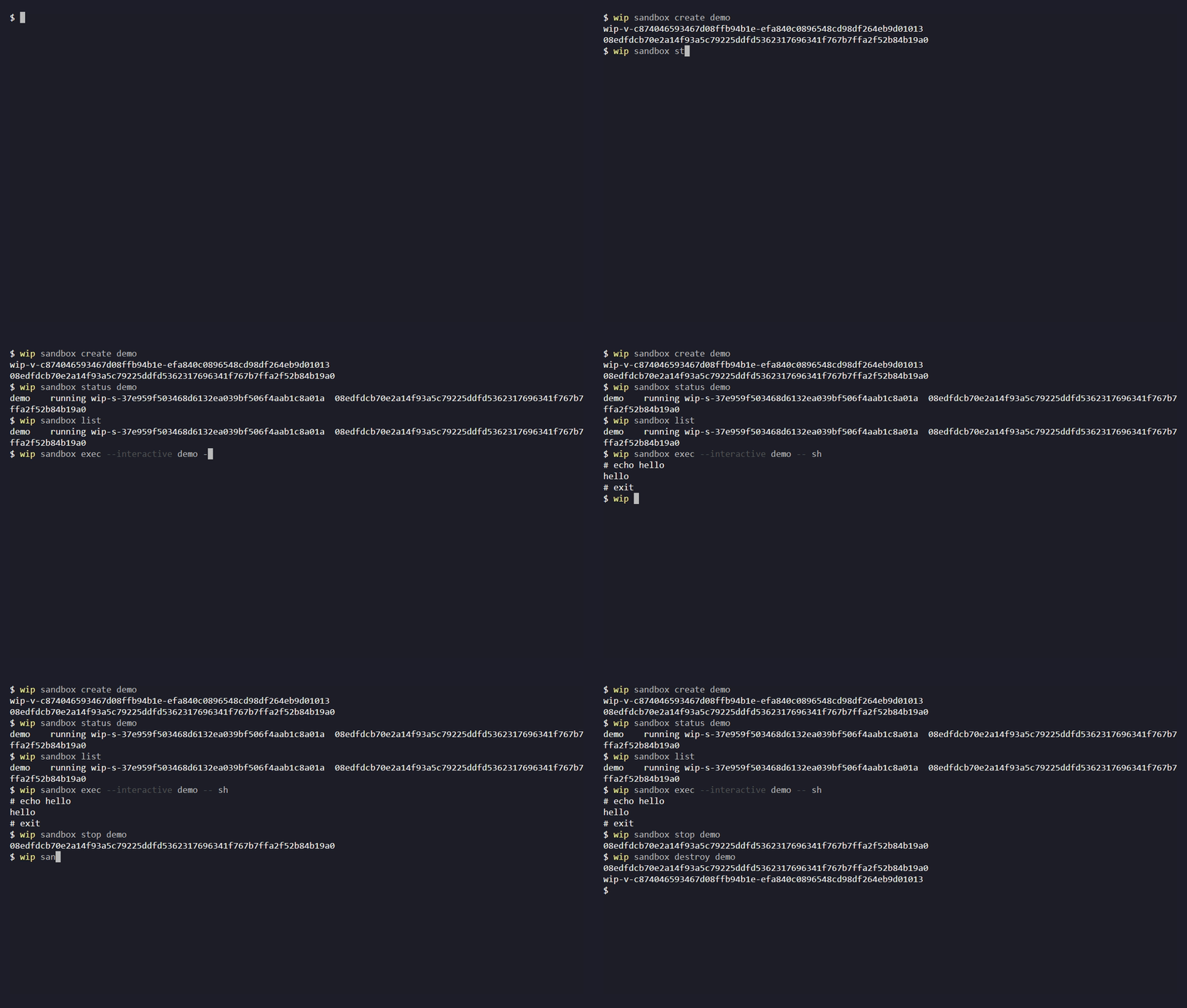
Watch a sandbox move through create, running status, list, and exec --interactive, with a command at the # prompt, before stop and destroy.
Use a sidecar under dependencies: when its lifetime matches the stack's. Sidecars get more from
the stack:
| Sidecar feature | Behavior |
|---|---|
| Startup |
wip up starts it with the stack and waits for a configured healthcheck |
| Supervision |
wip up --watch restarts it according to its restart policy |
| Networking | Joins the configured stack network |
| Cleanup |
wip down removes the primary container and all sidecars |
See Dependencies for those stack-managed containers.
Reach for a sandbox when a container has to outlive stack operations — a long-lived tool
container that stays up while an app's stack is brought up and down. It is addressed by name
(exec, attach, status, and list for every declaration), where the stack's wip exec and
wip shell always mean the primary container. Declared volumes with persistent: true survive
destroy and are reused by the next create, and nothing is created implicitly: exec and
attach never stand in for create. See Operations and
Stopping versus destroying.
What a sandbox gives up is that declarative supervision: an entry carries its name, image and
volumes, with no command:, healthcheck or restart policy. Keeping the container alive is the
image's job.
version: 1
resource_namespace: example
sandboxes:
  - name: agent
    image: example/tool:1
wip sandbox create agent
wip sandbox exec agent --interactive -- sh
wip sandbox stop agentThe image's default command has to keep running. A sandbox lives as long as its main process
does, so an image whose CMD exits immediately is reported as an unsuccessful creation rather
than a sandbox you can exec into.
A CMD that ignores SIGTERM keeps stop waiting for the backend's kill timeout — about ten
seconds in a measured run. Have the main process handle SIGTERM, terminate its children and reap
them, so stopping returns promptly.
| Command | What it does |
|---|---|
create NAME |
Runs the declared image, or resumes the sandbox's own stopped container. Ensures and mounts declared volumes first |
list |
One status line per sandbox declared in wip.yml, in declaration order. Takes no name |
status NAME |
Prints logical name, state, backend name and ID — or not found, successfully |
exec NAME -- COMMAND... |
Runs a command in the running sandbox and returns its exit code |
attach NAME |
Joins the main process that is already running |
stop NAME |
Stops the container, keeping it and every mount |
destroy NAME |
Removes the container. Declared persistent volumes are kept |
sandbox list is available in v2.11.1 and later; v2.11.0 does not include it.
create doubles as "start": resuming a stopped sandbox is the same command, so there is no
wip sandbox start. Nothing creates a sandbox implicitly — exec or attach on a sandbox that
is not running is an error, never a quiet create.
wip sandbox exec agent -- printf '%s\n' 'an argument with spaces'
wip sandbox exec agent --timeout 30 -- sh -c 'exit 7'
Each argv element goes to the container as-is: stdout and stderr stream back, and the child's exit
code is what wip returns. No shell is involved unless you ask for one — the sh -c above is
a shell because the caller wrote one.
-- ends wip's own options, so everything after it is the command and its arguments. Without it,
a flag meant for the child would be read as a flag for wip:
wip sandbox exec agent -- ls -la # -la goes to lsExecution is non-interactive by default, with a 300-second deadline. --timeout accepts
1–2147483 seconds, and exceeding it returns 124.
A timeout terminates the WSLC client; the process inside the container may still be running. Check
status, and destroy the sandbox before retrying work that isn't safe to run twice.
--interactive hands wip's own stdin, stdout and stderr to the child instead of streaming them.
That is what a shell, a REPL, a debugger, an interactive installer, or an interactive CLI needs:
wip sandbox exec agent --interactive -- bash
wip sandbox exec agent -it -- python3--interactive, -i, -t and -it are four spellings of one flag. wip decides the two
halves rather than asking: stdin is always attached, and a TTY is requested exactly when wip's own
stdin and stdout are a terminal — the same rule TTY Allocation describes for
wip exec. Piping into --interactive therefore works, and simply runs without a pty.
-
There is no deadline.
--timeoutexists so an automated call cannot hang a script; a session you are typing into has no such bound. Passing both is a usage error, not a silently ignored option, so you are never left believing a session is bounded. - EOF is passed to the child. Whether it exits depends on the program; wip returns its exit status when it exits.
- Ctrl-C comes from your terminal, not from wip — the child shares wip's console. wip forwards and synthesises nothing.
-
--quietdoes nothing here, and neither do error hints: both read a captured transcript, and an interactive child writes straight to the terminal.
If the sandbox's image ships a CLI, this is how you drive it:
wip sandbox exec agent --interactive -- my-cliNothing above is specific to any one tool. --interactive is a general terminal transport: no
tool-specific protocol or API is involved, and the sandbox only ever sees the argv you passed.
Installing that CLI, and logging into it, are outside wip's scope. Put the installation in the
sandbox's image, so it survives a destroy, and keep whatever the CLI writes for its own
configuration on a declared volume if it has to outlive the container — see
Sandboxes.
exec --interactive starts a new process beside the sandbox's main one, and ends when that
process ends. attach joins the process that is already running — the image's own
CMD/ENTRYPOINT, whose lifetime is the sandbox's lifetime.
wip sandbox attach agentexec --interactive |
attach |
|
|---|---|---|
| What you talk to | a new process you chose | the main process the sandbox runs |
| Takes a command | yes, after --
|
no — passing one is a usage error |
| Ending the session | ends that process only | Session termination does not guarantee that the main process keeps running; ending the main process stops the sandbox. |
| Needs a real terminal | no, a pipe works |
yes — WSLC's attach fails without a console |
WSLC exposes no detach key sequence, so leaving an attached session without stopping that process
is not something wip can offer. Reach for exec --interactive unless you specifically need the
main process's own streams.
stop → create
|
destroy → create
|
|
|---|---|---|
| The container | kept, then resumed | removed, then a new one is run |
| Packages installed inside the container | still there | gone — they lived in the container layer |
| Declared persistent volumes | kept | kept |
| Declared ephemeral volumes | kept | fresh storage, once the last referencing container is gone |
So stop keeps the container and mounts; wip does not delete volumes or run volume reconciliation. destroy is a
rebuild from the image, which is also how you pick up a changed image: — a changed image does
not replace an existing container implicitly.
Anything that has to survive a destroy belongs either in the image or on a persistent volume.
Sandboxes are ownership-checked. Creation stamps a label derived from
<namespace>:sandbox:<name>, and every later operation resolves the name, then verifies that
label and the container ID before acting — so replacing a container by name cannot redirect a
destructive operation onto the replacement. A name collision, or a container with no such label,
is rejected rather than adopted.
Changing resource_namespace designates different resources. Keep the previous configuration
around if you still need to clean up what it created.
| Symptom | Where to look |
|---|---|
Unknown sandbox: NAME |
The name is not declared in wip.yml — see Sandboxes
|
exec fails saying the sandbox is not running |
wip sandbox create NAME first; nothing creates implicitly |
| Creation reports failure and leaves a container behind | The image's default command probably exits at once. destroy, fix image:, create again |
| Exit code 124 | 124 can indicate the timeout deadline, but the child command can also return 124 itself. After a timeout, the container-side process may still be running |
attach fails with an invalid-handle error |
There is no console to join. Use exec --interactive
|
| A mutation failed or timed out | Nothing is retried automatically and nothing is rolled back. Read status, then decide |
The full operational contract — ownership, recovery after a partial failure, and the exact backend probes — is in docs/sandbox-lifecycle.md.
-
Sandboxes — the
wip.ymlside: namespace, volumes, sandboxes - wip exec — the same idea for the primary container
- TTY Allocation — when a TTY is requested
- docs/sandbox-volume-contract.md — the configuration and ownership contract