Repository navigation
Home
dsh-redteam is a Red Team workbench for DeepSeek Harness. It
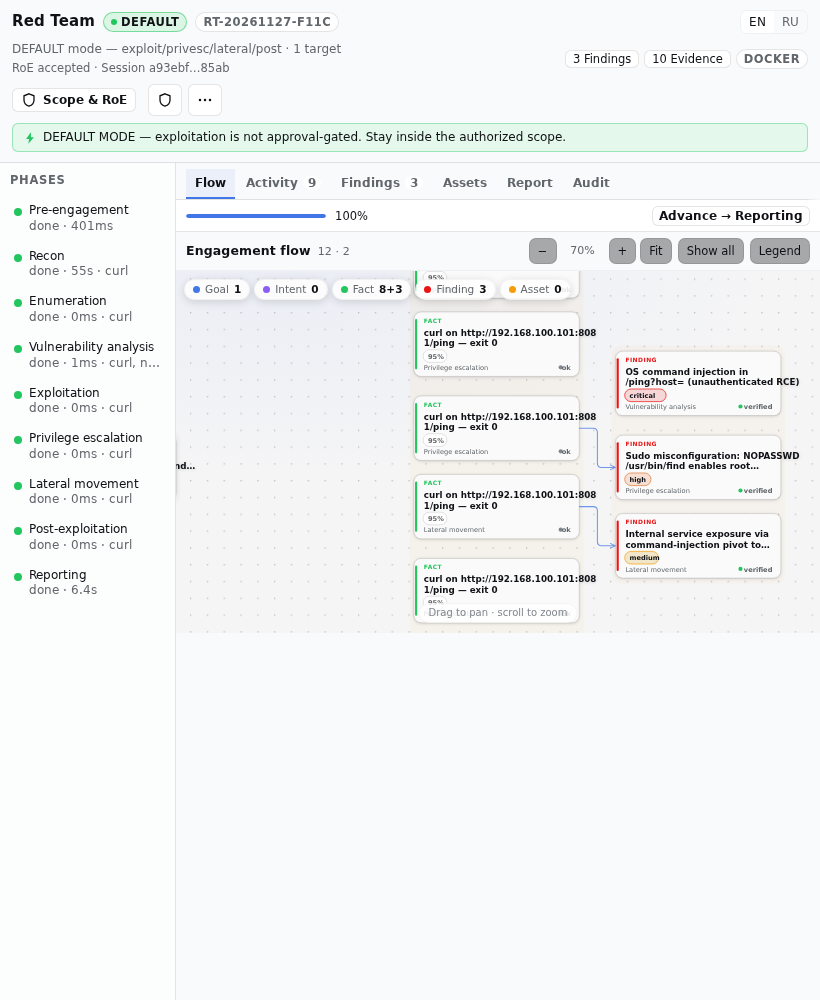
gives the agent 51 pentest_* tools and gives you a native right-sidebar panel that shows the
engagement as it happens — PTES phases, findings, command output, approvals, evidence and the final
report. Both halves read and write the same store, so nothing the agent does is invisible and
nothing you approve is unrecorded.
Authorization required. Use
dsh-redteamonly against systems you own or have written permission to test. Unauthorized access to computer systems is a criminal offense in most jurisdictions. The security mode, the scope checks and the approval queue keep authorized work inside its authorization — they are not a license. Read Scope and safety and the security policy before the first engagement.
Most "AI pentest" setups are a chat window plus shell access, and that leaves four gaps:
- No engagement object. The conversation is the record. Nothing survives it that a report can be rendered from, so findings get retold from model memory.
- No scope. Nothing stops a command, a redirect or an OSINT query from leaving the host you were authorized to test.
- No evidence chain. Command output and screenshots are transient, unhashed and impossible for a third party to verify.
- No operator authority. The model decides when to exploit, and there is no structural point where a human authorizes it.
The plugin makes the engagement the primary object instead. Goals, intents, facts, findings and assets are written to a per-session store as the work happens; reports are rendered from that store, never from model output. Three actions — accepting the Rules of Engagement, switching the security mode and resolving an approval — are reachable only from the operator's panel, and the engine refuses them for every other actor. Scope is validated in code at the moment of action, with exclusions winning, and every evidence capture is hashed and written once.
| Area | What you get |
|---|---|
| Engagement and methodology | PTES engine over nine phases with one-step-forward gating and free backtracking; scope and RoE gate; live Goal → Intent → Fact → Finding → Asset graph with an inspector down to the tool run; methodology knowledge base with 97 OWASP WSTG tests, OWASP Top 10 for Web/API/LLM/Mobile, 62 CWE entries, 57 ATT&CK techniques and NIST SP 800-115; 20 offensive-security skill playbooks with evidence and stop conditions. |
| Execution | Plugin-owned hardened dsh-redteam-kali container with a curated catalog of 47 tools plus apt-cache search, install and remove; degraded host mode when Docker is unreachable; isolated Chromium sessions; bounded HTTP web assessment; API discovery, single authenticated requests, controlled fuzzing for nine payload categories and scoped Nuclei template scans. |
| Assurance and team | Deterministic evidence-only verification for ten CWE families; identity/access matrix with coverage gaps; local OOB canary for SSRF/XXE/blind callbacks; SARIF 2.1.0 export (also inside every bundle); bounded retest replay; a budgeted planner with a deterministic critic; a nine-role team board with delegation prompts and optional native Agent Teams publish. |
| Knowledge and artifacts | Nine bundled wordlist categories plus operator uploads and AI-enhanced adaptive lists; 39 OSINT connectors with passive enrichment and a standalone OSINT report that turn results into facts; immutable evidence vault with SHA-256 per record, a vault ZIP and a full project bundle; reports in Markdown, HTML (with embedded screenshots), JSON, PDF, DOCX and slide outline, in English and Russian. |
| Panel | Eight tabs (Flow, Activity, Findings, Assets, OSINT, Report, Team, Audit) and eight drawers (Scope & RoE, Tool manager, Wordlists, OSINT, Web test, API test, Evidence, Approvals); light, dark and system appearance from Host tokens; per-session layout memory; error boundaries per tab. |
Two commands, from the checkout of your choice:
git clone https://github.com/sm0k3net/dsh-redteam.git
dsh plugin --profile web add "$PWD/dsh-redteam"
The package declares dsh.bundle.patch, so this one call links the checkout into the profile and
selects the bundle. Reload the Web page, open the right sidebar, press + and choose Red Team
— or start an engagement with the agent and the panel opens itself.
Docker access for the Kali toolbox is optional but recommended (run this inside the checkout):
sudo ./scripts/enable-docker-access.sh "$USER"Full requirements, the release-tarball route, verification and uninstall are in Installation.
DeepSeek Harness 0.2.2-rc.3 or newer · Node.js 20+ (21+ for the browser drawer, 22 recommended) · Docker
Engine optional (Kali toolbox only) · Chromium or Playwright optional (browser drawer only). No npm dependencies, no runtime build step.
- Installation — requirements, install routes, health check, Docker access, upgrade, uninstall and backup.
- Quick start — a ten-minute first engagement against a lab target, with the exact agent prompt and tool calls.
- Panel tour — the header, phase rail, eight tabs and eight drawers with screenshots.
- Agent tools — all 51 tools by area, their gates and worked call sequences.
- Engagement and graph — node types, edges, phase order, progress and closure.
- Scope and safety — modes, approvals, scope rules, audit, evidence and data egress.
- Configuration — every Host-row key, default and environment variable.
- Architecture — modules, store layout, HTTP bridge and security invariants.
- Kali toolbox — the container, the catalog and degraded host mode.
- Wordlists — bundled, uploaded and AI-generated lists.
- OSINT — the 39 connectors, passive enrichment, the standalone report and how keys are resolved.
- Web and API testing — browser sessions, assessments, discovery and fuzzing.
- Evidence and reports — hashing, the vault, packages, bundles and the six report formats plus the standalone OSINT report.
- Exploitation loop — the bounded, evidence-driven loop, its caps and the verifier and retest discipline around it.
- Team and planning — the plan, the nine roles, task board, critic and native Agent Teams publishing.
- Exploitation methodology — the long-form reference behind the loop.
- Troubleshooting — symptoms and fixes, starting with a missing tab or a failing health route.
- FAQ — short answers about scope, Docker, models and data handling.
- Contributing — build, tests, review expectations.
- Roadmap — what is planned and what is explicitly out of scope.
- Release notes 1.3.0 — what shipped in this release: 39 OSINT connectors, passive enrichment and the OSINT tab, safe scope expansion, the exploitation loop and the engagement lifecycle.
- Release notes 1.2.0 — assurance, team board, SARIF, verifier, canaries.
- Release notes 1.1.1 — report reuse, evidence-id validation and DOCX fixes.
- Release notes 1.0.0 — what shipped in the first release.
- CHANGELOG — release history.
- Repository docs — the long-form user, tool, safety, configuration and architecture documents this wiki summarises.
MIT — see LICENSE. Bundled wordlists are compact derivatives of SecLists (MIT); the methodology data cites OWASP, NIST, MITRE and the PTES project. See ATTRIBUTION.
Version 1.3.0 · 51 agent tools · 39 OSINT connectors · 714 node:test cases (712 passing, 2 environment-dependent skips) · CI on Node 20 and 22.