


A visual canvas for coding agents. Your agent shows you interactive HTML — design options, forms, previews, dashboards — in your browser, and your clicks flow straight back into the conversation. Works with Claude Code, Cursor, Codex, or any MCP client.
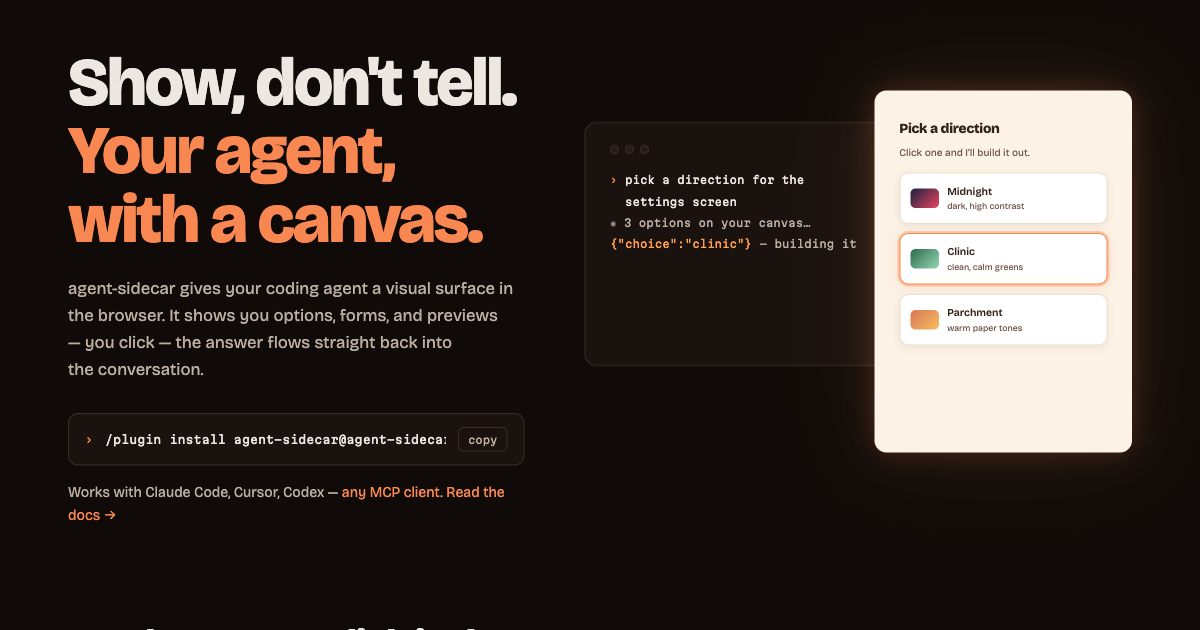
"Show me three layout options for the settings screen" → three clickable mockups appear on the canvas → you click one → Claude continues with your choice.
agent-sidecar is an MCP server with an embedded web server, packaged as a Claude Code plugin — and usable from any MCP client. It needs no push mechanism (works on orgs where Claude Code channels are blocked): the browser-to-agent return path is a long-poll the server turns into ordinary tool output.
Website & full docs → agent-sidecar.vercel.app (documentation)
Requires Bun on your PATH. In any Claude Code session:
/plugin marketplace add smarchetti/agent-sidecar
/plugin install agent-sidecar@agent-sidecar
Restart Claude Code, then ask for something visual: "show me three layout options for a pricing page on the canvas." The browser opens, the artifact renders, and clicking it answers Claude.
agent-sidecar is a standard MCP stdio server, so any MCP client can run it — the plugin is just Claude Code packaging. Point your agent at:
{ "mcpServers": { "agent-sidecar": { "command": "bunx", "args": ["agent-sidecar"] } } }| Agent | Config file |
|---|---|
| Cursor | .cursor/mcp.json (project) or ~/.cursor/mcp.json (global) |
| VS Code (Copilot) | .vscode/mcp.json — same entry under a "servers" key |
| Codex CLI | ~/.codex/config.toml — [mcp_servers.agent-sidecar] with command/args |
| Gemini CLI | ~/.gemini/settings.json |
| Windsurf | ~/.codeium/windsurf/mcp_config.json |
Everything transfers: the tools, the canvas, the token auth, the .sidecar/ files. Two Claude-flavored details to know: the injected browser helper is still named claude.send(), and the background-watcher pattern requires an agent that can run shell commands in the background — the blocking await_interaction tool works everywhere.
One process, two faces:
Claude Code  ⇄ MCP/stdio ⇄  agent-sidecar  ⇄ HTTP 127.0.0.1 ⇄  browser canvas
                              │
                              └── POST /api/webhook  ←  CI, scripts, anything
- Claude shows —
create_artifactputs a complete HTML document on the canvas (SSE-live; new artifacts take focus, updates hot-reload). - You click — every artifact gets a
claude.send(payload)helper injected. It crosses a postMessage bridge out of the sandboxed iframe; the canvas shell forwards it to the webhook with the session token. - Claude continues — either a blocking
await_interactioncall returns your payload in-turn (quick decisions), or a backgroundcurl /api/waitwatcher re-invokes Claude when you click (long waits, Claude keeps working meanwhile).
Every interaction is also appended to .sidecar/interactions.jsonl — a durable, tail -f-able audit log.
MCP tools — create_artifact, update_artifact, await_interaction (blocking, artifact_id filter), get_interactions (drain), list_artifacts, remove_artifact.
HTTP — GET / canvas · GET /events SSE · GET /artifact/:id · POST /api/webhook (token) · GET /api/wait long-poll (token) · GET /health.
Sessions — each agent session runs its own agent-sidecar: port 8765 preferred, ephemeral fallback if taken. Coordinates (port, URL, auth token) live in .sidecar/session.json, which is how external systems push events in:
url=$(jq -r .url .sidecar/session.json); token=$(jq -r .token .sidecar/session.json)
curl -X POST -H "X-Sidecar-Token: $token" -d "build failed on main" "$url/api/webhook"
Full parameter tables, artifact-authoring patterns, and the security model are in the docs.
Localhost-only binding; a random per-session token required on /api/webhook and /api/wait (defeats cross-site POSTs from web pages at localhost); artifacts run in an opaque-origin sandboxed iframe with no access to the token, the canvas shell, storage, or same-origin network — claude.send() is their only output channel. Don't tunnel or port-forward the server: anything that reaches the webhook is eventually placed in front of Claude. Details.
bun install
bun test                              # 24 end-to-end tests over real MCP stdio
claude --mcp-config dev.mcp.json      # run your working copy live (disable the plugin first)
Source is src/sidecar.ts (the whole server) and src/canvas.html (the browser shell, inlined into the bundle). Releases: bump package.json, the agent-sidecar@<version> pin in .claude-plugin/plugin.json, and CHANGELOG, then push and tag vX.Y.Z — GitHub Actions tests, publishes to npm with provenance, and cuts the release.
MIT