Repository navigation
Releases: somansch/annuals
Release list
v3.5.0

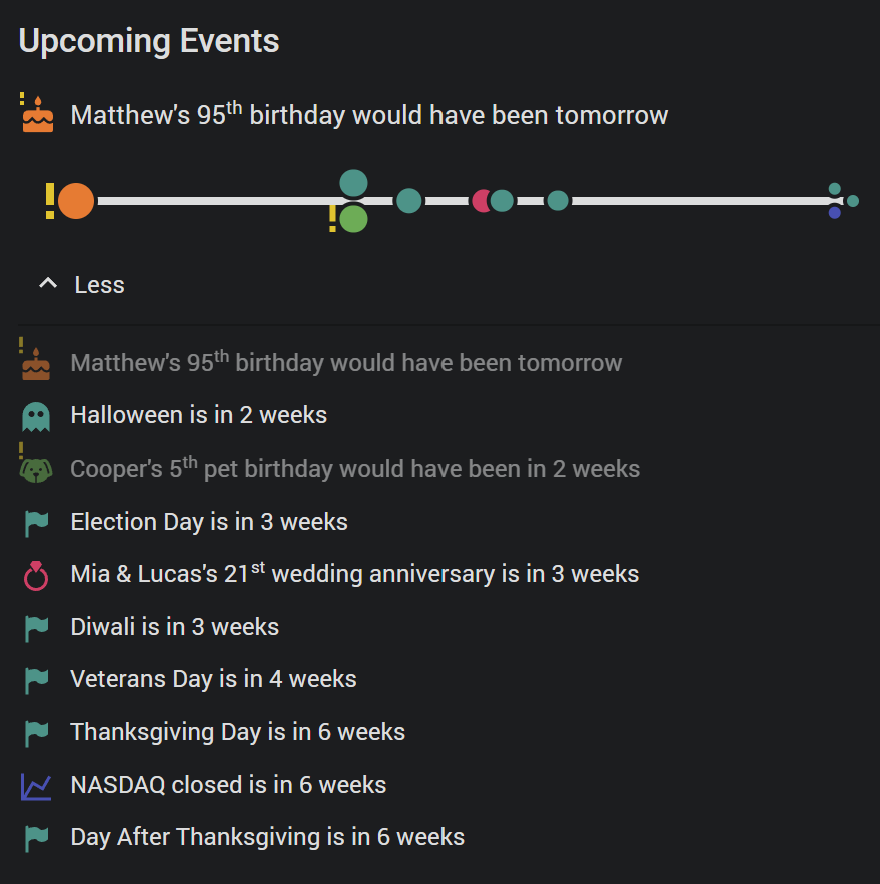
One feature, asked for with care in #16: the days of people who are no longer here.
🕯️ A "Deceased" switch on the yearly event form - for birthdays, name days, pet birthdays and wedding anniversaries. The day stays, with its year and its count; it is marked, not deleted, and never guessed from a memorial entry.
🏷️ The sensor says so: deceased: true, so a template or an automation can tell such a day apart without naming anyone. Its reminder_message - and with it the bundled blueprint's notification - reads Would have been today instead of Today.
🗓️ The card words it the way one does: Matthew's 95th birthday would have been tomorrow. Such a row is muted by default; Events of the deceased under Layout → General makes it muted, hidden, or like any other event, and a Deceased only filter beside VIP and Important makes a card of remembrance days.
📄 CSV import and export carry the flag as a deceased column.
📖 Full release notes: CHANGELOG
⭐ If Annuals is useful to you, a star on the repo is genuinely appreciated - it is how other people find it. Thank you!
v3.4.1
A small release, made of what three precise reports brought in.
🇱🇹 Lietuvių - Lithuanian joins the languages. The integration's strings, all 428 of them, come from the translation attached to #13, merged as submitted; the card's own strings were translated to match - Gimtadienis, Sukaktis, Vardadienis, the day counts declined after po and prieš, and the timeline's ordinal agreeing with its noun: Ričardas: 60-asis gimtadienis, Ona: 27-oji vestuvių sukaktis. Seventeen languages now.
📅 The calendar button's date picker opens in Firefox. Firefox never opens a date picker from inside a shadow root, so there the picker now opens from a twin input in the document, laid over the button and filled with the date on screen. With it: the pointer is a hand over the button in every browser, the button no longer stays lit after the picker has closed, and the picker's Clear takes you back to the opening list. From #14.
📏 A single search result no longer stretches across a fixed-height card. In a sections cell with a fixed number of rows, a search that left one event handed that row the whole card. Rows keep their height now; the space below stays empty. From #15.
🇸🇰 Slovak reminders count in Slovak. The blueprint's reminder_message fell back to English for Slovak - Dnes, Zajtra, o 5 dní now.
📖 Full release notes: CHANGELOG
⭐ If Annuals is useful to you, a star on the repo is genuinely appreciated - it is how other people find it. Thank you!
v3.4.0
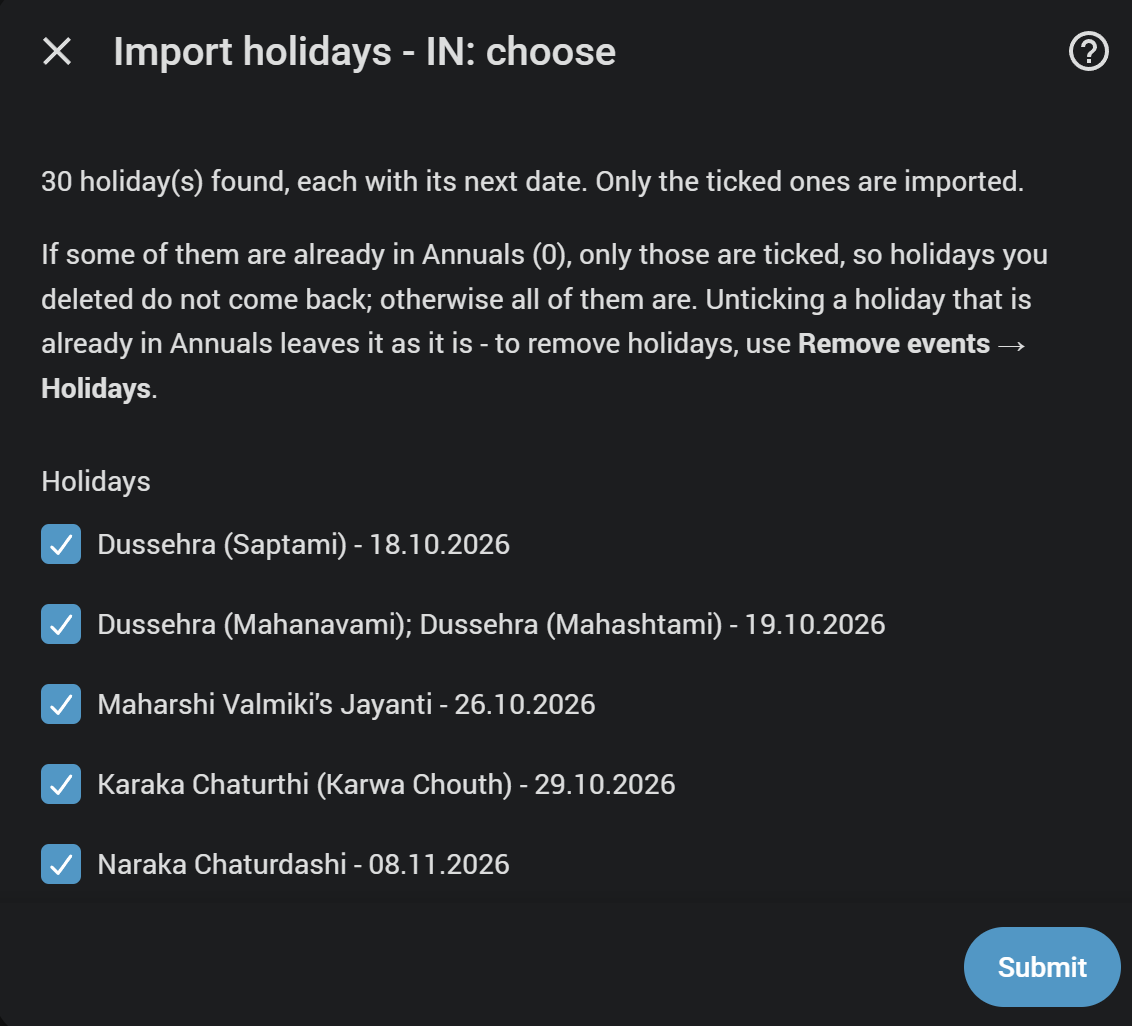
☑️ Pick the holidays you want. The holiday import has a third step: every holiday your country, region and categories produce, each with its next date, in the order they come up - and a checkbox for each. Only the ticked ones become events. No more importing thirty holidays to keep three.
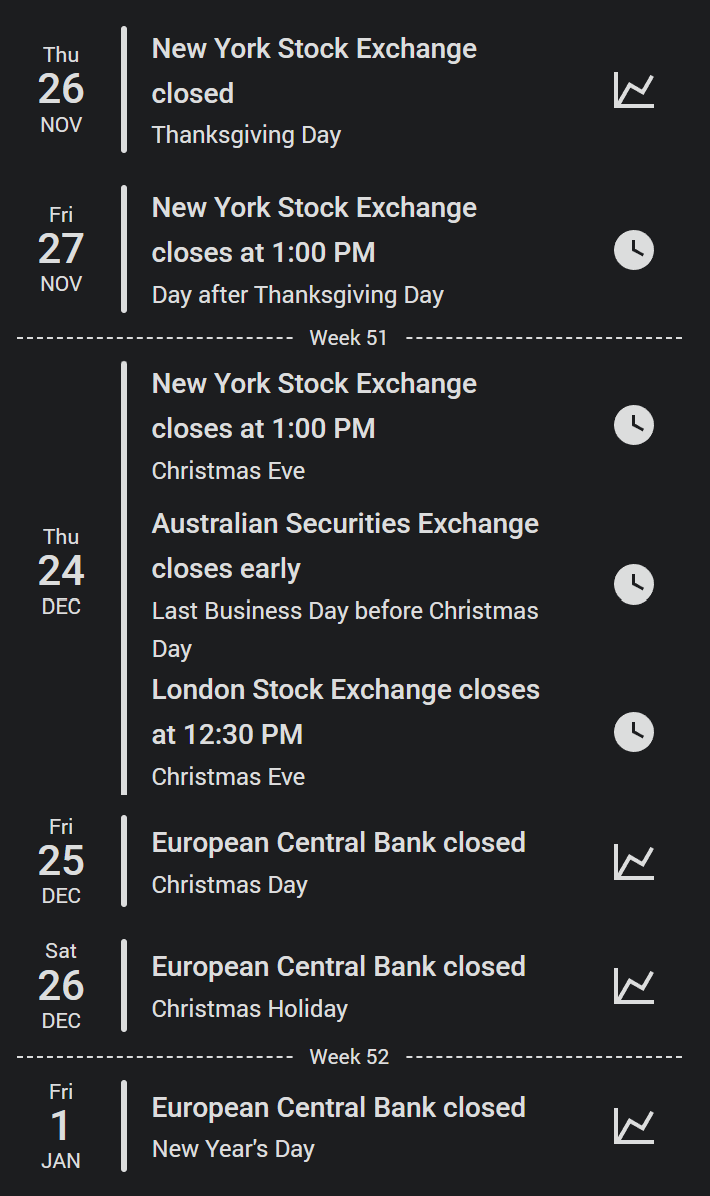
📈 Stock exchange days. Import events → Stock exchanges brings in the days a stock exchange is closed, and the days it closes early, from 25 markets - New York, Nasdaq, London, Frankfurt, Zurich, Tokyo, Hong Kong, Sydney and more. They are not holidays, so they are an event type of their own, with their own calendar, card filter and colour - and they say what they are: New York Stock Exchange closes at 1:00 PM, for Day after Thanksgiving Day.
🗺️ A category without holidays where you asked says so. Some only exist below the country - Germany's school holidays per state, India's women-only holidays in Himachal Pradesh. Picked without the right region, the import used to report 0 queued; it now names the regions that have any.
🏷️ Every category has a name. Optional (women) was the one category of the holidays library that Annuals had no word for - checked against its full list, in all sixteen languages and in the reminder blueprint.
📖 Full release notes: CHANGELOG
⭐ If Annuals is useful to you, a star on the repo is genuinely appreciated - it is how other people find it. Thank you!
v3.3.2
A fix release: the ICS import works again.
📅 ICS import fixed. Since v3.2.0 it stopped with Unknown error occurred right after the upload; it now goes through to the review as before.
📇 vCard import fixed too. The same fault stopped a vCard import of labelled dates on its review page.
📖 Full release notes: CHANGELOG
⭐ If Annuals is useful to you, a star on the repo is genuinely appreciated - it is how other people find it. Thank you!
v3.3.1
A fix release: the two ways a dashboard could show Configuration error where the Annuals card belongs, and one notification fewer.
🧩 A card that registered a moment too early is no longer lost. It now notices when Home Assistant swaps the browser's element registry for its own and registers itself again.
📋 The card is listed under Settings → Dashboards → Resources now, and loads from there as well. That covers the dashboard served while Home Assistant was still starting - same URL, so still one fetch and one card.
🔕 No more "refresh your browser tab" after an update. An update restarts Home Assistant and the frontend reloads the page itself, so the new card is usually there before anyone reads the message.
📖 Full release notes: CHANGELOG
⭐ If Annuals is useful to you, a star on the repo is genuinely appreciated - it is how other people find it. Thank you!
v3.3.0
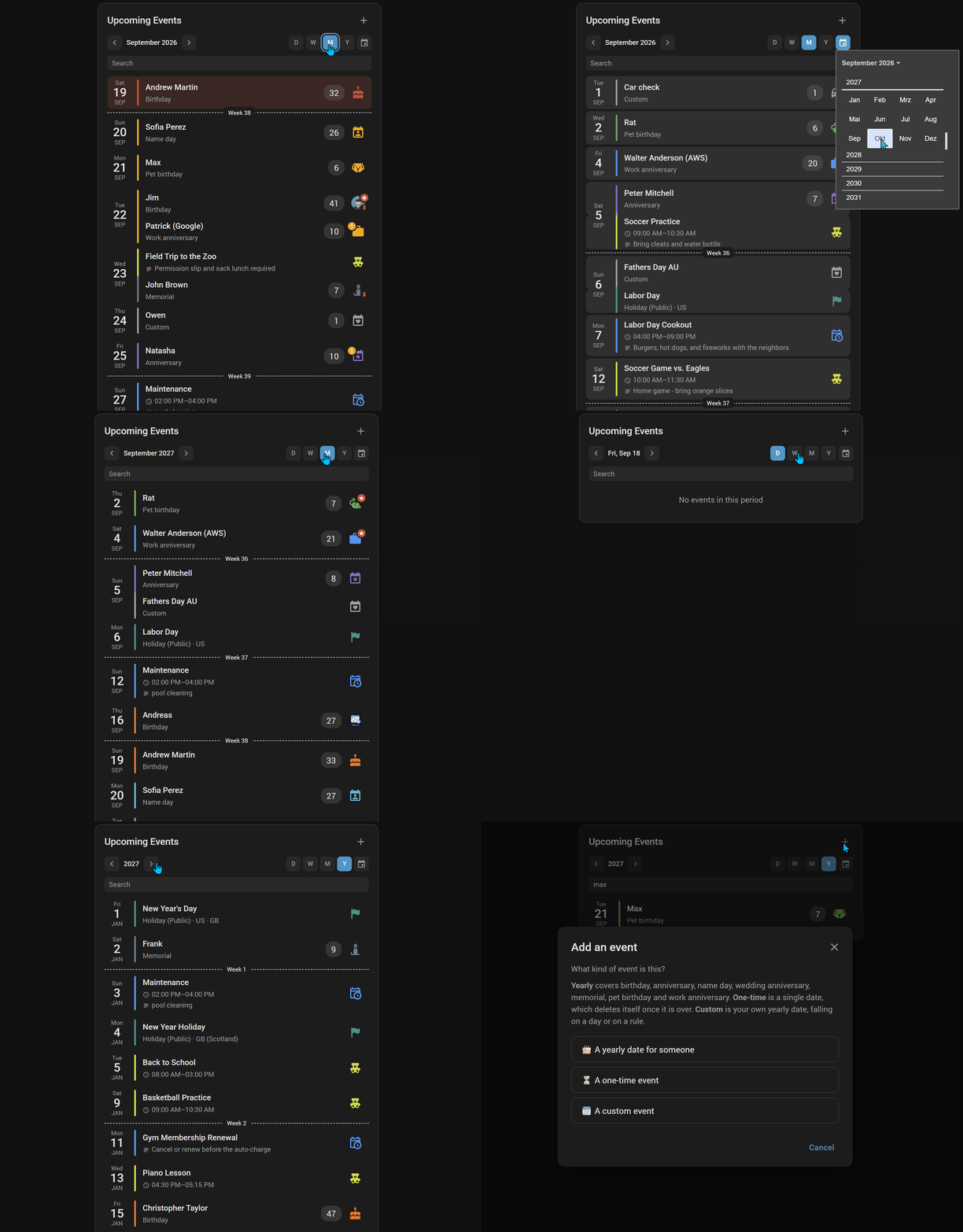
🗓️ Calendar navigation. A bar under the card title turns the list into one period at a time — day, week, month or year — with two arrows, a date picker, a swipe on a phone and a tap on the period as the way back to today. Stepping is a look, not a setting: nothing is written to the dashboard, so paging to next month on one screen leaves every other where it was.
🔎 A search field under it, filtering the list as you type — names, types, countries, everything a row shows — and gone again with the switch, list and all.
✏️ Add, edit and delete events from the card. A + beside the title opens the integration's own Add an event form in a dialog over the dashboard; a pencil and a trash can float over the end of every row while the pointer is on it, or after a click where nothing hovers. Same fields, same wording, same language as under Settings → Integrations. Administrators only, each switchable, and all three buttons take their own colour, hover colour, icon and size.
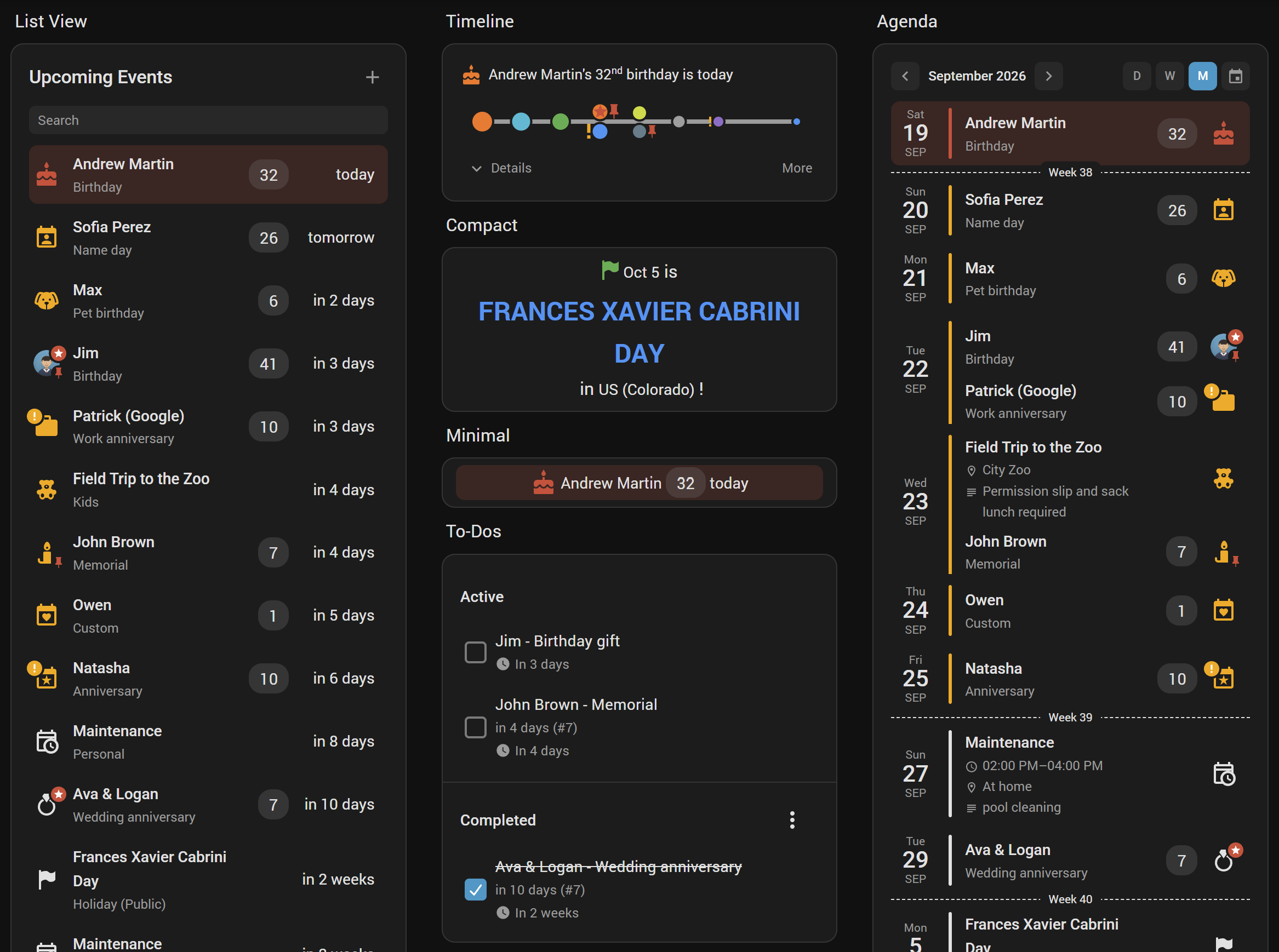
🧱 A day is one block. Where a Date block leads the row, a day writes its date and its countdown once and leaves them off the rows below it — those move up against it, and the accent bar runs through the whole day instead of breaking at every row. The date stands in the middle of its day, however many events it holds.
⏳ Today's appointments leave when they are over. An appointment from 2 to 3 is gone at 3 — on its own timer, not at the next redraw. All-day events stay until midnight, as before. On from the start, switchable off.
🙂 A person's picture on an event. Give a yearly event a Person and that person's picture stands in for the icon — round, with the same badges, in the list and in the Timeline — and the reminder blueprint attaches it to the push notification. A new photo there is a new photo here.
🔁 Every 6 months, every 2 years. A custom event can repeat by an interval instead of once a year: the dentist, the car inspection, the passport. The calendar lists every step in range, and the occurrence number counts steps rather than years.
📏 Countdown in weeks and months, for whom in 3 months says more than in 87 days.
⚡ The card renders in about a third of the time — the date formatters are built once per render now instead of once per row — and the editor no longer rebuilds itself on every state change in your house.
🐛 Fixed: tooltips in the card editor that could be cut off or covered, {occurrence} reading -1 on a past row of an event without a year, and the German font row wrapping onto two lines.
📖 Full release notes: CHANGELOG
⭐ If Annuals is useful to you, a star on the repo is genuinely appreciated - it is how other people find it. Thank you!
v3.2.1
🔧 A validation fix, with nothing to see. v3.2.0 offered the recurrence rule's Last as the option value -1. A select selector's option value doubles as its translation key, and Home Assistant's hassfest requires those to match [a-z0-9-_]+ without a leading hyphen — so the repository's own validation failed on the release commit. The dropdown offers last now, mapped back to the number when the form is submitted.
✅ Nothing changes for you. The stored configuration, the nth CSV column and the sensor's nth attribute all still carry -1, so a CSV file or a template written against v3.2.0 keeps working exactly as it did. Home Assistant itself never minded — it loaded and resolved the file either way, which is why only the validator caught it.
📖 Full release notes: CHANGELOG · everything new is in v3.2.0.
v3.2.0
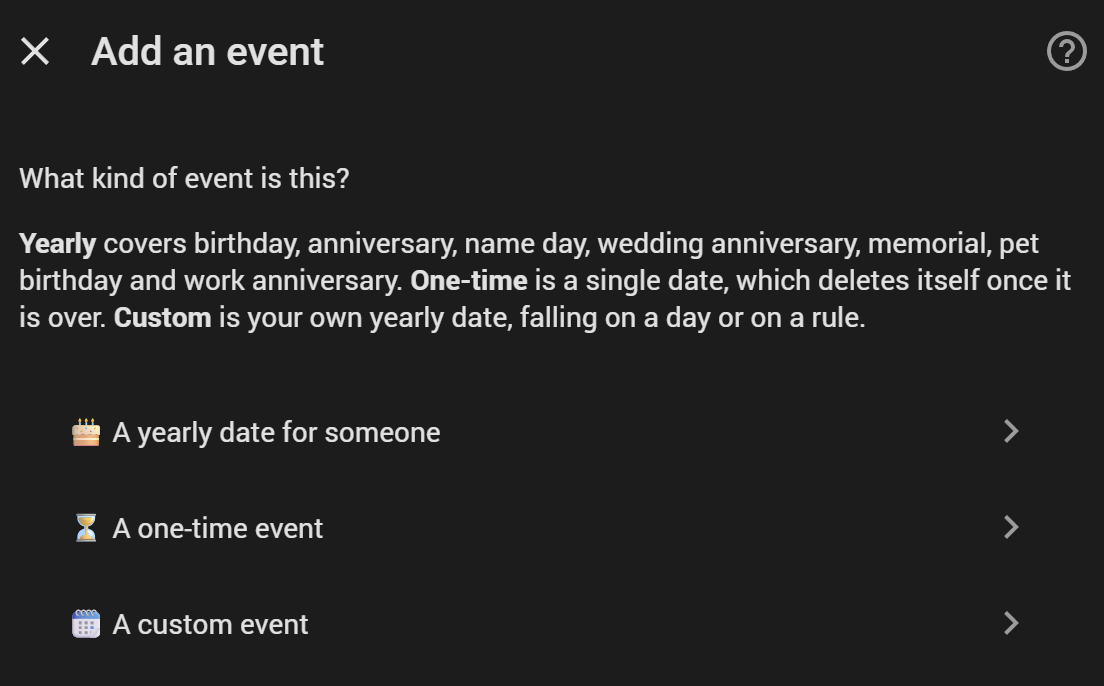
🎂 Adding an event asks what kind it is first - yearly, one-time or custom - and each kind's form then carries only its own fields.
🗓️ A custom event can follow a rule instead of a day - the second Sunday in May - for the observances the holidays database does not carry (#9).
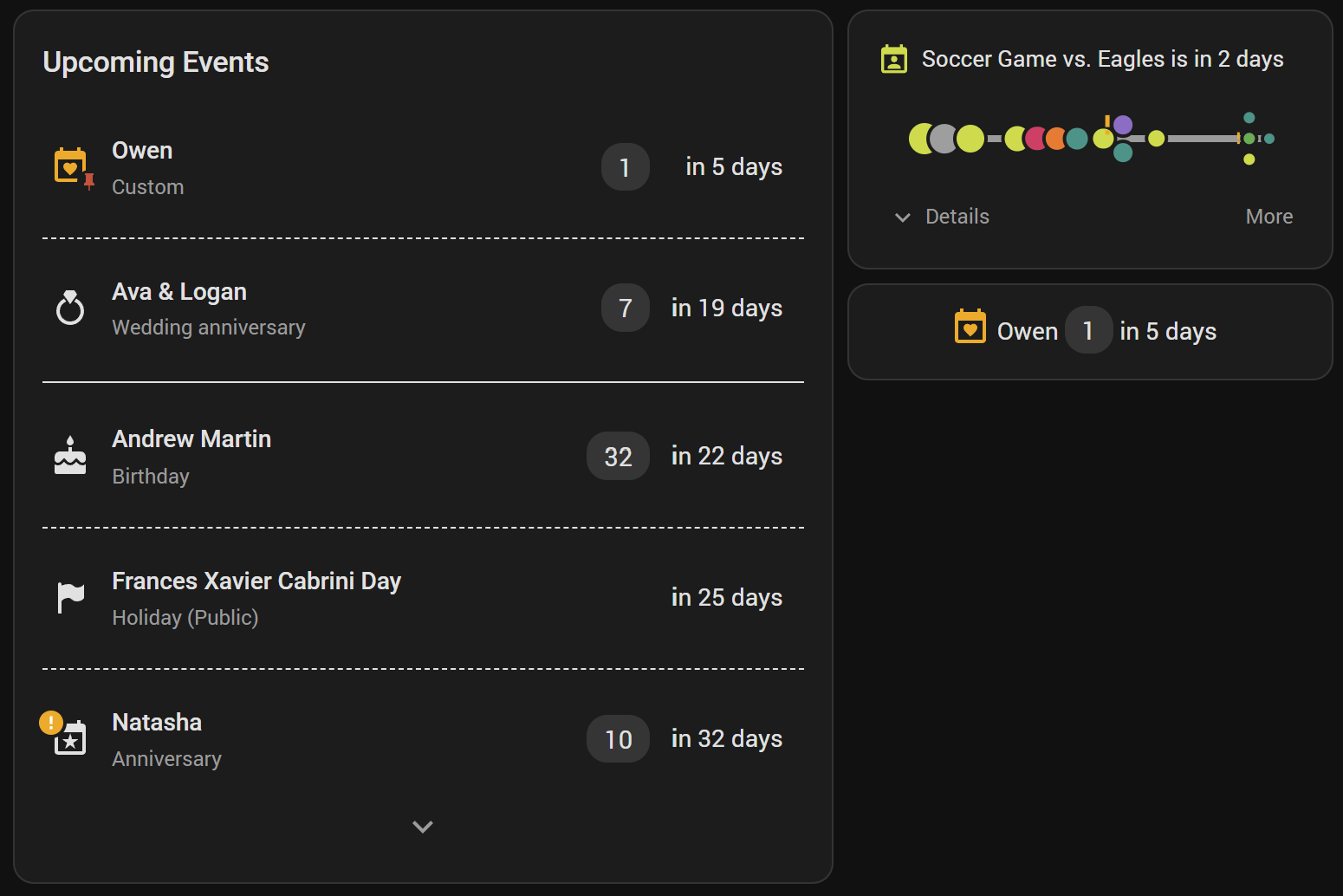
📐 The card resizes properly in a sections view now, down to a single row.
🔽 The list can fold after however many events you like, and Minimal makes a one-row card really fit one row.
🗂️ The editor's Design and Highlight tabs fold, one line per thing you can set.
📆 Multi-day events reaches embedded calendars - a week in a shared calendar can be its first day, its last, both, or one row per day.
🇸🇰 Slovak joins the languages - sixteen now (#8).
🐛 Fixed: the card sometimes never appeared until the page was reloaded (#10), and re-importing public holidays no longer duplicates the ones the library has renamed.
📖 Full release notes: CHANGELOG
⭐ If Annuals is useful to you, a star on the repo is genuinely appreciated - it is how other people find it. Thank you!
v3.1.0
📅 Annuals 3.1.0 — the dashboard card, rebuilt
🎨 One place per element. Layout is now six tabs — General, List view, Timeline, Design, Highlight, Card Background. An element's color, font and style sit together instead of being split across two tabs.
🧩 Colors resolve in a chain: card default → Design → event type → event status. Every type and every embedded calendar can paint the whole row, the accent bar, the icon or the timeline text — each on its own switch.
🏅 Badges have their own section. VIP, Important and to-do choose where they are drawn — on the event icon, on the accent bar, or both — and both halves, the symbol and the disc behind it, take a color.
📐 Two new columns, three one-click presets. Date block and Accent bar make a list read like a paper agenda; Default, Agenda and Minimal set the whole arrangement at once.
➖ Day, week and month separators, each able to write the boundary on the line itself — the weekday, the calendar week, the month.
🙈 The editor only shows what your card actually uses. A control appears when the data exists or its switch is on — and anything you configured stays visible even after its source goes away.
🐛 31 fixes. 🔒 An icon name containing a quote could inject markup into the card — the realistic way in was importing a CSV from a source you do not control. Also: the card counted from the wrong day when Home Assistant's time zone differed from the machine's, lunar-calendar holidays could report last year's date, and in the reminder blueprint a stray comma added a reminder you never asked for while a | in the title silently broke the Done button.
--annuals-<scope>-<element>-<property>: 83 unchanged, 40 renamed, 125 new. Watch the two badge colors — they painted the disc and are now …-background-color. Cards and their configuration are unaffected. Full mapping.
v3.0.0
🏫 School holidays are now whole breaks
Choose what to import — the first day, the last day, and/or every day:
- 📅 The dates are computed, not copied. School calendars only list school days, so a break listed Mon–Fri is imported as Sat to Sun — the days school actually breaks up and resumes.
- 🌍 Each country's own weekend is used: Sat/Sun in Germany, Fri/Sat in Israel. Adjacent public holidays count too.
- ✂️ Two different breaks filed under one name are split apart and named separately —
Easter/Spring BreakbecomesSpring BreakandEaster Break, decided by the holidays each one actually contains. - 🏷️ Every part says which it is, in your language:
Summer Break (start),(end),(day 3).
✈️ One-time events can span several days
For a trip, a conference, a hospital stay:
- 🗓️ New End date field. Leave it empty and nothing changes.
- ⏳ Counts down to the start, then holds at 0 for the whole time it runs instead of going negative.
- 🗑️ Removed after its last day, not its first.
- 🎴 The card lists it as its start, its end, both, or one row per day.
- 🔔 The reminder blueprint can remind before the start, before the end, or both.
🌐 Holiday names, your wording
- ✍️ Give any holiday your own name — in all 15 languages, or just yours. Useful where the holiday database has no translation for your language at all.
- 📤 Those names export and import as their own CSV.
- 🔗 Give five countries' versions of one holiday the same name and the card merges them into one row, listing the places behind it.
🎛️ More control on the card
- 🚩 Countries and regions filter — show only some of what you imported.
- 🏛️ Spelled-out region names —
US (California)instead ofUS (CA). - 🏷️ Type label toggle — drop
Holiday (Public)and keep just the region. - 🔎 Blueprint filters — remind only about chosen holiday categories, and only about the start of a school break rather than all forty-five of its days.
🧹 Cleaner holiday storage
- 🇺🇸 A holiday the whole country observes is stored once, not once per state. Importing California and Utah used to give you two Christmas Days — now it gives you one, plus each state's own holidays.
- ♻️ Existing entries are migrated automatically on update. Nothing to do.
- 📊 Re-importing now reports what really happened:
16 holiday event(s) queued for US (7 new, 9 updated).
🏫 Already have school holidays imported? Re-import the same country and region once — those entries move to the real break dates in place. Nothing is duplicated, nothing needs removing first.