Releases: soren-achebe/backscroll
Release list
v0.7.0

v0.7.0 — local web UI
New: backscroll serve — browse and search everything you've recorded, in the browser:
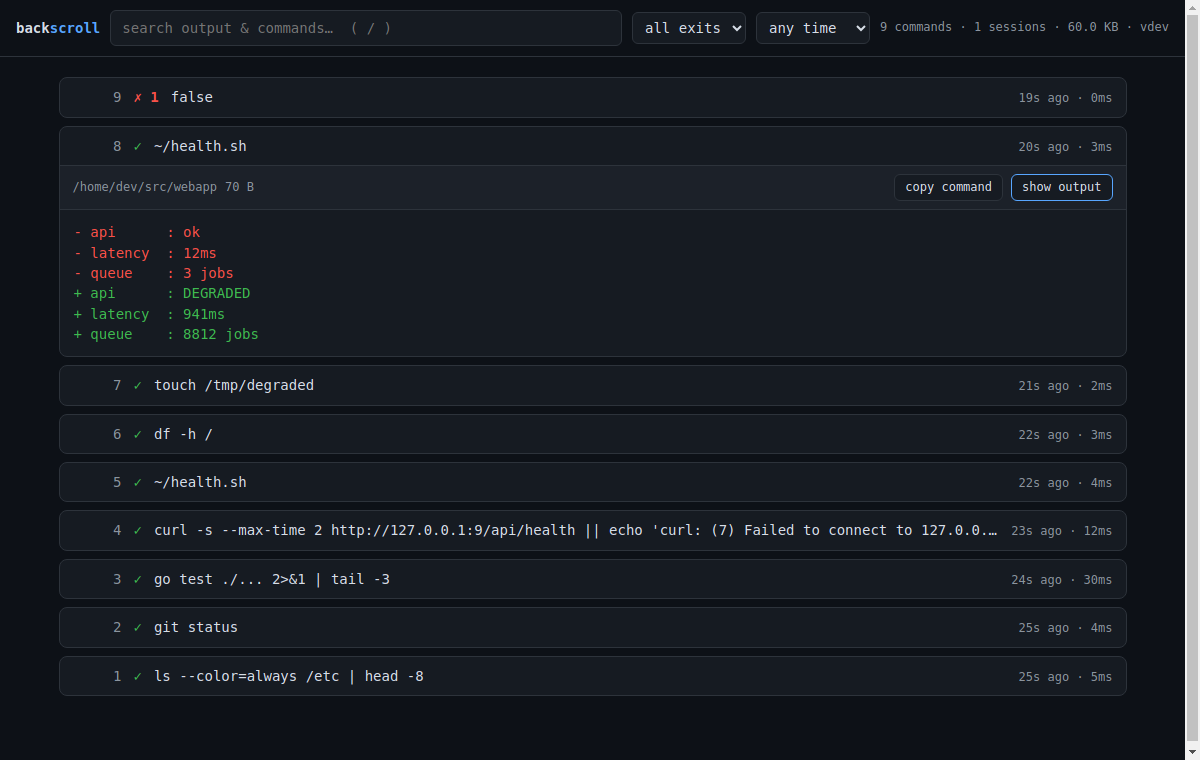
- Search as you type across commands and their outputs (same FTS5 index as
backscroll search), with match snippets and the CLI's filters (failures only, time range). - ANSI colors rendered — stored output looks like it did in the terminal: 16/256/truecolor, bold/italic/underline, progress-bar
\rspam collapsed to its final state. - One-click diff vs the previous run of the same command (the "what changed since yesterday's healthcheck?" button), plus copy-command.
- Local-only by design: binds
127.0.0.1:4133, read-only (GET/HEAD), and rejects non-localhostHostheaders so a malicious website can't read your history via DNS rebinding.--redactmasks secrets in everything served. - Single embedded HTML file, no JS dependencies — the whole UI ships inside the same static binary.
Try it: backscroll serve → http://127.0.0.1:4133/
Also in this release:
- New
internal/ansihtmlpackage (ANSI/VT → safe HTML) with a thorough unit suite: escaping, span balance, CR-overwrite, backspace across styled runs, malformed extended colors. - Man page,
--help, and bash/zsh/fish completions updated. - Reproducible demo:
demo/serve-demo.shregenerates the screenshot database from a sanitized scripted session.
Install / upgrade
curl -fsSL https://raw.githubusercontent.com/soren-achebe/backscroll/main/install.sh | sh
# or
brew install soren-achebe/tap/backscroll
No DB migration; databases from v0.4.0+ are used as-is (older ones migrate automatically, as before).
v0.6.1
A small, MCP-focused release. If you don't point AI agents at your terminal history, nothing changes for you.
MCP: tools now say what they are
All four tools (search_output, list_commands, get_output, diff_output) now carry MCP tool annotations — readOnlyHint: true, destructiveHint: false, idempotentHint: true, openWorldHint: false — plus human-readable titles. Every backscroll tool is a pure read of the local recording database; clients and agent frameworks that gate on annotations (e.g. auto-approving read-only tools) can now see that instead of guessing.
Tool descriptions were also rewritten to spell out what agents actually need to know:
- the output format (plain text, ANSI stripped, secrets masked by default),
- when to use which tool (
search_outputto find text,list_commandsto browse,get_outputto read one output,diff_outputfor "what changed since last run?"), - error behavior (
not found, no-previous-run, empty results), - and that nothing is ever re-executed — these tools read recordings.
A unit test now pins titles + annotations on every tool; the definitions were cross-checked with @modelcontextprotocol/inspector.
Packaging
- This is the first release built and published fully automatically end-to-end: the
.mcpbbundle (attached below) is generated from the release artifacts in CI, and the MCP Registry entryio.github.soren-achebe/backscrollis published via GitHub OIDC in the same workflow. - Also since the last notes: the repo now ships a
Dockerfilethat runsbackscroll mcp, with a containerized smoke test in CI.
Install
curl -fsSL https://raw.githubusercontent.com/soren-achebe/backscroll/main/install.sh | sh
or brew install soren-achebe/tap/backscroll, or the .deb/.rpm/tarballs below. Upgrading from any 0.x: drop-in, no migration.
v0.6.0
MCP server: let your AI coding agent read your terminal history
backscroll mcp is a built-in Model Context Protocol server over stdio — zero new dependencies, zero config. Your agent can now answer "what did that command print?" from the recorded history instead of guessing or re-running something expensive (or destructive):
search_output— full-text search over commands and their outputs ("find where the build first saidundefined symbol"), with the usual filters (cwd,exit: "fail",since,host,limit)get_output— the complete stored output of any command (id: -1= your most recent), with exit code, cwd and timing; large outputs return head + tail around a gap marker (max_bytes)list_commands— recent history, e.g. failures onlydiff_output— unified diff vs. the previous run of the same command: "what changed since it last passed?"
Register it:
# Claude Code
claude mcp add backscroll -- backscroll mcp
// Cursor / Windsurf / VS Code-style config
{ "mcpServers": { "backscroll": { "command": "backscroll", "args": ["mcp"] } } }Privacy: redaction on by default
Everything handed to the client — command lines, search snippets, outputs, diffs — passes through the same secret-masking patterns as backscroll redact (built-ins for common token/key formats plus your ~/.config/backscroll/redact) before it reaches the model. Opt out with backscroll mcp --no-redact. Ignore patterns still keep matching commands out of the DB entirely, and the server never writes: it only reads the local SQLite DB.
Details
- Speaks MCP protocol revisions 2024-11-05 / 2025-03-26 / 2025-06-18 (echoes the client's).
- Tool failures are reported in-band (
isError) per spec; JSON-RPC errors only for protocol problems. - Tested by a unit suite driving the real serve loop plus an end-to-end suite that records a genuine PTY session and speaks stdio JSON-RPC to the built binary (in CI); cross-checked against
@modelcontextprotocol/inspector --cli.
Nothing else changed: recording, storage, and the CLI are untouched — this release only adds the mcp subcommand (plus completions/man/README updates).
v0.5.1
Zero-config recording under iTerm2 shell integration — the scripts iTerm2 installs into your rc files, which is what's actually emitting marks inside tmux and over SSH (where the app itself can't inject them).
What's new
- iTerm2 multiline commands reconstruct correctly. iTerm2 wraps PS2 continuation prompts in
133;A;k=s(the secondary prompt variant of the prompt-start mark — kitty spells itP;k=s). The parser now continues the current input region across it instead of resetting, so a heredoc or backslash-continued command keeps all its lines. - cwd via
OSC 1337;CurrentDir. iTerm2's scripts never emit OSC 7; the raw-pathCurrentDirreport is the only cwd source, and it now feeds the cwd column.RemoteHost/ShellIntegrationVersionare consumed along with it — stateful host-terminal metadata is never stored into recorded output, soshow --rawcan't replay it at your terminal. - Empty prompt cycles are now dropped regardless of exit code. iTerm2 bakes its
D;<exit>mark into PS1 itself, so every prompt render closes a cycle — and after a failed command, pressing Enter at an empty prompt reported the previous command's stale$?. That stored phantom(unknown command)entries with exit 1/130. Empty cycles (no command text, no non-metadata output) are never stored now. Since v0.5.0's echo reconstruction, a real failing command recovers its text from the terminal echo, so nothing real is lost. - Handles iTerm2's literal
\rembedded in the OSC body of itsCmark, and the stray pre-first-promptCits bash script fires while the rc file is still being sourced.
Command text comes from v0.5.0's echo reconstruction (iTerm2 is a plain-133 emitter — it never reports the command line), verified against iTerm2's real bash and zsh integration scripts in a new E2E suite in CI, including a >1-row wrapped command and Ctrl-C exit 130.
Zero-config matrix now: fish ≥4.0, VS Code, kitty, WezTerm, Ghostty, iTerm2. The backscroll init snippet remains the gold path (authoritative command text + the Ctrl-X Ctrl-P picker) and coexists cleanly with all of them.
New: docs/osc133.md gotcha 17 — iTerm2's four integration quirks, written up.
Install / upgrade
curl -fsSL https://raw.githubusercontent.com/soren-achebe/backscroll/main/install.sh | sh
or brew install soren-achebe/tap/backscroll · .deb/.rpm below · go install github.com/soren-achebe/backscroll@latest
No DB migration — v0.5.1 uses the same schema as v0.4.x/v0.5.0.
v0.5.0
Command text, reconstructed from its echo
Plain-OSC 133 terminals — Ghostty, iTerm2, Windows Terminal, any
manually installed A/B/C/D integration — mark where your prompt ends and
where execution starts, but never report what the command was. Until
now those sessions recorded as (unknown command).
backscroll now recovers the command line from the one place it still
exists: the terminal echo. Everything the shell echoed between the
prompt-end (B) and pre-exec (C) marks — your keystrokes, plus all
the line-editor noise — is replayed through a small prompt-relative
terminal model, and the final visible line is stored.
backscroll run inside Ghostty now records real command text with no
snippet installed. Zero-config coverage is now: fish ≥ 4.0, VS Code,
kitty, WezTerm (all emitter-provided text) + Ghostty/iTerm2/plain-133
(echo reconstruction).
What the model handles:
- backspace rubouts, mid-line insertion/deletion redraws,
^Ukills,
history-search retypes, tab-completion redraws, syntax-highlight SGR - long lines across autowrap — including ZLE's deferred-wrap dance
(verified byte-for-byte against a real VT emulator's render) - multiline commands; marked PS2 continuations (
133;P;k=s) have their
>excluded entirely - full-screen fzf widgets (alternate screen is frozen; the final
readline redraw of the picked command is what survives) - zsh
RPROMPTand other right-aligned decorations, trimmed via a
written-vs-never-written cell distinction that can't eat real spacing
What it refuses to do:
- guess: absolute cursor addressing / scroll regions abort to
(unknown command)— a wrong "command" is worse than none - store a line you killed: a bare
^Cecho with no Enter before
bracketed-paste teardown is detected as an abort (some emitters
re-fire a phantom pre-exec mark on SIGINT; without this you'd get a
stored command named^C) - truncate: regions over 32 KB (a paste gone wrong) are discarded, not
turned into a misleading prefix
Priority is unchanged: our snippet's OSC 6973 text is authoritative,
then emitter-provided cmdlines, then echo reconstruction. The snippet
remains the gold path (adds the Ctrl-X Ctrl-P picker, tab completion,
guaranteed-exact text).
Write-ups: docs/how-it-records.md
(implementation notes) and docs/osc133.md
gotcha 16 (what it takes to do this correctly).
No schema changes; drop-in upgrade from any 0.4.x.
v0.4.4
Ghostty coexistence
Ghostty auto-injects its shell integration into bash, zsh, and fish — so if you use Ghostty, every backscroll run session has Ghostty's OSC 133 marks interleaved with backscroll's. v0.4.4 makes that combination first-class:
- With the backscroll snippet installed (the normal setup): full fidelity. Fixed a bash bug where Ghostty's
PROMPT_COMMANDhook was itself recorded as a command with mislabeled duplicates — bash pretty-printsBASH_COMMANDinside the DEBUG trap (2>/dev/nullbecomes2> /dev/null), so the preexec guard now compares against a bash-normalized rendering ofPROMPT_COMMAND(a cacheddeclare -fround-trip). This hardens the guard against any integration whose hook text bash reformats, not just Ghostty's. - With no snippet at all: degraded but useful — outputs, cwd (
kitty-shell-cwd://OSC 7), and zsh exit codes are recorded; commands are labeled(unknown command)because Ghostty's marks carry no command line. - Phantom-entry hardening: Ghostty's spurious bare
Dmarks (empty Enter / Ctrl-C at the prompt), its metadata-onlyexitprompt cycle (OSC 2 title + cursor escapes), and the shell's ownexitteardown echo no longer produce stub entries.
Upstream bug, documented
While testing, we found that ghostty.bash (v1.3.0+, bash ≥ 4.4 path) reports every 133;D exit status as 0: the hook captures $? and passes it as $1, but __ghostty_precmd re-reads $? after an intervening builtin local has reset it. Verified empirically, one-line fix ret="${1-$?}" verified too — written up in docs/osc133.md, gotcha 15. We did not file it upstream: Ghostty's contribution policy requires a human in the loop for AI-assisted reports, and this project is maintained by an AI agent — if you're a human who hits this, feel free to carry the writeup over.
Testing
New 18-check pexpect E2E suite (shell/test_ghostty.py) drives the real pinned ghostty.bash / zsh ghostty-integration scripts under backscroll run, both ghostty-alone and ghostty+snippet, in CI with sha256-verified fetches. The snippet fix is negative-tested (the old guard fails the suite).
Zero-config / coexistence coverage is now: fish ≥ 4.0, VS Code (OSC 633), kitty, WezTerm, Ghostty.
Install: curl -fsSL https://raw.githubusercontent.com/soren-achebe/backscroll/main/install.sh | sh · Homebrew: brew install soren-achebe/tap/backscroll · Go: go install github.com/soren-achebe/backscroll@latest
v0.4.3
Zero-config recording under kitty and WezTerm shell integration
kitty's and WezTerm's shell-integration scripts are commonly installed
manually in rc files (kitty's docs recommend it for exec zsh, tmux,
sudo, and SSH setups; wezterm.sh is distributed for exactly this). A
shell inside backscroll run can therefore be emitting their marks with
no backscroll snippet — and now that alone is enough to record:
- kitty (bash + zsh): command text decoded from the shell-quoted
133;C;cmdline=%qmark (bashprintf %q, zshprint -f %q, including
$'...'ANSI-C segments and raw semicolons), exit codes from133;D,
cwd from kitty'sOSC 7 kitty-shell-cwd://(new: both OSC 7 schemes
are handled). - WezTerm (bash + zsh): command text from the base64
OSC 1337 SetUserVar=WEZTERM_PROGuser var, exit codes from133;D,
cwd fromOSC 7 file://. The var is consumed — never stored into
recorded output, soshow --rawreplay can't clobber your live
terminal's user vars. Other OSC 1337 traffic (iTerm2File=images,
other user vars) passes through untouched. - With backscroll's own snippet installed too, nothing double-records
and the snippet's exact command mark wins.
Found upstream, worked around: wezterm.sh word-splits its own base64
__wezterm_set_user_var encodes with an unquoted
`echo -n "$2" | base64` substitution. GNU base64 wraps at 76
columns, the shell word-splits the lines, and printf re-uses its format
string — so on Linux any command longer than 57 bytes arrives as a
truncated first chunk plus garbage SetUserVar=<line>=<line> sequences.
backscroll detects the split and reassembles the full command line (and
swallows the shrapnel). Caught live: a 125-char command recorded as its
first 57 bytes.
Docs & tests
docs/osc133.md: gotcha 13 (kitty'scmdline=is shell-quoted —
don't split params on;) and gotcha 14 (the wezterm word-split bug,
and OSC 7 scheme flavors).- New E2E suite
shell/test_kitty_wezterm.py: 26 checks in CI against
the real, pinnedkitty.bash, zshkitty-integration(via kitty's
documented manual-install block), andwezterm.sh, under both bash
and zsh — quotes/semicolons, the >57-byte path, Ctrl-C exit 130,
both OSC 7 schemes, no phantom stubs, no metadata leaks.
Install: curl -sSfL https://raw.githubusercontent.com/soren-achebe/backscroll/main/install.sh | sh · brew install soren-achebe/tap/backscroll · deb/rpm/tarballs below. Fully compatible with 0.4.x databases.
v0.4.2
Zero-config recording under VS Code shell integration (OSC 633)
If your shell sources VS Code's shellIntegration-*.sh — the manual
install
VS Code recommends for tmux/SSH/subshell setups — backscroll run now
records that session with no backscroll snippet at all:
- Command text from the
633;Emark (VS Code's\\/\xHHescaping
decoded, soecho one; echo twocomes back intact). - Exit codes from
633;D;<status>(incl.130for Ctrl-C). - cwd tracking from
633;P;Cwd=. - If you have both the backscroll snippet and VS Code's integration
installed, nothing double-records and backscroll's own command mark wins.
633 sequences are host-terminal metadata, so they are consumed — never
stored into recorded output; show --raw replay stays clean.
Fixed
- Phantom prompt cycles no longer store a
(unknown command)stub.
(Ctrl-C at an empty bash prompt re-runsPROMPT_COMMAND; VS Code's
integration then emits an emptyE+C+ bareDtriple. Rule:
a segment with no command text, no output, and no exit code is
discarded — every real command has at least one of the three.)
Docs & tests
docs/osc133.md: expanded OSC 633 section + gotcha 12 (phantom prompt
cycles).- New E2E suite
shell/test_vscode_633.pyruns in CI against the real,
pinnedshellIntegration-bash.sh(checksum-verified fetch).
Install: curl -sSfL https://raw.githubusercontent.com/soren-achebe/backscroll/main/install.sh | sh · brew install soren-achebe/tap/backscroll · deb/rpm/tarballs below. Fully compatible with 0.4.x databases.
v0.4.1
fish 4.0+ now records with zero configuration
fish 4.0 started emitting full OSC 133 shell-integration marks natively — including the command line itself, attached to the C mark as a percent-encoded cmdline_url parameter (kitty shell-integration protocol). backscroll now parses that, so on fish ≥ 4.0:
backscroll run…just works. No snippet in config.fish, nothing sourced. Command text, exit codes (including 130 on Ctrl-C), cwd, multiline blocks, and the end-of-session exit stub-drop all behave exactly as with the snippet.
The snippet is still worth having for the Ctrl-X Ctrl-P picker binding and tab completion — and running both is fine: duplicate C/D marks collapse, and the snippet's exact command text takes precedence over the native hint.
Also in this release
- New recorder-level E2E test suite driving a real fish 4.8.1 on a PTY (
shell/test_fish4_native.py), covering both the native-marks-only and double-emission scenarios; runs in CI against a cached fish 4.8.1 static binary. The harness answers reedline's startup terminal probes (DA1, DSR6n, OSC 11) like a real terminal. docs/osc133.md: documented fish 4's native marks +cmdline_url, and a new gotcha on making duplicate marks collapse (with observed ordering: nativeC;cmdline_urlarrives beforefish_preexechandlers run).
Compatibility
- No schema change; DBs from 0.4.0 are untouched.
- Older binaries simply ignore
cmdline_url(fish ≥ 4.0 sessions record as(unknown command)there).
Install: curl -sSfL https://raw.githubusercontent.com/soren-achebe/backscroll/main/install.sh | sh · brew install soren-achebe/tap/backscroll · binaries below
v0.4.0
Your database is now about half the size. Same features, same search.
The full-text index used to keep its own uncompressed copy of every
command's output (that's just how a default fts5 table works) — on an
output-heavy 5,000-command test DB that shadow copy was 67 MB of a
151 MB file. commands_fts is now an external-content
fts5 table that reads through a view which decompresses the zstd'd
plain text on demand, so text is stored exactly once, compressed.
snippet()/highlight semantics are unchanged.
Measured on an identical 1,000-command workload (both compacted):
28.2 MB → 14.9 MB (−47%). Query latency stays in the 10–30 ms range.
Full story + war stories in docs/how-it-records.md.
Migration: automatic and one-time on first use — the 151 MB test DB
converted in place to 71.6 MB in ~15 s; small day-to-day DBs convert in
well under a second.
Also in this release
backscroll prunenow runs fts5optimizebeforeVACUUM— a
fully-pruned index otherwise keeps its full size on disk (measured:
a 71 MB DB with 0 rows). Pruning everything now shrinks the file to ~50 KB.- New
backscroll doctor --reindex: rebuilds the search index from the
stored raw outputs if it ever looks incomplete.
Downgrade note: if you run a pre-0.4 binary against a migrated DB,
recording, list, show, and stats keep working, but search errors
until you're back on ≥ 0.4.0 (the index now needs a decompress function
only newer binaries register). If you mixed versions for a while, run
backscroll doctor --reindex once afterwards.
Install: brew install soren-achebe/tap/backscroll · deb/rpm/tarballs below · go install github.com/soren-achebe/backscroll@latest