AI-Powered Coding Interview Assistant with Undetectable Side Panel


[

An intelligent Chrome / Firefox extension that helps you solve coding interview problems by leveraging AI models while keeping your assistance undetectable through advanced focus protection techniques. This extension can solve coding problems with undetectable focus protection. Supports 30+ platforms including LeetCode, HackerRank, and more.
Better than other extensions - Its free and private. Can integrate locally with ollama, llama.cpp server.
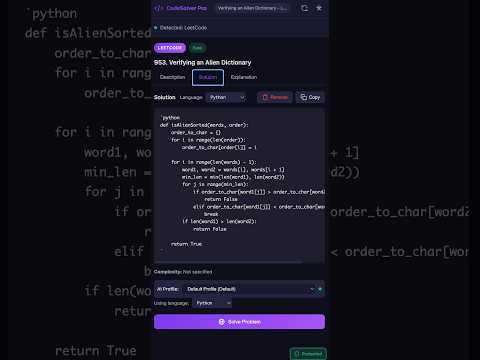
-
Download the Release
- Download and extract the (CodeSolver_Pro_Chrome.zip & CodeSolver_Pro_Firefox.xpi) ZIP file from the Releases page
-
Load in Chrome
# Open Chrome and navigate to: chrome://extensions/- Enable Developer mode (toggle in top-right)
- Click "Load unpacked"
- Select the extracted folder
-
Verify Installation for Chrome
- Click the Extensions icon in Chrome's toolbar
- Find "CodeSolver Pro" and click it
- The side panel should open
-
Load in Firefox
# Open Firefox and navigate to: about:debugging#/runtime/this-firefox- Click "Load Temporary Add-on..."
- Select the
manifest.jsonfile from the extracted folder
OR for permanent installation:
- Open Firefox and go to
about:addons - Click the gear icon → "Install Add-on From File..."
- Select the extracted folder where (CodeSolver_Pro_Firefox.xpi) is present.
-
Verify Installation for FireFox
- Click the Extensions icon in Firefox's toolbar
- Find "CodeSolver Pro" and click it
- The sidebar should open
-
Open a Coding Problem
- Navigate to LeetCode, HackerRank, or any supported platform
- Open a problem page
-
Configure AI Provider
- Click the Settings (gear icon) in the side panel
- Click "Add Profile"
- Choose your AI provider:
- OpenAI: Get API key from https://platform.openai.com/api-keys
- Anthropic: Get API key from https://console.anthropic.com/
- Local LLM: Use Ollama (free, works offline)
- Save your profile
-
Solve Your First Problem
- Select your AI profile from the dropdown
- Choose your programming language
- Click "Solve Problem"
- View the generated solution!
- Automatically detects coding problems from 30+ platforms
- Supports: LeetCode, HackerRank, CodeSignal, Codeforces, Codewars, and more
- Extracts problem description, examples, constraints, and starter code
- Multiple AI Providers: OpenAI (GPT-4), Anthropic (Claude), Local LLMs
- Comprehensive Output:
- Step-by-step approach
- Time & space complexity analysis
- Complete working code
- Detailed explanation
- Multi-Language Support: Python, JavaScript, Java, C++, Go, Rust, and more
- Focus Protection: Prevents blur event detection
- Visibility Override: Always appears "visible" to webpages
- Active Element Preservation: Maintains focus state
- Multi-Layer Defense: Works at multiple levels for maximum effectiveness
- Local Storage: All solutions stored locally in your browser
- Language-Specific: Different solutions for same problem in different languages
- XML Export: Backup all your solutions
- Persistent: Solutions remain available across browser sessions
- Multiple Profiles: Switch between different AI configurations
- Import/Export: Backup and share your AI profiles
- Background Processing: Generate solutions for multiple problems simultaneously
| Platform | Status |
|---|---|
| LeetCode | ✅ Full Support |
| HackerRank | ✅ Full Support |
| CodeSignal | ✅ Full Support |
| Codeforces | ✅ Full Support |
| Codewars | ✅ Full Support |
| InterviewBit | ✅ Full Support |
| HackerEarth | ✅ Full Support |
| AlgoExpert | ✅ Full Support |
| BinarySearch | ✅ Full Support |
| CSES | ✅ Full Support |
| AtCoder | ✅ Full Support |
| CodeChef | ✅ Full Support |
| GeeksforGeeks | ✅ Full Support |
| And 15+ more... | ✅ Full Support |
Generic Detection: Works on custom coding platforms too!
- Navigate to any coding problem on a supported platform
- The extension auto-detects the problem
- Select your AI profile and language
- Click "Solve Problem"
- View the solution in the Solution tab
Create a Profile:
- Settings → Add Profile
- Configure provider, API key, model, and parameters
- Save profile
Switch Profiles:
- Use the profile dropdown in the Solution tab
Export/Import:
- Settings → Export/Import Profiles
- Share profiles with team members
Add custom websites:
- Open Settings
- Scroll to Website Whitelist
- Enter website URL (e.g.,
https://customplatform.com) - Click Add
Provider: openai
API Key: sk-... (from https://platform.openai.com/api-keys)
Model: gpt-4 or gpt-4-turbo
Temperature: 0.2 (recommended for coding)
Provider: anthropic
API Key: sk-ant-... (from https://console.anthropic.com/)
Model: claude-3-5-sonnet-20241022
Temperature: 0.2
# Install Ollama
curl -fsSL https://ollama.ai/install.sh | sh

# Pull a model
ollama pull llama3.2

Also check if the following is working:
 curl http://localhost:11434/api/tags

If it does not work, check out the https://docs.ollama.com/faq

# Configure in extension
Provider: local
URL: http://localhost:11434/v1/chat/completions
Model: llama3.1
# No API key required!
Benefits of Local LLM:
- ✅ Completely free
- ✅ Works offline
- ✅ Privacy-focused
This extension uses Chrome's Manifest V3 with:
- Side Panel API: Integrated experience without opening new tabs
- Content Scripts: Problem detection and parsing
- Injected Scripts: Page-context focus protection
- Service Worker: Background processing and tab management
- Local Storage Only: All data stored in
chrome.storage.local - No External Servers: No data sent except to configured AI APIs
- API Keys: Stored securely, never shared
- No Analytics: No usage tracking or data collection
- Solutions: Never uploaded, stay on your device
- Chrome Browser: Version 114 or higher (for Side Panel API)
- AI Provider: API key or local LLM setup
Problem: "No problem detected"
- Click "Refresh Detection" button
- Ensure you're on a problem page (not list view)
- Check if website is whitelisted
Problem: AI not generating
- Verify API key is correct
- Check API credits/quota
- Try a different profile
- Check Network tab for errors
Problem: Focus protection not working
- Refresh the problem page
- Re-open the side panel
- Check console for errors
- Note: Some platforms have advanced detection
For detailed documentation, development guide, and API reference, visit the main repository.
This extension is intended for educational and practice purposes only.
Using AI assistance during actual coding assessments, interviews, or competitions where external help is prohibited is unethical and may violate terms of service.
Always use responsibly and ethically.
MIT License - See LICENSE in the main repository.
Contributions are welcome! Please visit the main repository to:
- Report bugs
- Request features
- Submit pull requests