This repository was archived by the owner on Jun 20, 2022. It is now read-only.
This repository was archived by the owner on Jun 20, 2022. It is now read-only.
Old versions of desktop app not fully deleted from Windows #580

Description

Describe the bug
In the "Apps & Features" Settings page of Windows, multiple versions of the app are listed. Attempting to uninstall the older version only uninstalls the newer version. While the old version remains listed as installed, it cannot be launched and does not appear to actually exist on the disk. It appears that this is an issue with updating the Windows log of installed programs.
To Reproduce
- Install Standard Notes for Windows, version 3.3.4.
- Update Standard Notes to version 3.4.1.
- Open Windows Settings > Apps & Features. See both versions listed.
- Click on version 3.3.4; click "Uninstall."
Expected behavior
Version 3.3.4 uninstalls and versions 3.4.1 remains. Instead, version 3.4.1 is uninstalled and removed from the list. Version 3.3.4 remains on the list but cannot be located or launched.
Screenshots
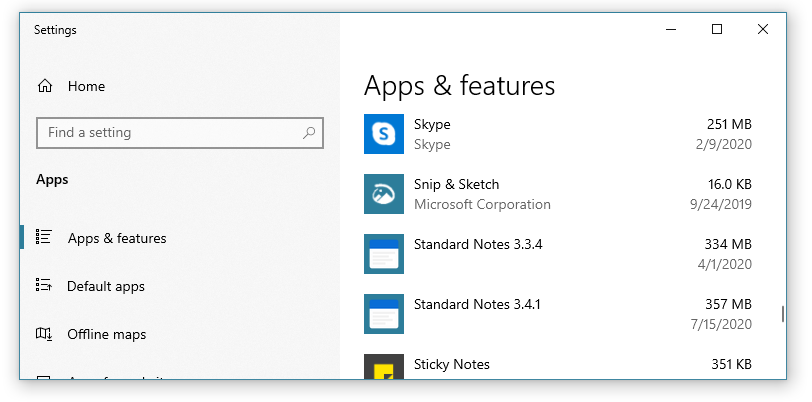
Desktop (please complete the following information):
- OS: Windows 10 Home