Releases: steelington/AHStats
Release list
v1.2.1 - The Ki-61 was showing up twice

Thanks to Shane for spotting this one.
If you flew in the old single Main Arena days, the Ki-61 was showing as
two separate aeroplanes on Kills by Plane - your kills in it split
between them, and two of it in the Model dropdown. It wasn't two
aeroplanes. HTC used to call it the Ki-61 and now calls it the
Ki-61-I-Tei, and the app was filing your early tours under the old
name and everything since under the new one.
Same thing had happened to the P-40B, which HTC now calls the
P-40C, so that's fixed too. Both now show as one aeroplane with your
whole career in it.
Nothing to re-sync and nothing to delete - the app repairs its own cache
the first time you open this version.
v1.2.0 - A light theme, and it tells you when there's an update
Two things people asked for: the app now tells you when there is a newer
version, and it comes in a light colour scheme as well as the dark one.
Nothing to re-sync and nothing to delete.
New
It tells you when there's an update. On startup the app asks GitHub
whether a newer version has been released. If there is one, a green
Update available button appears in the top right - click it and the
release page opens in your browser, where the exe is attached. If there
isn't, you see nothing at all.
To be clear about what that does and doesn't do: it asks GitHub one
question and reads the answer. Nothing about you, your pilot, your
scores or your machine is sent, nothing is recorded anywhere, and the
app never downloads or installs anything by itself - updating stays a
thing you do, by hand, when you feel like it. If you're offline, or
GitHub is having a bad day, the check gives up quietly and the app
carries on as normal.
Light theme. There's a Dark / Light switch in the top right, next
to where the update notice appears. It changes the whole app on the
spot - grids, graphs, dropdowns and all - with no restart, and it
remembers which one you picked for next time. The olive masthead stays
olive in both, because that's the app.
v1.1.5 - The Model box opens where you clicked
A follow-up to v1.1.4, reported by Shane again: the new Model picker
on Kills by Plane could flash something in the top-left corner of the screen
and then leave the box sitting on the A-20G with no list to choose from.
Nothing to re-sync and nothing to delete.
Fixed
The Model list appeared in the corner of the screen instead of under the
box. The list was being put on screen for an instant before it was moved
into place, so what you saw was a flicker in the top-left corner of the
monitor - and depending on where the window sat, sometimes that flicker was
all you got. It now stays hidden until it is where it belongs.
The Model box could get stuck on one aircraft. If the list ever
disappeared without the app noticing, the box would refuse to open a new one
and refuse to change what it showed - locked on whichever aircraft was first
in the list, usually the A-20G. It now notices and recovers.
The Model list follows the arena. Switching arena, or pilot, left the
previous list in the box: aircraft you never flew there were still offered,
and aircraft you only flew in the new arena were missing. Switch to All now
and the WWI aircraft appear where they should.
v1.1.4 - The whole aircraft list, and a wheel that works
The Model picker on Kills by Plane now filters as you type and scrolls
with the mouse wheel. Both reported by Shane - thanks for the catch, and
for spotting it precisely enough to find the cause.
Nothing to re-sync and nothing to delete.
Fixed
Aircraft were missing from the "By Model" list. The A6M3 among them, and
anything else near the top of the alphabet. The data was in your cache the
whole time - the list itself was the problem. A long career meets around a
hundred and thirty aircraft, and Windows draws a menu that long taller than
the screen, then quietly cuts off whatever doesn't fit.
The picker is now the same type-to-filter box as the tour pickers: type
"A6M" and you get the three Zeroes, type "109" and you get every Messerschmitt.
Changed
The Model list scrolls with the mouse wheel and has a real scrollbar,
instead of the hold-the-pointer-on-an-arrow menu it had before.
The 109G-10 rolling into the 109K-4 is HiTech's own doing, not ours - AHStats
shows the aircraft names exactly as the stats pages report them.
v1.1.3 - Scrollbars and grid borders that match the rest of the app
Cosmetic only. Nothing to re-sync, nothing to delete, and nothing behaves
differently - it just stops looking like two applications stitched together.
Fixed
Scrollbars are dark. Every scrollbar in the app - down the grids, down the
tour dropdown - was drawn in light grey with a ridged thumb and raised 3D
arrows, a Windows 95 control sitting in the middle of a dark window. The theme
had always meant to style them; it was setting the colours on a name none of
the scrollbars actually used, so they quietly kept the defaults.
Grids are no longer framed in white. Same cause: a near-white bevel drawn
around every table. The grids now carry the same soft grey edge as the rest of
the panels.
v1.1.2 - Type a tour number, get that tour
v1.1.1 read what you typed into the tour box, but then went looking for it in
the wrong place, so Single Tour sync could still fetch a tour you never asked
for. Reported again by The Fugitive - thanks for staying on it.
Nothing to re-sync and nothing to delete. Your cache is untouched.
Fixed
Typing a tour number finds that tour. One arena's tour list carries three
generations of HiTech's own naming: Melee Tour 319 down to 201, Late War Tour
200 down to 93, and plain Tour 92 down to 12 - all one continuous career. The
picker was matching your typing as plain text against those labels, which went
wrong two ways:
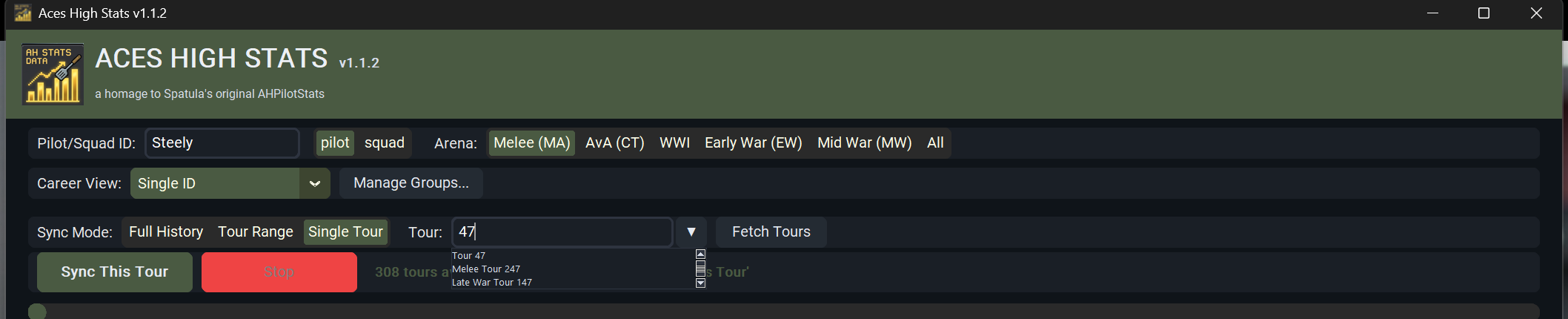
- Typing the bare number. "47" appears in Tour 47, Late War Tour 147 and Melee
Tour 247, and the newest-first list put Melee Tour 247 at the top - so Enter
synced a tour twenty years away from the one you wanted. - Editing the number in the box. The box arrives filled in with the current
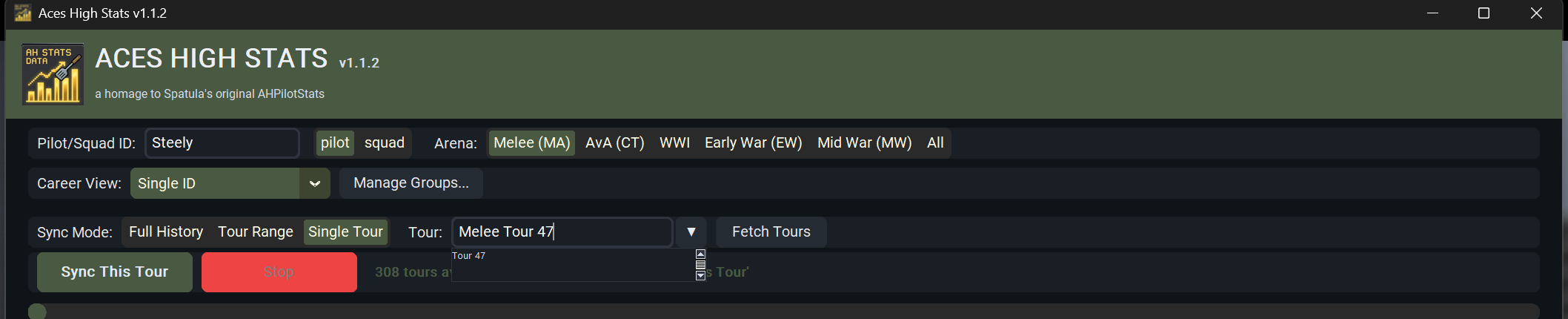
tour, so changing "Melee Tour 319" to "Melee Tour 47" is the natural move -
but there is no tour by that name, so it matched nothing and the box snapped
straight back to 319. That covered 189 of the 308 tours in the Melee list.
The tour number is now what the picker matches on. Type 47 and you get Tour 47;
type 93 and you get Late War Tour 93; leave the arena name wrong and it still
finds the tour. A label typed in full still wins over the tours that merely
contain those digits, so "Tour 21" is Tour 21, not Tour 210.
Clicking into the tour box selects what's in it, so the first thing you type
replaces the tour rather than being tacked onto the end of it. Click, type the
number, press Enter. Click a second time if you would rather edit in place.
A filter matching no tour says so. The list used to just go empty, which
looked like the dropdown had broken again.
What it looks like
Typing 47 puts Tour 47 first, ahead of the tours that merely contain those
digits:
Editing just the number, and leaving an arena name no tour of that vintage ever
had, still finds the tour:
v1.1.1 - Single Tour sync actually picks the tour
The type-to-filter tour pickers that arrived in v1.1.0 had two ways of not
working, and Single Tour sync ran into both of them: the dropdown arrow opened
nothing, and a tour typed into the box was ignored in favour of the newest tour.
Both are fixed.
Nothing to re-sync and nothing to delete - this release only changes the way the
pickers behave. Your cache is untouched.
Reported by The Fugitive, with both symptoms described precisely enough to
reproduce them on the first try. That is worth a lot - thanks.
Fixed
The dropdown arrow opens the tour list. The pickers were only filled after a
sync finished, or after you changed the arena or the pilot/squad setting. On an
ordinary launch - open the app, switch Sync Mode to Single Tour, click the arrow
- the list had nothing in it yet, so the arrow appeared dead. Every tour picker
in the app now loads from your local cache the moment the window opens: Single
Tour sync, Tour Detail, Squad and Arena Planes alike.
Typing a tour name now selects that tour. The box would take your typing,
but the tour that got synced was whatever had been selected before - which, on a
fresh launch, is always the newest tour. So no matter what you typed, you got
the current tour. What is in the box is now read at the moment you click the
button, so typing the tour and clicking Sync This Tour is the whole interaction;
you never have to pick from the list.
Typed text is matched the same way the filtered list is ranked, so the tour you
typed wins over the ones that merely contain those digits - "Tour 21" finds
Tour 21, not Tour 210 through 219. Text matching no tour at all is discarded and
the box snaps back to the tour that is still selected, rather than quietly
syncing something you never asked for.
One naming note while you are in there: HiTech's own labels changed over the
years, so the tours between the 2007 split and the Melee rename read as "Late
War Tour 200", the recent ones as "Melee Tour 318", and the pre-split ones as
plain "Tour 47". Filtering on the number alone finds any of them.
v1.1.0 - The missing eighty-one tours
Tours you flew before October 2007 were in the database all along and the app was hiding them. This release is the fix for that, plus everything players asked for while reporting it.
Every item below says who raised it and how to see it working. Thanks to The Fugitive and Lusche — this release exists because they took the time to say what was wrong.
Fixed
Main Arena tours before Tour 93 are visible again
Lusche reported that no MA data before Tour 93 would load, that only 227 tours were offered, and that career stats under Melee (MA) simply stopped at 93. The Fugitive worked out why: Tour 92 is the last tour called plainly "Tour XXX" — from Tour 93 they were renamed "Late/Mid/Early War Tour XXX" — and the app wasn't recognising the older ones as Main Arena at all.
That was exactly it. Aces High ran a single Main Arena through Tour 92, and HiTech's tour ids for those carry no arena letters — just Tour92. From Tour 93 the arena split and the ids gained prefixes (LWTour93), with the Late War arena — later renamed Melee — continuing the Main Arena's numbering without a break: Tour 92 ends 2007-09-30, Late War Tour 93 begins 2007-10-01. One unbroken career. AHSTATS was filing the unprefixed ids under an arena of their own that no picker offered, so with Melee (MA) selected everything before Tour 93 was missing from Career Summary, Tour History, Kills by Plane and Graphs alike. Only "All" reached them, and that dragged in every other arena too.
To check: open the app, pick Melee (MA), and look at Tour History. Tours below 93 are now in the list, and the tour count goes up — on a full cache that's 307 Melee tours instead of 226, back to Tour 12 and December 2000. Career Summary totals include them.
You do not need to re-sync. AHSTATS re-derives the arena of every cached tour when it opens the database, so your existing data is corrected the first time you launch this version.
Listing the same game ID twice no longer loses the group
Putting a name into an identity group twice used to fail the save outright and take the rest of the group with it. Repeats are now ignored.
New
Career totals across every name you've flown under
The Fugitive reported that groups wouldn't work for him, since his first name — MDJOE — was all from the early days before the Tour 92 cutoff. Lusche reported that groups appeared to be limited to 10 IDs.
There was never a limit; the old single-line box just scrolled the earlier names out of sight. And the reason MDJOE's tours contributed nothing was the arena bug above, not the group itself — so this one is genuinely fixed now rather than worked around.
To check: Manage Groups..., name it whatever you like ("MyTotals"), and put each game ID on its own line — MDJOE, then Fugitive. A count underneath tells you how many it holds and says outright that there's no cap. Save, pick the group under Career View, and every tab totals the whole career across both names.
Tour Range sync
Lusche asked for a way to type a range to download, rather than fetching everything or picking tours one at a time from a dropdown, which he called cumbersome — and noted that syncing "All" pulled down arenas he never flew in.
To check: Sync Mode → Tour Range, type a first and last tour number — 21 and 92, say — and hit Sync Tour Range. Only that stretch is fetched, within whichever arena you have selected. Entering the numbers backwards works fine.
Type-to-filter tour pickers
The Fugitive reported that the tour dropdown only had arrow buttons at the top and bottom to move through the list, and asked for a slider or the scroll wheel.
Every tour picker — Single Tour sync, Tour Detail, Squad, Arena Planes — is now a search box. Windows was drawing those 300-entry lists as a column with a tiny scroll arrow at each end: no scrollbar, no wheel, and no sane way to reach Tour 12.
To check: click any Tour picker. The wheel scrolls, the scrollbar drags, and typing filters as you go. Type 92 and Tour 92 is right there. The tour you typed comes first, not the ones that merely contain those digits — so "Tour 21" finds Tour 21 rather than Tour 210 through 219 — and Enter takes it.
Sync progress that looks alive
The Fugitive suggested a progress bar, since the text beside the Stop button tells you what's being fetched but doesn't show that anything is happening.
To check: start any sync. The bar is taller and in a row of its own, and the line underneath redraws four times a second: which tour of how many, percent done, elapsed time, and an estimate of the time left. Fetches are rate-limited to one every three seconds, so the elapsed clock keeps ticking between them rather than sitting still. The estimate is measured from your actual download rate, not assumed.
A note about squad errors
The Fugitive pointed out that a number of HiTech's squad pages return "so-and-so is not part of a squad", and suggested saying so up front to save the same reports coming in.
To check: the Squad tab now carries a standing note, and the dialog explains where the answer came from. It's HiTech's own reply — the website says the same thing when you look the player up there. While shooting the screenshot for this release, Tour 318 returned no squad records at all while Tour 317 returned thirteen, so it's a live example of exactly that.
Era column
Now that the pre-split tours share an arena with the Melee tours that continue them, the older ones are marked "Main Arena" in Tour History and in Kills by Plane grouped by model, so you can still tell at a glance which side of the 2007 split a tour falls on.
Notes
- HiTech's own tour dropdown begins at Tour 12, so Tours 1 through 11 aren't offered by their server and no version of this app can fetch them.
- Windows, 64-bit. No install — download
AHStats.exeand run. - Data is cached locally in
ahstats.db; existing databases carry over and repair themselves on first launch.
v1.0.4 - Spatula feature parity
Brings across the features Spatula's original AHPilotStats had that this didn't, plus a fix for tours you didn't fly.
New
Tour History tab — the eight per-category grids from Spatula's app (Fighter/Attack/Bomber/Vehicle-Boat × Score/Stats), one row per tour. Category and view are pickers rather than eight separate tabs. Score columns follow what HTC actually publishes per category — bombers get damage metrics, not kill metrics.
Sorting and filtering on every grid — click a heading to sort, right-click to filter a column by text or numeric range, plus a quick-filter box that matches any column.
Running totals footer — totals follow the filters, so narrowing to a tour range re-totals rather than showing career figures.
Obj v Obj group-by Model — pick an aircraft and get a row per tour, with a Kills/Death column. A new Backfill Plane Data button fills in per-plane data for tours synced before that endpoint was supported; an ordinary re-sync can't reach them.
Graphs tab — 17 trend types across all four categories, filtered by arena.
Also: scrollbars on every grid, and alternating row shading.
Fixed
Tours you didn't fly now cache correctly. HiTech bolds the pilot name on the "did not fly" page but not on the scores page, which broke header detection. Those tours failed to parse, were never cached, and got re-fetched on every full sync — for a long career that was minutes of pointless requests every time — while Tour Detail showed "Not fetched yet" no matter how often you synced.
A page that genuinely can't be parsed is now reported as an error instead of being indistinguishable from a quiet tour, and shows up under View Failed Tours.
Notes
- Windows, 64-bit. No install — download and run.
- Some older tours have no per-plane data on HiTech's side, so Backfill will keep listing them and fetching nothing.
- Data is cached locally in
ahstats.db; existing databases carry over.
AHSTATS v1.0.3
Adds a scope toggle to the Kills by Plane tab.
What changed
Kills by Plane always showed career-wide totals, even while you were looking at one specific tour on the Tour Detail tab - confusing when the two tabs disagreed.
- Added a Scope toggle: Career (all synced tours, unchanged default) vs Selected Tour (follows whatever tour is picked on the Tour Detail tab)
- Switching tours on Tour Detail now keeps Kills by Plane in sync automatically if it's set to "Selected Tour"
Builds on v1.0.2's Single Tour fix.