Releases: stoatworks-labs/cogwheel
Release list
v0.6.1

Resolume's browser has no vendor grouping, so the Stoatworks plugins scatter through one alphabetical list and you have to remember every name to find them (cogwheel#26). Every plugin now reports itself with an SW prefix, so they sit together.
Cogwheel Ink→SW Cogwheel InkCogwheel→SW Cogwheel
Nothing else moved. The four-character plugin ID a composition actually references is unchanged, and so are the bundle file names — an upgrade replaces what you have instead of leaving the old plugin beside the new one.
Full Changelog: v0.6.0...v0.6.1
v0.6.0: Unless Faded
One idea from VJPandaAU, filed as a thought experiment the morning after v0.5.1: what would happen if a pattern didn't close if the start had faded — would it be the same as Keep Going?
New
-
Unless Faded (#25), a switch under On Closing. With it on, a figure closes only if it was drawn inside the Fade time. One that took longer has faded from behind the pen by the time the pen comes home — there is no whole figure on the paper to close — so it keeps going instead, exactly as if On Closing said Keep Going, and is asked again the next time round. One that was quicker closes as On Closing says.
So the answer to the question is yes, for that figure, and the follow-up in the issue is the design: with a single fade setting the quick wheels stack and the slow ones keep going. At the default crank a 96/32 comes home in two seconds and stacks under a ten-second fade; a 96/31 takes a minute and never does. Turn Fade up past a figure's lap and it closes the next time it comes home; turn it down and the stack stops growing. The readout beside the switch says the number it is working to —
longer than 12s— so you can see which figures will close without doing the sum."Faded" means older than the Fade time — ghosted to under a third, since the sheet fades by
exp(−t / Fade)— because that is the one number you already set. The rule is the same under Fade by Figure, where the figure being drawn does not literally fade: a figure slower than the fade keeps going in both modes, so the switch means one thing whichever fade you are using. With Fade at zero nothing has faded and every figure closes; the readout saysno fade: closes.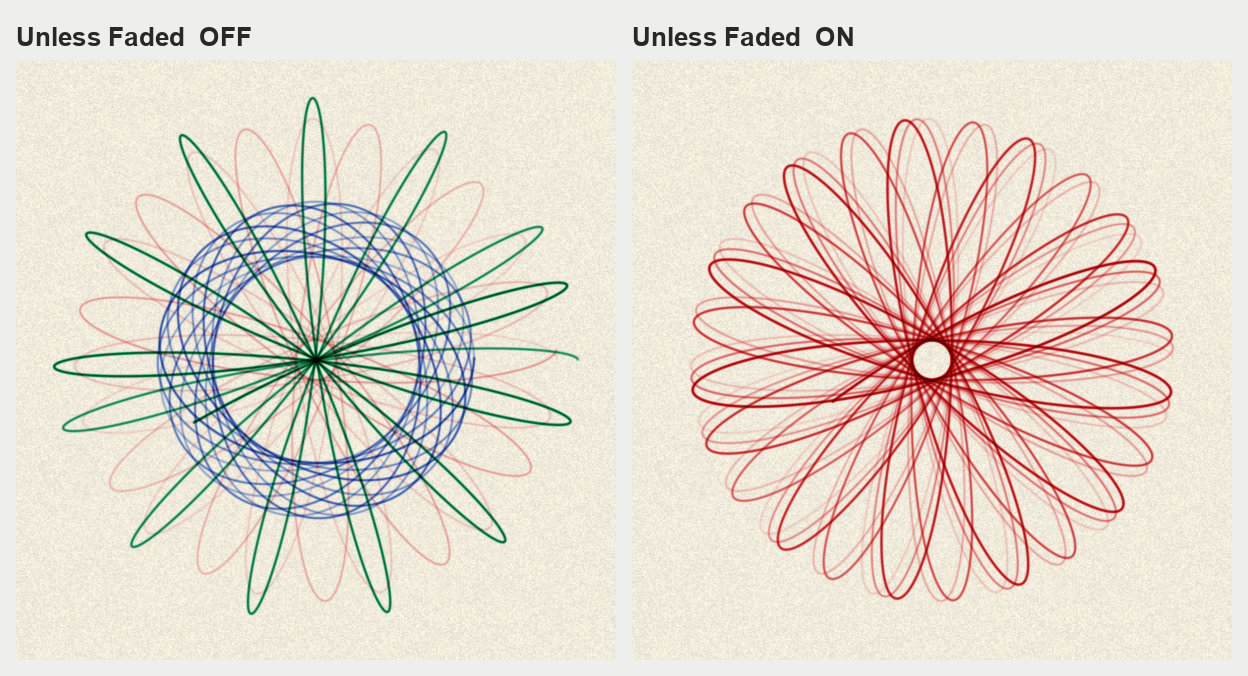
The same wheel, the same two-second fade, the same frame. Left, the figure closed anyway and the pen lifted twice — red, blue, green, each fading behind the next. Right, the same red pen never lifted and the figure kept going, precessing under Creep with the fade following it round.
The machine is told a time and not a fade, so nothing in machine/ learns what one is; the OpenFX build carries the same switch. cgtest --unlessfaded checks that a lap longer than the limit is Keep Going to the letter, that a shorter one is untouched, that two wheels under one limit come out one held and one stacking, and that raising the limit releases a held figure inside one lap. Off by default and not in the preset table, so every saved composition and exported XML opens unchanged.
Full Changelog: v0.5.1...v0.6.0
v0.5.1 — a saved composition keeps its own settings
Two bug reports from VJPandaAU, filed the morning after v0.5.0. Both are a control that would not stay where it was put.
Fixed
-
A saved composition keeps its own settings (#22). Ring Teeth, Wheel Teeth and Snap to Holes came back at the values of a previously loaded XML every time the composition was reopened — 120 and 80 in the report, which is exactly what that file said.
Resolume restores a plugin's parameters and then hands back the Load XML path it saved with them. That path was being read as a fresh choice, so the file was applied over the top of everything just restored — and then held against the host, the way a factory preset is held. The operator's own settings were there for one frame.
The composition is the newer record and now wins. A path arriving before the first frame, on an instance whose controls have already moved off their defaults, is the host restoring: the file is remembered, not re-read, and the row says
rememberedto tell you so. Nothing about picking a file changes — once a frame has gone by, choosing one loads it exactly as before, and a file chosen on a clip that has not run yet still loads too.Anything already saved is fixed by this release without being touched: the settings were always in the composition, they were just being overwritten on the way in.
-
Keep Going holds the figure that is on the paper (#24). Spotting a pattern worth keeping and switching On Closing to Keep Going changed it to a different one on the spot.
Which wheel and which hole a figure uses is worked out from the seed, the layer number and On Closing itself — so the instant that dropdown read Keep Going, the machine lost both of the things telling it what it was drawing and fell back to layer 0, what you originally threaded up. Three figures into a Next Wheel run that is a different wheel.
It now latches the layer and the mode that produced the figure in front of you. Selected from a standing start it holds layer 0 as it always did, and coming off Keep Going hands the drawing back to the live sequence at the next closure.
cgtest --config gains four checks over the restore path and cgtest --keepgoing one for the latch, printing the layer-0 train beside the held one so a check that stopped biting would say so. No parameter was renamed, so every saved composition and exported XML opens unchanged.
Full Changelog: v0.5.0...v0.5.1
v0.5.0 — Keep Going, and two more pens
Two feature requests from VJPandaAU, filed the afternoon v0.4.0 went out.
Added
-
On Closing → Keep Going (#21). A fifth entry in the dropdown, and the opposite of the other four: when the figure comes home nothing happens at all. The pen stays down, the same pen in the same hole carries on round, and with Creep on the figure keeps precessing for as long as the crank turns — the growing rosette, kept. A closure is not an event under Keep Going: nothing is counted, nothing is wiped, Layers has nothing to do (it reads
keeps goingto say so), and Fade by Figure has nothing to settle. With the ordinary Fade the drawing reaches whatever balance the fade rate sets and stays there.This is not the same as one Layer. A stack of one keeps the pen down too, but still counts each closure — which with Fade by Figure on settles the drawing so far and starts it fading.
cgtest --keepgoingchecks the pen does not move where the figure comes home and that Fade by Figure takes nothing from a Keep Going drawing. -
Blend (#20), in the Pen group. How new ink meets the ink already on the sheet, and each entry is a real thing you can put in the pen hole:
- Multiply — transparent ink, what every pen in the box does and the default. Absorptions add, crossings darken, red over blue is the near-black it is on the table. Nothing about existing compositions changes.
- Cover — opaque pigment, a paint marker. New ink hides what is under it, a crossing is the colour of whichever pen came second, and a pen never darkens beyond its own colour however often it crosses itself. Set Pens to Ink Colour and the Ink sliders to white, or to the paper colour, and Cover is white-out.
- Lift — an eraser in the pen hole. The pen's colour is ignored and the figure is drawn in whatever was underneath before the ink was laid.
If what you wanted was add — a line that brightens — that is Print → Negative, because ink cannot add light. All three compose exactly with Fade by Figure.
cgtest --blendholds the two new pens to an identity as parameter-free as the one for the first, and it holds to 1e-8 through every path. Same in the OpenFX build.
Blend is set by presets along with the rest of the pen; every factory preset is Multiply. A composition saved with an earlier release opens with Blend at Multiply and On Closing where it was.
Full Changelog: v0.4.0...v0.5.0
v0.4.0
Everything VJPandaAU found the evening v0.3.0 went out, in one release.
Fixed
- A dot outlived every figure at its starting point with Fade by Figure on (#14). The frame a figure closes in also holds the first stroke of the next one, and the whole frame was being drawn onto the next figure's paper, where nothing fades. The closing stroke now settles with its own figure. Same fix in the OpenFX build.
cgtest --settleguards it and fails on v0.3.0. - A wheel as big as the ring drew nothing, silently (#16). With Mesh on Inside and 100 wheel teeth against 96 ring teeth the Ring now reads
too small, the Wheeltoo big, and the log says why and what to do (Mesh → Outside, or a smaller wheel).
Added
- Clear Paper (#15). No paper at all: the ink on a clear sheet, with an alpha channel, for compositing the drawing over other layers in Resolume. Turning the paper black hid the drawing because ink is subtractive; this is the honest way to key the sheet out. Over white it is exactly the drawing on white paper, over black the line shows in its own colour, and a black pen darkens whatever is behind it the way ink does. On the effect the ink goes over the clip and the clip keeps its alpha.
Changed
-
The colour sliders are named as sliders (#17):
Ink Red,Ink Green,Ink Blue, and the same for Paper and Gear Tint. They used to beInk,Ink_Green,Ink_Blue.⚠️ Resolume saves a plugin's controls by name, so a colour you set in a v0.3.x composition reverts to its default once after upgrading. Set it again and it stays. Exported XML files from any earlier release still load — both builds know the old names.
Seen in the wild
VJPandaAU's set, cranking the pen hole live: https://www.youtube.com/watch?v=LDlGKthrdzc (#18, shared with permission, now linked from the README).
Full Changelog: v0.3.0...v0.4.0
v0.3.0
v0.2.2
v0.2.1
v0.2.0
What's Changed
- Keep every parameter display inside FFGL's 16 characters by @stoatworks-labs in #10
- Rename the Crank control to Speed by @stoatworks-labs in #11
- Put New Sheet where it cannot be collapsed, and export a config as XML by @stoatworks-labs in #12
- Release v0.2.0 by @stoatworks-labs in #13
New Contributors
- @stoatworks-labs made their first contribution in #10
Full Changelog: v0.1.0...v0.2.0
Contributors

Assets 9
v0.1.0
A Spirograph as a machine rather than a curve — two FFGL plugins for Resolume Arena/Avenue, and an OpenFX bundle for Resolve.
A toothed ring is pinned to the paper, a smaller toothed wheel rolls around inside it in mesh, and a pen dropped through one of the wheel's holes is carried along for the ride. Nothing here evaluates a curve.
What that buys
The ratio is two integers, because gears mesh. A wheel cannot roll by anything other than a whole tooth, so 96 and 32 close in a single turn with three lobes, while 96 and 31 share no factor and take thirty-one turns to lay down ninety-six. The Ring and Wheel controls report the lobe count and the turn count as you drag them — the question an operator is actually asking.
Ink is subtractive. The sheet accumulates optical density and what you see is the paper through it, so two pens crossing give the product of their transmissions — the muddy near-black it is on the table — rather than the bright sum additive blending produces. The palette and the paper can change mid-drawing without anything already down being wrong.
A closed figure retraces its own line for ever, which is arithmetic rather than a bug. The answer is the one a person at the table uses: Creep is a mesh not quite true and precesses the figure, Skip is the jumped tooth that ruins a drawing, and Layers lifts the pen at each closure to start the next figure in the next colour.
Two kinds of pen, because there are two. A ballpoint's ball rolls, so it lays ink per unit of distance and a line is the same darkness however fast your hand moved. A fibre tip feeds per unit of time and blooms at every cusp.
Verified, not asserted
- Resolume Arena 7.27.1 on macOS and Windows — both register with the right categories, expose all 48 controls with nothing truncated, render, and hold a factory preset through live rendering. The Windows half was tested with the artefact in this release, on Mesa llvmpipe, so the shaders are known to compile on a GLSL compiler that is not Apple's.
- DaVinci Resolve Studio 21.0.2.4 lists both plugins in its OpenFX library.
- 26 automated checks, including: the pen returns home to within 1e-14 after the turn count the tooth counts predict; two pens crossing transmit the product of what each transmits alone to ~2e-8; total ink is the same at Draft, Normal and Fine to 0.005%; and one second of cranking is the same drawing at 24, 60 and 120 fps to 0.001%.
Known limits
- The OpenFX build renders on the CPU — there is no OpenGL context to be had in an OFX host — and replays from the beginning, because a drawing is history and a warm-up window would produce a different one. Render forwards; scrubbing backwards through a long drawing is slow.
- It has not been driven over a clip inside Resolve, so its CPU renderer is proven to run and not yet proven to match the GPU one pixel for pixel.
- On macOS the OFX bundle must go in
/Library/OFX/Plugins, which needs an administrator.~/Library/OFX/Pluginsis silently ignored. - The classic tooth counts behind Snap to Set are published figures, never checked against a set in hand.
RingandWheelstay free integers so nothing depends on that list.
Spirograph is a registered trademark of Hasbro, Inc. This project is not affiliated with or endorsed by them.