
A combat-log analyzer for Throne and Liberty with two halves:
- 👥 Party DPS — a live, shared boss scoreboard that shows how your whole group stacks up on every kill (everyone runs the app), with per-member drill-down and head-to-head compare.
- 🧪 Solo Lab — a deep build-testing toolkit for tuning your own rotation: per-skill breakdowns, rotation timelines, and side-by-side build comparison.
It reads the log files the game writes; it never touches the game process.
This project exists because of SirPHz (mjb6967) and the original ツCKヤ DPS Meter / CKdpsApp. SirPHz built the first real combat-analytics tool for Throne and Liberty — real-time parsing, build testing, and the party-DPS concept this whole project is built around. None of this would exist without it.
STOOP is an independent successor, not a fork: the party stack was rebuilt from scratch on owned infrastructure. The original is free for personal use and not open source, so none of its code is used here — but the vision is entirely SirPHz's. If you haven't seen the original, go give it a look:
- 🌐 ckdps.netlify.app — SirPHz's original site
- 💻 mjb6967/CKdpsApp — the original app
See LICENSE · NOTICE · LINEAGE.md for the full lineage · CODE_OF_CONDUCT.md · CODE_SIGNING_POLICY.md
Two ways to get it — pick one:
| Installer | Portable | |
|---|---|---|
| File | STOOP-Setup.exe |
STOOP-portable.zip |
| Installs to | %LOCALAPPDATA%\Programs (per-user, no admin) |
nowhere — runs from the folder |
| Start Menu / uninstaller | yes | no |
| Your data lives | %LOCALAPPDATA%\TL-DPS-Meter |
next to the exe (USB-movable) |
| Best for | "set it and forget it" | a portable / USB setup, or trying it out |
- ⬇ Download the Installer —
STOOP-Setup.exe— run it, then launch from the Start Menu. - ⬇ Download the Portable zip —
STOOP-portable.zip— unzip anywhere (keep the files together), double-clickSTOOP.exe. The app is the window — no browser tab.
(Or browse all releases.)
Windows 10/11. Both the installer and the portable .exe show a Windows SmartScreen
"unknown publisher" notice on first launch — click More info → Run anyway. This is a
standard warning for unsigned apps (code signing is on the roadmap). See
Is it safe? in the FAQ if you want more detail.
Then in Throne & Liberty, enable Combat Logging (Settings → Shortcuts → Ring Menu → add "Combat Meter") and activate it from the Ring Menu. T&L writes logs after you leave combat, so stats populate when a fight ends, not during.
Turn everyone's combat logs into one shared boss scoreboard — no more comparing screenshots after a run. Each person runs the app and joins the same party; every boss kill produces a single ranked board with everyone on it.
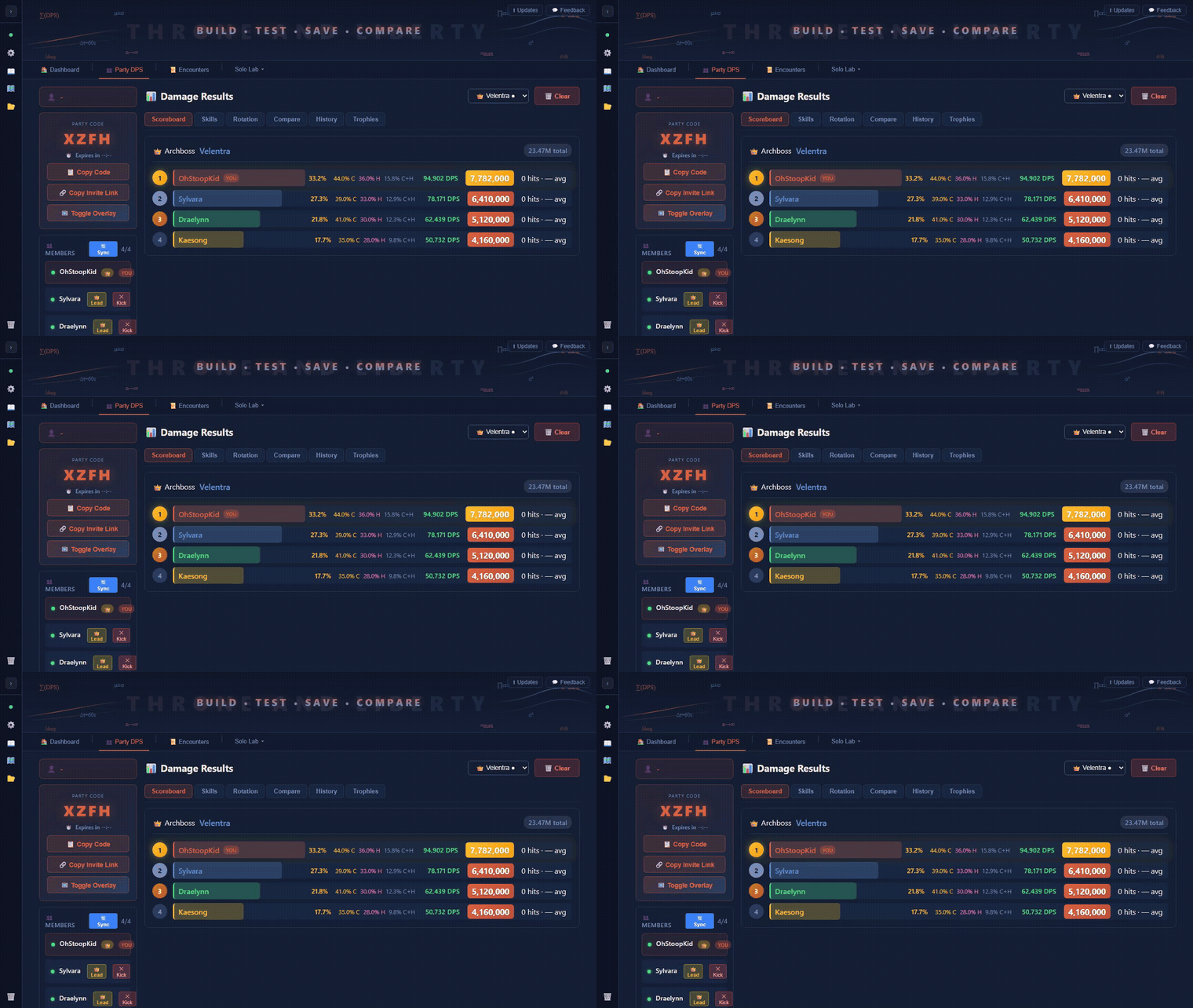
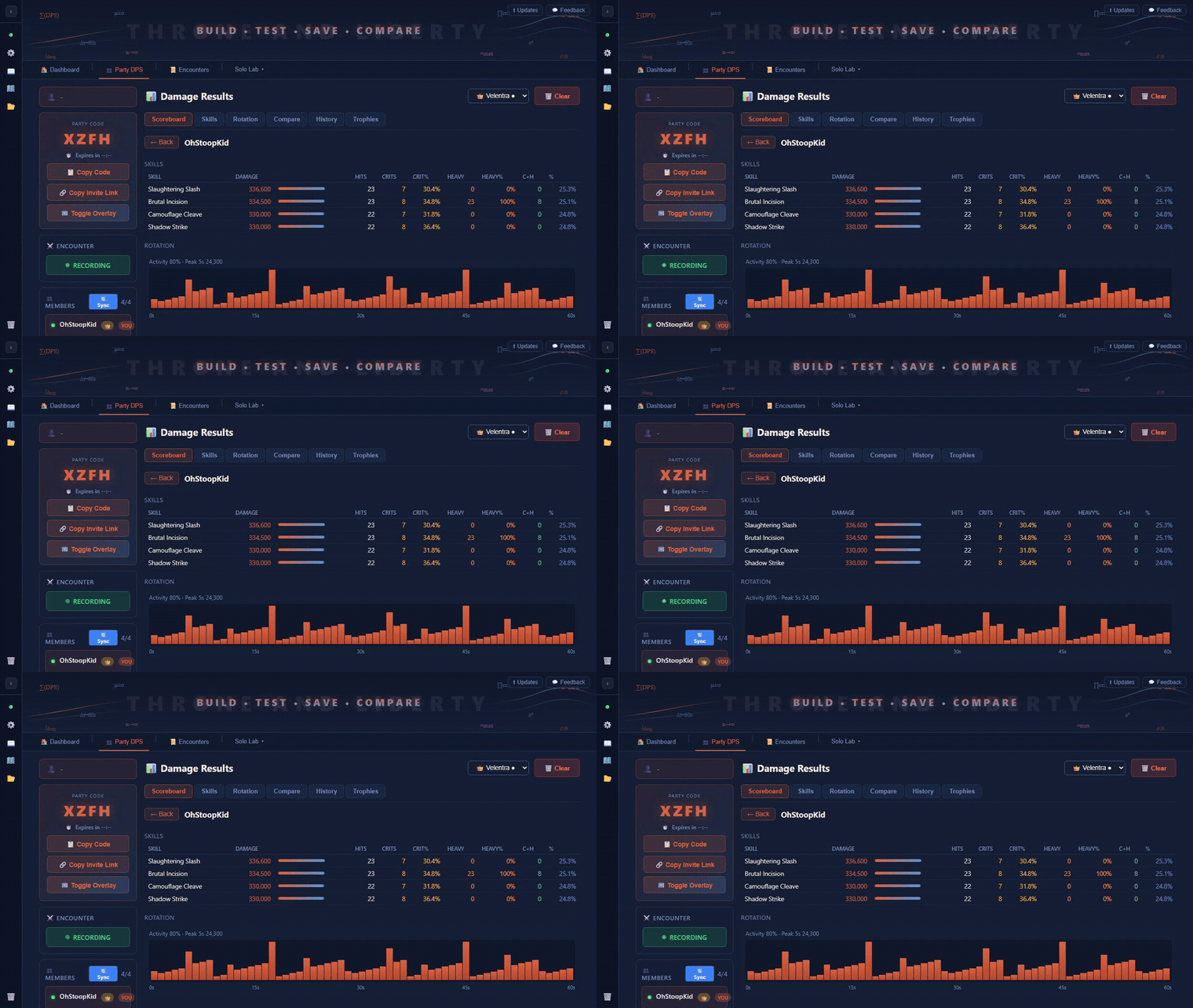
- One merged board per boss. Each kill = a ranked scoreboard with every member's damage, contribution %, DPS, hits, and crit / heavy rates.
- Drill into any teammate. Click a member to see their full per-skill breakdown and rotation timeline — the same depth as your own solo view.
- Head-to-head compare. Pick any two members and compare their skills side-by-side.
- Every boss, in order. A multi-boss run keeps each kill as its own board — flip between them with the encounter switcher.
- In-game overlay. A transparent, click-through overlay floats the live board over the game while you fight.
- Dead-simple join. Share a 4-character code or a one-click invite link — joiners enter the code (or click the link) and they're in.
- Post-combat by design. T&L writes logs when a fight ends, so the board fills in the moment the boss dies — reliable, no fragile live HUD.
Runs on its own (owned) infrastructure; nothing about your account is shared beyond the party scoreboard itself.
Party DPS is in active development — rough edges and missing polish are expected. Feedback and bug reports are very welcome.
The full solo toolkit, for when you're tuning your own build:
60-second standardized tests for fair build comparison — real-time DPS, crit, heavy, and crit+heavy rates, per-skill damage breakdown, weapon-specific DPS splits.
- Stacked DPS timeline (per-second damage colored by skill — see which skills drove each burst)
- Piano-roll per-skill cast timeline
- Gap detection + segment analysis (0-15s, 15-30s, 30-45s, 45-60s)
- Skill-aware performance insights: weak-window cause, dropped-cast detection, DPS consistency (coefficient of variation), damage concentration
Compare up to 3 saved builds side-by-side — per-skill matrix, rotation timing, segment DPS, and auto-computed key findings that name exactly which skills drove the delta.
Back-to-back build-testing without saving — Session Queue (runs auto-queue, tag/assign inline), Skill Matrix, Cast Timeline, and Cast Drilldown (every cast: timestamp, damage, hit type, interval chart).
Save encounters with build tags + class, load any for full review, combine encounters into full dungeon runs with boss detection and run summaries.
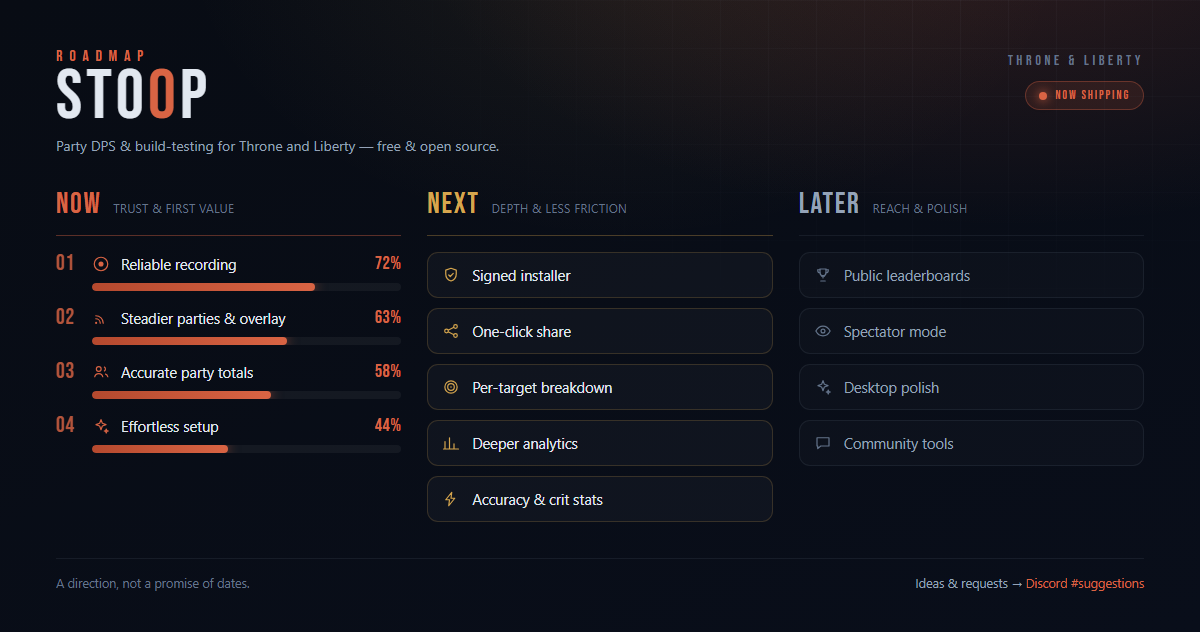
Where we're headed — we earn trust (accuracy & setup) first, then add depth, then
reach. Full text in docs/ROADMAP.md; priorities shift with your feedback
in the Discord #suggestions channel. A direction, not a promise of dates.
- Settings → Shortcuts → Ring Menu Settings
- Add "Combat Meter" to your Ring Menu
- In-game, open the Ring Menu and activate Combat Meter
Logs save to %LOCALAPPDATA%\TL\Saved\CombatLogs.
| Hotkey | Action |
|---|---|
Ctrl+Tab |
Reset encounter (works while in-game) |
Ctrl+Shift+O |
Toggle overlay click-through (let clicks pass to the game) |
The app is Python + a single-file HTML frontend, packaged with PyInstaller.
uv drives a reproducible build.
cd backend
uv run pytest                 # run the test suite
uv run python build.py        # -> dist/STOOP.exe + portable.zip + Setup.exe
build.py --no-installer skips the Inno Setup step. The installer needs
Inno Setup 6 (winget install -e --id JRSoftware.InnoSetup).
Run the app in dev (no packaging) with uv run python main.py.
The app seeds functional presets on first run; your fight data starts empty.
| File | Purpose |
|---|---|
config.json |
Settings (log path, player name, hotkey) |
encounters.json |
Saved encounters + build-tag history |
saved_runs.json |
Saved dungeon runs |
skill_settings.json |
Skills marked as cannot-crit / cannot-heavy |
weapon_config.json |
Skill→weapon assignments |
default_target_assignments.json |
Target categorization |
dungeons.json |
Dungeon definitions |
Reveal the folder from the app's sidebar ("🗃️ App Data"); reset fight data with "♻️ Reset Data" (keeps presets).
Do all of us need the app for Party DPS? Yes — the party board is built from each member's own combat log, so everyone who wants to appear on it runs the app and joins the same party. Make sure Combat Logging is enabled in-game, or you won't show up.
Why don't I see damage during combat? T&L writes logs when you leave combat, not during. Stats (solo and party) appear after each fight ends.
Can I get banned? Short version: low technical risk, some residual policy risk, no guarantees.
STOOP only parses the Detailed Combat Log that Throne & Liberty writes to disk when you enable the game's official Combat Logging feature. It does not inject code, read or write game memory, hook the renderer, capture network traffic, or send any input to the game — the overlay is a separate window in its own process. That design sits outside what EasyAntiCheat is documented to act on (code injection, memory tampering, renderer hooks, known-cheat signatures). The tools people usually blame for EAC bans — FiveM, Overwolf — inject DLLs and hook DirectX; STOOP does none of that.
That said, no one can promise you won't be penalized: EAC is proprietary and changes without notice, and Amazon Games' Code of Conduct lets them act against any unauthorized third-party tool at their discretion. Amazon hasn't published a position specifically permitting third-party log parsers for T&L. Use STOOP at your own risk — keep it to your own stats and never use it to pressure or harass other players.
Want the full reasoning? See the evidence-based writeup in docs/BAN-RISK.md — how EAC actually works, the inject-vs-read distinction, and a point-by-point look at the common ban claims.
Is it safe (malware / antivirus)?
The full source is in this repo and can be audited line by line, and STOOP only reads the log files Throne & Liberty writes to disk — it does not inject into, hook, or interact with the game process in any way.
SmartScreen "unknown publisher": this notice appears because the exe isn't code-signed yet (on the roadmap). It's the same warning any unsigned Windows app gets, regardless of what it does — click More info → Run anyway to proceed.
Antivirus flags: a false positive from PyInstaller's packaging (it bundles a Python
runtime into a single .exe, which some scanners misread as suspicious). The current release
scans 3/69 on VirusTotal
— all three are known PyInstaller false-positive triggers; 66 vendors flag it clean. If you want to
verify your download, each release includes a checksums.txt — check it against your file
with certutil -hashfile STOOP.exe SHA256. Or build from source (see above).
How do I filter to only my damage? Settings → Player Name → your character name.
- Original concept: SirPHz — mjb6967/CKdpsApp
- This build: stoopkid4529
Made for the Throne and Liberty community ☕