Duplicate Line along with Multi-Cursor Selection places the cursors in the wrong column #2612

Description

Description
The “Duplicate Line” function places the cursor in the wrong column with a multi-line selection.
Steps to reproduce
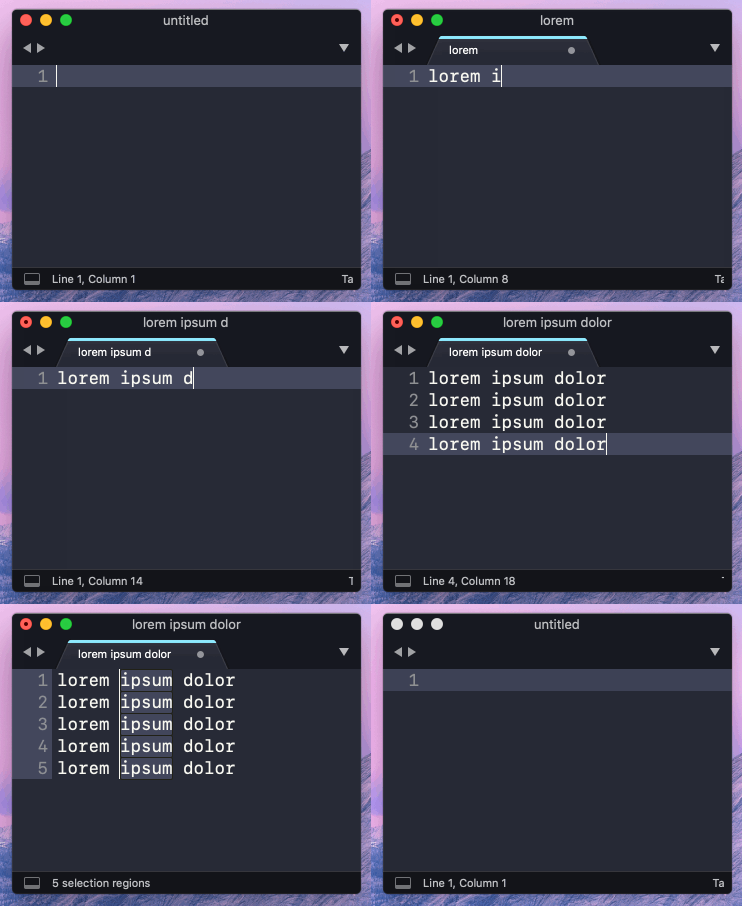
- From the menu choose “File > New File”
- Type “lorem ipsum dolor”
- Hit “Cmd + Shift + D” four times to duplicate the line
- “Arrow Left” six times to place the cursor at then end of “ipsum”
- “Ctrl + Shift + Arrow Up” four times to create multiple selections
- “Cmd + D” to select all the “ipsum” words
- “Cmd + Shift + D” to duplicate the word “ipsum”
- Each line now has “lorem ipsumipsum dolor”
- “Arrow Right” to cancel the word selection
- Notice the position of the multiple cursors
Expected behavior
After step ten (10) above, the multiple cursors should be in these columns:
Line 1, Column 17
Line 2, Column 17
Line 3, Column 17
Line 4, Column 17
Line 4, Column 17
Actual behavior
After step ten (1) above, the multiple cursors are placed in these columns:
Line 1, Column 17
Line 2, Column 12
Line 3, Column 7
Line 4, Column 2
Line 4, Column 20
Environment
- Build: 3189
- Operating system and version: macOS 10.14.3