Releases: superstables/superstables-client
Release list
Superstables client v0.2.0: more demo services, clearer discovery

Discover more demo services and find relevant results more easily. The client uses MCP over stdio; the demo page has setup steps for Claude Desktop, Claude Code, Codex, Cursor and VS Code with GitHub Copilot. You can also use the CLI or TypeScript SDK.
- More services to try. Demo listings include supported inputs, example prompts and clear labels for simulated outputs.
- Better search results. Discovery prioritises relevant matches and explains when a listed service cannot be paid through the client.
- Clearer installation. Claude Desktop users can download the
.mcpbextension from this release. Other local MCP apps connect to the built client using the setup steps on the demo page.
Demo services are enabled in the Claude Desktop bundle and demo setup. CLI users can enable them with find --demo.
Payments use x402 exact and test USDC on Base Sepolia. Each payment requires your approval. Mainnet and unattended payments are not supported.
Superstables client v0.1.0: wallet-approved payments for AI agents

The first Superstables client release connects service discovery, payment quotes, approval and receipts through MCP, a CLI and a TypeScript SDK.
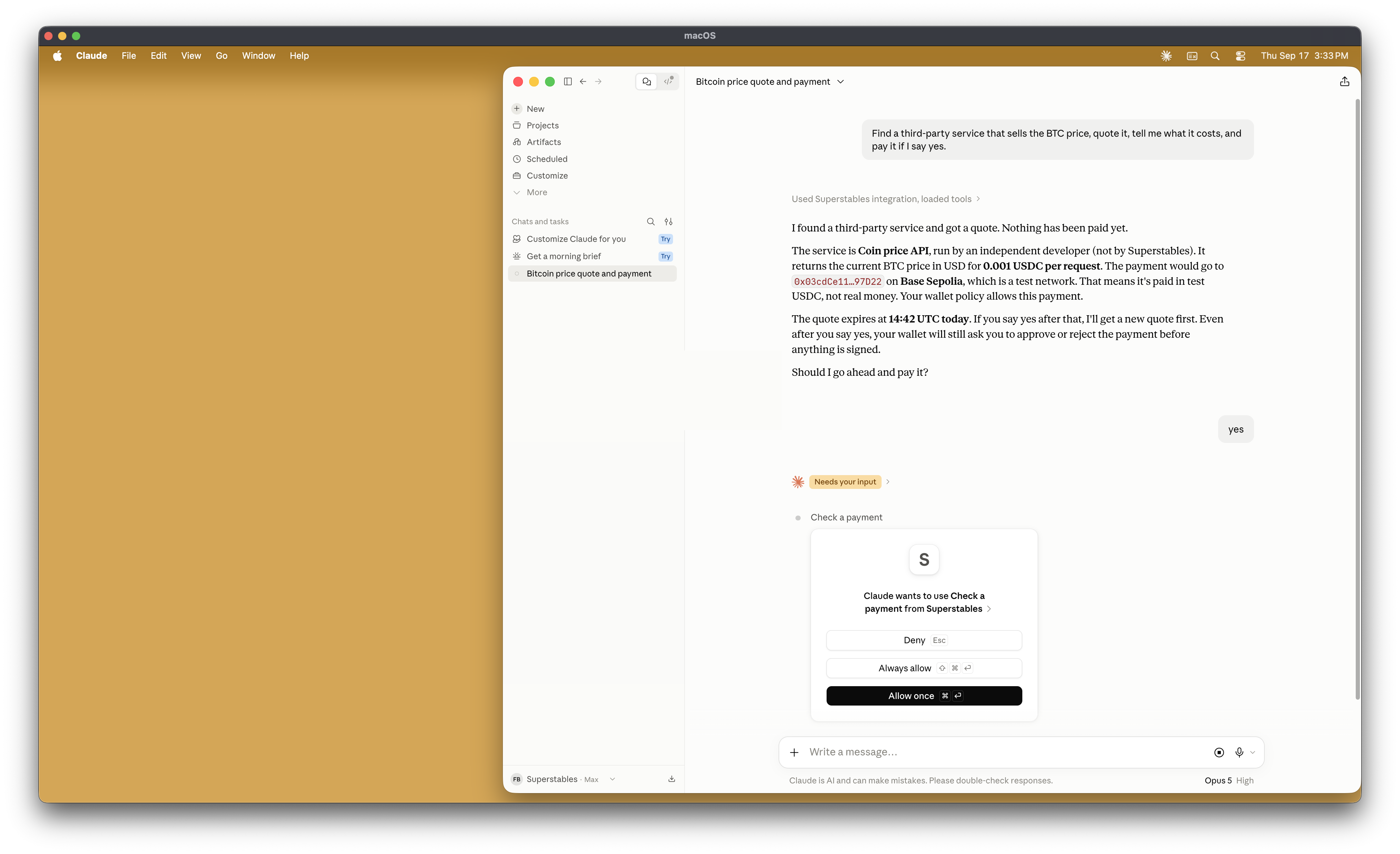
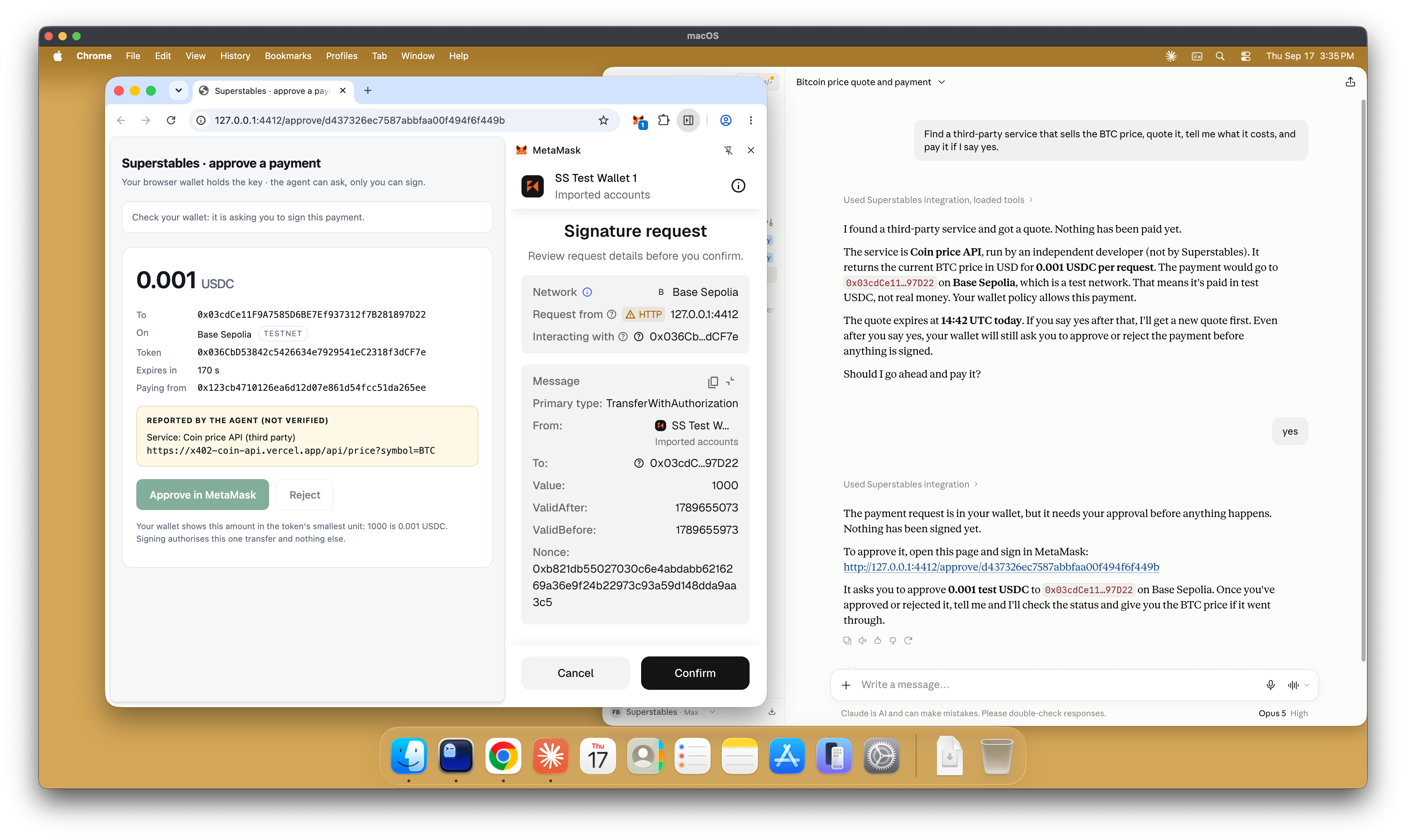
An agent finds a paid service and retrieves its terms. You review the amount, asset, network and recipient on a local approval page, then sign in MetaMask. The client submits the signed request and records the payment outcome and the service response. In this default flow, your signing key remains in MetaMask. The agent can request a payment, but it cannot approve one.
This demo uses x402 exact payments with test USDC on Base Sepolia. Every payment requires approval. Mainnet and unattended payments are not supported.
The flow
- Find. Discover paid services and identify which ones the client can call.
- Quote. Read the service's HTTP 402 challenge and record its terms. Nothing is signed or paid.
- Approve. Review the seller's payment terms on the local approval page and check them in MetaMask before signing. The agent's description is shown separately and marked unverified. An alternative local-wallet mode stores a signing key on the machine and provides its own approval page.
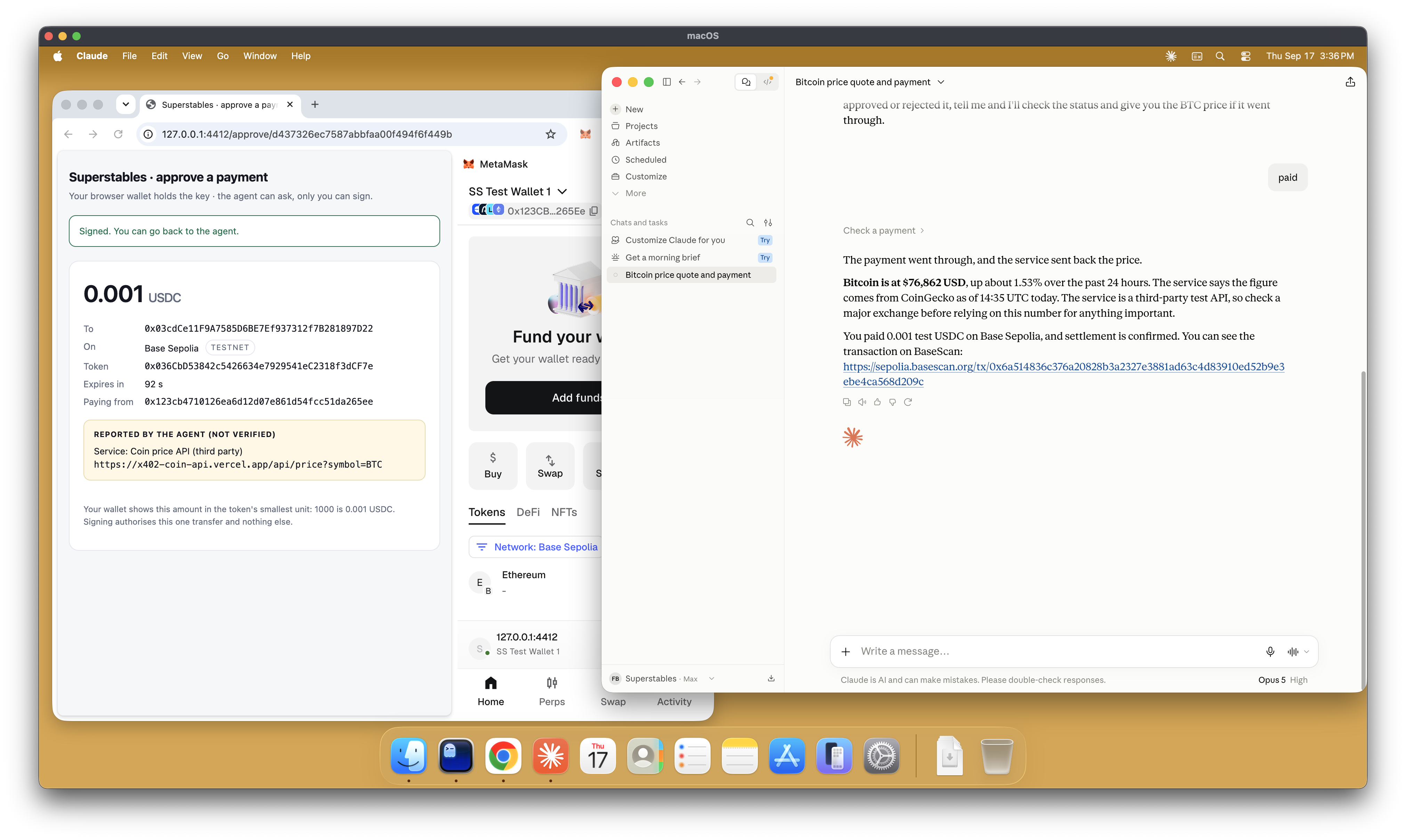
- Pay. A public facilitator submits the transfer and covers the gas in this demo flow. The client records the payment and service outcomes separately.
- Reject. Reject on the approval page or in MetaMask before signing. No signature or payment is submitted, and the paid service request is not sent.
In pictures
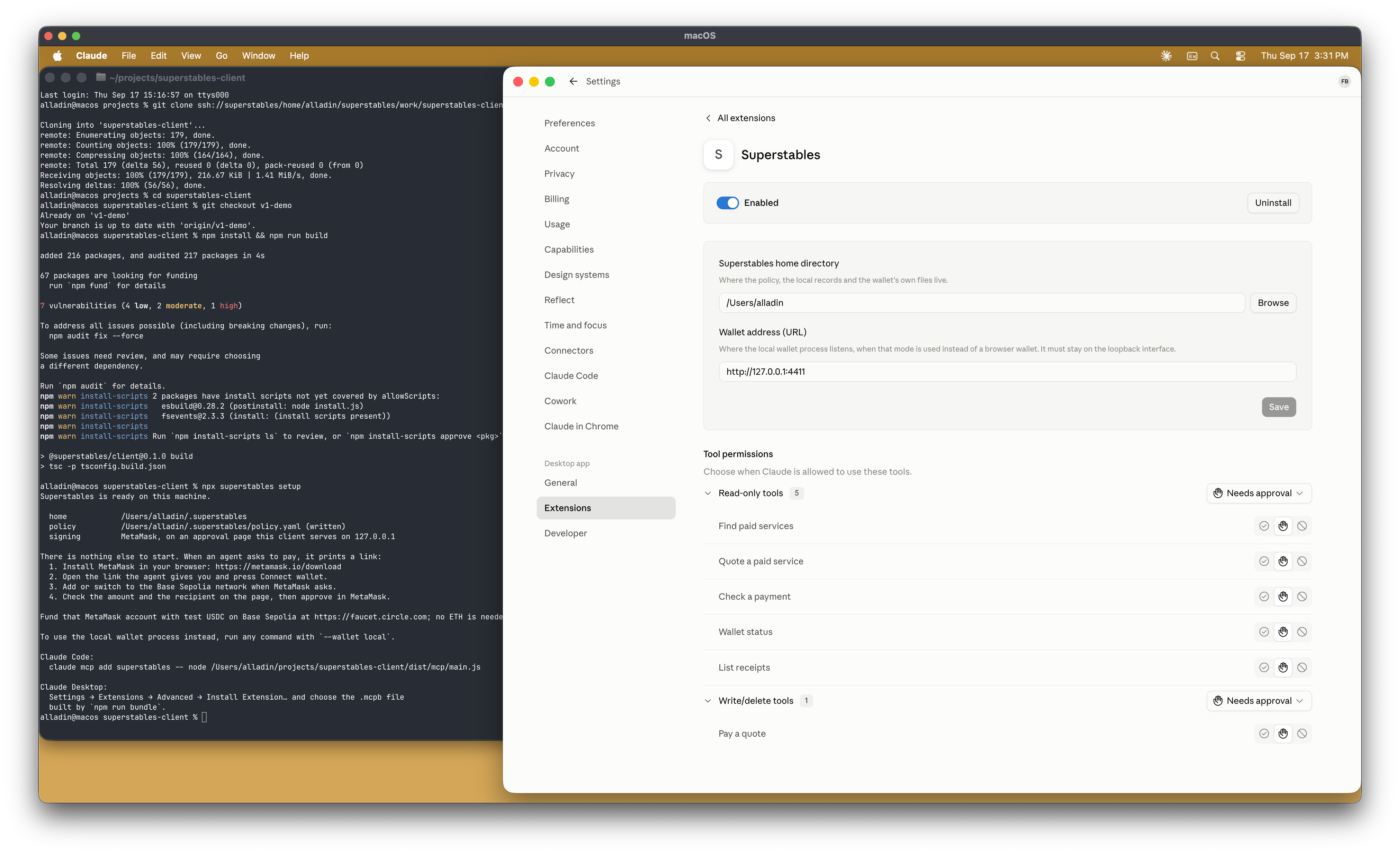
Installing the Claude Desktop bundle and running superstables setup:
Claude Desktop asking permission before the agent uses a tool:
The approval page next to MetaMask's signature request, both showing the same payment:
The agent returning the service's answer and the transaction link:
What is supported
x402 with the exact scheme, on Base Sepolia (eip155:84532), paying in test USDC. Any other
scheme, network or asset is refused before the owner is asked to sign anything. There is no
mainnet switch and no unattended mode.
Interfaces
Six MCP tools over stdio. The MetaMask flow has been tested end to end in Claude Code and Claude Desktop:
find_services: search for payable services and say which are actionablequote: read a service's terms and record them; nothing is signedpay: ask the owner to approve a quote, return theapproval_url, then pay and return the
service's answerpayment_status: wait for an attempt to finish and report where it got towallet_status: which signer is in use, and its address, network, balance and policy, plus
theclient_versionandhomeof the server that answered, so a host running an older build
than the one just installed can be told apart from one running the new onelist_receipts: the payments that settled on this machine
The superstables CLI does the same work from a terminal: setup, doctor, find, quote,
pay, status, receipts, attempts, policy show / policy init, mcp, demo-service,
and wallet init / wallet serve / wallet status for the local wallet. superstables --version prints the version of the build that is running, doctor prints it and the home
directory above its checks, and the MCP server logs the same three facts to stderr on start.
The same code is available as a TypeScript SDK.
Records and state
Every quote, attempt, approval and receipt is appended to JSONL files in ~/.superstables, mode
0600 by default. An attempt is an explicit state machine:
awaiting_approval → denied, expired, failed, or approved → submitting → settled,
paid_service_failed, failed or uncertain. failed means the money did not move and that
is known; uncertain means the credential left the machine and what became of it is not, and
the client never retries it automatically. Receipts record payment and service outcomes separately. A settled payment does not guarantee a successful service response. When a transaction hash is unavailable, the receipt can contain a pending reference.
policy.yaml holds a per-payment cap, a daily cap, an allowed-host list and a kill switch.
These checks run locally using the client's records. They are not blockchain or MetaMask limits. Host rules use agent-reported URLs and cannot protect against an agent that misreports them.
Demo services
Superstables hosts the demo seller, a real x402 market-data service on the testnet, so there is
something to pay for without anyone running a seller. The catalogue also lists a third-party
x402 service on Base Sepolia, run by an independent developer, so a payment to a seller nobody
at Superstables controls can be shown too. superstables demo-service runs the seller locally
for anyone who wants to watch that side of a payment.
Claude Desktop bundle
npm run bundle builds build/superstables-<version>.mcpb, an MCP bundle that installs into
Claude Desktop through Settings → Extensions → Advanced → Install Extension…. Both Claude Code
and Claude Desktop have been tested end to end with the MetaMask flow.
npm run bundle -- --dev stamps the staged bundle with a
version derived from the commit, for example 0.1.0-dev.14+gabc1234, so that two development
builds of the same release are never called the same thing and a host cannot silently keep the
copy it already has. docs/install.md says how to update an installed
extension and how to confirm which build is running.
Known limitations
- Testnet only: one network (Base Sepolia), one asset (test USDC), one scheme (x402
exact). - MetaMask's signature popup shows the value in USDC's smallest unit, so
10000is 0.01 USDC.
The approval page shows the conversion. Check the amount and recipient before signing. - Listings from the public Superstables index are shown but cannot be paid yet: the index does
not record the request parameters a service needs, and each listing says so. - An attempt that ends
uncertainis never retried automatically; check the payment outcome before trying again. - With
--wallet localthe key is a file on the machine, readable by any process running as the
owner. That mode exists for a machine with no browser.