A quick update regarding SPT 4.1: As some of you might have noticed, the Forge will be shutting down soon. You can find the Discord message explaining the reasons here: https://discord.com/channels/875684761291599922/875706629260197908/1533159965597110352
Due to this announcement, I have decided to put the SPT 4.1 update for this mod on hold for now. I apologize for the disappointment. My time for modding is quite limited as it is, and considering the uncertain future of the project right now, I think it makes the most sense to step back.
Speed up your sales!
A remarkably convenient quick-sell add-on lurks in the Addon tab, waiting patiently for you to notice it. If patience is not your strong suit, you may bend spacetime and simply click here.
Imagine examining an item in Tarkov and having the game whisper gently into your ear:
“Here’s exactly how much money this thing is worth, who will buy it, and whether selling it is a brilliant idea or a catastrophic financial farce.”
That’s what SMTM does. It modifies the in-game tooltip to reveal:
- The trader who will pay you the most (because some traders appreciate your junk more than others)
- The flea market price required to achieve a 100% chance of sale
- Both price per slot and total price, helpfully highlighted so you don’t have to do arithmetic
- Optional inclusion of flea market taxes, for those who enjoy pain
Version 1.5.0+ adds color-coding based on the World of Warcraft rarity scheme - from poor (grey, sad, mildly apologetic) to legendary (orange, smug, expensive).
The server-side portion of the mod exposes an endpoint that politely hands the client mod the relevant backend configuration and flea prices.
Everything is configured through the BepInEx Configurator.
And yes, the mod is designed to whisper requests to the SPT server, not shout them.
Practically none. If you can run SPT, you can run this.
Splendid news: Do not install anything there. Seriously, don’t. It will only cause complications, headaches, and possibly the rising of ancient eldritch forces. Add this mod to your Exclusions.json if you use Corter’s Mod Sync.
Access the BepInEx Configurator (usually via F12 or F1) and behold:
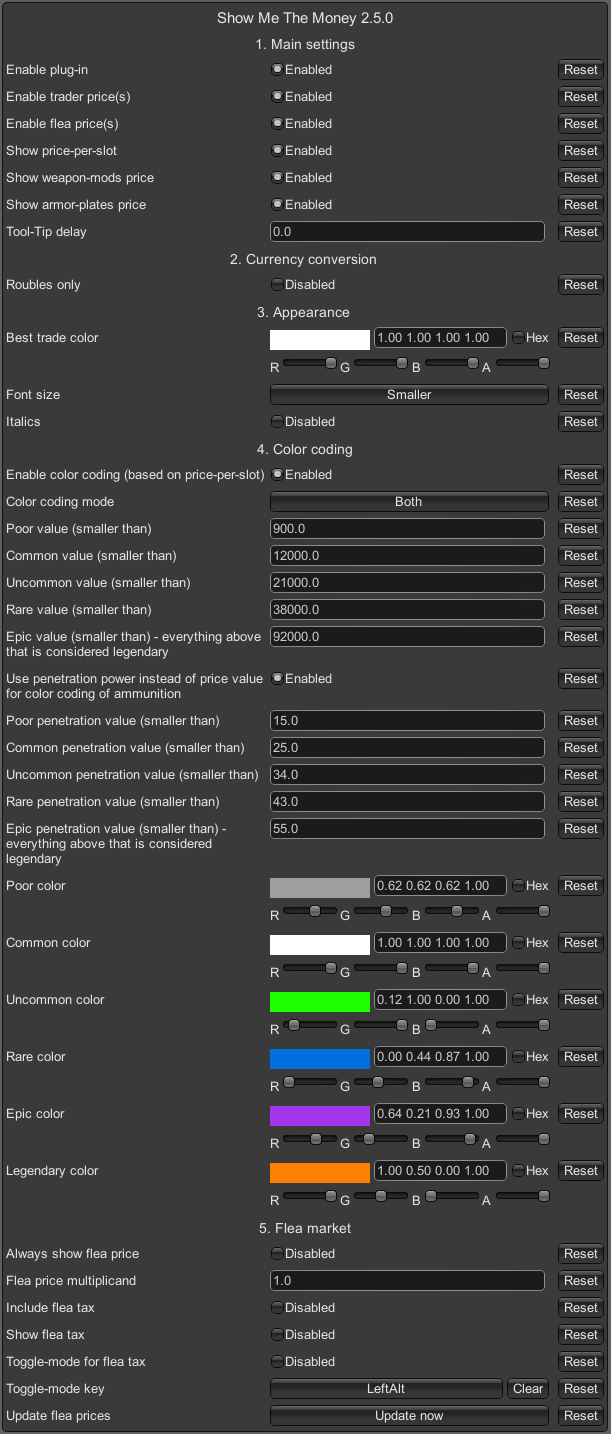
Here you can also summon fresh flea market prices from the server. This is particularly handy if you’re using SPT-LiveFleaPrices, which updates prices regularly but not telepathically.
Just to be clear: Triggering this does not cause LiveFleaPrices itself to contact the celestial flea-market-gods. It simply fetches whatever your SPT server already knows.
- Changes to trader price markups (e.g., via SVM) are automatically accounted for.
- Multiple languages are supported, but if something looks as if it was spat out by a malfunctioning Babel Fish, leave a comment. Disabling color-coding may help.
- SPT-LiveFleaPrices ≥ v2.0.1 (DrakiaXYZ)
- UIFixes ≥ v5.0.5 (Tyfon)
- ODT’s Item Info ≥ v2.0.2 (kobethuy)
- Note: ODT’s Item Info has Opinions™ about how color-coding should work. It may overwrite item-name color, but price colors remain intact.
- All Quests Checkmarks ≥ v1.3.1 (ZGFueDkx)
- MoreCheckmarks ≥ v2.0.0 (VIPkiller17)
- … (imagine a gentle, wistful sigh here)
- A friend of mine occasionally experiences a stuck tooltip when using the flea-tax toggle. I have investigated this thoroughly and discovered that… I still have no idea why it happens.
- Some weapons feature suffixes like “Carbine.” These sometimes refuse to participate in color-coding. Possibly out of spite.
- Traders added by other mods may or may not play nicely with the price system.
- The flea-tax toggle exists to maintain peace between tooltip-altering mods. If something goes wrong, let me know.
If your SPT installation is normal (i.e. not a baroque cathedral of symbolic links and misplaced folders):
- Extract the contents of the
.zipor.7zstraight into your SPT directory. - When you're done, you should see:
- C:\yourSPTfolder\BepInEx\plugins\com.swiftxp.spt.showmethemoney\SwiftXP.SPT.ShowMeTheMoney.Client.dll
- C:\yourSPTfolder\SPT\user\mods\com.swiftxp.spt.showmethemoney\SwiftXP.SPT.ShowMeTheMoney.Server.dll
Extract the BepInEx folder into the client.
Extract the user folder into the server.
Client:
- C:\yourSPTclient\BepInEx\plugins\com.swiftxp.spt.showmethemoney\SwiftXP.SPT.ShowMeTheMoney.Client.dll
Server:
- C:\yourSPTserver\SPT\user\mods\com.swiftxp.spt.showmethemoney\SwiftXP.SPT.ShowMeTheMoney.Server.dll
If your SPT installation is normal (i.e. not a baroque cathedral of symbolic links and misplaced folders):
- Extract the contents of the
.zipor.7zstraight into your SPT directory. - When you're done, you should see:
- C:\yourSPTfolder\BepInEx\plugins\SwiftXP.ShowMeTheMoney.dll

- C:\yourSPTfolder\user\mods\swiftxp-showmethemoney\package.json
- C:\yourSPTfolder\user\mods\swiftxp-showmethemoney\src\mod.ts
- C:\yourSPTfolder\user\mods\swiftxp-showmethemoney\src\models\partialRagfairConfig.ts
- C:\yourSPTfolder\user\mods\swiftxp-showmethemoney\src\services\fleaPricesService.ts
- C:\yourSPTfolder\user\mods\swiftxp-showmethemoney\src\services\ragfairConfigService.ts
Extract the BepInEx folder into the client.
Extract the user folder into the server.
Client:
- C:\yourSPTclient\BepInEx\plugins\SwiftXP.ShowMeTheMoney.dll
Server:
- C:\yourSPTserver\user\mods\swiftxp-showmethemoney\package.json
- C:\yourSPTserver\user\mods\swiftxp-showmethemoney\src\mod.ts
- C:\yourSPTfolder\user\mods\swiftxp-showmethemoney\src\models\partialRagfairConfig.ts
- C:\yourSPTfolder\user\mods\swiftxp-showmethemoney\src\services\fleaPricesService.ts
- C:\yourSPTfolder\user\mods\swiftxp-showmethemoney\src\services\ragfairConfigService.ts
(Last updated Feb 02, 2026 — SMTM v2.7.0)
-
How do I install SMTM?
- Extract the folders into your SPT directory. If that sounds too simple, consult the installation section(s).
-
How do I configure SMTM?
- Press F12 or F1. A configuration window will appear, as if summoned from a parallel dimension.
-
Is there a quick-sell addon?
- Yes! It has its own tab. It is quite proud of this.
-
No price information appears. What now?
- Check your installation. Reinstall if confused. Also, please don’t use WinRAR to extract
.7zfiles. It sometimes mangles them like a clumsy Vogon.
- Check your installation. Reinstall if confused. Also, please don’t use WinRAR to extract
-
No flea market prices?
- You must unlock the flea market unless you enable “Always show flea market price.” If prices are missing entirely, the server component is probably not installed correctly.
-
I get SSL errors. Help?
- Unlikely to be SMTM’s fault. SSL in Tarkov behaves like a paranoid toaster. Seek help on the SPT Discord.
-
What does the
(+)in the tooltip mean?- This indicates that the displayed flea market price includes all attachments/mods. If the sign is missing, the price refers only to the base item.
-
Why do flea prices differ from the average?
- Because:
- SMTM shows the 100% sell-chance price, not the average.
- It updates flea data every 5 minutes to avoid server overload.
- Live Flea Prices may cause sudden market lurches.
- The flea market is fundamentally chaotic, briefly capable of holding an opinion, and possibly drunk.
- Because:
-
Displayed flea prices seem wildly wrong. Why?
- Check your settings (SPT, SVM, SMTM, etc.). If still wrong, report details: item, expected vs shown price, screenshots, logs, the alignment of Jupiter, etc.
-
Armor plates don’t affect flea price. Why?
- Because SPT 4.0.4 also ignores plate value in its sell-chance logic. SMTM 2.5.0 can display plate value separately. SPT 4.0.5 may fix this.
-
Key remaining-uses don’t affect the price. Why?
- SPT 4.0.4 bug. A 1/40 key and a 40/40 key sell for the same amount. SMTM mimics SPT’s logic. SPT 4.0.5 fixed this bug. Update for SMTM (2.5.1) is available.
{.endtabset}
I maintain this in my spare time, between bouts of existential dread and tea.
Please be patient.
My friends and I play SPT co-op via FIKA.
We used another price-display mod that turned our poor little VServer into a molten puddle of lag.
Requests flooded in like panicked bureaucrats. The server begged for mercy.
So I built a new plugin. This one. Designed to be gentle, efficient, and unlikely to ignite anything.
It worked splendidly, so I shared it.
Shout-out to the SPT team and all modders.
You’re brilliant, bewildering, and beloved.