-
-
Notifications
You must be signed in to change notification settings - Fork 5
Jobs
Many actions in the VPin Studio - table backups, media conversion, statistics downloads, and more - run as background jobs so you can keep working while they finish. The Job Overview button in the header toolbar shows how many jobs are currently active ("No active jobs", "1 active job", "N active jobs") and gets a highlighted border while anything is running.
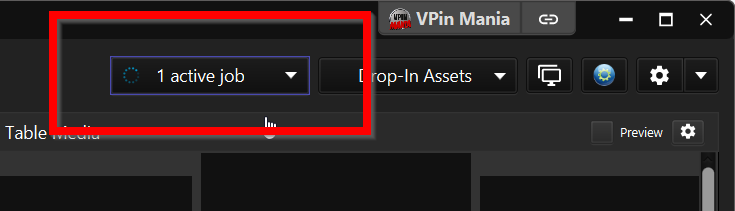
The Job Overview button, highlighted, with one active job
Click the button to open the job list. Every job shows its title, a status line, and a progress bar (indeterminate at first, then a percentage once known). Once finished, the status line shows either a green Job successful message or the error that caused it to fail.
Job List Panel
Per-job actions:
- Open folder - if the job is linked to a table, jumps to that table in the Table Overview.
- Stop Job - cancels the job, if it supports cancellation.
- Remove - dismisses a finished job from the list.
At the top of the list, Cancel All stops every running job and Clear All dismisses every finished one.
VPin Studio Wiki
- Download and Installation
- Getting Started
- Updates
- Discord
- Bug Tracking
- Features
- Third Party Integrations
- Adding Alias Mappings
- Enable Wake-On-LAN
- The Controller.stop Function
- Change the Default Port of the VPin Studio Server
- DMD Positioning on Frontend full DMD videos
- VPin Studio Server Status Updates
- Taking Screenshots
- Importing Visual Pinball Archives
- How To Install Test Versions
- Table Overview
- Table Overview Settings
- Table Scans
- Table Uploads
- Table Validations
- Table Asset Manager
- Table Versions
- Table Script Editor
- Context Menu
- Tagging Tables
- Media Converter
- Tables Sidebar
- Highscore Types
- Unsupported Highscores
- Highscore Versioning
- Highscore Filtering
- Highscore Reset and Backup
- Registering Your Cabinet
- Cabinet Settings
- Privacy Settings
- Synchronizing Tables & Scores
- Player Ranking
- Table Ranking
- Dashboard Customization
- Latest Highscore Widget
- Player Ranking Widget
- Competition Widgets
- Player Highscores
- Player Ranking
- Offline Competitions
- Discord Competitions
- How Discord Competitions Work
- Competition Badges
- Table Subscriptions
- Get an API Key
- Configure WOVP in Studio
- Configure Pause Menu
- Real DMD Support
- Configure Tables
- Submit Scores
- Troubleshooting