This docker image allows you to run obsidian in docker as a container and access it via your web browser.
Use http://localhost:8080/ to access it locally, do not expose this to the web unless you secure it and know what you are doing!!
- Using the Container
- Using Docker Compose
- Enabling GIT for the obsidian-git plugin
- Reloading Obsidan in the Browser
- Setting PUID and PGID
- Adding missing fonts
- Hosting behind a reverse proxy
- Hosting behind Nginx Proxy Manager (NPM)
- Updating Obsidian
- Building locally
- Copy/Paste From External Source
To run a interactive version to test it out:
docker run --rm -it `
  -v D:/ob/vaults:/vaults `
  -v D:/ob/config:/config `
  -p 8080:8080 `
  ghcr.io/sytone/obsidian-remote:latest
To run it as a daemon in the background:
docker run -d `
  -v D:/ob/vaults:/vaults `
  -v D:/ob/config:/config `
  -p 8080:8080 `
  ghcr.io/sytone/obsidian-remote:latest
The ARM container is now avaliable, will look to make this simpler in the future. The ARM imange is on the docker hub and not the github container registry.
docker run -d `
  -v D:/ob/vaults:/vaults `
  -v D:/ob/config:/config `
  -p 8080:8080 `
sytone/obsidian-remote:arm64To run a interactive version to test it out:
mkdir -p ob/{vaults,config}
docker run --rm -it \
  -v ./ob/vaults:/vaults \
  -v ./ob/config:/config \
  -p 8080:8080 \
  ghcr.io/sytone/obsidian-remote:latest
To run it as a daemon in the background:
mkdir -p ob/{vaults,config}
docker run -d \
  -v ./ob/vaults:/vaults \
  -v ./ob/config:/config \
  -p 8080:8080 \
  ghcr.io/sytone/obsidian-remote:latest
The ARM container is now avaliable, will look to make this simpler in the future. The ARM imange is on the docker hub and not the github container registry.
mkdir -p ob/{vaults,config}
docker run -d \
  -v ./ob/vaults:/vaults \
  -v ./ob/config:/config \
  -p 8080:8080 \
sytone/obsidian-remote:latest| Port | Description |
|---|---|
| 8080 | HTTP Obsidian Web Interface |
| 8443 | HTTPS Obsidian Web Interface |
| Path | Description |
|---|---|
/vaults |
The location on the host for your Obsidian Vaults |
/config |
The location to store Obsidan configuration and ssh data for obsidian-git |
| Environment Variable | Description |
|---|---|
| PUID | Set the user ID for the container user. 911 by default. |
| PGID | Set the group ID for the continer user. 911 by default. |
| TZ | Set the Time Zone for the container, should match your TZ. Etc/UTC by default. See List of tz database time zones for valid options. |
| DOCKER_MODS | Use to add mods to the container like git. E.g. DOCKER_MODS=linuxserver/mods:universal-git See Docker Mods for details. |
| INSTALL_PACKAGES | Use to add package for the container like language pack. E.g. INSTALL_PACKAGES=fonts-noto-cjk fonts-noto-extra And the docker mod linuxserver/mods:universal-package-install is required. |
| KEYBOARD | Used to se the keyboard being used for input. E.g. KEYBOARD=en-us-qwerty or KEYBOARD=de-de-qwertz a list of other possible values (not tested) can be found at https://github.com/linuxserver/docker-digikam#keyboard-layouts |
| CUSTOM_PORT | Internal port the container listens on for http if it needs to be swapped from the default 8080. |
| CUSTOM_HTTPS_PORT | Internal port the container listens on for https if it needs to be swapped from the default 8443. |
| CUSTOM_USER | HTTP Basic auth username, abc is default. |
| PASSWORD | HTTP Basic auth password, abc is default. If unset there will be no auth |
| SUBFOLDER | Subfolder for the application if running a subfolder reverse proxy, need both slashes IE /subfolder/ |
| TITLE | The page title displayed on the web browser, default "KasmVNC Client". |
| FM_HOME | This is the home directory (landing) for the file manager, default "/config". |
To show the other languages, add the mod linuxserver/mods:universal-package-install and add the language pack. E.g. INSTALL_PACKAGES=fonts-noto-cjk fonts-noto-extra to support CJK (Chinese Japanese Korean).
To type other language in the browser you should enable the IME Input Mode in the side panel.

services:
  obsidian:
    image: 'ghcr.io/sytone/obsidian-remote:latest'
    container_name: obsidian-remote
    restart: unless-stopped
    ports:
      - 8080:8080
      - 8443:8443
    volumes:
      - /home/obsidian/vaults:/vaults
      - /home/obsidian/config:/config
    environment:
      - PUID=1000
      - PGID=1000
      - TZ=America/Los_Angeles
      - DOCKER_MODS=linuxserver/mods:universal-git
      - CUSTOM_PORT="8080"
      - CUSTOM_HTTPS_PORT="8443"
      - CUSTOM_USER=""
      - PASSWORD=""
- SUBFOLDER=""This container uses the base images from linuxserver.io. This means you can the linuxserver.io mods. To add support for git add the DOCKER_MODS environment variable like so DOCKER_MODS=linuxserver/mods:universal-git.
docker run -d `
  -v D:/ob/vaults:/vaults `
  -v D:/ob/config:/config `
  -p 8080:8080 `
  -e DOCKER_MODS=linuxserver/mods:universal-git `
ghcr.io/sytone/obsidian-remote:latestIf you make changes to plugins or do updates that need to have obsidian restarted, instead of having to stop and start the docker container you can just close the Obsidian UI and right click to show the menus and reopen it. Here is a short clip showing how to do it.

To set PUID and PGID use the follow environment variables on the command line, by default the IDs are 911/911
docker run --rm -it `
  -v D:/ob/vaults:/vaults `
  -v D:/ob/config:/config `
  -e PUID=1000 `
  -e PGID=1000 `
  -p 8080:8080 `
  ghcr.io/sytone/obsidian-remote:latest
Or, if you use docker-compose, add them to the environment: section:
environment:
  - PUID=1000
  - PGID=1000
It is most likely that you will use the id of yourself, which can be obtained by running the command below. The two values you will be interested in are the uid and gid.
id $userThanks to @aaron-jang for this example.
Download the font of the language that you want to use in Obsidian and add it to the volume as shown below.
-v {downloaded font directory}:/usr/share/fonts/truetype/{font name} volumes:
- {downloaded font directory}:/usr/share/fonts/truetype/{font name}If you wish to do that please make sure you are securing it in some way!. You also need to ensure websocket support is enabled.
This is an example, I recommend a SSL based proxy and some sort of authentication.
server {
  set $forward_scheme http;
  set $server         "10.10.10.10";
  set $port           8080;

  listen 80;
  server_name ob.mycooldomain.com;
  proxy_set_header Upgrade $http_upgrade;
  proxy_set_header Connection $http_connection;
  proxy_http_version 1.1;
  access_log /data/logs/ob_access.log proxy;
  error_log /data/logs/ob_error.log warn;
  location / {
    proxy_set_header Upgrade $http_upgrade;
    proxy_set_header Connection $http_connection;
    proxy_http_version 1.1;
    # Proxy!
    add_header       X-Served-By $host;
    proxy_set_header Host $host;
    proxy_set_header X-Forwarded-Scheme $scheme;
    proxy_set_header X-Forwarded-Proto  $scheme;
    proxy_set_header X-Forwarded-For    $remote_addr;
    proxy_set_header X-Real-IP          $remote_addr;
    proxy_pass       $forward_scheme://$server:$port$request_uri;
  }
}
Thanks to @fahrenhe1t for this example.
If you install obsidian-remote in Docker, you can proxy it through Nginx Proxy Manager (NPM - running on the same Docker instance), and use an access list to provide user authentication. The obsidian-remote container would have to be on the same network as Nginx Proxy Manager. If you don't expose the IP external to the container, authentication would be forced through NPM:
services:
  obsidian:
    image: 'ghcr.io/sytone/obsidian-remote:latest'
    container_name: obsidian-remote
    restart: unless-stopped
    ports:
      - 8080 #only exposes port internally to the container
    volumes:
      - /home/obsidian/vaults:/vaults
      - /home/obsidian/config:/config
    environment:
      - PUID=1000
      - PGID=1000
      - TZ=America/Los_Angeles
      - DOCKER_MODS=linuxserver/mods:universal-git
networks:
  default:
    name: <your nginx proxy manager network>
    external: true
Create a proxy host in NPM pointing to the "obsidian-remote:8080" container, choose your domain name, use a LetsEncrypt SSL certificate, enable WebSockets. This video talks about it: Nginx Proxy Manager - ACCESS LIST protection for internal services
By default obsidian will update itself in the container. If you recreate the container you will have to do the update again. This repo will be updated periodically to keep up with the latest version of Obsidian.
To build and use it locally run the following commands:
docker build --pull --rm `
  -f "Dockerfile" `
  -t obsidian-remote:latest `
  "."
To run the localy build image:
docker run --rm -it `
  -v D:/ob/vaults:/vaults `
  -v D:/ob/config:/config `
  -p 8080:8080 `
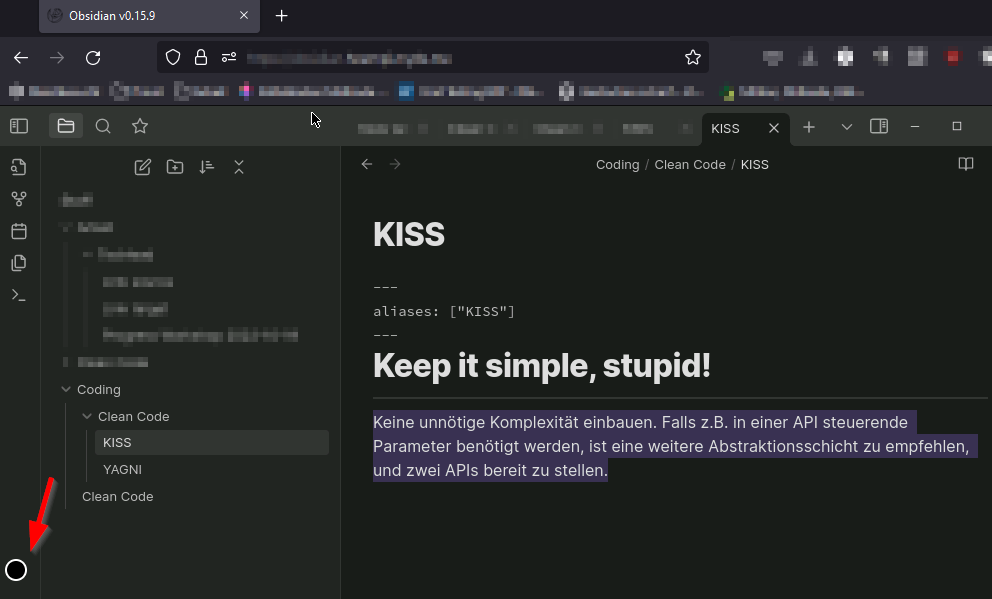
obsidian-remote:latest bashClick on the circle to the left side of your browser window. In there you will find a textbox for updating the remote clipboard or copying from it.