Releases: tdh1985/wattlebooks
Release list
Downloads are now named Wattlebooks

The downloads are now named Wattlebooks too.
- Windows: the app is now
Wattlebooks.exe. Download it, open it, and your books are there as before. Once it opens you can delete the oldInvoiceDesk.exe, and pin the new one if you had the old one pinned. - Mac: the app is now
Wattlebooks.app. Drag it into Applications and delete the oldInvoiceDesk.app. - Linux: the program is now
Wattlebooks. - Your invoices, clients, receipts and settings don't move. The data folders keep their old InvoiceDesk name, so the new app finds them straight away.
- The project has moved to github.com/tdh1985/wattlebooks. Old links still redirect there.
Downloads
- Windows:
Wattlebooks.exe(Windows 10 and 11, 64-bit) - Linux:
Wattlebooks-linux-x64.tar.gz - Mac (preview):
Wattlebooks-macos-arm64.tar.gzfor Apple silicon,Wattlebooks-macos-x64.tar.gzfor Intel
1.7.0: InvoiceDesk is now Wattlebooks
InvoiceDesk is now Wattlebooks.
- A new name and icon: a wattle sprig growing out of an open book.
- A navy and wattle look, with a gold edge on the page you're on and a small Wattlebooks mark at the foot of the side menu.
- The phone app has the new name, a navy header and the new icon. On iPhone, remove it from your home screen and add it again to see the new icon and name.
- Your invoices, clients, receipts and settings carry over as they are. The data folders keep their old name, so nothing moves.
- The Windows download is still named
InvoiceDesk.exe, so existing links keep working.
Downloads
- Windows:
InvoiceDesk.exe(Windows 10 and 11, 64-bit) - Linux:
InvoiceDesk-linux-x64.tar.gz - Mac (preview):
InvoiceDesk-macos-arm64.tar.gzfor Apple silicon,InvoiceDesk-macos-x64.tar.gzfor Intel
InvoiceDesk 1.6.1
InvoiceDesk 1.6.1 makes the app easier to use with a keyboard and a screen reader. Nothing about how it works has changed.
What's new
Keyboard and screen readers
- Drawers and pop-ups keep your place. Record payment, Chase up and the Ctrl+K search now hold the keyboard inside them while they're open, and put you back where you were when they close.
- You can see where you are. Focus outlines are brighter on the dark side menu and in the dark theme.
- On/off buttons say whether they're on. Filters, the theme switch, the Invoices/Quotes switch and the report periods now tell a screen reader which one is picked.
- The dashboard chart is one stop. Tab to it once, then use the arrow keys to move between months.
- Ctrl+K search reads out each result as you arrow through it.
- Previews can be scrolled with the keyboard, and the invoice preview no longer adds an extra heading or link to the page.
Smaller fixes
- The grey text on the side menu is easier to read.
- The reminder bell on each dashboard ticket is bigger and easier to hit.
- With reduced motion turned on in Windows, loading spinners now sit still.
- Empty lists say what you're filtering by, like "No expenses in Other expense this month", and how to see more.
Everything else
- Download the new file for your computer and run it in place of the old one. Your data stays as it is.
Needs
- Windows: Windows 10 (1809) or later, 64-bit, with the Microsoft Edge WebView2 Runtime (Windows 11 already has it).
- Linux: 64-bit with WebKitGTK (
sudo apt install libwebkit2gtk-4.1-0on Ubuntu and Debian). - Mac (preview): macOS 12 or later. The Mac apps are signed and notarised by Apple, so they open without a warning.
- Phone: any recent iPhone or Android browser.
The Windows exe isn't code-signed yet, so SmartScreen may say it "protected your PC". Click More info, then Run anyway. The Microsoft Store version doesn't show this warning.
Check the download
SHA-256:
9abc7739764e07f456149ab81263c7dcd2dbc65ac5fe201246cedebf203f3988  InvoiceDesk.exe
58913340b7874eb322a2d39b341497a6a59d983fcccd26432c9c0d79a8dc8a10  InvoiceDesk-linux-x64.tar.gz
95414190e7021827ed34117dfb2dbd6803619741e7c6cb3d49dd55b12cae7b7d  InvoiceDesk-macos-arm64.tar.gz
f5216218a0e534387c11a94d0bcf0353f5eb2fd76f67d3aa253507d4f649b19a  InvoiceDesk-macos-x64.tar.gz
InvoiceDesk 1.6.0
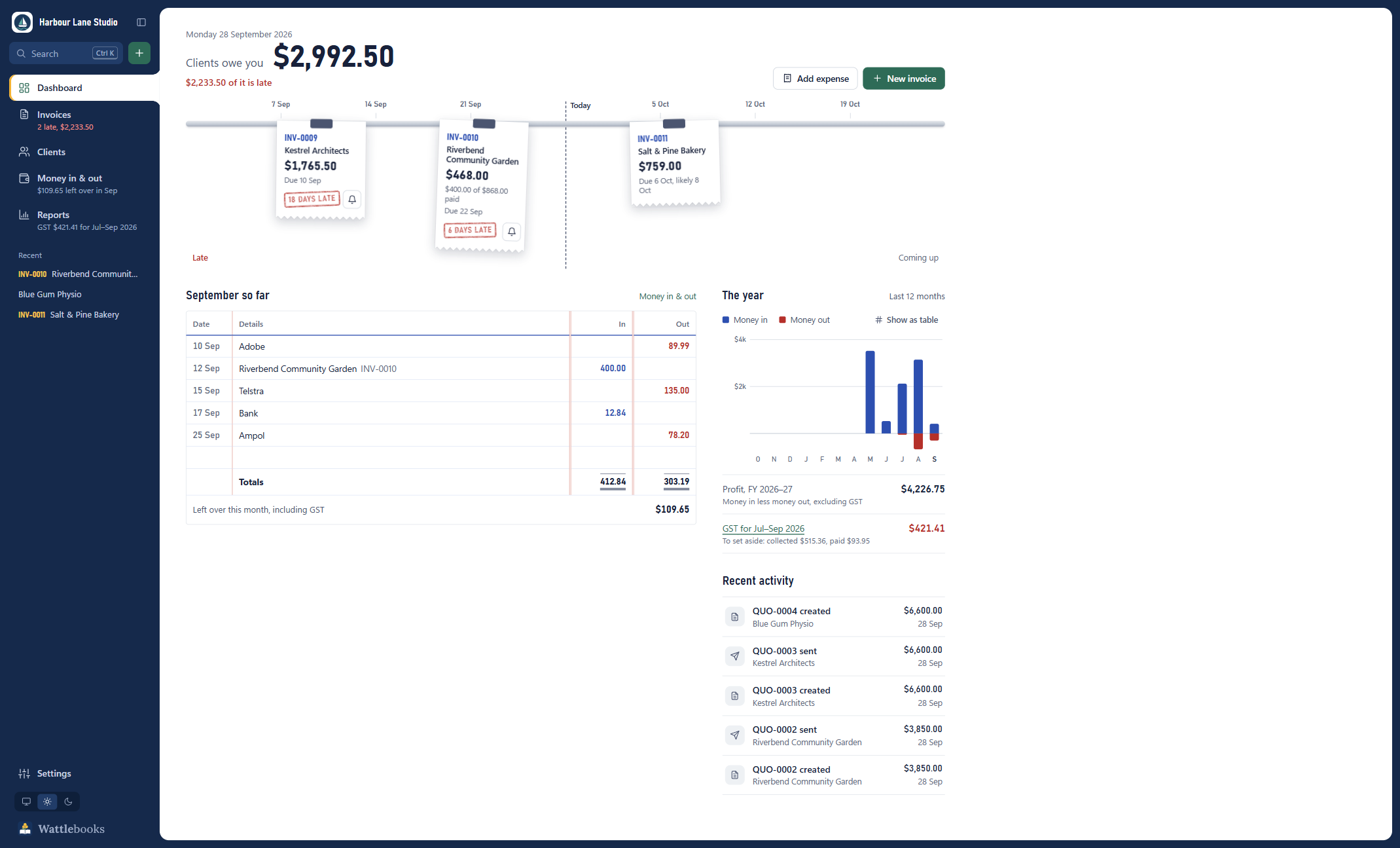
InvoiceDesk 1.6.0 is a redesign. The dashboard shows who owes you and how late they are at a glance, statuses look like rubber stamps, and the side menu tells you what matters without opening each page.
What's new
A new dashboard
- Unpaid invoices hang on a rail at their due date, with today in the middle. Anything left of the line is late, and each late one is stamped with how many days.
- Send a reminder from the ticket. The bell button opens the reminder email for that invoice.
- See when a client will probably pay. Upcoming invoices show a likely date, based on how late that client usually pays.
- Tickets that fall close together stack into a pile, so the rail stays readable with lots of unpaid invoices.
- This month on a cash book page. Money in and out, line by line, with the totals and what's left over.
- The year chart shows money in above the line and money out below it, in the same scale.
Stamps and stubs
- Statuses are rubber stamps. Paid, sent, overdue and draft are easier to tell apart in every list.
- Invoice numbers sit on a tear-off stub, and paid invoices fade back so the unpaid ones stand out.
A new side menu
- The menu shows what matters. Invoices shows what's late, Money in & out shows what's left over this month, and Reports shows the tax for the period.
- Recent invoices and clients are listed underneath, one click away.
- Press [ to fold the menu down to icons when you want more room. A red count on Invoices shows when something is late.
- The menu and window frame are now a dark graphite, in both light and dark themes.
Fixes
- The window opens at the right size on scaled screens. With Windows display scaling at 125% or 150%, InvoiceDesk could open too small and cut off the dashboard. It now opens at a size that fits, and remembers the size you leave it at.
Everything else
- Nothing else changes. Download the new file for your computer and run it in place of the old one. Your data stays as it is.
Needs
- Windows: Windows 10 (1809) or later, 64-bit, with the Microsoft Edge WebView2 Runtime (Windows 11 already has it).
- Linux: 64-bit with WebKitGTK (
sudo apt install libwebkit2gtk-4.1-0on Ubuntu and Debian). - Mac (preview): macOS 12 or later. The Mac apps are now signed and notarised by Apple, so they open without a warning.
- Phone: any recent iPhone or Android browser.
The Windows exe isn't code-signed yet, so SmartScreen may say it "protected your PC". Click More info, then Run anyway. The Microsoft Store version doesn't show this warning.
Check the download
SHA-256:
96b09ad3eeff04da8163c635817a1fe54e240f1f5bf91b30b9c53fff2b702387  InvoiceDesk.exe
5aedaacbcf972e3ad35a4f667a85f98c782f30570322c03876a9947f78facdd9  InvoiceDesk-linux-x64.tar.gz
70b81cb527150e1274e30b7d7f12f0b67271b3364441210aac12a82bcca29608  InvoiceDesk-macos-arm64.tar.gz
fe449fbe1163a443a07a6c8b0b5a3b7917c5701e84be98d84e9b609c8d06d093  InvoiceDesk-macos-x64.tar.gz
InvoiceDesk 1.5.1

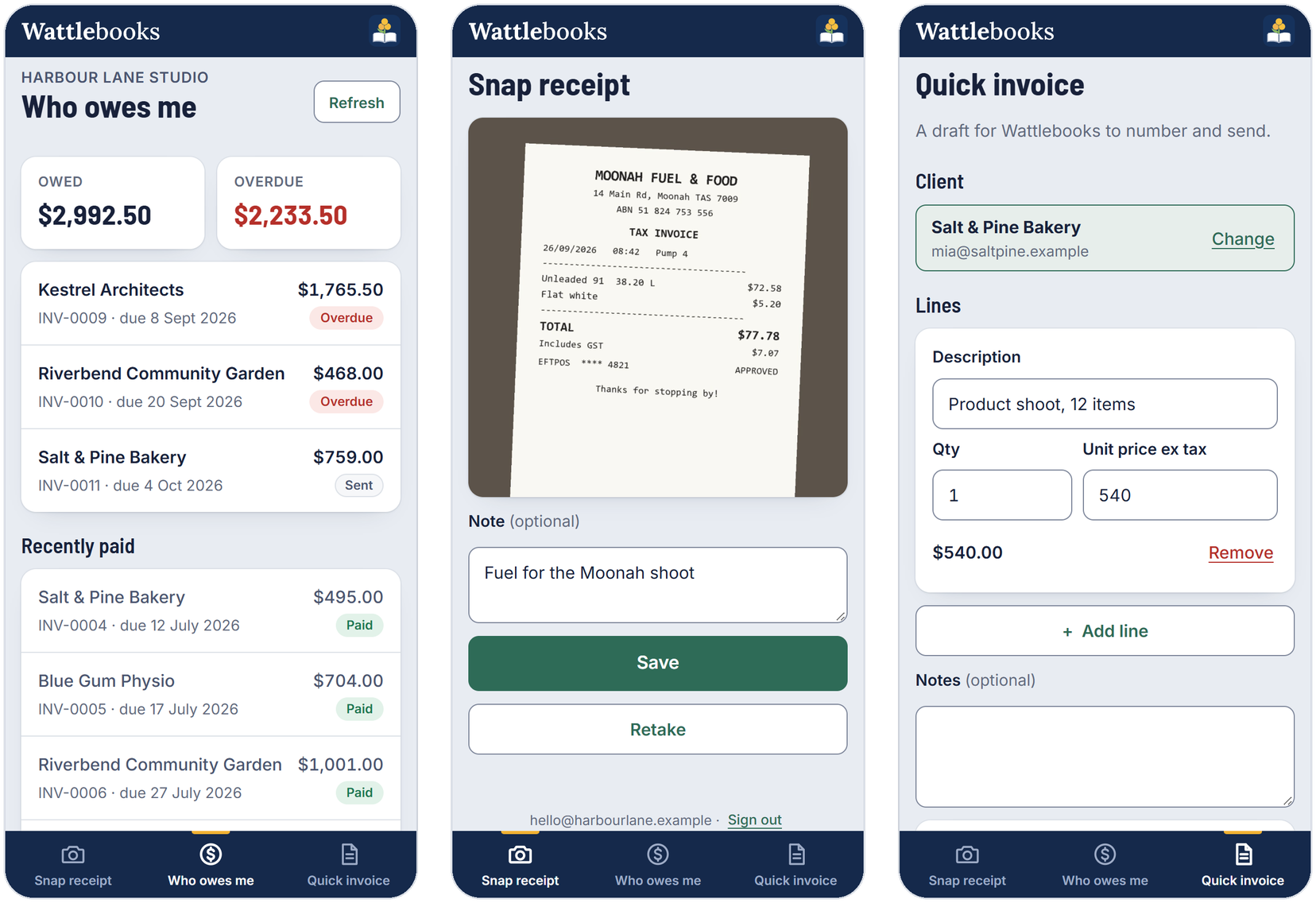
InvoiceDesk 1.5.1 adds a phone app as a pilot. Snap receipts, see who owes you and start a quick invoice from your phone. It also fixes a few small bugs.
What's new
Phone app (pilot)
- Open Settings → Phone, enter your email and click Email me a code. There's no password.
- On your phone, open https://invoicedesk-phone.vercel.app, sign in with the same email and choose Add to Home Screen.
- Snap a receipt. It lands in a From your phone tray on Money in & out, ready to turn into an expense.
- See who owes you, with overdue invoices first.
- Start a quick invoice. It arrives as a draft, and InvoiceDesk gives it the next number.
- Receipts and quick invoices wait on the phone when there's no signal and upload later.
- The sign-in code comes from
no-reply@in.setitnow.online. While the pilot is new it can land in junk, so check there and mark it as not junk.
What goes online
- Nothing, until you sign in under Settings → Phone.
- Once you do, your open invoices, recently paid ones and client names are kept online so your phone can see them. Each login can only see its own data.
- Photos and quick invoices are deleted from the cloud as soon as your computer has them.
- Sign out can remove everything from the cloud too. Your computer stays the only full copy.
Fixes
- Scanned amounts over $999 are read in full. A receipt or remittance showing $1,100.00 could be read as $100.00. It's now read as $1,100.00.
- Deleting a payment keeps the right bank fee. If an invoice had a local payment and a foreign "paid in full" payment on the same day, deleting the local one also deleted the other payment's bank fee. It now leaves the fee alone.
- Undo after scanning a receipt works properly. After you undid a scan, the Undo button stayed on screen and you couldn't scan another receipt into the same expense. Both work now.
- Mac and Linux show the right message when something's missing. A broken install was sometimes reported as missing WebKitGTK. That message now only appears when the web view really is missing.
Everything else
- Nothing else changes. Download the new file for your computer and run it in place of the old one. Your data is updated the first time it opens.
Needs
- Windows: Windows 10 (1809) or later, 64-bit, with the Microsoft Edge WebView2 Runtime (Windows 11 already has it).
- Linux: 64-bit with WebKitGTK (
sudo apt install libwebkit2gtk-4.1-0on Ubuntu and Debian). - Mac (preview): macOS 12 or later. It isn't notarised by Apple, so the first time you open it go to System Settings → Privacy & Security and click Open Anyway.
- Phone: any recent iPhone or Android browser.
The Windows exe isn't code-signed yet, so SmartScreen may say it "protected your PC". Click More info, then Run anyway.
Check the download
SHA-256:
fa63df94bb5a17a8ebe2f12d5aa49de0a8609b83244fa9120b6486a306bc3e29  InvoiceDesk.exe
ecd4b50930906cc64403bf7e5b35c5680d9d201a76b0aba4889ca87fb2baf4f2  InvoiceDesk-linux-x64.tar.gz
43b40bbfe0f489fe1d9c2fcdb0b7d2ca45c746bff9de69db1f9a4553b3719d69  InvoiceDesk-macos-arm64.tar.gz
208cdc577a1425921ca0e06d85ee60441ca43aacb68493aeef588331445981ed  InvoiceDesk-macos-x64.tar.gz
InvoiceDesk 1.4.0
InvoiceDesk 1.4.0 runs on Linux and, as a preview, on macOS, with the same screens as on Windows.
What's new
Linux
- Download InvoiceDesk-linux-x64.tar.gz, unpack it and run
InvoiceDesk. - PDFs are made with Chrome, Chromium, Edge or Brave, including the snap versions. Without one, the invoice opens in your browser for you to print to PDF.
- Exported PDFs go in
~/Documents/InvoiceDesk/so any app can open them.
macOS (preview)
- Download InvoiceDesk-macos-arm64.tar.gz for Apple Silicon or InvoiceDesk-macos-x64.tar.gz for Intel. Each holds
InvoiceDesk.app. - This build hasn't been tried on a real Mac yet. Please report anything that goes wrong.
- The app isn't notarised by Apple, so the first time you open it macOS says it can't check it. Open System Settings → Privacy & Security and click Open Anyway.
On both
- Email opens your mail app with the message filled in and shows the PDF so you can drag it in.
- Receipt scanning isn't there yet, so receipts are attached for you to fill in by hand.
- The taskbar badge, jump list and translucent window stay Windows only.
Windows
- Nothing changes. Download the new exe and run it in place of the old one.
Moving your data between computers
Your data is one folder, so it moves between Windows, Mac and Linux. Put it in a synced folder from Settings → Your data on one computer and choose Open that data here on the other. Only open it on one computer at a time.
Needs
- Windows: Windows 10 (1809) or later, 64-bit, with the Microsoft Edge WebView2 Runtime (Windows 11 already has it).
- Linux: 64-bit with WebKitGTK (
sudo apt install libwebkit2gtk-4.1-0on Ubuntu and Debian). - Mac: macOS 12 or later.
The Windows exe isn't code-signed yet, so SmartScreen may say it "protected your PC". Click More info, then Run anyway.
Check the download
SHA-256:
3dfe61dea2b4ede2ee9f1cae82ccc68f0ef8fa77245c71b2f111e9f203fe84cc  InvoiceDesk.exe
d323711d5cc614762489d3a622ae67137101c726cb9d4d744983f216c9b9d1b7  InvoiceDesk-linux-x64.tar.gz
5c3f4fb696a4d093af5816df2137ea3444be39e9c74a11614ac5afb043a35003  InvoiceDesk-macos-arm64.tar.gz
09b8266227abaebd1541c52804f06c72871ed19b0ead2d2fcb73e222c57f4f8e  InvoiceDesk-macos-x64.tar.gz
On Windows: Get-FileHash .\InvoiceDesk.exe. On Linux or Mac: shasum -a 256 <file>.
InvoiceDesk 1.3.0
InvoiceDesk 1.3.0 reads remittances when you record a payment and handles money that arrives or leaves in another currency, including the bank fee taken along the way.
What's new
Scan a remittance to record a payment
- Drop a remittance advice or bank receipt onto Record payment and it fills in the amount, date and currency for you, using the text reader built into Windows. Nothing leaves your PC.
- If a receipt can't be read within 20 seconds, the app stops trying and you can type the details in yourself.
Invoices paid in another currency
- Record what the client actually sent, in the currency they sent it in, next to what it came to in your own currency.
- When the bank takes a fee and less arrives than you invoiced, tick Treat as paid in full. The invoice is marked paid for its full amount, and the shortfall is recorded as a Bank fees expense, so your income and GST stay right and the two together match what reached your bank.
- Invoices show the bank fee and the foreign amount under each payment. Deleting a payment also deletes its bank fee.
Expenses paid in another currency
- Choose the currency an expense was paid in, and enter what it cost in your own currency.
- Foreign expenses start with no GST, because overseas suppliers usually don't charge it. You can still add it if they did.
- Receipts now pick up the currency and the date paid as well.
Upgrading from 1.2.x
Download the new exe and run it in place of the old one. Your data is updated automatically the first time it opens, and a backup of the database is taken first.
Download and run
- Download InvoiceDesk.exe below. It's a single file, so there's nothing to install and you don't need .NET.
- Run it. Your data is kept in
%LOCALAPPDATA%\InvoiceDesk\and you can move it to a synced folder later from Settings.
The exe isn't code-signed yet, so Windows SmartScreen may say it "protected your PC". Click More info, then Run anyway.
Needs
- Windows 10 (1809) or later, 64-bit
- Microsoft Edge WebView2 Runtime, which Windows 11 already has. If it's missing, the app offers to open the download page.
Check the download
SHA-256 of InvoiceDesk.exe:
3dc35a1de98ba347d1ce1da0921964e4095e4d66d65a18ef41f533a3074d8fff
In PowerShell: Get-FileHash .\InvoiceDesk.exe
InvoiceDesk 1.2.1
A small follow-up to 1.2.0 that makes the app easier to read. Nothing about your data, your invoices or your tax figures changes.
What's fixed
Secondary text is easier to read
The smaller grey text — things like "Including GST", the line under each invoice number, and the counts on the filter buttons — was too light against the background. It now meets the WCAG AA contrast standard for text that size, in both the light and dark themes.
Settings sections no longer nudge the list
Clicking Business in Settings moved the section list down by a few pixels compared with every other section. It now stays put.
Upgrading from 1.2.0
Download the new exe and run it in place of the old one. Nothing else to do — this release changes no data and no figures.
Download and run
- Download InvoiceDesk.exe below. It's a single file, so there's nothing to install and you don't need .NET.
- Run it. Your data is kept in
%LOCALAPPDATA%\InvoiceDesk\and you can move it to a synced folder later from Settings.
The exe isn't code-signed yet, so Windows SmartScreen may say it "protected your PC". Click More info, then Run anyway.
Needs
- Windows 10 (1809) or later, 64-bit
- Microsoft Edge WebView2 Runtime, which Windows 11 already has. If it's missing, the app offers to open the download page.
Check the download
SHA-256 of InvoiceDesk.exe:
d567a66e2ccd3582fc1622ac1316b0310615561b55b277fd9a82b2f93acf2dfd
In PowerShell: Get-FileHash .\InvoiceDesk.exe
InvoiceDesk 1.2.0
InvoiceDesk 1.2.0 works in New Zealand, the UK, Canada and the US as well as Australia, and can bill a client overseas in their own currency. It still runs as one exe, keeps your data on your own PC and doesn't need any paid service.
What's new
Your country
Pick it in Settings → Business. It sets your tax, currency, tax number, bank details, tax year and tax return.
| Country | Tax | Tax number | Bank details | Tax year starts | Report |
|---|---|---|---|---|---|
| Australia | GST 10% | ABN | BSB and account | 1 July | BAS worksheet (G1, 1A and 1B) |
| New Zealand | GST 15% | GST number | Bank account | 1 April | GST return (boxes 5 to 15) |
| United Kingdom | VAT at 20%, 5%, 0% or exempt | VAT number | Sort code and account | 6 April | VAT return (boxes 1 to 9) |
| Canada | GST or HST at your client's province's rate | GST/HST number | Transit, institution and account | 1 January | GST/HST return |
| United States | Sales tax at your rate | EIN | Routing and account | 1 January | Sales tax summary |
- Invoices use your country's words and heading, like TAX INVOICE or VAT INVOICE.
- Tax numbers are checked as you type, so a mistyped digit is caught before it reaches an invoice.
- The preview and exported PDFs are A4 or US Letter to match your country.
- Choose how often you send your return, like every two months in New Zealand or your VAT quarter in the UK.
Clients overseas
- Clients can be anywhere. An invoice to a client overseas starts with no tax and a note you can edit, and shows their country.
- Bill in their currency: AUD, NZD, GBP, CAD, USD, EUR, SGD, HKD, CHF, SEK, NOK, DKK or ZAR.
- When they pay, you enter what they paid and what reached your bank, and your reports use what reached your bank. There's no exchange rate lookup, so nothing goes online.
Tax returns
- Each country's own return worksheet, saved as PDF or CSV.
- Your dashboard shows the tax for the current return period and your tax year.
Upgrading from 1.1.0
Download the new exe and run it in place of the old one. Your data is updated automatically the first time it opens, and a backup of the database is taken first.
If you're in Australia nothing changes. Your GST, BAS, financial year, ABN and BSB all stay exactly as they were.
Your country locks once you've sent an invoice or recorded money, so past amounts never change currency. For a business in another country, start a new data folder in Settings → Your data.
Download and run
- Download InvoiceDesk.exe below. It's a single file, so there's nothing to install and you don't need .NET.
- Run it. Your data is kept in
%LOCALAPPDATA%\InvoiceDesk\and you can move it to a synced folder later from Settings.
The exe isn't code-signed yet, so Windows SmartScreen may say it "protected your PC". Click More info, then Run anyway.
Needs
- Windows 10 (1809) or later, 64-bit
- Microsoft Edge WebView2 Runtime, which Windows 11 already has. If it's missing, the app offers to open the download page.
Not covered yet
Quebec QST and the provincial sales taxes in BC, Saskatchewan and Manitoba.
InvoiceDesk helps you keep records. It isn't tax advice, so check your figures with your accountant or your tax office: the ATO, IRD, HMRC, CRA, or the IRS and your state.
Check the download
SHA-256 of InvoiceDesk.exe:
d9805a99a7eba2355fe8822b176f4c0313bd56343e402c68c47d08ed16288e88
In PowerShell: Get-FileHash .\InvoiceDesk.exe
InvoiceDesk 1.1.0
InvoiceDesk 1.1.0 adds quotes, repeating invoices, receipt scanning and a lot more for getting paid. It still runs as one exe, keeps your data on your own PC and doesn't need any paid service.
What's new
Quotes
- Send a quote with its own numbering (QUO-0001) and a valid-until date.
- Mark it accepted or declined, then turn it into an invoice in one click.
- Quotes never count toward what you're owed, your BAS or your statements.
Getting paid
- Email an invoice in one click. With classic Outlook the PDF is attached for you. Other mail apps open with the PDF's folder beside them.
- Chase overdue invoices with a friendly, firm or final reminder you can edit first.
- Send a client a statement of everything they owe, aged into 30-day columns.
- Make an invoice repeat weekly, fortnightly, monthly, quarterly or yearly. Each one is drafted for you to check and send, never sent on its own.
Receipts and reports
- Drop a receipt photo or PDF onto the Money page and it fills in the amount, GST, date and supplier using the text reader built into Windows. Nothing leaves your PC.
- A Reports page with a BAS worksheet (G1, 1A and 1B) and a profit and loss, saved as PDF or CSV.
- Export invoices or money in and out as CSV for your accountant.
Smarter
- Each client shows how late they usually pay, and the dashboard shows what's likely to come in over the next 30 days.
- Line items suggest what you last charged that client, and expenses pick the category you used last time.
- Ctrl+K runs commands like recording a payment, and ? lists every shortcut.
Look and feel
- Three invoice layouts: classic, modern and minimal.
- On Windows 11 the window edges pick up your desktop colours. You can turn this off in Settings.
- Right-click the taskbar icon to start a new invoice or expense. The icon shows how many invoices are overdue.
- Settings → About has a Check for updates button. It only goes online when you click it.
Upgrading from 1.0.0
Download the new exe and run it in place of the old one. Your data is updated automatically the first time it opens, and a backup of the database is taken first.
Download and run
- Download InvoiceDesk.exe below. It's a single file, so there's nothing to install and you don't need .NET.
- Run it. Your data is kept in
%LOCALAPPDATA%\InvoiceDesk\and you can move it to a synced folder later from Settings.
The exe isn't code-signed yet, so Windows SmartScreen may say it "protected your PC". Click More info, then Run anyway.
Needs
- Windows 10 (1809) or later, 64-bit
- Microsoft Edge WebView2 Runtime, which Windows 11 already has. If it's missing, the app offers to open the download page.
Check the download
SHA-256 of InvoiceDesk.exe:
2b3ea52fca56cb05bfc03f6e52a7854fb30417921209d6d4a0679f84305931ea
In PowerShell: Get-FileHash .\InvoiceDesk.exe