Repository navigation
Releases: thatcalikid760/TTT2-Recomp
Release list
TTT2 Recomp 0.2.6

-
Fighting Lounge is still in alpha testing and being built. Here is concept art of what I'm aiming for:
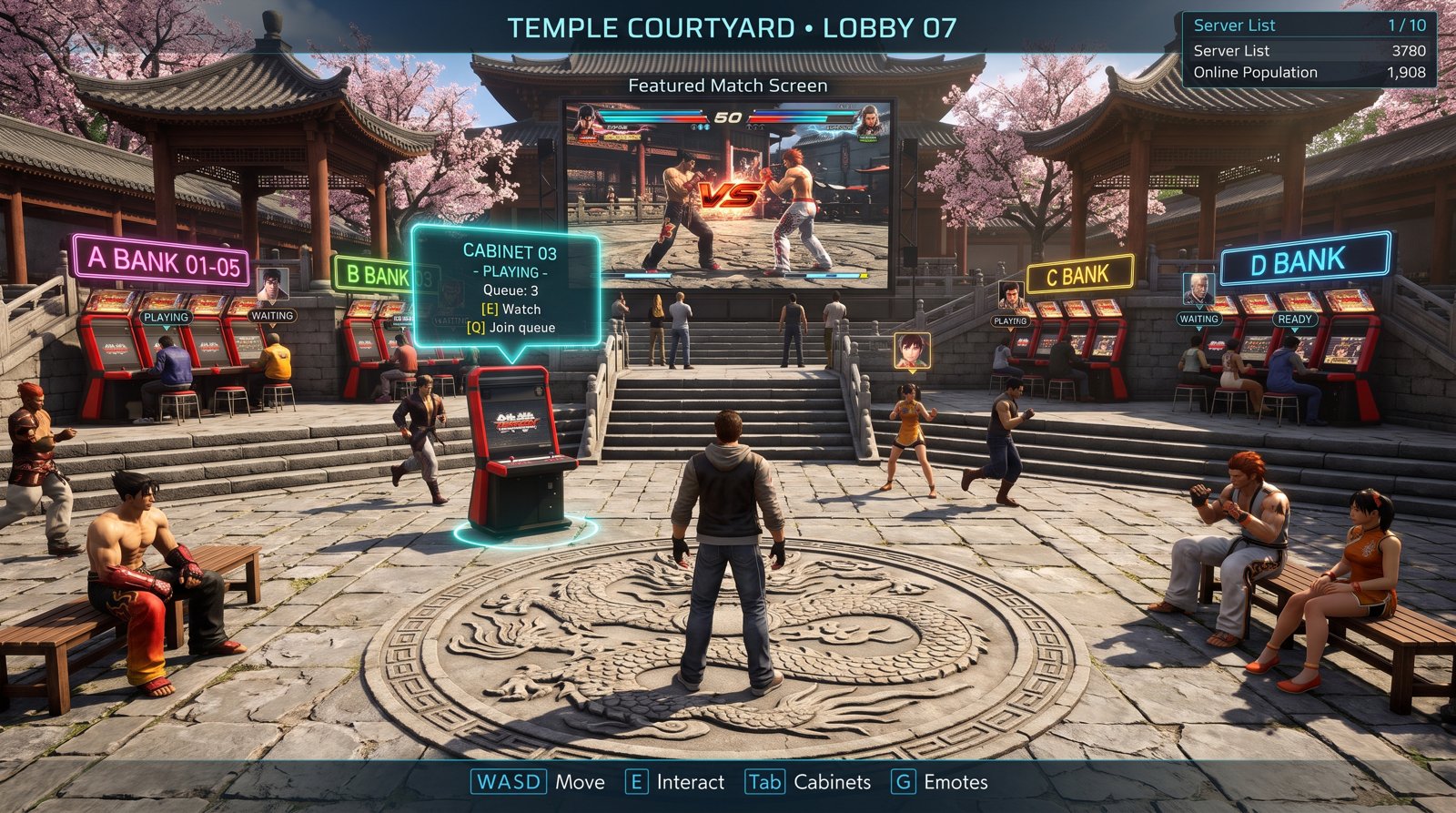
This build adds a first, simple 3D blockout of the courtyard and its cabinets. It's local only for now: other players don't walk around in it yet. Both seated players still press ready before a cabinet match starts.
-
Controller Setup shows your controller: the big controller picture switches to a PS4 or PS5 controller, or a keyboard and mouse with your bound keys lit up, following whatever you last pressed (or your button prompt setting).
-
Unlock all Customize items: Options > UNLOCK ALL ITEMS asks YES / NO and makes every Customize item free to equip. Your save isn't changed, so choosing it again locks them back to what you own.
-
Voice chat panel (RS / R3 / F7) only opens in Online Mode's menus and the online lobby, and no longer while you're setting keys in Controller Setup (#8).
-
F8 no longer mutes everyone in voice chat, so it won't clash with clip / recording shortcuts.
-
Controller Setup > KEYBOARD: the keyboard works again right after you choose a key (#6).
TTT2 Recomp 0.2.5
Everything from 0.2.4 (Fighting Lounge beta, VS BATTLE with an Xbox + PlayStation pad, KEYBOARD PLAYER, 80-character GAME CHAT), with the online fix:
- Fixed: online matches stuck on "syncing". The ONLINE CROWDS option is removed: on most stages it crashed the game while the match loaded, leaving both players waiting (#5).
- Smaller log files: one online message no longer fills the log every frame.
Everyone playing online should update to 0.2.5.
TTT2 Recomp 0.2.3
- Ranked rematch: after a ranked match both players are asked REMATCH?: yes with Xbox Y (PlayStation Triangle, keyboard X) or a left-click on the note, no with Xbox X (PlayStation Square, keyboard Z) or a right-click. If both say yes you play the same opponent once more, as in TEKKEN 8.
- Rage-quit penalties (community servers): leaving a ranked match early counts as a loss, earns a strike and locks you out of ranked matchmaking for 5 minutes (15 for the second strike, an hour from the third; a strike is forgiven every 24 hours). The opponent's quit rate shows when a ranked match is found.
- Classic Offline: on the main menu, put the cursor on OFFLINE MODE and press Xbox X (PlayStation Square, keyboard Z). You start with 22 fighters; every ARCADE clear unlocks the next one. Progress is kept per profile, and the option disappears once all 37 are unlocked. The normal Offline Mode keeps the full roster.
- The player card shows your Steam avatar (it was see-through).
- The ONLINE MODE menu notes that Steam must be running for online play.
- Select Profile shows RENAME (Xbox Y, PlayStation Triangle, keyboard X) and DELETE (Xbox X, PlayStation Square, keyboard Z) in the bottom bar; the icons follow the controller you use.
- Keyboard keys are the defaults; with your own in Controller Setup, use the keys you set for Y and X.
- Rematch and quit reports need 0.2.3 on both sides; server owners need the new
ttt2-serverfor the penalties. - SHA-256 of
ttt2_setup.exe:8b048827eb4e57d7545ea08e306cd6ee1e4d92f4c01c807f6662f9da7fd9b738
TTT2 Recomp 0.2.2
- Delete profiles: on Select Profile, press Xbox X (PlayStation Square, keyboard Z) on a profile and confirm. Its save data goes to the Recycle Bin, so it can be restored.
- Display Settings no longer shows 3D MODE / 3D DEPTH.
- Motion blur has one switch again: the game's own in Display Settings (the copy in Graphics Settings is gone).
- The online menu no longer shows "SEARCH FOR Xbox LIVE PARTY" (it did nothing).
- Online play needs 0.2.0 or newer on both sides.
- SHA-256 of
ttt2_setup.exe:40b20596ae3181900a977e01f54c11ce5630400fad7dbc1f9067bb172a22fd00
TTT2 Recomp 0.2.1
- Ranked Match works on Steam again. 0.2.0 grayed it out unless a community server was picked. Team and Leaderboards still need a server.
- Online play needs 0.2.0 or newer on both sides (rollback netcode).
- SHA-256 of
ttt2_setup.exe:115a6f33094e24cc17e7b9dcb55d44d5f61f5fefe095f0b7754f950b2f13ac9f
TTT2 Recomp 0.2.0
Online
- Rollback netcode (from upstream 0.1.7): online fights stay smooth when the connection wobbles.
OPTIONS→GAME OPTIONS→ONLINE NETCODEsets the balance between input delay and rollback. - Community servers: Ranked Match, leaderboards, teams, Tekken Channel replays and ghosts. Add one in
ONLINE MODE→SERVER→ADD SERVER. - Steam Friend Invite (Y, and triangle in a Player Match room), pair play online, and rooms no longer vanish after a few matches.
- Fix: the voice chat panel's player list no longer reshuffles, so mute hits the player you picked.
Graphics
- Graphics Settings: presets (LOW to ULTRA), FSR 1 upscaling with FSR modes, SMAA anti-aliasing, motion blur and shadows on/off. The page scrolls.
- No more shader stutter: the installer prepares all shaders up front (the first install takes a few minutes longer).
- Texture mipmaps, 640x360 / 960x540 resolutions for older PCs, laptops use the dedicated GPU.
Notes
- Both players need 0.2.0 to play online. It uses rollback netcode and can't see or join 0.1.9 rooms.
- Install over your existing copy; saves and profiles are kept. Or update from inside the game.
- SHA-256 of
ttt2_setup.exe:1703272d7c78c00e081fbaf5b24d571c1c7a61563785207fff6d3ed17e52d712
TTT2 Installer 0.1.9
What's new
- Update notifications: when you pick your profile, the game checks for a newer version and shows your build number in the top right. If an update is out, click the notification to download it, then click again to install (right-click dismisses it).
- Voice chat in the lobby: press the right stick: Xbox RS, PlayStation R3 (keyboard F7) in the menus or an online lobby to change voice mode and volume and to mute players, without leaving the lobby. The lobby's button bar shows the shortcut for your controller.
- Steam profiles: in that panel, select a player and press Xbox X (PlayStation Square, keyboard Z) to open their Steam profile.
- Mouse cursor hides when you're not using the mouse.
- Fix: with FXAA or sharpening on, the picture could be cut off at large render scales.
Installing
From 0.1.8: Options > Updates, or run ttt2_setup.exe over your install and choose Update.
From 0.1.7 or older: run ttt2_setup.exe over your install and choose Update.
TTT2 Installer 0.1.8
What's new
- Graphics Settings: V-Sync, render scale (supersampling), FXAA, anisotropic filtering, sharpening, brightness, FPS counter
- Voice Chat: open mic or push-to-talk in online lobbies and matches, voice volume, mute players (F8 mutes everyone)
- Updates: check for and install new versions from inside the game (Options → Updates)
- The new Options pages use the game's own Options background
Installing
Updating from 0.1.7 or older: run ttt2_setup.exe over your install and choose Update. From 0.1.8 on, you can update from inside the game.
TTT2 Installer 0.1.7
This installer now includes:
PS4/PS5 controller support
Discord Join: You can now join lobbies straight from Discord on any voice channel. Simply play the same build with a friend, and if they have a lobby open, you can join them directly from Discord—no need to search for their lobby in-game.
Update Mode: The installer now features an update mode. If you already have the game installed, it will update you to the new version while keeping all your progress and game files intact.
Chat Fixes: You can now use text chat in online custom lobbies for players without microphones.
Custom Character Card Fix: Fixed the black box issue around custom characters. You can now properly see your custom character's portrait.
Note you must have Steam running in the background for online play.
TTT2 Installer 0.1.7 Hot fix
Hotfix Patch Notes
Platform Button Prompts: Added a new menu setting allowing the game to automatically switch button icon displays between PlayStation, Xbox, and PC layouts across all menus and in-game UI.