Releases: theatrus/seiza-win
Release list
Seiza for Windows v0.7.2

Seiza for Windows 0.7.2
This point release reduces graininess in smaller image previews and brings the
Windows app onto the same Seiza 0.18.14 core as Seiza for Mac 0.7.2.
Download the Windows x64 installer
· SHA-256 checksums
Smoother image previews
- Smaller previews average source pixels instead of sampling isolated pixels.
This reduces noise and false patterns that can appear when fitting a large
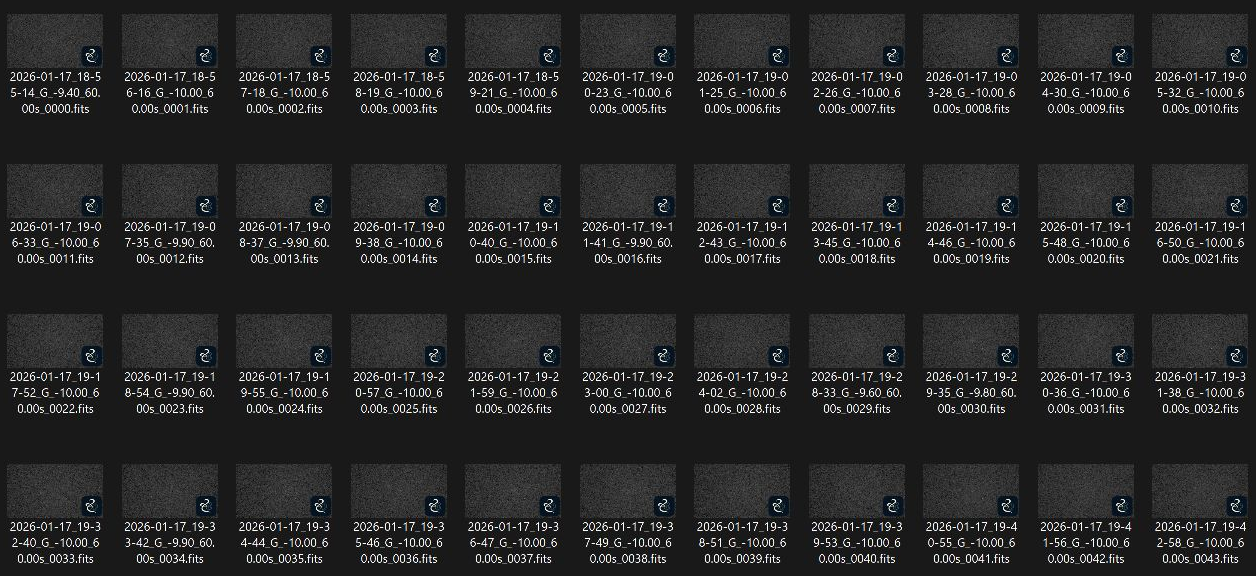
image into a window. - Explorer thumbnails and Preview Pane images use area averaging, including
partial pixels at the image edges. - The viewer chooses its display filter using the preview bitmap's size and
display DPI. Enlarging a reduced preview no longer switches too soon to
nearest-neighbor sampling. Native-resolution pixels stay sharp at 1:1 and above. - The live-stack window also filters scaled images.
These changes do not alter source files or stretch settings. Full-resolution
export remains available with or without overlays.
Core and distribution
- Bundle the published Seiza 0.18.14 C ABI, including the shared preview
downsampling fixes. - The x64 MSI and its first-party binaries are Authenticode signed by
StackFoundry LLC. The in-app updater verifies both the signed update feed
and the installer signature in that feed.
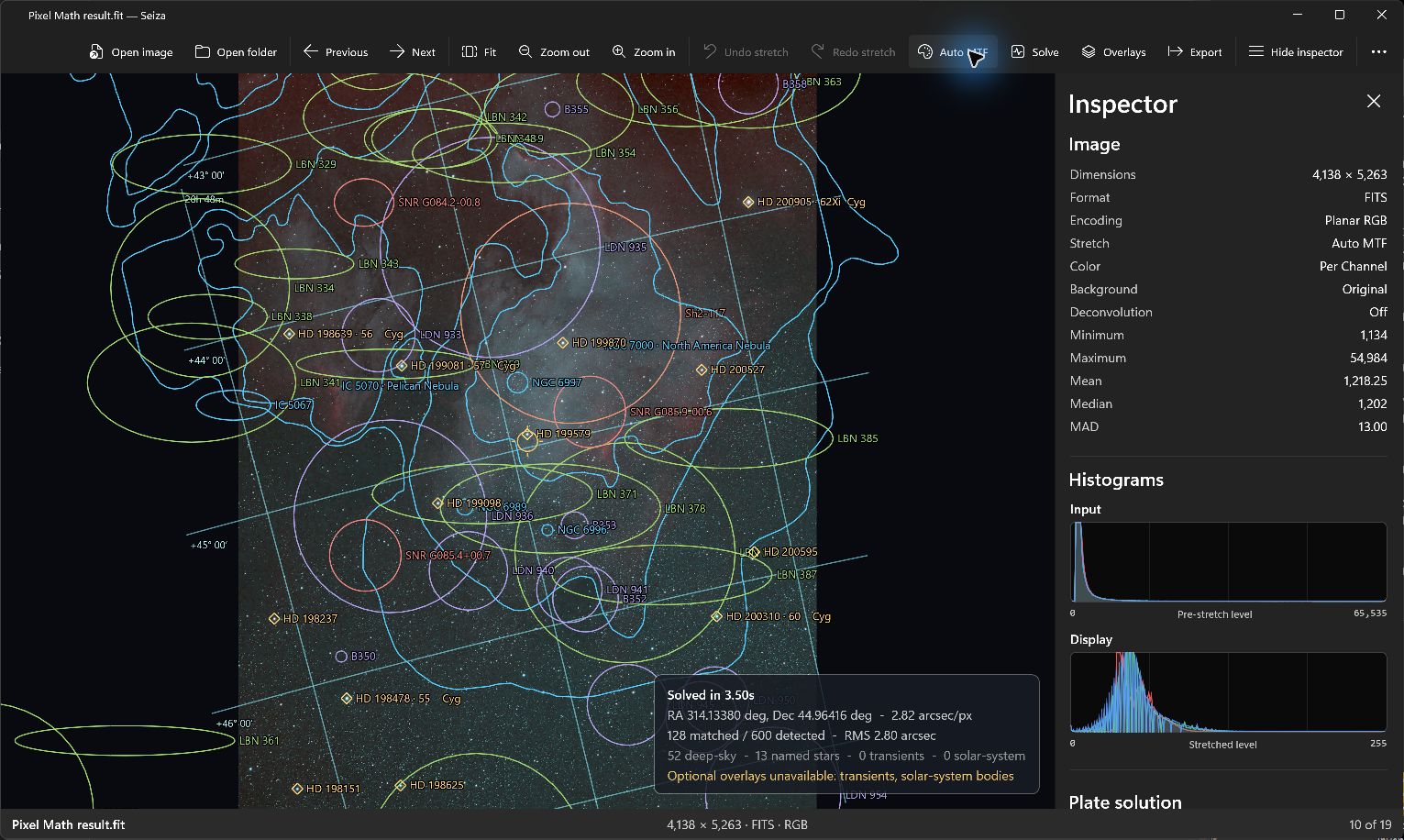
App and Explorer views
Existing screenshots show the supported workflows; they are not a before-and-after
comparison of the sampling changes.
Seiza for Windows v0.7.1
Seiza for Windows 0.7.1
This point release makes measured-star and sensor-tilt analysis more reliable
on frames whose stars span only a few pixels.
Adaptive star detection
- Analyze stars now asks the native core for a target of 200 measured stars.
The existing bounded binning-2, sensitivity-30 pass still runs first and is
returned immediately when it supplies enough measurements. - If the first pass measures fewer than 200 stars, Seiza retries with a relaxed
SNR gate and, if still below target, with native-resolution, unblurred detection.
This can populate the nine-cell sensor grid and the parallelogram and triangle
tilt diagrams on undersampled data that previously produced too few
measurements. - Each retry remains a complete detector pass. Seiza returns the first pass to
reach the target, or the best pass otherwise; it never merges measurements
made at different scales. - On the release validation set, the adaptive path increased a real C925 FITS
image from 71 to 146 measured stars with all nine cells reliable. A dense
real XISF image remained bit-for-bit identical at 468 stars because its
first pass already met the target. Both native triangle results were ready,
and neither source file changed.
Core and distribution
- The bundled native C ABI moves to Seiza 0.18.8 with
seiza-stars 0.1.3.
Existing FITS/XISF decoding, HFR/FWHM measurements, native tilt math,
calibration, stacking, and export contracts remain unchanged. - The self-contained x64 MSI and its first-party binaries are Authenticode
signed by StackFoundry LLC. The in-app updater independently verifies the
signed appcast and installer enclosure.
Tilt remains a diagnostic, not a one-frame hardware verdict. Confirm patterns
over several comparable exposures and rule out seeing, guiding, wind, focus,
and field curvature before adjusting the imaging train.
Seiza for Windows v0.7.0
Seiza for Windows 0.7.0
This release adds calibrated, resumable live stacking, SNR depth analysis, and
solve-independent star and sensor-tilt measurements.
Live folder stacking
- Watch a capture folder and integrate stable FITS or XISF light frames as
they arrive, with bounded autostretched previews and accepted/rejected frame
status. - Pause safely and resume the exact native accumulator after an app restart.
Crash-safe current/previous checkpoint generations preserve calibration,
registration, normalization, rejection, and the processed-file ledger. - Save a non-destructive 32-bit floating-point FITS snapshot at any time, or
finish the session to publish the final stack. - Inspect measured noise reduction and SNR at progressive stack depths against
the square-root ideal.

Automatic calibration
- Select raw bias, dark, dark-flat, and flat libraries and let Seiza plan and
build a safe master chain for directory or live stacks. - Matching considers every target light, alternate reference anchors,
coherent sessions, exposure, temperature, sensor, filter, focal length, and
rotator metadata. The native builder reports every accepted and skipped
calibration frame with its reason before Windows publishes or caches a
master. - Unreadable, master, or already-calibrated files are set aside with warnings
instead of preventing otherwise valid groups from stacking. Native
per-frame admission remains the final safety check. - Cached masters are retained across concurrent work so pruning cannot remove
one while a stack is opening it.
Star measurements and sensor tilt
- Analyze stars measures FITS or XISF source samples before display stretch,
without a plate solution or catalog download. The inspector reports star count,
average HFR and FWHM, background, noise, and a nine-region sensor summary. - A separate measured-star layer draws HFR markers without conflating them
with the solver's diagnostic detections. - The sensor grid, Parallelogram tilt diagram, and Triangle tilt diagram
share the same source-image transform in the viewport and composited export.
Sparse regions and unreliable direction estimates are withheld rather than
presented as hardware conclusions. - Analysis work is serialized and cached by source stamp, native-core version,
and options. The stamp combines normalized path, length, timestamp,
and Windows file identity when available; those source checks prevent a
validated result from attaching after navigation or file replacement.


Core and distribution
- The bundled native core is Seiza 0.18.7 with
seiza-stars 0.1.2and
seiza-stacking 0.11.4. - Live-preview normalization is display-only: accumulator values, SNR,
checkpoints, snapshots, and exported FITS data remain physical linear
floating-point samples. - The self-contained x64 MSI and its first-party binaries are Authenticode
signed by StackFoundry LLC. The in-app updater independently verifies the
signed appcast and installer enclosure.
Tilt is a diagnostic, not a one-frame hardware verdict. Confirm patterns over
several comparable exposures and rule out seeing, guiding, wind, focus, and
field curvature before adjusting the imaging train.
Seiza for Windows v0.6.1
Seiza v0.6.1
Signed Windows installer. No functional changes.
The MSI and the first-party binaries inside it — Seiza.App.exe,
Seiza.App.dll, seiza_cabi.dll and SeizaThumbnailProvider.dll — are now
Authenticode signed as StackFoundry LLC, through Azure Artifact Signing.
Previously the installer shipped unsigned and Windows reported "Unknown
Publisher".
The binaries are signed before WiX packages them, so the installed program
carries a publisher identity and not just the installer around it. The .NET
runtime and Windows App SDK files are deliberately left alone: Microsoft has
already signed those, and re-signing them would replace their publisher
identity with ours.
SmartScreen may still warn on first download. Reputation is scored per file
hash and starts from zero on every build.
Seiza for Windows v0.6.0
Seiza for Windows 0.6.0
This release aligns Seiza for Windows with the macOS 0.6 product generation,
updates the native processing core to Seiza 0.15.1, and fixes
catalog-protected background extraction for real astronomy fields.
Changes
- Updated
seiza-cabito 0.15.1 andseiza-backgroundto 0.2.1. - Normalized repeated adjacent and closing vertices in catalog protection
polygons before background fitting. - Fixed zero-length polygon edges that could classify every candidate point as
protected and leave background extraction with no usable samples. - Added safe rejection for zero-area, overflowing, and non-finite protection
geometry while keeping valid emission regions protected. - Retained compatibility with existing background recipes and the automatic,
polynomial, and radial-basis controls introduced in Seiza for Windows 0.5.3.
Update from 0.5.3
Use More > Check for updates or Settings > Check now. Seiza verifies the
signed appcast and MSI before opening Windows Installer, then exits so the
normal UAC and in-place upgrade can run.
Install directly
Download seiza-0.6.0-windows-x86_64.msi and compare it with the value in
SHA256SUMS.txt. Windows 11 24H2 or newer on an x64 computer is required.
The installer is self-contained and installs Seiza for every user. It includes
the .NET 10 and Windows App SDK runtimes. The MSI is not yet
Authenticode-signed, so Windows can show an unknown-publisher warning even
though Seiza's updater independently verifies the release with its Ed25519
trust key.
Seiza for Windows v0.5.3
Seiza for Windows 0.5.3
This release adds the Seiza 0.14 background-model controls to the Windows
astronomy processing workflow.
Changes
- Added automatic, polynomial, and radial-basis background models for FITS and
XISF images, with both subtract and divide correction modes. - Added adjustable correction strength and model-specific controls for
polynomial degree and ridge, radial-basis smoothing and control points, and
automatic model selection. - Added optional radial-basis consideration and a minimum-improvement threshold
to automatic selection. The interface warns that flexible radial-basis fits
can remove genuine extended nebula or galaxy detail. - Preserved complete background configurations through undo and redo,
adjustment copy/paste, and folder navigation. Recipes from older releases
continue to load as degree-two polynomial corrections. - Added the fitted model and accepted/candidate background sample counts to the
metadata inspector. - Updated the native processing core to Seiza 0.14.0.
Update from 0.5.2
Use More > Check for updates or Settings > Check now. Seiza verifies the
signed appcast and MSI before opening Windows Installer, then exits so the
normal UAC and in-place upgrade can run.
Install directly
Download seiza-0.5.3-windows-x86_64.msi and compare it with the value in
SHA256SUMS.txt. Windows 11 24H2 or newer on an x64 computer is required.
The installer is self-contained and installs Seiza for every user. It includes
the .NET 10 and Windows App SDK runtimes. The MSI is not yet
Authenticode-signed, so Windows can show an unknown-publisher warning even
though Seiza's updater independently verifies the release with its Ed25519
trust key.
Seiza for Windows v0.5.2
Seiza for Windows 0.5.2
This point release completes three Windows integration features and fixes the
final handoff from the signed updater to Windows Installer.
Changes
- Added a native Explorer Preview Pane handler for
.fit,.fits,.fts,
and.xisffiles. It autostretches the image in Explorer without starting
Seiza and runs in the isolated, low-integrity preview host. - Added independent document windows. Multi-file Open and Windows file
activation stay in one Seiza process, open separate windows, and focus an
existing window when the same file is reopened. - Added true 16-bit-per-channel PNG and TIFF export for FITS and XISF sources,
with optional visible-overlay compositing that preserves high-bit-depth
image samples. - Fixed automatic update installation from GitHub releases. Seiza now keeps
the signed appcast's.msifilename instead of replacing it with GitHub's
extensionless redirect identifier, so NetSparkle invokes Windows Installer
correctly after signature verification. - Extended installer validation to cover Preview Pane registration, isolated
hosting, install/repair shell refresh, and complete removal on uninstall.
Update from 0.5.1
Use More > Check for updates or Settings > Check now. Seiza verifies the
signed appcast and MSI before opening Windows Installer, then exits so the
normal UAC and in-place upgrade can run.
Install directly
Download seiza-0.5.2-windows-x86_64.msi and compare it with the value in
SHA256SUMS.txt. Windows 11 24H2 or newer on an x64 computer is required.
The installer is self-contained and installs Seiza for every user. It includes
the .NET 10 and Windows App SDK runtimes. The MSI is not yet
Authenticode-signed, so Windows can show an unknown-publisher warning even
though Seiza's updater independently verifies the release with its Ed25519
trust key.
Seiza for Windows v0.5.1
Seiza for Windows 0.5.1
This Windows integration release adds native FITS and XISF content thumbnails
to File Explorer. Astronomy folders can now show the image data itself before
Seiza is opened.
Changes
- Render autostretched Explorer thumbnails for
.fit,.fits,.fts, and
.xisffiles, including mono, RGB, and Bayer images. - Preserve source aspect ratio, avoid upscaling, and use Explorer's normal
thumbnail cache. - Run the native Rust
IThumbnailProviderin Explorer's isolated shell host
without loading the WinUI app, .NET runtime, catalogs, or solver. - Notify Explorer after install, repair, and uninstall so file associations and
thumbnail registration refresh without a Windows restart. - Reject oversized images and compressed expansion bombs before decoding when
their conservative thumbnail working-set estimate exceeds 1.5 GiB.
The installer remains a self-contained, all-users x64 WiX MSI. It includes the
.NET 10 and Windows App SDK runtimes and can update an existing Seiza for
Windows installation in place.
Update from 0.5.0
Installed copies can use More > Check for updates or Settings > Check
now. Seiza verifies the signed Sparkle feed and MSI enclosure before opening
Windows Installer, then exits so the normal UAC and in-place upgrade can run.
Install directly
Download seiza-0.5.1-windows-x86_64.msi and compare it with the value in
SHA256SUMS.txt. Windows 11 24H2 or newer on an x64 computer is required.
The MSI is not yet Authenticode-signed, so Windows can show an
unknown-publisher warning even though Seiza's updater independently verifies
the release with its Ed25519 trust key.
Still in progress
Explorer Preview Pane integration, multiple app windows, 16-bit PNG/TIFF
export, ARM64 packages, and production Authenticode signing remain planned.
Seiza for Windows v0.5.0
Seiza for Windows 0.5.0
This release aligns the Windows marketing version with Seiza for Mac and adds
the same filter-aware directory image-stacking generation powered by the shared
Seiza Rust core.
Changes
- Register and combine selected FITS or XISF light frames into an unstretched
32-bit floating-point FITS image. - Split stacks automatically by filename filter, with an independent reference
frame for each filter group so incompatible channels are not mixed. - Configure global or local normalization, delta-sigma pixel rejection,
registration limits, and optional bias, dark, and flat calibration masters. - Follow stacking progress without blocking the viewer, inspect accepted and
rejected frame counts, cancel safely between frames, and automatically open
the completed result. - Validate an entire multi-filter batch before work begins so an output cannot
overwrite any input, calibration master, or another filter output. - Publish completed files atomically so failed or cancelled writes do not
replace an existing output with a partial file.
Update from 0.1.4
Windows 0.1.4 was an intermediate release of the same stacking feature set.
Version 0.5.0 supersedes it and establishes a shared marketing-version sequence
with Seiza for Mac. Existing installations can update normally through the
signed Sparkle feed.
To check immediately, use More > Check for updates or
Settings > Check now. Seiza verifies the signed feed and MSI before opening
Windows Installer. The app then exits and Windows requests administrator
approval for the all-users upgrade.
Install directly
Download seiza-0.5.0-windows-x86_64.msi and compare it with the value in
SHA256SUMS.txt. The installer requires Windows 11 24H2 or newer on x64 and
administrator approval because it installs for every user.
This preview is not yet Authenticode-signed, so Windows may display an
unknown-publisher warning. Sparkle's Ed25519 signatures independently protect
the update feed and downloaded installer. The MSI includes .NET 10, Windows App
SDK/WinUI, Win2D, and the Seiza Rust core; it does not download another runtime
during installation or first launch.
Still in progress
Multiple document windows, 16-bit PNG/TIFF export, Explorer Preview/thumbnail
integration, ARM64, and production code signing remain planned work.
Seiza for Windows v0.1.4
Seiza for Windows 0.1.4
This release adds a native directory image-stacking workflow powered by the
same Seiza Rust core used on macOS.
Changes
- Register and combine selected FITS or XISF light frames into an unstretched
32-bit floating-point FITS image. - Split stacks automatically by filename filter, with an independent reference
frame for each filter group so incompatible channels are not mixed. - Configure global or local normalization, delta-sigma pixel rejection,
registration limits, and optional bias, dark, and flat calibration masters. - Follow stacking progress without blocking the viewer, inspect accepted and
rejected frame counts, cancel safely between frames, and automatically open
the completed result. - Validate an entire multi-filter batch before work begins so an output cannot
overwrite any input, calibration master, or another filter output. - Publish completed files atomically so failed or cancelled writes do not
replace an existing output with a partial file.
Update from 0.1.3
Seiza checks for this release automatically after startup. To check immediately,
use More > Check for updates or Settings > Check now. Seiza verifies the
signed Sparkle feed and MSI before opening Windows Installer. The app then exits
and Windows requests administrator approval for the all-users upgrade.
Install directly
Download seiza-0.1.4-windows-x86_64.msi and compare it with the value in
SHA256SUMS.txt. The installer requires Windows 11 24H2 or newer on x64 and
administrator approval because it installs for every user.
This preview is not yet Authenticode-signed, so Windows may display an
unknown-publisher warning. Sparkle's Ed25519 signatures independently protect
the update feed and downloaded installer. The MSI includes .NET 10, Windows App
SDK/WinUI, Win2D, and the Seiza Rust core; it does not download another runtime
during installation or first launch.
Still in progress
Multiple document windows, 16-bit PNG/TIFF export, Explorer Preview/thumbnail
integration, ARM64, and production code signing remain planned work.