Repository navigation
Releases: thousandflowers/stockfish-continue-to-play
Release list
v3.3.0

Added
- The position now comes from Chess.com's own board. A second script runs in
the page's own JavaScript world, where their board component is reachable, and
reads the position being shown straight from it - castling rights and the
en-passant square included, both of which had to be estimated when all this
extension could see was the piece divs. It reads and nothing else: no move, no
resign, no mode change, and the page world holds no extension permissions of
its own. Where it cannot reach - an older Chess.com, a browser that ignores
world: "MAIN"- everything falls back to the scraping that shipped before. - The engine is calibrated on the opponent's real rating. Their board names
both ratings outright, so a bot rated 300 is played as 300 instead of as
whichever rating-shaped number the page happened to show first. - Continue from the position you are looking at, not only the one the game
ended on. Walk back through the move list to the move where it went wrong
and press Continue from there: lose to a mate, rewind three moves, play it
differently. Still only ever after a game has ended - the trigger is gated on
the same game-over check as before, which has been tightened rather than
duplicated. - The arrow keys walk the continuation. ← and → step one move, ↑ jumps to
the position you continued from, ↓ back to the live one - Chess.com's own
keys, which used to walk their board hidden under ours, so nothing visible
moved. A click on the board while looking back returns to the present. - A new icon: the seahorse knight, every size derived from one master.
- Continued games can end in a draw. A game here ended when the side to move
ran out of legal moves, which is checkmate and stalemate and nothing else.
Every other draw leaves legal moves on the board, so a continuation that
reached two bare kings simply carried on until you closed it. The fifty-move
rule, threefold repetition and insufficient material are now decided from the
move list, and only ever where the side to move is known to have a legal move- mate outranks every draw, and a game that ends in mate on the hundredth
quiet move is mate.
- mate outranks every draw, and a game that ends in mate on the hundredth
Changed
- The side to move follows the selected ply. The piece placement always came
from the board, which Chess.com re-renders as you navigate; only the turn was
still read off the end of the move list, so an earlier position came out with
the right pieces and the wrong player up. Three independent readings now agree
on it: the index of the selected ply, its colour class, and the board's
last-move highlight. - The trigger docks under the move-list column when there is no game-over
card, instead of falling through to a button floating over the window. A
finished game you came back to is exactly where the move list gets walked, and
there is no card there to hang off. The column is asked to be that much
shorter - a padding on their element, never a node inserted into it - so the
row of icons at its foot moves up rather than disappearing under the bar, and
is handed back untouched when the trigger goes. - The viewed ply is read from the URL. Chess.com writes it into the query
string (?move=20) and rewrites it on every click in the move list. Probing a
real finished game found no ply node carrying a "selected" class at all, so
this is now the first of the readings, with the move list and the board behind
it. - The legal-move markers are Chess.com's own, not an imitation:
hint,
capture-hintandhighlight, the same borrowing the pieces already do with
.piecefor the sprite, so they follow a restyle for free. Their ring is
scaled to the board - the5pxin their rule is a floor, a live board
computes 7.5px on an 86px square - so ours is scaled the same way rather than
coming out a third too thin. The checked king keeps its red glow, with
Chess.com's own grow / wiggle / shrink timings, played when the check arrives
instead of on every re-render.
Fixed
-
Nothing of this extension sits on the page any more. The status pill and
the "new game" banner are gone, and so is the card that used to stop the page
to ask whose move it was. A continuation announces itself the way a real game
does: Chess.com's own opponent row takes the engine's name, rating and face,
and gives them all back untouched when you leave. Esc ends a continuation. The
banner had a second sin worth naming - being fixed and ours, it swallowed the
first click of every continuation, because the extension's own handlers skip
the extension's own UI on purpose. -
The piece follows your finger. There was no drag at all: the press and the
release were read, and nothing in between, so a piece only ever jumped to its
new square once the move was committed. It now travels with the cursor, hand
closed, with the move animation switched off while it is carried - measured on
a live board, the piece's centre sits exactly on the pointer. A press that
never travels is still a click. -
Move dots and the selected square stop outliving the move that made them.
Two separate causes, both closed. Everything of ours was found among the
board's DIRECT children, so a Chess.com re-render that nested our nodes one
level deeper left them on screen and invisible to the code that removes them -
and the one-second watchdog, fooled the same way, painted a second set on top.
And the markers were cleared halfway through a function with nocatch: a
throw anywhere above that line left them up for good. They are cleared first
now, before anything that can fail, and found anywhere under the board. -
A draw left the popup with no button in it. The trigger is placed the
moment a game reads as over, and Chess.com's result card is not on screen yet
when that happens - timed on a live drawn game, the game ended at 49 ms, the
button docked to the move-list column at 301 ms, and their popup only appeared
at 557 ms. The button was there the whole time, at the foot of the column,
while the card covering the board had none. It now moves into their card the
moment their card exists. -
The selected square was the right colour at twice the strength. Chess.com
writes that highlight's paint inline on every square it marks, so wearing the
class alone gave the colour at full opacity instead of theirs. Their own marked
square is copied now, which also follows a board theme that changes the colour
rather than overriding it. -
Both kings kept the half-point badge for the whole continuation. Their
end-of-game artwork sits on the board as its own layer, not as pieces, so
hiding their pieces left it painted over the new game. Hidden while you play,
and handed back untouched when you stop. -
The promotion picker is Chess.com's own promotion window, built the way
their board builds it: the white column, the close cross, the opening
animation, the scale under the pointer and the sprites of your piece theme. -
The end-of-game card is their v6 game-over modal, copied node for node -
title, subtitle, their close cross, x-large buttons with their own glyphs.
Rendered beside theirs on a live page it computes identically, down to the
8px between icon and label. It stays a node of ours in the page body and never
enters their component tree - which is the thing that takes the board down. -
The trigger is one more button of their game-over card, now labelled
Keep Playing. It docks over the foot of their card and takes the shape of
their buttons - whichever card it is: the v6 one, the bots' one, the signed-in
one with New and Rematch side by side - and re-reads it on every tick, so a
card whose buttons arrive late no longer leaves it small. -
A clicked piece no longer sinks under its own selected square. Releasing
it stripped its stacking order, and their piece class computes none. -
Text written into Chess.com's nodes no longer goes missing. Replacing a
node's text swapped out the text node their framework keeps patching; after a
page change without a reload, words could land off screen. The existing text
node is written instead. -
No more queen nobody chose. Two paths turned a promotion into a queen
without asking: a'q'default intoUci(), and a fallback in the picker for
when there was no board to hang it off. A promotion with nothing chosen is now
not a move at all, and you are asked again. -
You can see the legal-move markers, including on captures. The dot was
flat 18% black, which disappears on Chess.com's dark squares, and it sat
BEHIND the pieces - so a capture destination, the one you most want to see,
was covered by the piece standing on it. Markers now sit above the pieces,
carry a pale rim so they read on light and dark squares alike, and a square
with a piece on it gets a ring around the piece instead of a dot under it. -
A king-versus-king ending can be continued. The scraper rejected anything
with fewer than three pieces as noise, so the most obviously drawn position on
the board answered "Position not found." The guard is now that both kings are
present, which is what actually tells a position from a stray match. -
The trigger appears on a finished game whose result modal is gone. It
looked for.game-result-componentandresult-text; Chess.com dropped the
-componentsuffix and renamed the other toresult-row, so on a game you
came back to nothing matched and the page read as "no game has ended here".
Matched on the durablegame-result/game-reviewshapes now, with both
surfaces' class vocabularies pinned in a test - the trigger must be possible
on a finished game and impossible on one in progress. -
The engine is calibrated on your opponent, never on you. When the player
row could not be matched, the opponent's rating fell back to the largest
...
v3.2.1
Changed
- New icon. A seahorse chess piece standing on the board, replacing the
circuit-board knight. The small sizes are not the same picture as the large
ones: at 16 px an eight-square board is two pixels per square and the piece
dissolves into the pattern, so 16 and 32 are cut down to the piece itself and
keep only the two or three squares behind it.scripts/make-icons.py
regenerates every size fromstore/icon-source-534.png, finding the piece by
its own darkness rather than by hardcoded coordinates, so the next change of
artwork is one command.
v3.2.0 - the engine is WebAssembly now, and Firefox can finally accept it

If you are running v3.1.2 by hand, this is worth replacing. The extension behaves
exactly the same at the board - the change is underneath it, and it is what unblocks the
Firefox Add-ons submission.
To install now, before either store approves it: download the zip for your browser,
unzip it, and load the folder unpacked - chrome://extensions with Developer mode on, or
about:debugging → "Load Temporary Add-on" for Firefox. The engine is already inside;
nothing is fetched at runtime.
| Asset | For |
|---|---|
stockfish-continue-to-play-chrome-3.2.0.zip |
Chrome, Edge, Brave, Arc, Opera - and the Chrome Web Store upload |
stockfish-continue-to-play-firefox-3.2.0.zip |
Firefox 128+ - and the AMO upload |
source-v3.2.0.zip |
the source archive AMO requires alongside the add-on |
WebAssembly, not ASM.JS
The old engine was a single 10.5 MB JavaScript file. Mozilla's linter will not parse a
JavaScript file over 5 MB at all, so the add-on could not be submitted - the validator gave
up before it started.
The package now ships a 21 KB loader (stockfish.js) beside a 7 MB binary
(stockfish.wasm). The largest JavaScript file in the extension is now content_chesscom.js
at 44 KB, and the WASM binary is never parsed as script. web-ext lint runs clean:
errors    0
notices   0
warnings  2
Both remaining warnings are the deliberate strict_min_version / data_collection_permissions
tension documented in v3.1.2, unchanged here.
The build variant is stockfish-18-lite-single. Single-threaded is not a shortcut: the
multi-threaded build needs cross-origin isolation headers, which a content script cannot set
on chess.com. vendor/STOCKFISH-PROVENANCE.md records the reasoning and the exact provenance.
The packaged extension drops from 6.4 MB to 5.5 MB.
Also in this release
- There is a CHANGELOG now, covering every release back to 2.0.
- The README described promotion as "auto-queen". It has offered a four-piece picker since
3.1.0, and castling by dropping the king on the rook landed at the same time - neither was
in the feature list. - Both engine files are checksum-pinned together, so the pin file is
stockfish.sha256.
Verified
Against the packaged zip, not the working tree: a clean clone, download-stockfish.sh with
both checksums verifying, 110/110 unit tests, and the full end-to-end suite loading the built
extension in a real browser - 15/15, including castling, promotion, checkmate and mid-load
restart.
v3.1.2 - the build to upload to the stores
This is the version to submit to the Chrome Web Store and to addons.mozilla.org. Nothing changes for anyone already running v3.1.1 by hand, except on Firefox.
To install now, before either store approves it: download the zip for your browser, unzip it, and load the folder unpacked - chrome://extensions with Developer mode on, or about:debugging → "Load Temporary Add-on" for Firefox. The engine is already inside; nothing is fetched at runtime.
| Asset | For |
|---|---|
stockfish-continue-to-play-chrome-3.1.2.zip |
Chrome, Edge, Brave, Arc, Opera - and the Chrome Web Store upload |
stockfish-continue-to-play-firefox-3.1.2.zip |
Firefox 128+ - and the AMO upload |
source-v3.1.2.zip |
the source archive AMO requires alongside the add-on |
The one real change
Mozilla's own validator had never been run against this add-on. Running it turned up a blocker:
browser_specific_settings.gecko.data_collection_permissions is now required for every new AMO submission, and it was missing. This extension collects nothing, so the value is {"required": ["none"]}. Without the key the upload gets flagged on submission.
That key only exists in Firefox 140+, while strict_min_version here is 128.0, so the linter now reports two version warnings instead. That is deliberate: older Firefox ignores the unknown key and the add-on still runs on 128-139. Raising the floor to 140 would drop twelve Firefox versions to silence a warning that changes nothing.
Publishing is now a scripted step
| Command | What it does |
|---|---|
npm run lint:ff |
Mozilla's addons-linter against the built package |
npm run source-archive v3.1.2 |
the source zip AMO requires, built from the git tag |
npm run publish:amo |
web-ext sign; re-lints first and refuses to ship a failing package |
npm run publish:cws |
Chrome Web Store API; uploads as a draft unless given --publish |
Credentials come from the environment and none are stored in the repository. docs/PUBLISHING.md covers the half that cannot be scripted: the one-time $5 Chrome registration, the OAuth client and refresh-token walkthrough, and the AMO source upload. store/LISTING.md has paste-ready copy for every field either dashboard asks for.
Known: FILE_TOO_LARGE
The linter reports an error on the 10 MB engine, because it will not parse files over 5 MB. This is exactly why AMO requires a source submission - a human verifies what the scanner cannot. source-v3.1.2.zip and the notes in docs/AMO-SOURCE-SUBMISSION.md give a reviewer the two commands that prove the shipped engine is byte-identical to the upstream Stockfish build against the checksum pinned in stockfish.js.sha256.
If AMO's server-side validation rejects on it rather than routing to manual review, the fallbacks are written down in docs/PUBLISHING.md. Chrome has no such limit.
Verified
102 unit tests and 15 end-to-end checks against a real Chromium and the real engine, green in CI on the released commit. Both zips inspected for node_modules, .git, tests/, store/, docs/ and a stray manifest-firefox.json.
v3.1.1 - the icons were never actually transparent
A bug-fix release. If you installed v3.1.0, replace it with this one - v3.1.0 shipped a toolbar icon with a grey tile behind it and a popup that reported the wrong version.
Download a zip below, unzip it, and load the folder unpacked - chrome://extensions with Developer mode on, or about:debugging for the Firefox one. Both zips already contain the engine; nothing is fetched at runtime.
Fixes
The icons had no alpha channel at all
All four PNGs carried the editor's grey transparency checkerboard baked into the pixels, so the browser drew a grey tile behind the knight in the toolbar instead of a transparent one.
CWS-AUDIT.md had looked at icon128.png, called it "an oversized 128×128" and explicitly cleared the rest - "the other three icons are already fine". Both halves were wrong: the file was 640×640, declared in the manifest under the 128 key, and all four icons were broken the same way.
Rebuilt from the master artwork at true sizes with real alpha: 503,829 → 18,279 bytes for the 128, and the whole package drops from 10.6 to 10.2 MiB.
The popup hardcoded its own version
popup.html printed v3.0.0 in the footer as a literal string. It had been wrong since the 3.1.0 version bump, and went out that way in the v3.1.0 release. It now reads chrome.runtime.getManifest().version, so it cannot drift again.
The popup named the button wrongly
It described the "Continue vs AI" button. The button has always read "Continue vs Computer".
tests/popup.test.js locks all three down: it fails if a literal version string reappears in popup.html, and it reads the button label straight out of content_chesscom.js and asserts the popup quotes that exact string. The first strength option was also being clipped mid-word by the 260px popup, and is now shorter.
Store submission material
Everything needed to submit to the Chrome Web Store and AMO is now in the repository rather than in someone's head:
store/- five 1280×800 screenshots, the 440×280 promo tile, a true 128×128 store icon, andstore/LISTING.mdwith paste-ready copy for every field of both dashboards, including the remote-code answer and which Data Use boxes to tick.PRIVACY.md- the policy the listing points at. Short version: nothing is collected, nothing is transmitted, two preferences live inchrome.storage.localon your own device.docs/AMO-SOURCE-SUBMISSION.md- AMO requires a source submission becausestockfish.jsis minified vendored code. Archive command, reviewer notes, and how to reproduce the engine binary from its pinned checksum.
One permanent change for Firefox
The add-on id was the hand-typed placeholder {a1b2c3d4-e5f6-7890-abcd-ef1234567890}. It is now stockfish-continue@thousandflowers. Ids cannot be changed after publication, and this was changed before any publication.
Verified
102 unit tests and 15 end-to-end checks against a real Chromium and the real engine, green in CI on the released commit. The popup was re-rendered from the built extension to confirm the footer fills itself from the manifest.
v3.1.0 - play the finished game out on the Chess.com board itself
First tagged release since v2.0.7. v3.0.0 was merged but never tagged, so everything from it ships here too.
Download a zip below, unzip it, and load the folder unpacked - chrome://extensions with Developer mode on, or about:debugging for the Firefox one. Both zips already contain the engine, so there is no download step and nothing is fetched at runtime.
The big change: no more redirect
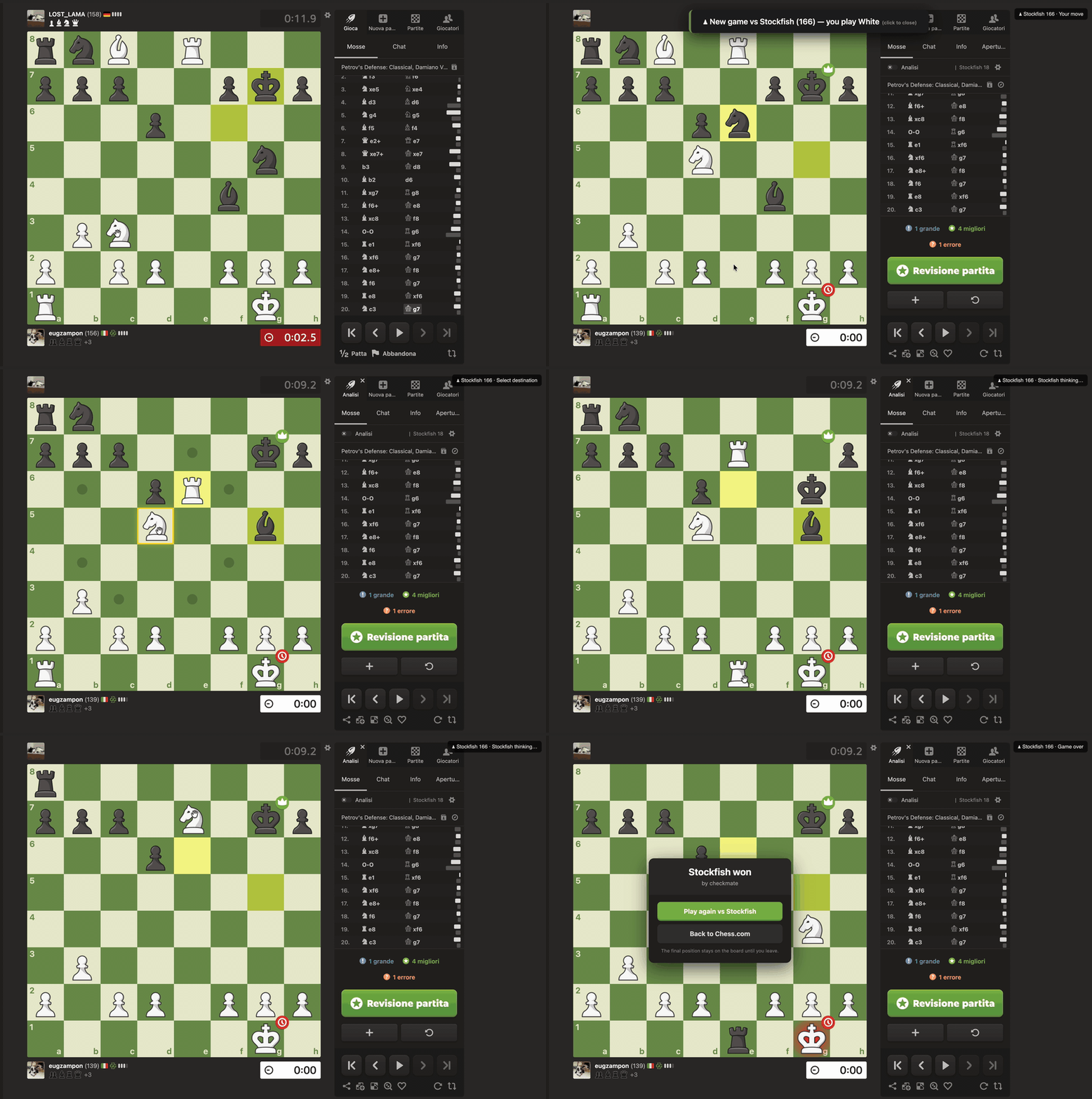
Up to v2.0.7 the extension moved you to Lichess to finish the position. It no longer leaves the page (#4). When a game on Chess.com ends, a ♟ Continue vs Computer button appears on the game-over modal, and the same board you were already looking at keeps going against Stockfish.
Playing
- Move how you already move - click or drag; legal destinations are highlighted (#11).
- Castle by dropping the king on the rook, and pick what a pawn promotes to instead of always getting a queen (#15).
- A king in check goes red, the way Chess.com marks it (#14).
- The engine is paced like the game you just played - it does not answer instantly in a game that was running on a 10-minute clock (#13, #14).
- The game ends the way Chess.com ends one: a named result in a modal, and the final position stays on the board until you leave (#12).
- Strength is yours to set in the popup - automatic (matched to the opponent's rating the page shows), a fixed rating, or full strength (#11).
Fixes since v2.0.7
- Side to move was wrong after every Black reply, so the engine could start playing your colour (#7).
- The opponent's rating was read from a DOM chess.com no longer ships, so difficulty was mis-sized (#6).
- The trigger button anchored to modal buttons that do not always exist (#9).
- Removed a broken selector-audit workflow (#3) and two dead
chess-corehelpers (#8). - CI now runs the end-to-end suite on every PR (#5, #10).
Licence: this project is now GPLv3
It bundles Stockfish, which is GPLv3, so the combined package is GPLv3 too. LICENSE, LICENSE.stockfish and LICENSE.MIT ship inside the zips. Up to and including v3.0.0 the project was MIT; that code is redistributed here under the GPLv3, which MIT permits, and its notice is preserved in LICENSE.MIT. Provenance of the exact engine build is in vendor/STOCKFISH-PROVENANCE.md.
Store-submission work in this release
wasm-unsafe-evalis gone from the CSP. The bundled engine is the ASM.JS build of Stockfish.js 18 -WebAssemblyappears zero times in it - so the directive was loosening the CSP for nothing.host_permissionsis gone. The shipped code touches onlychrome.runtimeandchrome.storage; nothing needed it, and it was costing an install-time warning.npm run packagebuilds both zips from an explicit path list, re-verifies the pinned engine checksum, and renamesmanifest-firefox.jsoncorrectly for the Firefox build. The zip used to be a hand-typed command.CWS-AUDIT.mddocuments the full submission audit and what is still outstanding (listing screenshots and dashboard paperwork, not code).
Verified
97 unit tests and 15 end-to-end checks against a real Chromium and the real engine, green in CI on the released commit. The extension was also run with the browser offline to confirm nothing it needs comes from the network.
Engine binaries: Stockfish 18 Lite (WASM, single-threaded)
Engine binaries only. This is not a release of the extension - it is the hosting spot the build script downloads from, versioned independently of the extension version.
| File | Size | What |
|---|---|---|
stockfish.js |
21 KB | the Emscripten loader |
stockfish.wasm |
7.0 MB | the engine and its neural network |
Both are stockfish-18-lite-single from nmrugg/stockfish.js, taken unmodified from npm stockfish@18.0.8, redistributed under the GPLv3. Renamed from stockfish-18-lite-single.* to stockfish.*; the bytes are untouched.
5243fd9b276cab7dfe3ad1d43ab9ead73568fac76468c614242977a210c4a391  stockfish.js
a8fbc05ec6920b56d7485826dcb02c5ffd2826bcbf751cf973046f237a9096f1  stockfish.wasm
scripts/download-stockfish.sh fetches these and verifies them against those digests, pinned in stockfish.sha256.
Why this replaces the ASM.JS build
The previous engine (engine-2.0) was the ASM.JS build: one 10.5 MB JavaScript file with the network embedded as base64. Mozilla's addons-linter refuses to parse any JavaScript file over 5 MB and reports FILE_TOO_LARGE as an error, which stood between this extension and an AMO listing.
Here the engine is a genuine binary. Linters do not parse .wasm, so the error disappears - and the package drops from 10.5 to 7.0 MB and runs considerably faster, since WebAssembly beats asm.js by a wide margin.
Verified before publishing: chess.com's CSP is frame-ancestors 'self' only, and WebAssembly compiles both on the page and inside a blob Worker there; the loader finds this .wasm through the fragment of its own worker URL.
v2.0.7
Strategia completamente cambiata. Invece di fare POST a /setup/ai (che richiedeva CSRF token), ora naviga a /setup/ai?fen=FEN&color=COLOR con GET. La pagina /setup/ai viene poi auto-inviata cliccando Play sul form nativo di Lichess - il CSRF e' incluso automaticamente.
Fix anche per injectButton su Lichess: redirect diretto a /setup/ai invece di passare dall'editor page.
v2.0.6
Bugfix principale: redirect manual->follow, fenVariant, FEN extraction robusta
v2.0.5 - fetch() con CSRF token
Fix
- submitAIForm(): sostituito
form.submit()confetch()POST a/setup/ai, con headerX-CSRF-Tokenpreso dal meta tag della pagina - Retry automatico: 3 tentativi con backoff prima di cadere nel fallback
form.submit() - Rimossi commenti e variabili obsolete
Come testare
- Vai su
chrome://extensions - Premi Update (o ricarica se in modalità sviluppatore)
- Verifica versione: 2.0.5
- Finisci una partita su Chess.com e clicca Continue vs Computer