🚀 Introducing the All-New Radar Card! 🚀

Hello everyone!
I'm thrilled to introduce the all-new Radar Card! I've built it from the ground up to give you a much more powerful, interactive, and customizable experience for tracking your devices.
This isn't just a small tweak; it's a whole new card.
✨ What's New?
Here are some of the exciting new features you can now enjoy:
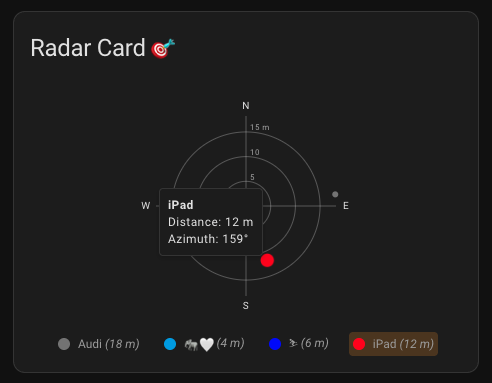
- A Dynamic, Interactive Radar: The old static view is gone! Say hello to a beautiful and smooth radar chart that plots your devices in real-time.
- Powerful Visual Editor: Forget digging into YAML! The new editor lets you customize almost everything with just a few clicks.
- Easily add or remove entities.
- Change colors for the grid, text, and individual devices.
- Set radar distances and other options visually.
- Smart Tooltips: Simply hover your mouse over any point on the radar to see the device's name, its exact distance from home, and its direction (azimuth).
- Click for Details: Want to see more about a device? Just click on its point on the radar to open the familiar Home Assistant "more-info" dialog. You can also turn this feature off in the settings if you prefer.
- Auto-Scaling Distance: The radar can now automatically adjust its range to make sure all your devices fit perfectly on the screen. Of course, you can still set a manual distance if you like.
- Total Color Control: Make the card your own! You can now set custom colors for:
- The radar grid lines.
- The "N, E, S, W" labels.
- A default color for all your devices.
- A specific color for each individual device.
How to Get Started
After installing the card (preferably through HACS), just open the card editor on your dashboard. You'll find all the new options waiting for you. I encourage you to play around with the settings to see what's possible!
Here's a peek at what you can build:
type: custom:radar-card
title: Device Locations
auto_radar_max_distance: true
entity_color: 'var(--accent-color)'
entities:
  - entity: device_tracker.person1
    name: Person 1
    color: '#ff0000'
  - device_tracker.person2
  - entity: device_tracker.car
    color: 'blue'
I hope it makes tracking your devices in Home Assistant more enjoyable and useful.
Thank you for your continued support! I'd love to hear your feedback on the GitHub repository.