Repository navigation
Releases: tommyb3ll/FlowCE
Release list
FlowCE 2.4

FlowCE 2.4 adds logs with any base: log₂(8) is drawn as textbooks write it, typed from the math
key or the log key, with exact answers and steps for log equations.
Install from the website, or send FlowCE.b84
with TI Connect CE and run INST. On a TI-83 Premium CE, send FlowCE.b83 instead.
- Log with any base:
math, then0puts log□(□) on the line with the caret in the base, as
the TI-84's logBASE: type the base,▶, the number. Or presslog, type the number, a comma and
the base: log(8,2) is drawn log₂(8). The math card's new last row also has the n-th root and eˣ. - Exact answers: log₄(8) is 3/2, log₈(2) is 1/3, log₂(1/8) is −3; a number that is not a power
of the base gives ln(10)/ln(2) (≈ 3.32193). In 2.3,log8 , 2 gave two answers (the logs of 8
and of 2), and log₄(8) was ln(2)/ln(4)+1. - Log equations keep their base on the steps page: log₂(x+1) = 3, its exponential form,
x = 7. - Algebra's steps show for what you type: a power typed with
^orx²(x²−5x+6=0,
factor(x²−5x+6), (x³−1)/(x−1)) hid the steps of equations, factoring and polynomial division;
enterafter the answer shows them now. Calculus was not affected. - TI-83 Premium CE: the trig key shows sin, cos, tan and their inverses to choose from (1 to 6;
enter: sin). - Graph:
X,T,θ,nswitches the readout between the equation and the slope m (the radius R
with the osculating circle). - Keys: a function key right after a letter multiplies: a, then
sin, is a·sin, not arcsin. - Menus open faster.
Checks
- On an emulated TI-84 Plus CE: the 898 regression problems give the same answers as 2.3 (none
hung, 2% less time in all), and so do the 71 applications problems and the equations, statistics
and quartic sets; interrupting withon, out of memory (8/8), 101 screen checks (the same but for
the version, the math card's new row and the graph's X,T,θ,n hint), 29 ways through the menus. - The log with a base: 46 cases of typing, arrows, delete and answers (the math card, the
log
key, log(8,2) typed, bases 1/2 to 10, log equations and their steps), and the 2D editor's host
tests. Algebra's steps: 14 problems typed with the keys (quadratics, cubics, a quintic, factoring,
divisions, rational and linear equations): each offers steps and shows them, or offers none.
On a TI-83 Premium CE build: the trig key's six functions. - The release file installed on a fresh calculator (arTIfiCE, INST, the reset button).
KhiCAS + Flow 1.2
KhiCAS + Flow 1.2 follows Bernard Parisse's third round of comments: the graph's readout shows the
slope m and the radius R, the Config is in khicasce's order, the TI-83 Premium CE's trig key offers
the six functions, and the F-key menus open faster.
Install from the website (pick
KhiCAS + Flow), or send KhiCAS-Flow.b84 with TI Connect CE and run INST. It shows up as KhiFlow
under apps. On a TI-83 Premium CE, send KhiCAS-Flow.b83 instead.
- The graph's readout: with the tangent, the normal or the osculating circle on (F5, more), it
shows the curve's slope m and the circle's radius R, on the line with x and y.X,T,θ,nswitches
to the full equation and back. A parametric or polar curve's tangent also shows its velocity, an
arrow as long as the speed, as in khicasce. - Config in khicasce's order: Set time, Clear variables, 2D history, then this app's own
settings (Simplify answers, Arrows by character). - TI-83 Premium CE:
trigshows 1 sin, 2 cos, 3 tan, 4 asin, 5 acos, 6 atan (the 83 has no cos
or tan keys), as khicasce's 83 build;enteris sin,2ndtrigis π. - Faster menus: an F-key menu starts drawing after about 20 ms instead of 45, and is done sooner.
- π then sin typed with their keys gave the name
pisin; it is now π·sin. (The same for a letter
then a function or value key, as on a TI; not forx, which names typed letter by letter use.)
Checks
- On an emulated TI-84 Plus CE: the 248 problems give the same answers as 1.1 (none hung), and the
114 parity cases against khicasce give the same results as 1.1 (87 identical). - The release bundle installed on a fresh calculator (OS 5.8.2): INST, the first start (the four
leftover AppIns removed: ARC FREE from 1 KB to 256 KB), the Config, the help for a command. - The 83's trig key was checked on a build made to act as one (no TI-83 Premium CE was available).
Please report problems with what you typed
and your calculator's OS.
Source: KhiCAS + Flow 1.2: FlowCE be5e422 (tag khicasflow-v1.2), giac 054c86b.
The graph screen was adapted in part from DeltaCE, a GPL-3.0
fork of FlowCE.
FlowCE 2.3
FlowCE 2.3 adds the normal line and the osculating circle to the graph screen, uses the TI-83
Premium CE's own keys, and opens with a start screen that flows into the app. It also deletes the
installer's leftover files the first time it starts (256 KB of archive back).
Install from the website, or send FlowCE.b84
with TI Connect CE and run INST. On a TI-83 Premium CE, send FlowCE.b83 instead.

- Normal line and osculating circle: on the graph screen, F5 (more) → Normal line here or
Osculating circle, beside the tangent. They are drawn at the trace point, and the readout gives
the normal's equation or the circle's, (x−a)²+(y−b)²=R². Functions, parametric and polar curves. - TI-83 Premium CE: FlowCE reads the model when it starts and uses the 83's keys:
trigtypes
sin (π on2nd),résolfinds the solve commands,fracmakes a fraction. Nothing changes on
the TI-84 Plus CE. - The start screen flows into the app: the name rises and fades, and the curve shrinks into the
trig key's icon, from which the screen fades in. Any key skips it. - Leftover installer files: INST leaves four AppIns variables (256 KB) in the archive; FlowCE
deletes them the first time it starts. - Built with the CE toolchain's nightly compiler: the app is 32 KB smaller.
- Keys after a pause: a quick key press is no longer missed after the calculator has sat idle
(it read the battery every few seconds, which takes 150 ms; now once a minute).
Checks
- On an emulated TI-84 Plus CE: the 898 regression problems give the same answers as 2.2.4 (none
hung), and so do the 71 applications problems and the equations, statistics and quartic sets;
interrupting withon, out of memory (8/8), 101 screen checks, 29 ways through the menus. - The screens are 2.2.4's but for the version, the new items, and matrices shown large, which sit
3 pixels higher (centered between the input and the F4 chip). - The normal line and the osculating circle checked against exact values (y = x²/4, sin x, an
ellipse). The 83's keys were checked on a build made to act as one (no TI-83 Premium CE was
available).
Known limits
- One area problem with acos and asin takes over two minutes on the calculator (
onstops it). - Not every problem has steps; when no textbook method explains it, FlowCE says so.
Please report problems with what you typed
and your calculator's OS.
Source: FlowCE 2.3: FlowCE ca1af59 (tag v2.3), giac 054c86b.
Parts of FlowCE (the algebra steps, the graph screen, analyze, statistics and probability) were
adapted from DeltaCE, a GPL-3.0 fork of FlowCE.
FlowCE 2.2.4
FlowCE 2.2.4 fixes quitting. Since 2.0, 2nd quit could restart the calculator ("Validating OS...
Calculator will restart when validation is complete"), bring back TI's "PRESS ALPHA F1-F4" help
screen, or leave the calculator in an odd state. FlowCE now hands the calculator back cleanly.
It also no longer crashes when the calculator's RAM is nearly full: FlowCE now reserves its working
memory when it starts, and uses less of it when RAM is tight. Everything else is 2.2.3. FlowCE
Python 1.9.1 is unchanged.
Install from the website and pick a version.
Checks
- On an emulated TI-84 Plus CE: quitting traced step by step (the calculator is handed back the
normal way), quitting and turning the calculator off and on again many times, 61 to 130 KB of
variables in RAM (64.5 KB reset the calculator in 2.2.3), the 898 regression problems (the same
answers as 2.2.3, none hung), interrupting withon, out of memory (8/8), 101 screen checks, 29
ways through the menus, and the 71 applications problems.
Please report problems with what you typed
and your calculator's OS.
Source: FlowCE 2.2.4: FlowCE fa7fe28 (tag v2.2.4), giac c0df91b; FlowCE Python 1.9.1: tag v1.9.1-rc1 (5917207), giac 15f875e.
Parts of FlowCE (the algebra steps, the graph screen, analyze, statistics and probability) were
adapted from DeltaCE, a GPL-3.0 fork of FlowCE.
FlowCE 2.2.3
FlowCE 2.2.3 has a smoother opening: the curve draws itself under "FlowCE" and each letter fades in
as the curve passes under it, then the tag line. It plays at startup and when you turn the
calculator back on after 2nd on. Everything else is 2.2.2. FlowCE Python 1.9.1 is unchanged.
Install from the website and pick a version.
Checks
- On an emulated TI-84 Plus CE: the opening frame by frame, the first start after an install, the
898 regression problems (the same answers as 2.2.2, none hung), interrupting withon, out of
memory (8/8), 101 screen checks, 29 ways through the menus, and the 71 applications problems.
Please report problems with what you typed
and your calculator's OS.
Source: FlowCE 2.2.3: FlowCE c3cb13f (tag v2.2.3), giac c0df91b; FlowCE Python 1.9.1: tag v1.9.1-rc1 (5917207), giac 15f875e.
Parts of FlowCE (the algebra steps, the graph screen, analyze, statistics and probability) were
adapted from DeltaCE, a GPL-3.0 fork of FlowCE.
FlowCE 2.2.2
FlowCE 2.2.2: turn the calculator off with 2nd on and back on, and FlowCE opens with its short
start animation, then right where you were (a line you were typing included). When the calculator
went to sleep by itself, it comes straight back as before. Everything else is 2.2.1. FlowCE
Python 1.9.1 is unchanged.
Install from the website and pick a version.
Checks
- On an emulated TI-84 Plus CE: off with
2ndonand on again at the main screen (with a line
being typed too), in a menu, and after the idle power-off; the 898 regression problems (the same
answers as 2.2.1, none hung), interrupting withon, out of memory (8/8), 101 screen checks, 29
ways through the menus, and the 71 applications problems.
Please report problems with what you typed
and your calculator's OS.
Source: FlowCE 2.2.2: FlowCE 387c5c2 (tag v2.2.2), giac c0df91b; FlowCE Python 1.9.1: tag v1.9.1-rc1 (5917207), giac 15f875e.
Parts of FlowCE (the algebra steps, the graph screen, analyze, statistics and probability) were
adapted from DeltaCE, a GPL-3.0 fork of FlowCE.
FlowCE 2.2.1
FlowCE 2.2.1 cleans up the start screen. The first time FlowCE opened after an install, the status
bar showed over the start screen with "Loading session.xw" in it, and every later start flashed
"Evaluating vars" in the bar for a moment. Both are gone. Everything else is 2.2. FlowCE Python
1.9.1 is unchanged.
Install from the website and pick a version.
Checks
- On an emulated TI-84 Plus CE: the first start after an install (the start screen without a
status bar, then the console), a second start, the 898 regression problems (the same answers
as 2.2, none hung), interrupting withon, out of memory (8/8), 101 screen checks, 29 ways
through the menus, and the 71 applications problems.
Please report problems with what you typed
and your calculator's OS.
Source: FlowCE 2.2.1: FlowCE f202908 (tag v2.2.1), giac c0df91b; FlowCE Python 1.9.1: tag v1.9.1-rc1 (5917207), giac 15f875e.
Parts of FlowCE (the algebra steps, the graph screen, analyze, statistics and probability) were
adapted from DeltaCE, a GPL-3.0 fork of FlowCE.
KhiCAS + Flow 1.1
KhiCAS + Flow 1.1 adds KhiCAS's 1D command line in color, the normal line and the osculating
circle on the graph screen, and the TI-83 Premium CE's own keys. It also deletes the installer's
leftover files the first time it starts (256 KB of archive back).
Install from the website (pick
KhiCAS + Flow), or send KhiCAS-Flow.b84 with TI Connect CE and run INST. It shows up as KhiFlow
under apps. On a TI-83 Premium CE, send KhiCAS-Flow.b83 instead.
- KhiCAS's command line:
mode→ 2D history off, as in KhiCAS. The input is text in KhiCAS's
colors (commands, keywords, numbers, strings),/and^are typed as they are, and the history
shows as text. The setting is kept. - Normal line and osculating circle: on the graph screen, F5 (more), beside the tangent. They
are drawn at the trace point, and the readout gives the normal's equation or the circle's,
(x−a)²+(y−b)²=R². - TI-83 Premium CE: the app reads the model when it starts and uses KhiCAS's keys for the 83:
trigtypes sin (π on2nd),résolopens the Solve commands,fracmakes a fraction. - Into the history faster: up from an empty line repaints only what changes.
- The start screen now rises away into the app.
- Built with the CE toolchain's nightly compiler, as KhiCAS is: 33 KB smaller (43 AppIns), the
same answers. - Keys after a pause: a quick key press is no longer missed after the calculator has sat idle
(it read the battery every few seconds, which takes 150 ms; now once a minute).
Checks
- On an emulated TI-84 Plus CE: 248 problems give the same answers with the nightly compiler as
with v15 (none hung), and the 114 parity cases against KhiCAS give the same results as 1.0 (87
identical). - The 83's keys were checked on a build made to act as one (no TI-83 Premium CE was available).
Please report problems with what you typed
and your calculator's OS.
Source: KhiCAS + Flow 1.1: FlowCE ca1af59 (tag khicasflow-v1.1), giac 054c86b.
The graph screen was adapted in part from DeltaCE, a GPL-3.0
fork of FlowCE.
KhiCAS + Flow 1.0
KhiCAS + Flow is Bernard Parisse's KhiCAS for the TI-84 Plus CE, arranged as he made it, drawn in
FlowCE's look and at its speed. It takes FlowCE Python's place; FlowCE, with its steps, stays the one
for class.
Install from the website (pick
KhiCAS + Flow), or send KhiCAS-Flow.b84 with TI Connect CE and run INST. It shows up as KhiFlow
under apps. On a TI-83 Premium CE (the same hardware), send KhiCAS-Flow.b83 instead.
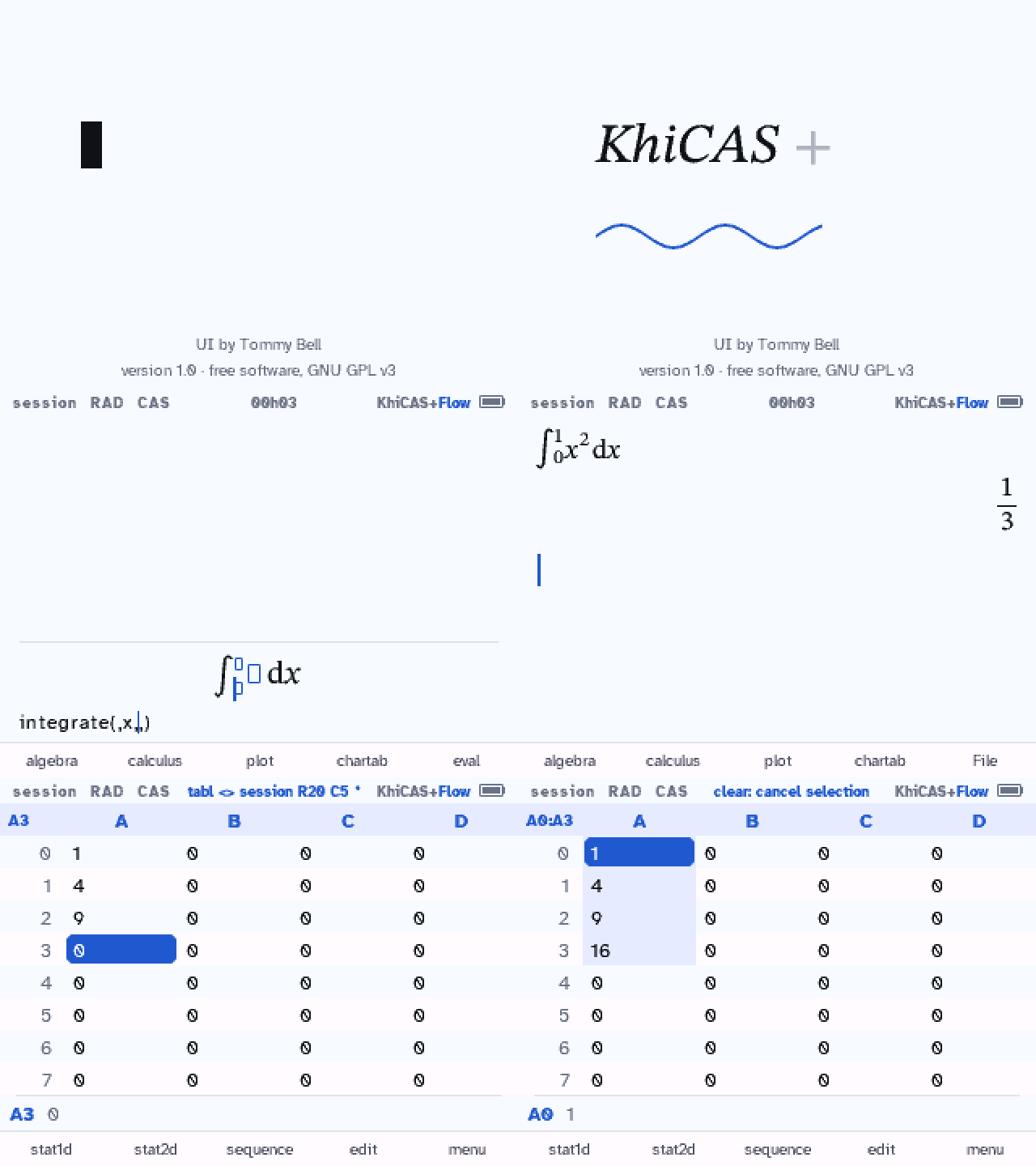
- KhiCAS's menus and keys: the F-key menus as numbered lists rising from the key, the same
commands in the same order on every layer; the catalog with its keys (F1 the command, F2 and F3
its examples, F5 its help). - KhiCAS's 2D editor: a panel at the bottom with the line as typed under it, the caret and a
selection shown in both (mode→ Arrows by character moves through the text instead). - The history as KhiCAS shows it; graphs kept in it as small pictures you can open again.
- The spreadsheet, the periodic table and the program debugger with KhiCAS's keys, in FlowCE's
look. - Answers as giac gives them, as in KhiCAS.
FlowCE 2.2
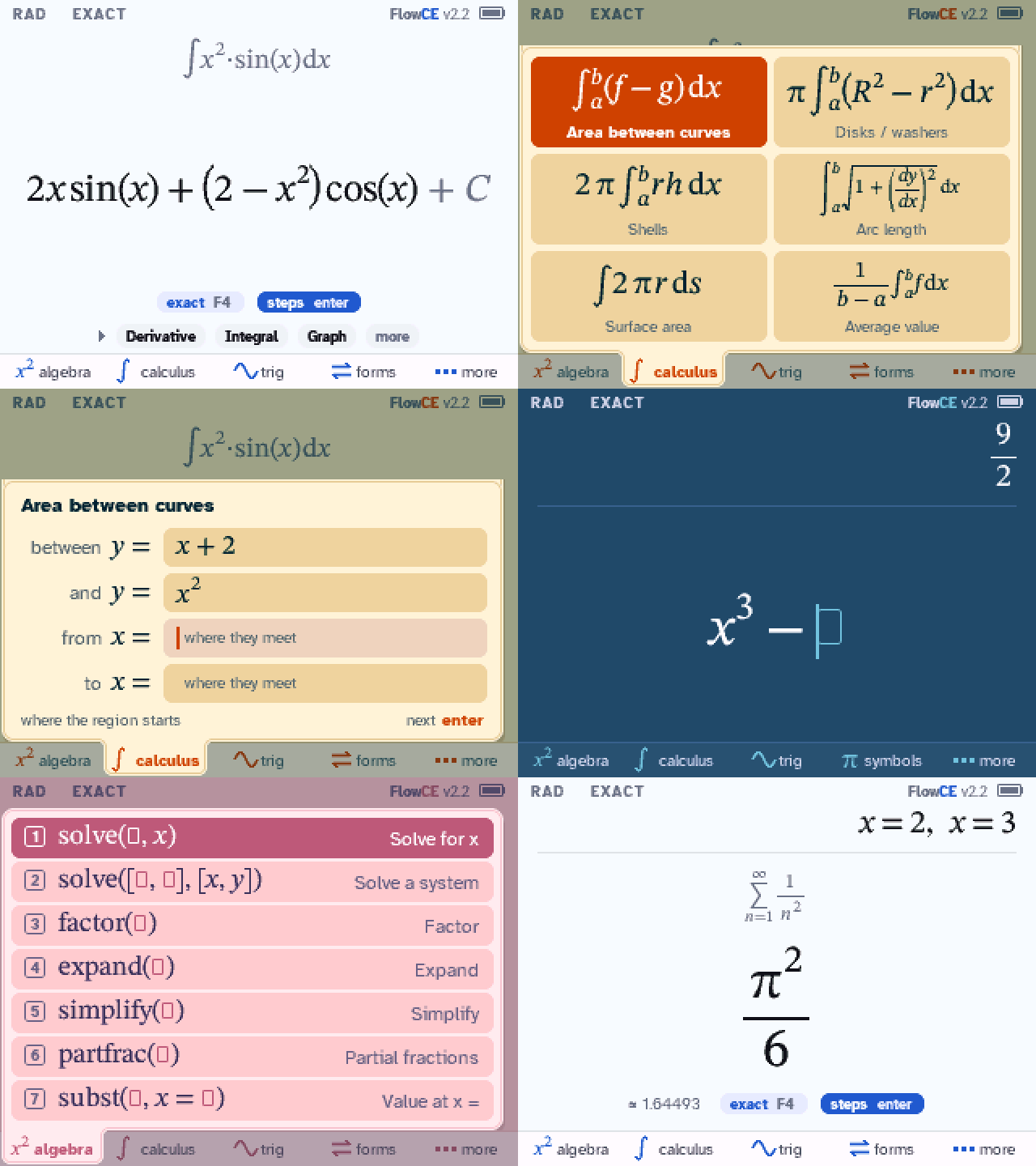
FlowCE 2.2: themes you can tell apart on the calculator. Sand, Mint, Rose, Arctic, Ember, Grape
and Forest have stronger colors: cream, mint, blush, blue slate, brown, plum and green. Their old
shades were so close that the calculator's screen showed several of them alike. The new ones were
picked on a TI-84 Plus CE. Text is as readable as before, and Paper and Night are unchanged.
Everything else is 2.1: the same answers, the same speed. FlowCE Python 1.9.1 is unchanged.
Install from the website and pick a version.
Why they looked alike
The calculator's screen shows 32 levels of red, green and blue, and the old backgrounds were 1 to
3 levels apart (Ember and Grape differed by one level of blue), on a panel that squashes shades
near white and black. Now each background is at least 4 levels from every other light or dark one.
Checks
- The app is 2.1's byte for byte except the seven themes' colors and the version.
- On an emulated TI-84 Plus CE: the 898 regression problems give the same answers as 2.1 (none
hung), interrupting withon, out of memory (8/8), 101 screen checks, 29 ways through the
menus, and the 71 applications problems. - Both files use the updated installer the website switched to on October 21.
Known limits
- Grape's purple stays subtle on the calculator's screen.
- One area problem with acos and asin takes over two minutes on the calculator (
onstops it). - Not every problem has steps; when no textbook method explains it, FlowCE says so.
Please report problems with what you typed
and your calculator's OS.
Source: FlowCE 2.2: FlowCE 41e8a25 (tag v2.2), giac c0df91b; FlowCE Python 1.9.1: tag v1.9.1-rc1 (5917207), giac 15f875e.
Parts of FlowCE (the algebra steps, the graph screen, analyze, statistics and probability) were
adapted from DeltaCE, a GPL-3.0 fork of FlowCE.