BareDroid infrastructure
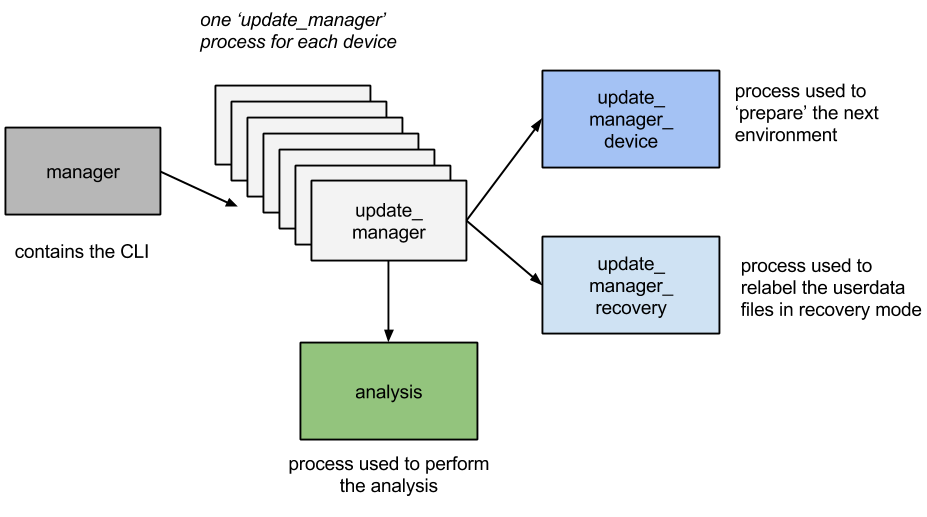
Figure above shows an overview of the architecture of our phone cloud. The following are the components that constitute our system:
-
Supervisor: It constitutes the front-end of the infrastructure. It provides a command line interface (CLI) used to start/stop the analysis and monitor the status of the various devices;
-
config.cfg: It is a configuration file that contains information about the infrastructure (e.g., where to store logs);
-
device.info: It is a configuration file that contains information (e.g., DeviceId) about the devices used by the infrastructure;
-
Update manager: Each device is managed by a dedicated update manager process. It manages the workflow of the analysis and triggers the transitions between states. Depending on the state, the update manager can start either one of the following two procedures:
- Update manager device, which manages the update of the userdata partition;
- Update manager recovery, which manages the swap of the userdata partitions;
-
Analysis: It provides a base class that can be used to implement specific malware analysis techniques.
##Setup Configuration File
This file contains 4 main stanzas.
Log
folder = "directory containing the files defined below"
log = "file used to store the information logs"
error = "file used to store error logs"
Devices
folder = "directory containing the setup device file"
name = "setup device file. See below"
Analysis
apps = "how many apps you want to analyze during one analysis"
duration = "for how long" (max time needed to perform the analysis)
Project
module_path = "directory containing the system analysis"
module_name = "file name containing the main function"
class = "the entry point class for the analysis system"
method = "the method that BareDroid has to call in order to start the analysis"
##Device Setup Configuration File This file is used to maintain information about the devices used in the BareDroid infrastructure. If a device is connected to the infrastructure but the relative DeviceID is not written in this file the infrastructure will not be able to use it.
| Field | Description |
|---|---|
| Device Id | the serial number of a connected device |
| Color | take note about the cover color |
| Port | #usb port used in the switch |
| User | account used to setup the device |